Krea Review 2026
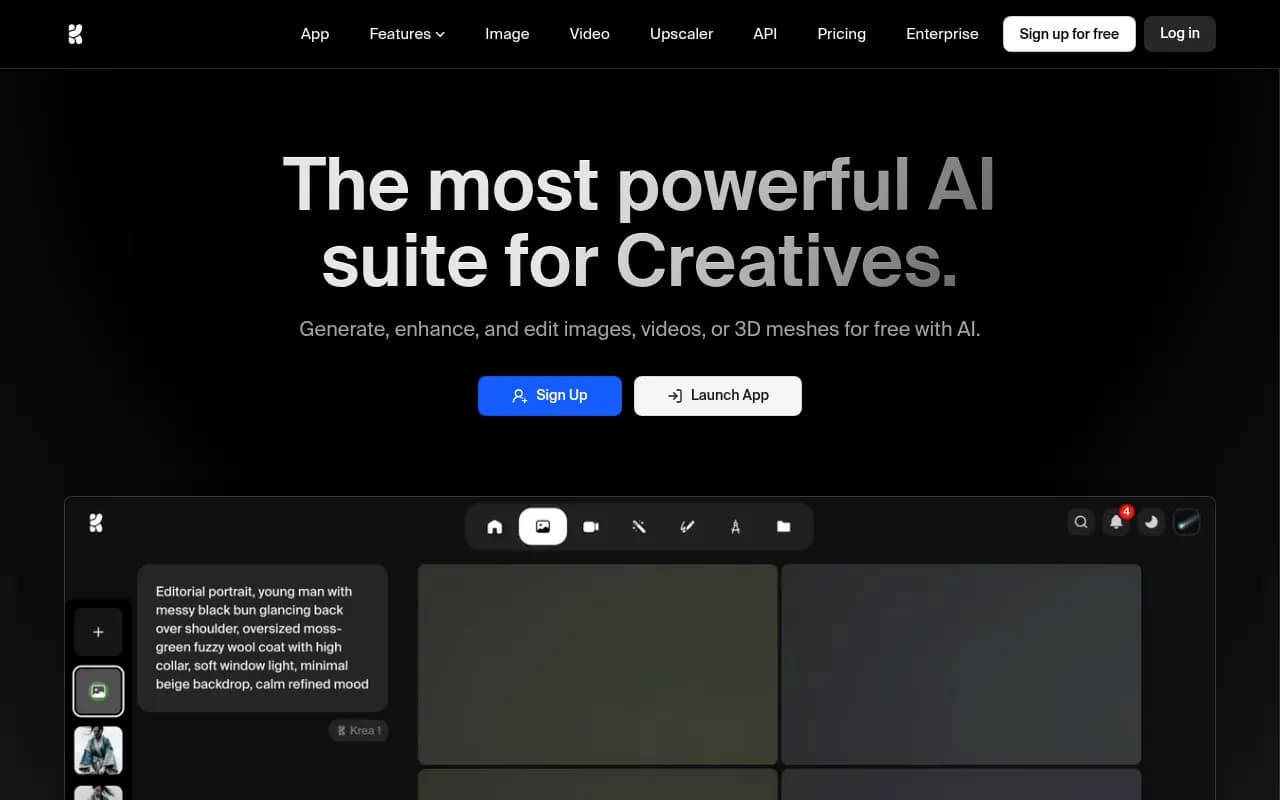
AI creative tool featuring real-time video and image generation with advanced controls for artistic and marketing content creation.
Summary: Key Takeaways
• All-in-one creative powerhouse: Krea consolidates image, video, 3D generation, upscaling, and editing into one subscription with access to 64+ models including Veo 3, Flux, Runway, Kling, and proprietary Krea 1 • Industry-leading speed: Generates 1024px Flux images in 3 seconds at FP16, plus real-time rendering in under 50ms for instant visual feedback • Enterprise-grade upscaling: Upscale images to 22K resolution and videos to 8K with 120fps interpolation using Topaz and proprietary models • Best for: Creative professionals, marketing teams, agencies, and enterprises needing high-volume AI content production with advanced controls • Limitations: Compute-based pricing can get expensive for heavy users, learning curve for advanced features despite simple UI
Krea has emerged as one of the most comprehensive AI creative suites on the market, trusted by over 30 million users across 191 countries. Built by a team backed by HF0 and other world-class venture firms, Krea consolidates what would normally require subscriptions to 5-10 different AI tools into a single platform. Major brands like Nike, Samsung, Microsoft, Lego, and Shopify use Krea for everything from product visualization to marketing content creation.
What sets Krea apart is its focus on speed and simplicity without sacrificing power. The platform offers real-time image generation that renders photorealistic visuals in under 50ms, making it feel more like a traditional creative tool than a typical AI generator. This real-time capability extends to video with full frame consistency, a feature that's still rare in the AI video space as of 2026.
Comprehensive Model Access Across All Creative Formats
Krea's core value proposition is aggregating the best AI models under one roof. Instead of juggling separate subscriptions to Midjourney, Runway, and various upscaling tools, Krea users get access to 64+ models including DeepMind's Veo 3.1, Ideogram, Runway, Luma, BFL Flux, Gemini, Kling, Hailuo, Wan, and Krea's proprietary Krea 1 model. The platform adds new models on release day, ensuring users always have access to cutting-edge capabilities.
AI Image Generation offers native 4K output with over 1000 preset styles and 20+ different models. The interface is deliberately minimal—just describe what you want in any language, select a style, and generate. Advanced users can control compositions with image prompts, style transfer, and aspect ratio controls. The Krea 1 proprietary model specializes in ultra-realistic skin textures, dynamic camera angles, and expressive artistic rendering that handles everything from Dali-style surrealism to product photography. Krea claims the industry's fastest generation speeds at 3 seconds for a 1024px Flux image at FP16 precision.
Real-time Rendering is where Krea truly differentiates itself. The real-time canvas lets you draw simple shapes or primitives and watch them transform into photorealistic images in under 50ms. This is revolutionary for concept artists and designers who need instant visual feedback. The newer Video Realtime feature maintains full frame consistency across real-time video generation, something competitors like Runway and Pika haven't fully solved yet.
AI Video Generation aggregates all major video models including Veo 3, Kling, Hailuo, Wan, and Runway. You can generate videos from text prompts, animate static images, or add new details to existing footage. The Motion Transfer feature lets you apply the movement from one video to another, useful for creating consistent character animations or product demos. Krea's video interface is notably more intuitive than Runway's, with clearer controls for camera movement, motion intensity, and style consistency.
Image and Video Upscaling goes up to 22K resolution for images and 8K for video, with frame interpolation up to 120fps. The platform includes 7 different upscaling models including Topaz Photo and Topaz Gigapixel (which normally cost $99-199 as standalone products). This makes Krea valuable for architecture firms turning 3D renders into photorealistic visualizations, photographers restoring old film scans, or video editors creating ultra slow-motion footage from regular phone captures.
LoRA Fine-tuning lets you train custom models with your own data. Upload 10-20 images of a specific face, product, or visual style, and Krea learns to generate it on demand. Business and Enterprise plans support training with up to 20,000 images, making this viable for large product catalogs or brand asset libraries. Trained LoRAs can be shared privately with team members or published to the community.
Generative Editing provides 10+ editing models including Nano Banana, Flux Kontext, and Qwen for AI-powered image manipulation. Add or remove objects, change lighting, merge images, or alter expressions through a simple interface. This is more intuitive than Photoshop's generative fill for quick edits, though Photoshop still wins for precision work.
Text to 3D and Image to 3D generate 3D meshes from text descriptions or 2D images. The 3D models export as standard formats compatible with Blender, Unity, and Unreal Engine. Quality isn't quite at the level of specialized 3D tools like Spline or Meshy, but it's impressive for rapid prototyping.
Asset Manager provides full-fledged file management with folders, tags, and search. All your generated images, videos, and 3D objects live in one organized library with version history. This is crucial for teams managing thousands of AI-generated assets.
Lipsync generates talking head videos from audio files, useful for creating AI avatars or dubbing content into multiple languages.
Who Krea Is Built For
Krea targets three main user groups. Creative professionals and agencies (designers, video editors, 3D artists, marketing agencies) who need high-volume content production across multiple formats. An agency creating 50+ social media videos per week for clients would save thousands in subscriptions by consolidating tools into Krea. The real-time features are particularly valuable for client presentations where you need to iterate on concepts live.
Enterprise marketing and creative teams at companies like Nike, Samsung, and Microsoft use Krea for product visualization, advertising content, and brand asset creation. The Business and Enterprise plans offer team collaboration, custom user roles, fine-grained model access controls, and business terms of service that make it viable for corporate use. Enterprise customers get custom compute packages, priority support with SLA, analytics API, and audit logs.
Independent creators and small businesses (YouTubers, social media creators, e-commerce sellers, indie game developers) who need professional-quality AI content without enterprise budgets. The free tier provides 100 compute units daily with full access to real-time models and limited access to other features, making it genuinely usable for hobbyists and people testing the platform.
Krea is not ideal for users who only need one specific capability (like just image generation or just video upscaling), since specialized tools like Midjourney or Topaz might be more cost-effective. It's also overkill for casual users who generate a few images per month—the free tier works for this, but paid plans assume higher volume usage.
Integrations and Ecosystem
Krea offers a REST API for programmatic access, though documentation is less extensive than competitors like Replicate or Stability AI. The platform includes browser-based access with no desktop app required, making it accessible from any device. There's no official mobile app yet as of early 2026.
The Krea Nodes and Apps feature (available on Pro and higher plans) lets users build custom workflows and share them with team members or the community. This is similar to ComfyUI but with a more user-friendly interface. Users have built apps for specific use cases like product photography, architectural visualization, and character design.
Export options include standard formats (PNG, JPG, MP4, GLB for 3D) with full commercial licensing on paid plans. There's no direct integration with tools like Figma, Adobe Creative Cloud, or Canva, so you'll need to manually export and import assets.
Pricing and Value Proposition
Krea uses a compute-based pricing model rather than simple generation limits. All plans include monthly compute units that get consumed based on what you generate (video uses more units than images, higher resolutions cost more, etc.).
Free tier: 100 compute units per day, full access to real-time models, limited access to image/video/3D models, limited upscaling, limited LoRA training. This is genuinely usable for testing and light usage.
Basic ($24/month): 5,000 compute units/month, commercial license, full access to image/3D/lipsync models, full LoRA training, 4K upscaling, access to selected video models. Good for freelancers and small creators.
Pro ($30/month): 10,000 compute units/month, access to all video models, higher concurrency, full access to Krea Nodes and Apps, bulk discounts on extra compute units, early access to new features. Best value for professional creators.
Max ($60/month with 40K units, scales to $99/month for 100K units): Unlimited LoRA trainings, unlimited concurrency, 22K upscaling, unlimited relaxed generations on selected models, high priority queues. For power users and small teams.
Business (starts at $99/month with 20K units, scales to $499/month for 1.5M units): Business terms of service, up to 50 seats included, private Node Apps sharing, LoRA training with up to 20,000 images, custom user roles, fine-grained model access controls. For growing teams.
Enterprise (custom pricing): Custom terms of service, priority support with SLA, analytics API, per-member spend limits, Slack connect, custom compute packages, audit logs. For large organizations.
Annual plans offer 20% discount. Extra compute units can be purchased in bulk with volume discounts.
Compared to buying separate subscriptions to Midjourney ($30-60/month), Runway ($12-76/month), Topaz ($99-199 one-time), and other tools, Krea's Pro plan at $30/month is excellent value if you use multiple capabilities. However, heavy video users might burn through compute units quickly, making the per-generation cost higher than Runway's unlimited plans.
Strengths
• Unmatched model variety: Access to 64+ models including all major image and video generators in one subscription • Real-time generation speed: Sub-50ms rendering makes it feel like a traditional creative tool, not a slow AI generator • Enterprise-grade upscaling: 22K image and 8K video upscaling with Topaz models included is exceptional value • Minimalist interface: Despite offering dozens of models and features, the UI remains clean and approachable for beginners • Proprietary Krea 1 model: Offers unique ultra-realistic rendering with accurate skin textures and dynamic camera angles that other models struggle with
Limitations and Honest Drawbacks
• Compute-based pricing complexity: Figuring out how many compute units you'll actually need requires trial and error, and heavy video users can burn through units quickly • Limited integrations: No direct plugins for Figma, Adobe, or other creative tools means manual export/import workflows • 3D quality lags specialists: While impressive for rapid prototyping, the 3D generation isn't as refined as dedicated tools like Spline or Meshy • API documentation: Less comprehensive than competitors like Replicate, making programmatic access harder for developers
Bottom Line
Krea is the best all-in-one AI creative suite for professionals and teams who need high-volume content production across images, video, and 3D. The combination of real-time generation, 64+ models, enterprise-grade upscaling, and team collaboration features makes it a compelling alternative to juggling 5-10 separate AI tool subscriptions. The Pro plan at $30/month offers exceptional value for creative professionals, while Enterprise plans provide the security and controls large organizations require. If you only need one specific capability (just image generation or just video), specialized tools might be more cost-effective, but for multi-format AI content creation, Krea is the most comprehensive platform available in 2026.
Tags:
Similar and alternative tools to Krea