Adobe Premiere Pro Review 2026
Industry-standard video editing software with AI-powered features for color correction, audio enhancement, and automated editing of long-form content.
Summary: Key Takeaways
- Industry standard for professionals: Premiere is the go-to video editor for film studios, YouTube creators, agencies, and broadcast networks — trusted for everything from feature films to social media content
- AI features accelerate tedious tasks: Object Mask eliminates hours of manual rotoscoping, Generative Extend adds missing frames, Text-Based Editing creates rough cuts from transcripts, and Enhance Speech cleans dialogue automatically
- Steep learning curve but unmatched power: Expect weeks to months to master the interface, but you gain precise control over every aspect of your edit with professional-grade color grading, audio mixing, and effects
- Subscription-only at $22.99/mo: No perpetual license option — you're locked into Adobe's subscription model, but you get continuous updates and 100GB cloud storage
- Best for: Professional editors, agencies managing client work, YouTubers editing long-form content, and anyone who needs advanced color correction, multi-cam editing, or tight integration with After Effects and Photoshop
Adobe Premiere (formerly Premiere Pro) is the video editing software that powers Hollywood blockbusters, Netflix documentaries, and millions of YouTube videos. Launched in 1991 and continuously refined for over three decades, it's the industry standard for professional video editing — the tool you'll find in post-production houses, creative agencies, and on the laptops of serious content creators worldwide. Adobe has invested heavily in AI features over the past two years, adding capabilities that automate tedious tasks like masking, transcription, and audio cleanup while maintaining the precise manual control that professionals demand.
The target audience spans professional film editors working on feature-length projects, YouTube creators producing weekly long-form content, marketing agencies cutting ads and branded content, broadcast journalists assembling news packages, and wedding videographers delivering polished highlight reels. If you're editing more than simple social clips and need advanced color grading, multi-cam sync, or complex audio mixing, Premiere is built for you. It's overkill for casual users who just want to trim clips for Instagram — those users should look at Adobe Express or mobile-first editors.
AI-Powered Features That Actually Save Time
Object Mask is the standout AI feature that eliminates the pain of rotoscoping. Traditionally, isolating a moving subject required manually drawing masks frame-by-frame — a process that could take hours for a 10-second clip. Now you hover over your subject, click once, and Premiere's AI tracks and masks it across every frame automatically. This works for people, cars, products, animals — any distinct object. You can then apply effects, color grades, or compositing only to the masked subject. It's not perfect on complex motion or occlusions, but it handles 80% of masking tasks instantly and lets you refine the remaining 20% manually. Competitors like DaVinci Resolve have similar AI masking, but Premiere's implementation is faster and more accurate in real-world tests.
Generative Extend uses Adobe Firefly AI to add frames to the beginning or end of clips when you need just a bit more footage for the perfect cut. It analyzes the existing frames and generates new ones that match the motion, lighting, and composition. It also generates ambient audio to match. This is invaluable when you're a few frames short of a clean transition or need to hold on a shot slightly longer. The generated frames aren't perfect under close scrutiny, but for B-roll, establishing shots, or quick cuts, they're convincing enough. You get 25 monthly generative credits with the standard plan, which covers moderate use — heavy users will need the Creative Cloud Pro plan with 4,000 credits.
Text-Based Editing automatically transcribes your footage on import using AI speech recognition. You then edit the video by editing the transcript — delete a sentence, and the corresponding video disappears; rearrange paragraphs, and the clips reorder themselves. This is transformative for interview-heavy content, podcasts, or any talking-head footage. You can create a rough cut in minutes by copying and pasting text instead of scrubbing through hours of footage. The transcription accuracy is excellent for clear speech in English, decent for accented speech, and struggles with heavy background noise or multiple overlapping speakers. You can manually correct transcription errors, and those corrections improve the AI's accuracy over time.
Media Intelligence and Search lets you find clips by describing them in plain language. Type "woman laughing in kitchen" and Premiere surfaces all matching clips from your project. This is powered by AI that analyzes every frame for objects, actions, scenes, and even emotions. For editors managing large projects with hundreds of clips, this is a massive time-saver. You no longer need to meticulously organize and tag footage upfront — the AI does it automatically. The search works across all imported media, including stock footage from Adobe Stock.
Enhance Speech uses AI to clean up dialogue audio. It removes background noise, reduces echo, normalizes volume levels, and makes speech sound crisp and clear — even if recorded on a smartphone in a noisy environment. This doesn't replace proper audio recording technique, but it salvages usable audio from less-than-ideal recordings. It's particularly useful for run-and-gun documentary work, interviews in uncontrolled environments, or user-generated content. The effect is adjustable, so you can dial in how much processing to apply.
Remix automatically retimes music tracks to match your edited video length. If you cut a 3-minute video down to 2 minutes, Remix intelligently shortens the music track to fit, preserving the song structure and avoiding awkward cuts. It analyzes the music's tempo, beats, and structure to make seamless edits. This works best with instrumental tracks and struggles with vocal-heavy songs where cuts are more noticeable.
Core Editing Capabilities
Timeline and Multi-Track Editing: Premiere's timeline supports unlimited video and audio tracks, nested sequences, and non-destructive editing. You can work with mixed frame rates, resolutions, and codecs on the same timeline without transcoding. The magnetic timeline snaps clips together to prevent gaps, but you can disable this for more manual control. Keyboard shortcuts are fully customizable, and experienced editors can cut footage without touching the mouse.
Color Grading with Lumetri Color: Premiere includes professional color grading tools comparable to dedicated color software. Lumetri Color offers curves, wheels, HSL adjustments, vignettes, and support for LUTs (Look-Up Tables). You can match colors across clips, create custom looks, and apply color grades to adjustment layers that affect multiple clips. For even more advanced color work, you can send projects to DaVinci Resolve via XML export.
Audio Mixing and Effects: The Essential Sound panel provides one-click audio fixes for dialogue, music, sound effects, and ambience. For advanced users, Premiere includes a full audio mixer with EQ, compression, reverb, and support for VST plugins. You can mix in 5.1 surround sound, automate volume levels, and sync audio from external recorders automatically. For complex audio post-production, you can round-trip to Adobe Audition.
Motion Graphics and Titles: The Essential Graphics panel lets you create animated titles, lower thirds, and motion graphics directly in Premiere. You can also import Motion Graphics templates from After Effects, customize them, and apply them to your timeline. This is faster than jumping to After Effects for simple animations, though After Effects remains necessary for complex motion design.
Multi-Cam Editing: Premiere can sync and edit footage from up to 16 cameras simultaneously. It auto-syncs clips based on audio waveforms or timecode, and you can switch between camera angles in real-time during playback. This is essential for live events, interviews, music videos, or any multi-camera shoot.
Effects and Transitions: Premiere ships with hundreds of built-in effects and transitions, from basic dissolves and wipes to advanced keying, stabilization, and distortion effects. Third-party plugins from Boris FX, Red Giant, and others extend capabilities further. The effects are GPU-accelerated for real-time playback on modern hardware.
Integrations and Ecosystem
Premiere integrates tightly with the Adobe Creative Cloud ecosystem. You can send projects to After Effects for advanced motion graphics and VFX, to Audition for detailed audio editing, and to Photoshop for custom graphics and titles. Changes made in these apps automatically update in Premiere via Dynamic Link, eliminating the need to export and re-import files.
Frame.io for Creative Cloud is included with all Premiere subscriptions. It provides cloud-based video review and collaboration — upload cuts, share links with clients or team members, and collect timestamped comments directly on the video. Reviewers don't need Premiere or even an Adobe account to leave feedback. This replaces clunky email chains and speeds up the approval process significantly.
Adobe Stock integration lets you search and license stock footage, music, and graphics without leaving Premiere. You can preview watermarked clips on your timeline before purchasing.
Adobe Express Premium is bundled with Premiere subscriptions. It's a simplified editor for quick social media edits, thumbnail creation, and video resizing. You can start a project in Express on your phone and finish it in Premiere on desktop.
iPhone app (included with subscription) lets you capture, edit, and share videos on mobile. Projects sync via Creative Cloud, so you can start editing on your phone during a commute and continue on desktop later. The mobile app is simplified compared to desktop but includes essential tools like trimming, transitions, titles, and audio mixing.
Export and format support: Premiere exports to virtually every video format and codec — H.264, H.265/HEVC, ProRes, DNxHD, AVI, MOV, MP4, and more. It includes presets for YouTube, Vimeo, Instagram, TikTok, and broadcast standards. You can also export directly to social platforms or to Adobe Media Encoder for batch processing and background rendering.
Third-party integrations: Premiere works with hardware like Blackmagic capture cards, Elgato Stream Decks for custom controls, and professional I/O devices from AJA and Matrox. It supports plugins from Boris FX (Sapphire, Continuum), Red Giant (Magic Bullet, Trapcode), and hundreds of others via the Adobe Exchange marketplace.
Who Should Use Premiere
Professional video editors working on films, TV shows, commercials, or music videos need Premiere's advanced color grading, multi-cam editing, and tight integration with After Effects and other post-production tools. If you're delivering broadcast-quality content or working with high-end cameras shooting in RAW formats, Premiere handles it.
YouTube creators and content agencies producing long-form content (10+ minute videos) benefit from Text-Based Editing for fast rough cuts, AI-powered audio cleanup, and the ability to manage large projects with hundreds of clips. If you're editing multiple videos per week, Premiere's efficiency tools and keyboard shortcuts pay off quickly.
Marketing teams and social media managers at mid-size to large companies use Premiere for ads, branded content, and social videos. The ability to resize videos for different platforms, create templates for consistent branding, and collaborate via Frame.io makes it ideal for teams.
Wedding and event videographers rely on Premiere's multi-cam editing, color grading, and audio mixing to deliver polished highlight reels and full ceremony edits. The ability to work with mixed footage from multiple cameras and drones is essential.
Who should NOT use Premiere: Casual users editing occasional clips for Instagram or TikTok will find Premiere overwhelming and expensive. Adobe Express, CapCut, or iMovie are better fits. Beginners with no video editing experience face a steep learning curve — expect to invest weeks watching tutorials before you're productive. If you're on a tight budget and only need basic editing, free alternatives like DaVinci Resolve (free version) or HitFilm Express offer surprising capability at no cost.
Pricing and Plans
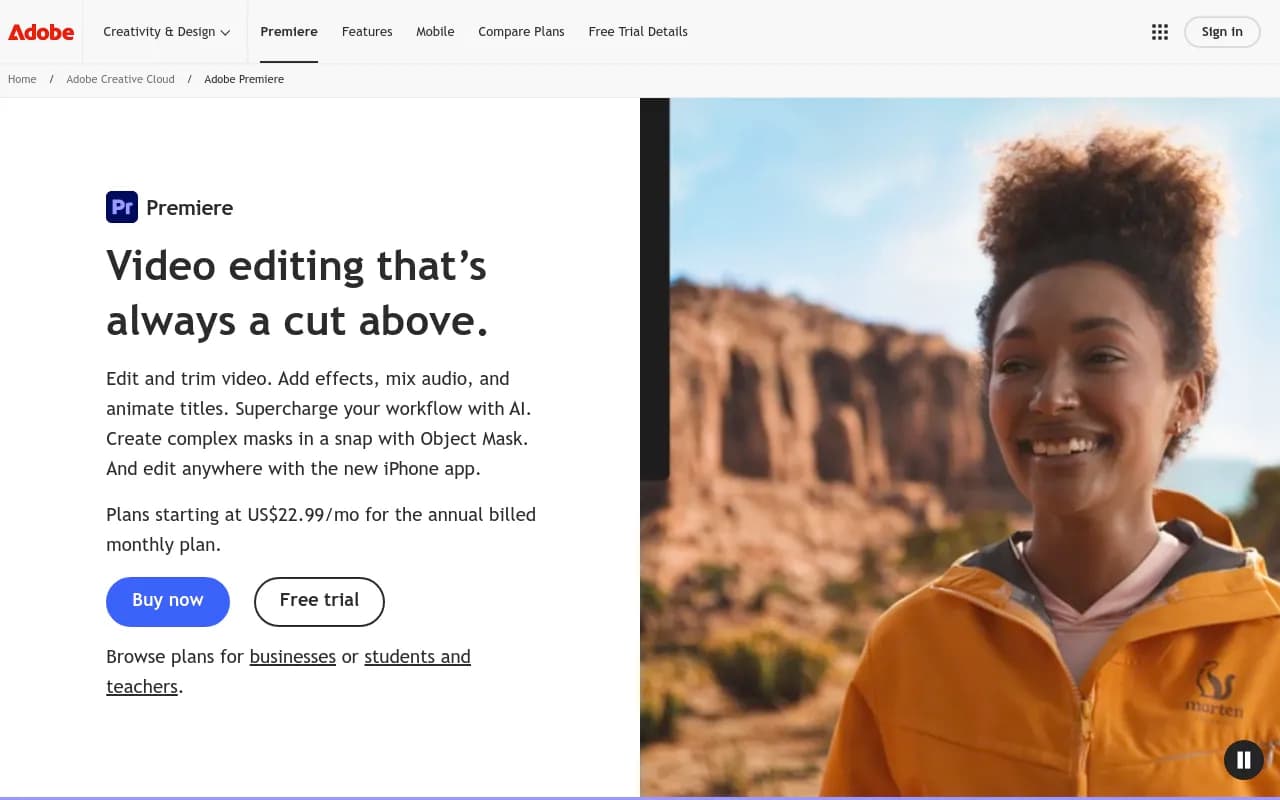
Premiere is subscription-only — no perpetual license option exists. The Premiere plan costs $22.99/month (billed annually) or $34.49/month (month-to-month). This includes Premiere on desktop and iPhone, Adobe Express Premium, Frame.io, 100GB cloud storage, and 25 monthly generative credits for AI features like Generative Extend.
The Creative Cloud Pro plan costs $69.99/month (billed annually) and includes Premiere plus 20+ other Adobe apps (Photoshop, After Effects, Illustrator, Audition, etc.), 4,000 monthly generative credits, and unlimited access to standard Firefly AI features. If you use more than just Premiere, this plan offers better value than subscribing to apps individually.
Students and teachers get 60% off — Creative Cloud Pro for $19.99/month for the first year, then $34.99/month after. You need to verify your student or teacher status.
Teams and businesses pay $44.99/month per user for Premiere or $99.99/month per user for Creative Cloud Pro, with centralized billing, admin controls, and priority support.
Free trial: Adobe offers a 7-day free trial of Premiere with full functionality. No credit card required upfront, but you'll need to provide payment info before the trial ends to continue using it.
Compared to competitors: DaVinci Resolve offers a powerful free version and a one-time $295 purchase for the Studio version — better value if you don't need Adobe's ecosystem. Final Cut Pro costs $299 one-time for Mac users. Premiere's subscription model is more expensive long-term but ensures continuous updates and access to new AI features.
Strengths
Industry-standard workflow: Premiere is what professionals use, so learning it makes you employable. Job listings for video editors almost always list Premiere as a required skill. Project files are easily shared with collaborators, and freelancers can jump into agency projects without compatibility issues.
Tight Adobe ecosystem integration: If you already use Photoshop, After Effects, or Illustrator, Premiere fits seamlessly into your workflow. Dynamic Link between apps eliminates export/import steps and saves hours on complex projects.
AI features that actually work: Object Mask, Text-Based Editing, and Enhance Speech aren't gimmicks — they genuinely speed up tedious tasks. Adobe is investing heavily in AI, and Premiere users get early access to new Firefly features.
Handles any format or resolution: Premiere works with footage from smartphones, DSLRs, cinema cameras, drones, and everything in between. It supports 8K resolution, HDR, and professional codecs like ProRes RAW without breaking a sweat (on capable hardware).
Extensive third-party plugin ecosystem: Thousands of plugins, templates, and presets are available from Adobe Exchange and third-party developers. If Premiere doesn't do something natively, a plugin probably exists.
Limitations
Steep learning curve: Premiere's interface is dense and intimidating for beginners. You'll spend hours watching tutorials before you can edit efficiently. Competitors like Final Cut Pro and DaVinci Resolve have more intuitive interfaces for new users.
Subscription fatigue: At $22.99/month, you'll pay $275/year — every year. Over five years, that's $1,375 for software you don't own. If you stop paying, you lose access to your projects. DaVinci Resolve's one-time $295 purchase looks increasingly attractive.
Performance can be inconsistent: Premiere is notorious for occasional crashes, especially on older hardware or with large projects. Playback performance depends heavily on your GPU, and some effects require rendering before you can preview them smoothly. DaVinci Resolve is generally more stable and better optimized.
Generative credits run out fast: The 25 monthly generative credits included with the base plan cover maybe 10-15 uses of Generative Extend. Heavy users will need to upgrade to Creative Cloud Pro for 4,000 credits or purchase additional credits. This feels like nickel-and-diming on top of an already expensive subscription.
Bottom Line
Premiere is the professional's choice for video editing — the tool you learn if you want to work in film, TV, advertising, or content creation at scale. Its AI features genuinely accelerate tedious tasks, and its integration with the Adobe ecosystem is unmatched. But it's expensive, has a steep learning curve, and requires powerful hardware to run smoothly. If you're a professional editor, agency, or serious content creator editing multiple projects per week, Premiere is worth the investment. If you're a hobbyist, student, or budget-conscious creator, explore DaVinci Resolve's free version or Final Cut Pro's one-time purchase before committing to Adobe's subscription.
Best use case in one sentence: Professional video editors and content agencies producing long-form, high-quality videos who need advanced color grading, multi-cam editing, and seamless integration with After Effects and Photoshop.
Tags:
Similar and alternative tools to Adobe Premiere Pro