ChatGPT Review 2026
Multi-purpose AI tool capable of handling writing tasks, research, brainstorming, and file analysis all in one conversational interface.
Summary: Key Takeaways
- Best for: Anyone needing a general-purpose AI assistant -- from students writing essays to developers debugging code to marketers drafting campaigns. The free tier is genuinely useful, not a trial.
- Standout strength: Conversational memory and context handling. ChatGPT remembers what you said 50 messages ago and uses it to refine answers. Most competitors feel like talking to a goldfish.
- Major limitation: No real-time web search in free tier. You're working with training data that cuts off in late 2023 unless you pay for Plus/Pro. For current events or fresh data, you'll hit a wall.
- Lacks content optimization tools: Unlike Promptwatch, which shows you how to create content that ranks in AI search engines and tracks your visibility across ChatGPT, Perplexity, Claude, and others, ChatGPT is purely a conversational assistant. It won't tell you which prompts competitors rank for, generate SEO-optimized content based on citation data, or track how often your brand gets cited in AI answers. If you're trying to improve your AI search visibility, you need a GEO platform like Promptwatch -- ChatGPT can't do that work.
- Bottom line: The default AI assistant for most people in 2026. Free tier is solid for casual use, Plus ($20/mo) is worth it if you use it daily, Pro ($200/mo) only makes sense for power users who need o1 reasoning and unlimited everything.

ChatGPT is OpenAI's flagship product and the AI chatbot that kicked off the generative AI boom in late 2022. By early 2026, it's used by over 300 million people weekly -- students, developers, marketers, writers, researchers, and anyone who needs to think through a problem with an AI that actually understands context. It's not the most specialized tool for any one task, but it's the Swiss Army knife that does 80% of what most people need without requiring a PhD to operate.
OpenAI launched ChatGPT in November 2022 as a research preview. Within two months it hit 100 million users -- the fastest-growing consumer app in history at the time. The free tier ran on GPT-3.5, a capable but occasionally clunky model. In March 2023, OpenAI released GPT-4 for paying subscribers, which felt like a generational leap -- better reasoning, fewer hallucinations, longer context windows. By 2024, GPT-4 became the baseline for serious work. In 2025, OpenAI shipped GPT-4o (the "o" stands for "omni") with native voice, vision, and faster response times, then followed it up with the o1 reasoning model for complex problem-solving. As of early 2026, the free tier runs GPT-4o mini (a smaller, faster version of GPT-4o), Plus and Pro subscribers get full GPT-4o and o1 access, and Enterprise customers get custom deployments with admin controls and data residency options.
The target audience is everyone, which sounds like marketing fluff but is actually true. High school students use it to explain calculus. Developers use it to debug Python scripts. Marketers use it to draft email campaigns. Lawyers use it to summarize case law. The unifying thread: people who need to process information, generate text, or think through a problem faster than they could alone. It's not a vertical tool -- it's horizontal infrastructure.
Core Features (What You Actually Get)
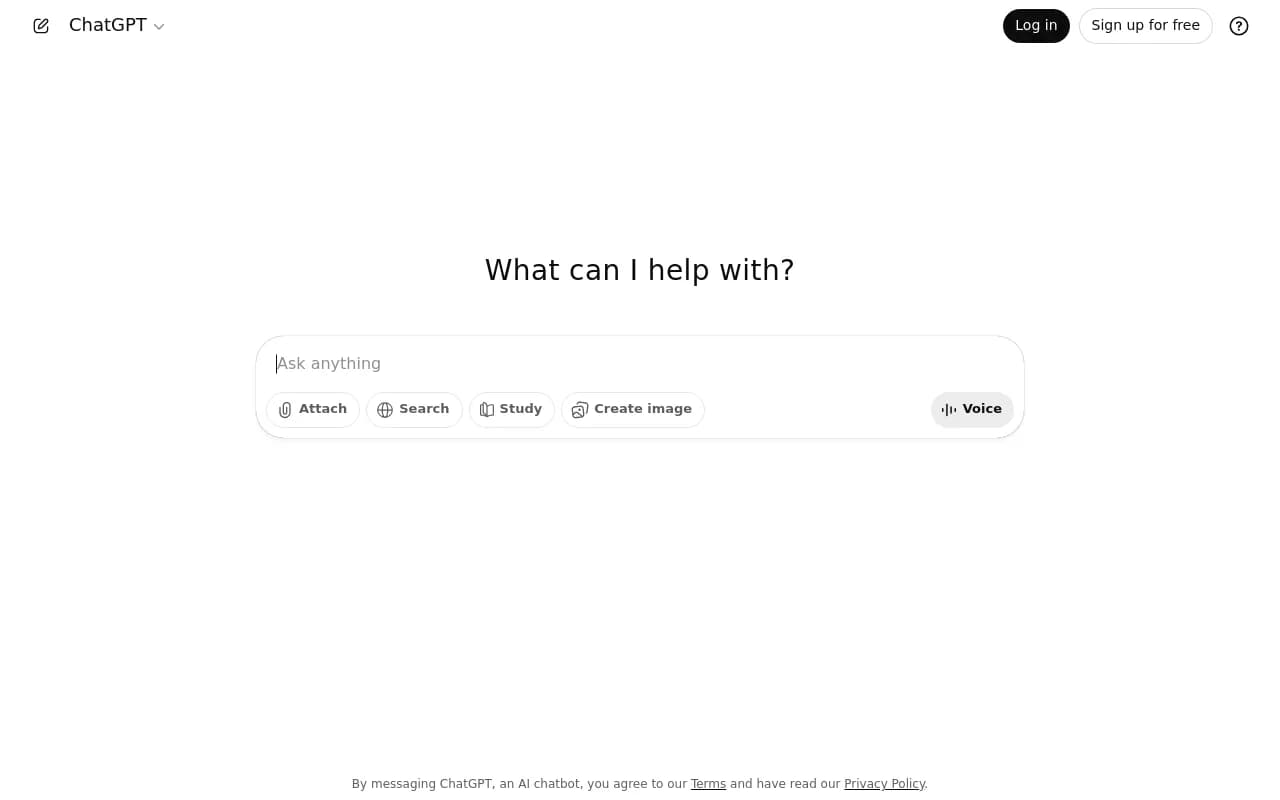
Conversational Interface with Memory: You type a question or prompt, ChatGPT responds, and you keep going. The killer feature is context retention. ChatGPT remembers the entire conversation thread -- if you said "I'm working on a SaaS product for freelancers" 30 messages ago, it'll still reference that when you ask "What pricing tiers should I offer?" Most competitors (Claude, Gemini, Perplexity) do this too now, but ChatGPT's implementation feels the most natural. It also has a "Custom Instructions" feature where you can set persistent preferences (tone, format, background info) that apply to every new chat. Useful if you're always asking it to write in AP style or assume you're a Python developer.
GPT-4o and o1 Models: The free tier gives you GPT-4o mini, which is fast and cheap but occasionally shallow. Paid tiers unlock GPT-4o (the full model) and o1 (the reasoning model). GPT-4o is what most people use most of the time -- it's good at writing, coding, analysis, and general tasks. o1 is slower but thinks harder -- it's designed for math, logic puzzles, complex coding problems, and anything that requires multi-step reasoning. You can see it "thinking" in the interface, which is both cool and slightly unnerving. o1 is overkill for "write me a blog post" but necessary for "debug this recursive algorithm" or "solve this physics problem."
File Upload and Analysis: You can upload PDFs, spreadsheets, images, and text files. ChatGPT will read them and answer questions. Upload a 50-page research paper and ask "What are the key findings?" Upload a CSV and ask "Which product had the highest sales in Q4?" It works surprisingly well for documents up to a few hundred pages. The limitation: it doesn't actually "see" images in the way a human does -- it's doing OCR and pattern recognition. If you upload a hand-drawn diagram, it might miss nuances. But for typed documents, charts, and screenshots, it's solid.
Code Interpreter (Advanced Data Analysis): This is a sandboxed Python environment that runs inside ChatGPT. You can upload a dataset, ask ChatGPT to analyze it, and it'll write Python code, execute it, and show you the results. It can generate charts, clean data, run statistical tests, and even build simple simulations. This is wildly useful for non-coders who need to do data work. The catch: it's not persistent -- the environment resets after each session, so you can't build long-running scripts. But for one-off analysis ("plot a histogram of this column", "calculate the correlation between these variables"), it's faster than opening Excel.
DALL-E Image Generation: Built into ChatGPT Plus and Pro. You type a prompt ("a cat wearing a spacesuit on Mars"), and it generates an image using DALL-E 3. The quality is good -- better than Midjourney v5 for photorealism, though Midjourney still wins for artistic styles. You get 50 images per day on Plus, unlimited on Pro. The interface is clunky -- you can't easily iterate on a specific image or tweak parameters like you can in Midjourney. But for quick mockups or concept art, it's convenient.
Voice Mode: You can talk to ChatGPT instead of typing. It transcribes your speech, processes it, and responds with synthesized voice. The voice quality is shockingly good -- natural cadence, emotional inflection, and it doesn't sound robotic. You can interrupt it mid-sentence and it'll adjust. This is useful for hands-free use (driving, cooking, walking) or if you think faster by talking. The limitation: it's not real-time conversation -- there's a 1-2 second delay between your speech and its response. OpenAI demoed a real-time voice mode in 2024 that felt like talking to a human, but as of early 2026 it's still in limited beta.
Web Browsing (Plus/Pro Only): ChatGPT can search the web and pull in current information. You ask "What's the latest news on the 2026 election?", it searches Bing, reads a few articles, and summarizes. This is critical for anything time-sensitive. The free tier doesn't have this -- you're stuck with training data from late 2023. The browsing feature is slower than Perplexity (which is built around real-time search) but more conversational. It'll cite sources inline, which is helpful for fact-checking.
Custom GPTs (Plus/Pro/Team/Enterprise): You can build your own mini-versions of ChatGPT tailored to specific tasks. For example, a "Legal Contract Reviewer" GPT that's pre-loaded with contract templates and instructions to flag risky clauses. Or a "Social Media Caption Writer" GPT that always writes in your brand voice. You can share these GPTs with your team or publish them to the GPT Store (OpenAI's app marketplace). This is powerful for teams that do repetitive tasks -- you codify the workflow once and everyone uses the same GPT. The limitation: you can't train the model on your own data (that requires fine-tuning via the API), you're just giving it instructions and documents to reference.
Canvas Mode (New in 2025): A side-by-side interface where ChatGPT writes in one pane and you edit in the other. It's designed for long-form writing and coding. You can highlight a section and ask ChatGPT to rewrite it, or ask it to add a paragraph after a specific sentence. This is way better than the old workflow of copying text back and forth. It's still a bit buggy (sometimes it overwrites your edits), but when it works, it feels like pair programming or co-writing with a human.
Team and Enterprise Features: Team ($25/user/mo for 2+ users) adds admin controls, shared workspaces, and higher usage limits. Enterprise (custom pricing) adds SSO, data residency, custom model fine-tuning, and dedicated support. Most individuals and small teams don't need this. It's for companies that want to deploy ChatGPT across 50+ employees and need compliance guarantees.
Who Is It For
ChatGPT is for anyone who works with information. That's vague, so here are specific personas:
Students and Researchers: High school and college students use it to explain concepts, summarize readings, and draft essays (though many schools now ban this). Researchers use it to brainstorm hypotheses, summarize papers, and generate literature review outlines. The free tier is enough for most students. Researchers who need to upload and analyze dozens of papers should pay for Plus.
Developers: ChatGPT is shockingly good at coding. You can describe a function in plain English and it'll write the code. You can paste an error message and it'll debug it. You can ask it to refactor a messy script. It supports 50+ languages (Python, JavaScript, Rust, SQL, etc.). The limitation: it doesn't have access to your codebase, so it can't understand project-specific context unless you paste it in. For that, tools like GitHub Copilot (which runs inside your IDE) are better. But for one-off scripts, learning a new language, or debugging, ChatGPT is faster than Stack Overflow.
Writers and Marketers: Bloggers, copywriters, and content marketers use ChatGPT to draft articles, generate headlines, brainstorm angles, and rewrite clunky sentences. It's not going to write a publishable article from scratch (the output is too generic), but it's great for getting past a blank page. Marketers use it for email campaigns, ad copy, social media captions, and SEO meta descriptions. The catch: everyone else is using it too, so ChatGPT-generated content is starting to sound samey. You need to edit heavily to add your own voice.
Business Analysts and Data People: Anyone who works with spreadsheets or datasets can use the Code Interpreter to analyze data without writing code. Upload a sales CSV, ask "Which region had the highest growth?", and ChatGPT will calculate it and generate a chart. This is a game-changer for non-technical analysts who used to rely on Excel pivot tables or bugging the data team.
Freelancers and Solopreneurs: Freelancers use ChatGPT as a cheap assistant. It can draft client emails, generate invoice templates, brainstorm project ideas, and even role-play difficult conversations ("How should I tell a client their deadline is unrealistic?"). For $20/mo, it's cheaper than hiring a VA and available 24/7.
Who Should NOT Use ChatGPT: If you need real-time data (stock prices, live sports scores, breaking news), the free tier is useless and even Plus is slower than Perplexity. If you need highly specialized domain knowledge (medical diagnosis, legal advice, financial planning), ChatGPT will confidently give you wrong answers -- it's not a replacement for experts. If you're trying to rank in AI search engines or track your brand's visibility in AI answers, ChatGPT won't help -- you need a GEO platform like Promptwatch for that.
Integrations & Ecosystem
ChatGPT has an API that developers use to build custom apps. Thousands of tools integrate with it -- Zapier, Notion, Slack, Microsoft Teams, Salesforce, HubSpot, and more. You can pipe ChatGPT responses into your CRM, use it to auto-generate meeting notes in Slack, or trigger workflows in Zapier based on ChatGPT output. The API pricing is separate from the consumer plans -- it's pay-per-token, starting at $0.15 per million input tokens for GPT-4o mini and $2.50 per million for GPT-4o.
There's also a ChatGPT mobile app (iOS and Android) that syncs with your web account. The app has voice mode, which is the main reason to use it over the web interface. No browser extensions yet, though third-party devs have built unofficial ones.
The GPT Store is OpenAI's attempt to build an app ecosystem. You can browse thousands of custom GPTs built by other users -- "Logo Designer", "SQL Query Helper", "Meal Planner", etc. Some are useful, most are junk. The store doesn't have a revenue-sharing model yet, so there's no incentive for developers to build high-quality GPTs. This feels like a missed opportunity.
Pricing & Value
ChatGPT has six tiers as of early 2026:
Free: GPT-4o mini, limited messages per day (the cap varies but it's around 50-100 messages), no web browsing, no DALL-E, no voice mode. This is enough for casual users who ask a few questions per day. The message cap is annoying -- you'll hit it if you're doing anything serious.
Go ($20/mo): This is a new tier launched in late 2025. It's basically Plus but with a lower message cap (around 500 messages per day instead of unlimited). You get GPT-4o, web browsing, DALL-E, and voice mode. Good for people who use ChatGPT regularly but not all day.
Plus ($20/mo): Full GPT-4o, o1 access (limited to 50 messages per week), unlimited messages, web browsing, DALL-E (50 images/day), voice mode, file uploads, Code Interpreter, and custom GPTs. This is the sweet spot for most power users. $20/mo is cheap compared to hiring a human for any of these tasks.
Pro ($200/mo): Unlimited o1 access, unlimited DALL-E, priority access during peak times, and early access to new features. This is for people who use o1 heavily (researchers, developers, data scientists) or generate hundreds of images per month. For everyone else, it's overkill.
Team ($25/user/mo, min 2 users): Everything in Plus, plus admin console, shared workspaces, and higher usage limits. For small teams (5-20 people) that want to collaborate.
Enterprise (custom pricing): Everything in Team, plus SSO, data residency, custom model fine-tuning, dedicated support, and volume discounts. For companies deploying ChatGPT to 100+ employees. Pricing starts around $60/user/mo but drops with volume.
How does this compare to competitors? Claude Pro (Anthropic) is $20/mo and offers similar features but with a longer context window (200k tokens vs ChatGPT's 128k). Gemini Advanced (Google) is $20/mo and integrates with Google Workspace. Perplexity Pro is $20/mo and focuses on real-time search. ChatGPT Plus is the best general-purpose option, but if you have a specific need (long documents for Claude, search for Perplexity, Google integration for Gemini), the others might be better.
Strengths & Limitations
Strengths:
Conversational fluency: ChatGPT feels more natural to talk to than any other AI. It picks up on context, adjusts its tone, and doesn't make you repeat yourself. This is the result of years of RLHF (reinforcement learning from human feedback) tuning.
Multimodal capabilities: Text, images, code, data analysis, and voice all in one interface. You don't need separate tools for each task.
Ecosystem and integrations: The API and third-party integrations mean you can plug ChatGPT into almost any workflow. Competitors are catching up, but OpenAI still has the most mature ecosystem.
Custom GPTs: The ability to build task-specific versions of ChatGPT is underrated. Once you've built a good GPT for a repetitive task, it saves hours.
Code Interpreter: This is a killer feature for non-coders. Being able to analyze data and generate charts without writing code is a superpower.
Limitations:
No real-time search in free tier: If you're not paying, you're working with stale data. This is a dealbreaker for anything time-sensitive.
Message caps are annoying: Even on Plus, the o1 model is capped at 50 messages per week. If you're doing heavy reasoning work, you'll hit the limit.
Hallucinations: ChatGPT still makes up facts, especially for obscure topics or recent events. Always fact-check anything important.
No AI search visibility tools: ChatGPT won't help you understand how your brand appears in AI search results, track competitor visibility, or optimize content to rank in AI engines. For that, you need a dedicated GEO platform like Promptwatch, which offers content gap analysis, AI crawler logs, citation tracking, and traffic attribution -- capabilities ChatGPT doesn't have.
Generic output: Because millions of people use ChatGPT, its writing style is becoming recognizable. You need to edit heavily to avoid sounding like everyone else.
Bottom Line
ChatGPT is the default AI assistant for most people in 2026. The free tier is good enough for casual use. Plus ($20/mo) is worth it if you use it daily. Pro ($200/mo) only makes sense if you're a power user who needs unlimited o1 access. For teams, Team and Enterprise plans offer admin controls and collaboration features, but most small teams can get by with individual Plus accounts.
If you need real-time search, Perplexity is better. If you need long context windows, Claude is better. If you need Google Workspace integration, Gemini is better. But for general-purpose AI assistance -- writing, coding, research, brainstorming, data analysis -- ChatGPT is still the best all-around option.
If you're trying to improve your visibility in AI search engines or track how often your brand gets cited in AI answers, ChatGPT won't help. For that, you need Promptwatch, which shows you content gaps, generates optimized content, tracks AI crawler activity, and measures your AI search performance across ChatGPT, Perplexity, Claude, Gemini, and other models. ChatGPT is a conversational assistant; Promptwatch is an optimization platform for AI visibility.
Similar and alternative tools to ChatGPT