HopperHQ Review 2026
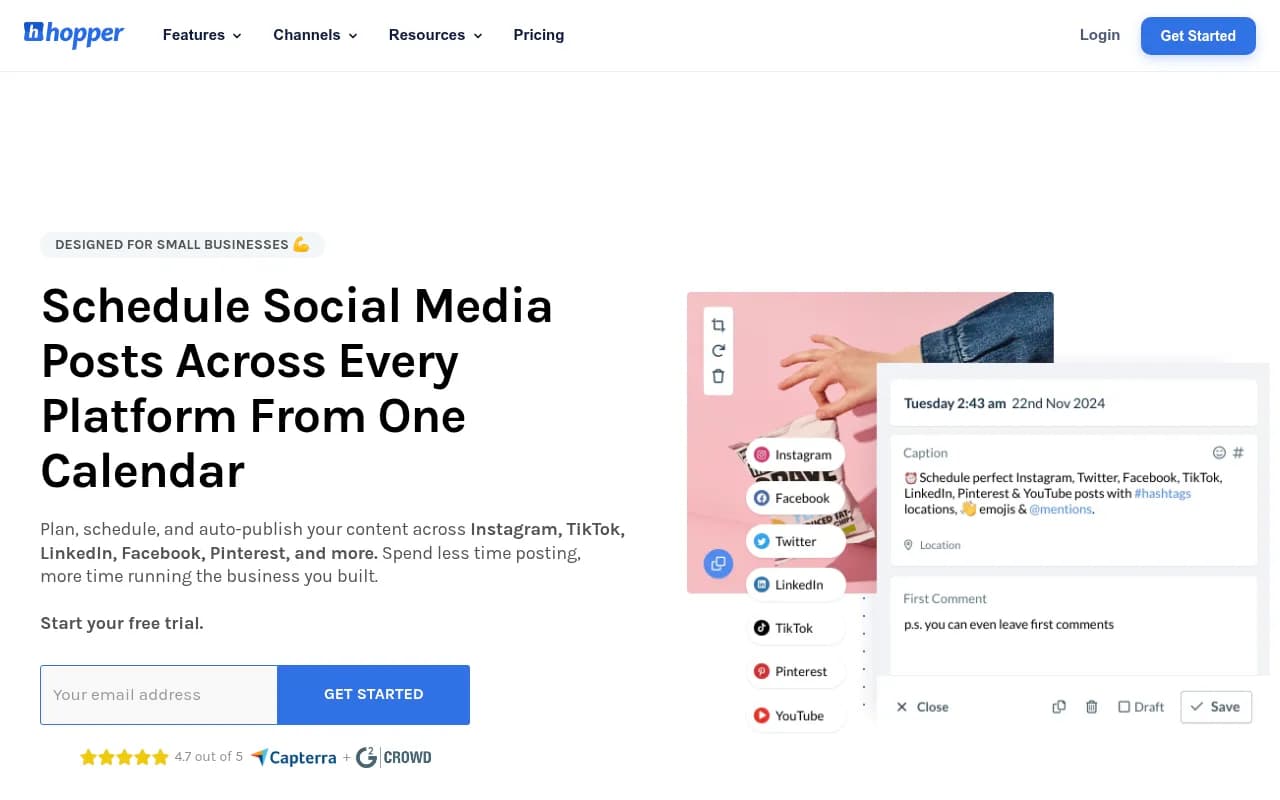
Visual content calendar with large post previews, a grid planner, and AI-driven suggestions for the best time to post.
Key takeaways
- Hopper HQ is a genuinely easy-to-use, visual-first scheduler that covers nine platforms including Instagram, TikTok, LinkedIn, Facebook, X, Threads, Bluesky, Pinterest, and YouTube Shorts, with true auto-publishing for Reels and Stories.
- Pricing is per connected social account: Grow at $5/month (annual) or $6 monthly, Scale at $10/month (annual) or $12 monthly. That's cheap for one or two accounts, but it scales poorly for agencies managing 10+ client profiles.
- The grid planner and bulk CSV upload are the standout features. The analytics are the weakest part of the product, and reviewers consistently flag this.
- It supports an unusually wide channel list for this price point: Instagram, TikTok, LinkedIn, Facebook, X, Threads, Bluesky, Pinterest, and YouTube Shorts, with true auto-publishing for Reels and Stories.
- Watch the billing: there are documented complaints from users charged after cancelling during the trial period, and support's refund policy is reportedly rigid.
What Hopper HQ does
Hopper HQ is a UK-based social media scheduling tool that has been around since 2020 and now claims over 10,000 business customers in 70+ countries, including some recognizable logos like MyProtein, the BBC, and VaynerMedia. The pitch is simple: plan a week of posts in ten minutes, schedule everything visually, and let the auto-publisher handle the rest.
What separates it from the crowd of schedulers is that it's genuinely visual-first. The Instagram grid planner shows your feed as it will actually look before anything goes live, which matters if you care about how your profile presents at a glance. The calendar view gives large post previews rather than tiny thumbnails, so you can spot a low-quality image or an off-brand post immediately.
The channel coverage is broader than most competitors at this price. Alongside the usual suspects (Instagram, Facebook, LinkedIn, TikTok, X, Pinterest, YouTube Shorts), Hopper HQ added Threads and Bluesky, which as of 2026 still isn't universal among scheduling tools. Cross-posting between networks is supported, including reposting TikTok content to Instagram without watermarks.
The features that matter
The bulk upload deserves specific mention. You can create hundreds of posts in minutes using the CSV importer, which is genuinely useful if you run a content batch day once a month. One gym owner in the reviews mentions uploading 50 posts at a time, and that use case is exactly who this feature is for.
The AI Assistant is now bundled unlimited into both pricing tiers. It handles caption generation and hashtag suggestions, and there's a hashtag research database tracking over 10 million hashtags. The AI upscaling feature, which fixes small or pixelated images, is a nice touch that solves a real problem for small businesses working with limited design resources.
Auto-publishing works for Stories and Reels, not just feed posts. This is a genuine differentiator versus Later, which historically required manual publishing for some formats. If your entire strategy is hands-off scheduling, this matters.
There's also a link-in-bio page builder, first-comment automation, image editing, and mobile apps on both iOS and Android.
Pricing
Hopper HQ uses per-account pricing, which is either its best or worst feature depending on how many profiles you manage.
- Grow: $5/month per account billed annually, or $6 billed monthly. Includes unlimited posts, the AI Assistant, grid planner, hashtag tools, link-in-bio, and one user seat.
- Scale: $10/month per account billed annually, or $12 billed monthly. Adds unlimited users, team permissions, and content approvals.
For a solo business owner managing two Instagram accounts, this is excellent value at $10-12/month total. For an agency managing 15 client profiles, you're looking at $75-150/month before you've added any team functionality, and flat-fee competitors start looking attractive. Hopper HQ does market an agencies page, but the pricing model itself works against that segment.
A 14-day free trial is available with no card required upfront.
What users say
Ratings are solid but inconsistent across platforms. Capterra shows 4.7/5 from 139 reviews, with ease of use and customer service both scoring well. G2 sits at 4.5/5 from a smaller pool of 22 reviews. Trustpilot, however, shows 3.1/5 from 61 reviews, which is a meaningful gap and worth investigating before committing.
The positive themes are consistent: it's easy to learn, the visual planning is genuinely helpful, and the bulk upload saves real time. The negative themes are equally consistent.
Analytics come up repeatedly as a weakness. G2's review aggregation flags "lack of analytics" as a recurring con despite the product including an analytics feature. If you need deep performance reporting, you'll likely want a separate analytics tool.
The billing complaints are harder to dismiss. A Capterra review from October 2025 describes being charged after cancelling before really using the product, with support responses characterized as "copy-paste excuses" and "zero help." The refund policy is reportedly strict. This isn't unique to Hopper HQ in the SaaS world, but it's worth knowing going in.
Meta account connections, meaning Facebook and Instagram, are described as occasionally clunky. Most reviewers attribute this to Meta's API rather than Hopper HQ, but it's still friction you'll experience.
Who it's for
Hopper HQ is best for a specific type of user: the small business owner or solo marketer who wants to batch social content efficiently, cares about visual presentation, and doesn't need advanced analytics. Restaurants, gyms, photographers, realtors, and coaches are the segments Hopper HQ markets to directly, and the feature set matches those use cases well.
It's less ideal for data-driven marketing teams who need to prove ROI from social, agencies managing many client accounts where per-account pricing compounds, or anyone who requires robust approval workflows at scale.
Alternatives to consider
If Hopper HQ's analytics gap is a dealbreaker, Buffer offers stronger reporting at a similar price point. If you're agency-focused, Later's flat-fee agency plans or Sendible's white-label options may scale better. For visual Instagram planning specifically, Planoly is a direct competitor worth comparing.
Final verdict
Hopper HQ does one thing very well: it makes visual social media scheduling genuinely easy and affordable for small teams. The grid planner, bulk upload, and broad channel support including Bluesky and Threads make it a strong choice for its target market. The analytics limitations and per-account pricing model are real constraints, and the billing complaints suggest you should set a calendar reminder before your trial converts. If you're a small business that treats social as a maintenance task rather than a growth channel to be measured obsessively, Hopper HQ is worth the free trial.
Tags:
Frequently asked questions
Does Hopper HQ support auto-publishing for Reels and Stories?
How much does Hopper HQ cost?
Is Hopper HQ good for agencies?
How good are Hopper HQ's analytics?
Is there a free trial?
Similar and alternative tools to HopperHQ