WordStream Keyword Tool Review 2026
Fast and simple free tool for discovering keywords your business needs to drive traffic, ideal for both SEO and PPC campaign planning.
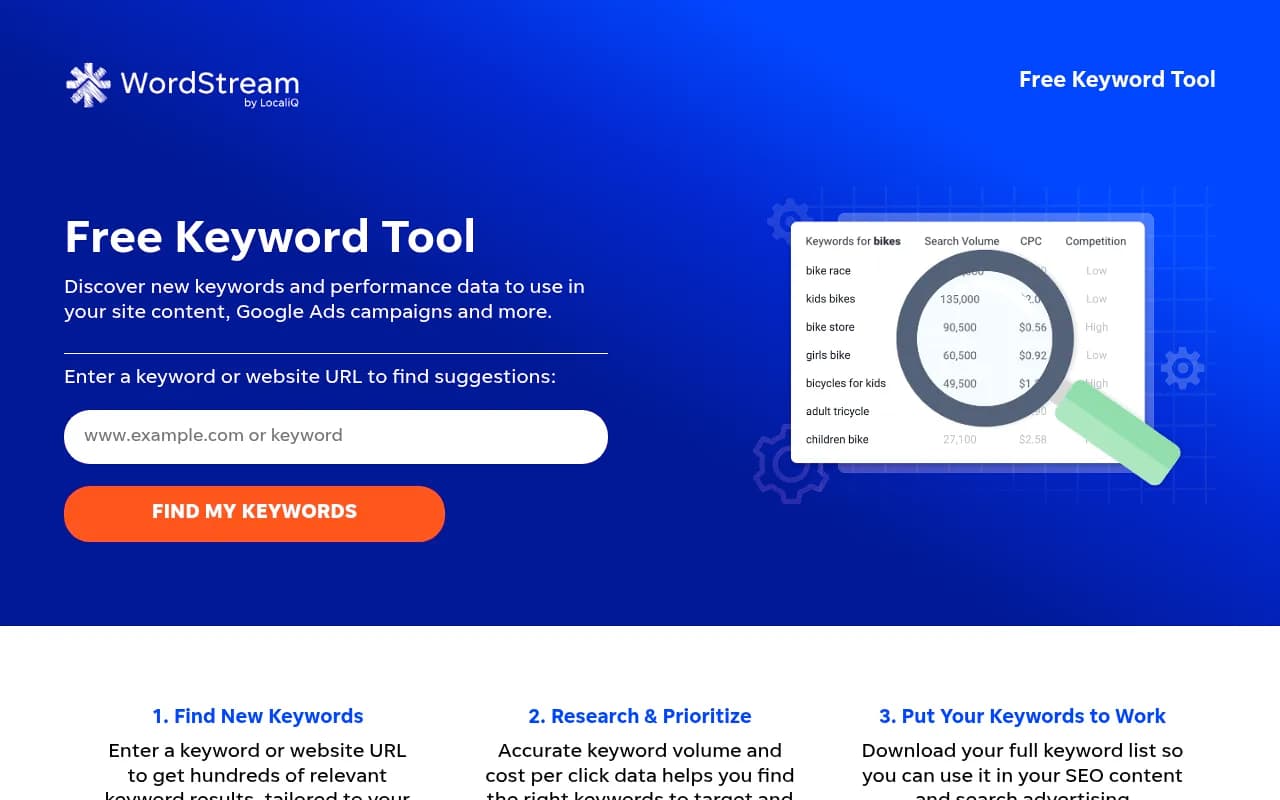
Summary: Key Takeaways
- Best for: PPC marketers and agencies managing Google Ads campaigns who need accurate keyword data without paying for enterprise tools
- Standout feature: Industry-specific filtering across 24 verticals delivers more relevant keywords than generic research tools
- Major limitation: Requires email signup to access full keyword lists beyond the first 25 results
- Pricing: Completely free for the keyword tool; paid WordStream platform starts at $294/month for campaign management
- Bottom line: Solid free alternative to Google Keyword Planner with better search volume transparency, though limited to basic research without the paid platform
WordStream's Free Keyword Tool has been a staple in the PPC community since the company launched in 2007. Built by WordStream (now owned by LOCALiQ), this tool was designed specifically to address the limitations marketers face with Google's Keyword Planner, particularly around vague search volume ranges and lack of industry context. While WordStream offers a full paid platform for campaign management, their free keyword research tool remains one of the most accessible options for marketers who need quick, actionable keyword data without enterprise-level investment.
The tool targets PPC specialists, SEO content strategists, and digital marketing agencies managing client campaigns. It's particularly valuable for small to mid-sized businesses running Google Ads or Bing Ads campaigns who need to expand their keyword lists beyond what they can manually brainstorm. The interface is deliberately simple: enter a seed keyword or competitor URL, select your industry and country, and get hundreds of keyword suggestions with actual search volume numbers rather than ranges.
Core Keyword Research Capabilities
The tool's primary function is generating keyword suggestions from either a seed keyword or a website URL. When you enter a term like "project management software," it returns related keywords, long-tail variations, and question-based queries that real users search for. The URL analysis feature is particularly useful for competitive research -- paste a competitor's homepage or product page, and WordStream extracts relevant keywords from their content to help you identify gaps in your own strategy.
Search volume data comes directly from Google and Bing APIs, giving you actual monthly search numbers rather than the broad ranges ("10-100" or "1K-10K") that Google Keyword Planner shows to non-spending accounts. This transparency is critical for prioritizing which keywords deserve your budget or content creation time. The tool also displays estimated cost-per-click (CPC) data, helping PPC marketers forecast budget requirements before launching campaigns.
Industry-Specific Filtering
One of WordStream's most distinctive features is industry filtering across 24 business verticals including Apparel, Finance & Banking, Health, Real Estate, Travel & Tourism, and more. This matters because the same keyword can have wildly different intent depending on industry context. Search for "cars" with Arts & Entertainment selected, and you'll see "cars movie" and "pixar cars." Switch to Finance & Banking, and results shift to "new car incentives" and "car lease deals." This contextual intelligence saves hours of manual filtering and reduces irrelevant keyword bloat in your campaigns.
The industry filter also adjusts competition level and CPC estimates to reflect your specific market. A keyword might show low competition in one vertical but high competition in another, which directly impacts whether it's worth targeting. This feature alone makes WordStream more useful than generic keyword tools that treat all searches the same regardless of business context.
Geographic and Location Targeting
WordStream supports keyword research for 23+ countries including the US, UK, Canada, Australia, Germany, France, Japan, Brazil, and more. For US-based advertisers, you can drill down to state-level data by entering your state name, which is valuable for local service businesses or regional campaigns. A plumber in Texas gets different keyword suggestions and search volumes than one in New York, and WordStream surfaces those regional variations.
This geographic specificity extends to both search volume and CPC data. A keyword might have 10,000 monthly searches in the US but only 500 in Australia, with dramatically different cost-per-click rates. If you're running international campaigns or testing new markets, this country-level data helps you prioritize where to allocate budget before committing to full-scale expansion.
Competition Level and CPC Estimates
Each keyword result includes a competition level indicator (low, medium, high) that reflects how many advertisers are bidding on that term in Google Ads. This is sourced from Google's auction data and helps you identify opportunities where search volume is decent but competition is manageable. Pairing this with estimated CPC gives you a quick cost-benefit analysis: a keyword with 5,000 monthly searches, low competition, and $1.50 CPC is often more valuable than one with 20,000 searches, high competition, and $12 CPC.
The CPC estimates are averages based on historical auction data in your selected industry and location. They're not guarantees of what you'll actually pay (that depends on your Quality Score, ad relevance, and real-time auction dynamics), but they're accurate enough for budget planning and prioritization. Agencies managing multiple client accounts particularly appreciate this data for setting realistic expectations about campaign costs.
Long-Tail Keyword Discovery
WordStream automatically surfaces long-tail keyword variations, which are longer, more specific phrases that typically have lower search volume but higher conversion intent. For a seed keyword like "email marketing," you'll get suggestions like "email marketing automation for small business" or "best email marketing software for ecommerce." These long-tail terms are gold for both PPC (lower CPCs, better conversion rates) and SEO (easier to rank for, more targeted traffic).
The tool identifies question-based keywords ("how to," "what is," "best way to") that are particularly valuable for content marketing and SEO. These informational queries help you build blog content that captures users early in the buying journey, establishing authority before they're ready to convert. For SaaS companies and B2B businesses with longer sales cycles, this early-stage content is critical for building pipeline.
Negative Keyword Identification
While not explicitly labeled as a negative keyword tool, WordStream's results help you identify irrelevant terms to exclude from PPC campaigns. If you sell project management software and see suggestions like "free project management templates" or "project management certification," you know to add those as negatives to avoid wasting budget on non-buyer traffic. This is especially useful for broad match campaigns where Google's algorithm might show your ads for tangentially related searches.
CSV Export and Campaign Integration
After entering your email to unlock the full keyword list (beyond the first 25 results), you can download everything as a CSV file. This export is formatted for direct upload into Google Ads or Microsoft Advertising, saving the manual copy-paste work. The CSV includes all the data columns: keyword, search volume, competition level, and estimated CPC, making it easy to sort and prioritize in Excel or Google Sheets before importing.
For agencies managing multiple clients, this export feature streamlines the keyword research phase of campaign setup. You can quickly generate keyword lists for different clients, filter by relevance, and hand off organized spreadsheets to your media buying team or clients for approval.
Who Should Use WordStream's Free Keyword Tool
This tool is ideal for PPC specialists at small to mid-sized businesses (1-50 employees) who need reliable keyword data without paying for enterprise platforms like SEMrush or Ahrefs. If you're spending $5,000-$50,000/month on Google Ads and need to expand your keyword lists quarterly, WordStream gives you the core data you need without the $200+/month subscription cost of full-featured SEO suites.
Digital marketing agencies managing 5-20 client accounts find value in the industry filtering and geographic targeting, which lets them quickly generate relevant keyword lists for clients in different verticals and locations. The free tool handles the research phase efficiently, though agencies with larger client rosters typically graduate to paid tools for more advanced features like rank tracking and backlink analysis.
SEO content strategists can use WordStream for topic ideation and search volume validation, though it's not a replacement for dedicated SEO platforms. If you're planning a content calendar and need to know which topics have actual search demand, WordStream provides that directional data. However, it doesn't offer SERP analysis, keyword difficulty scores, or content gap analysis that tools like Ahrefs or Surfer SEO provide.
WordStream is less suitable for enterprise SEO teams managing large-scale content operations across hundreds of keywords, or for affiliate marketers who need deep competitive intelligence on specific niches. The tool's simplicity is a strength for quick research but a limitation for complex, data-intensive workflows.
Integrations and Ecosystem
The free keyword tool is a standalone web application with no direct integrations. However, the CSV export format is compatible with Google Ads, Microsoft Advertising, and any spreadsheet software. WordStream's paid platform (separate from the free tool) integrates with Google Ads, Microsoft Advertising, and Facebook Ads for campaign management, but those features require a paid subscription starting at $294/month.
There's no API access for the free keyword tool, and no browser extensions or mobile apps. It's purely a web-based tool accessed through wordstream.com/keywords. For marketers who need programmatic access to keyword data, you'd need to look at paid APIs from Google, SEMrush, or DataForSEO.
Pricing and Value Proposition
The keyword research tool is completely free with no usage limits, though you must provide an email address to download full keyword lists beyond the first 25 results. This email gate is how WordStream generates leads for their paid platform, so expect follow-up emails about their campaign management software.
WordStream's paid platform (which includes the keyword tool plus campaign management features) starts at $294/month for accounts spending up to $5,000/month on ads, with pricing scaling up based on ad spend. The paid platform adds features like automated bid management, ad creation tools, and performance reporting, but the keyword research functionality in the free tool is identical to what paid users get.
Compared to alternatives, WordStream's free tool offers more transparency than Google Keyword Planner (which shows vague search volume ranges unless you're actively spending) and more industry context than Ubersuggest or AnswerThePublic. However, it lacks the depth of paid tools like Ahrefs ($99+/month) or SEMrush ($129.95+/month), which include keyword difficulty scores, SERP analysis, and competitive intelligence.
For marketers who only need basic keyword research and don't require rank tracking or backlink analysis, WordStream's free tool delivers excellent value. For those running sophisticated SEO operations or managing large PPC budgets, it's a useful supplementary tool but not a complete solution.
Strengths and Honest Limitations
WordStream excels at providing accurate, industry-specific keyword data quickly and for free. The industry filtering is genuinely useful and not commonly found in free tools. The interface is clean and beginner-friendly, making it accessible for marketers who aren't keyword research experts. The direct connection to Google and Bing APIs ensures data accuracy, and the CSV export streamlines campaign setup.
However, the tool has clear limitations. The email gate to access full results is a minor friction point, though understandable for a free tool. More significantly, WordStream doesn't provide keyword difficulty scores or SERP analysis, so you can't assess how hard it would be to rank organically for a given term. There's no historical trend data to see if a keyword is growing or declining in popularity. The tool also doesn't identify search intent (informational vs. commercial vs. navigational) automatically, leaving that analysis to the user.
Competitive intelligence is limited to basic URL analysis. You can't see which keywords competitors are ranking for or bidding on, what their estimated traffic is, or how their keyword strategy has evolved over time. Tools like SpyFu or SEMrush offer far more depth in competitive research. WordStream also doesn't integrate with rank tracking or content optimization tools, so it's purely a research tool rather than an end-to-end SEO platform.
Bottom Line: When WordStream Makes Sense
WordStream's Free Keyword Tool is best for PPC marketers and small business owners who need quick, reliable keyword suggestions with accurate search volume and CPC data. If you're launching a new Google Ads campaign, expanding into a new product category, or validating content ideas with search volume data, this tool gets the job done efficiently and for free. The industry filtering and geographic targeting make it more useful than Google Keyword Planner for most practical purposes, especially if you're not actively spending enough on Google Ads to unlock Keyword Planner's full data.
Use WordStream when you need to generate a keyword list in 10 minutes, not when you need to conduct deep competitive analysis or plan a 12-month SEO content strategy. It's a solid first step in keyword research, but most serious SEO practitioners will eventually need more advanced tools for execution and ongoing optimization.
Similar and alternative tools to WordStream Keyword Tool