Mapline Review 2026
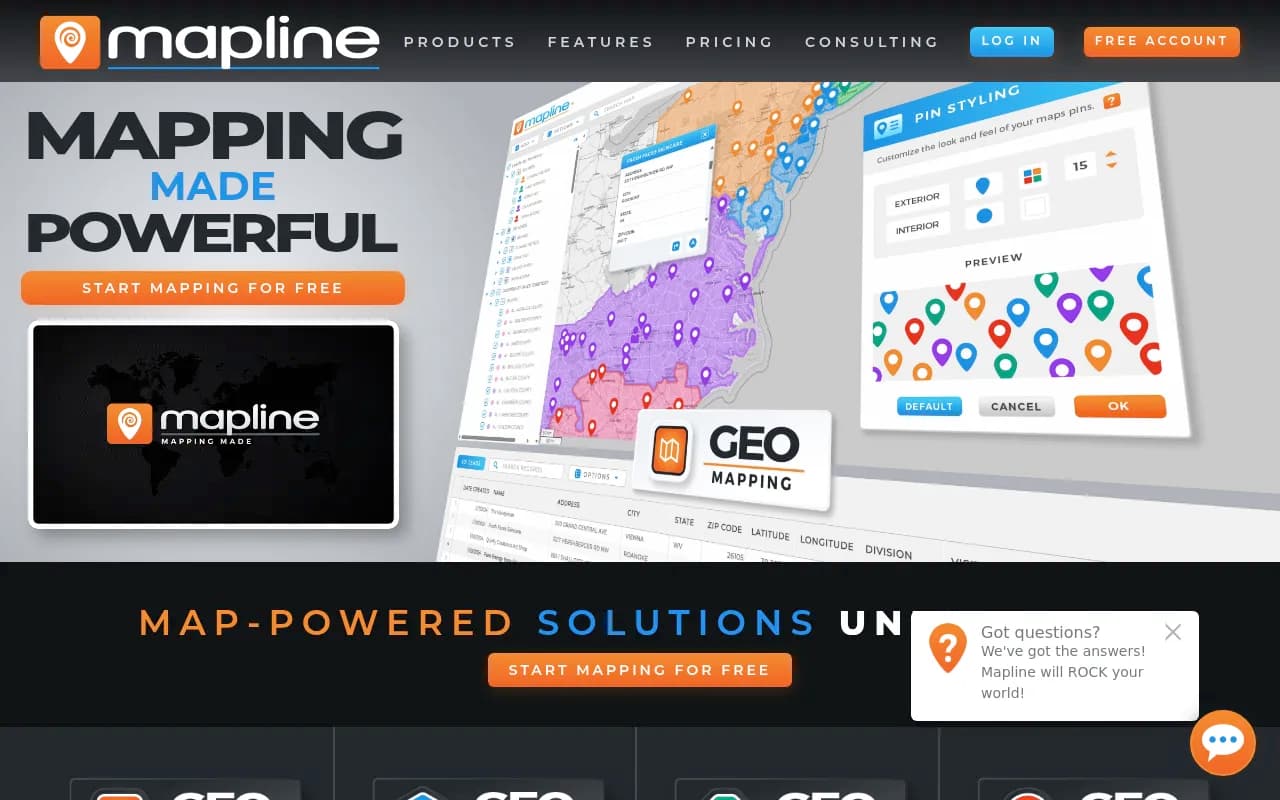
User-friendly mapping tool that turns spreadsheet data into interactive maps. Designed for sales territories, route optimization, and location analysis.
Key Takeaways:
• Best for: Sales teams managing territories, delivery/logistics operations, field service companies, and marketing teams running location-based campaigns • Standout strength: Four integrated products (Geo Mapping, Geo BI, Geo Routing, Geo Scheduling) built on a proprietary geospatial engine that goes beyond basic pin-dropping to optimize routes, analyze territories, and schedule field teams • Unique capability: Only platform combining mapping, business intelligence, route optimization, and field scheduling in one ecosystem with real-time geospatial analytics • Limitations: Pricing not publicly listed (requires sales contact), steeper learning curve for advanced features like Smart Simulations and geo-enriched data layers • Bottom line: Enterprise-grade location intelligence platform that replaces 3-4 separate tools for companies serious about optimizing field operations and sales territories
Mapline positions itself as "the world's most powerful geo analytics software," and after examining its feature set and customer roster (Chipotle, UPS, Hilton, McDonald's, Apple, Harley-Davidson), that's not just marketing hyperbole. This is a comprehensive geospatial platform built for companies where location data drives revenue — sales organizations carving up territories, logistics operations optimizing delivery routes, field service teams scheduling technicians, and marketing departments targeting campaigns by geography.
Founded as a mapping tool, Mapline has evolved into a four-product ecosystem: Geo Mapping (core visualization), Geo BI (analytics and dashboards), Geo Routing (route optimization), and Geo Scheduling (field team calendaring). What sets it apart from basic mapping tools like Google My Maps or even specialized competitors like Maptive and BatchGeo is its proprietary Geospatial Engine — technology that doesn't just plot points but calculates drive times, optimizes multi-stop routes, enriches data with demographic layers, and generates territory recommendations based on actual road miles and revenue potential.
Geo Mapping: The Foundation
The core product lets you upload spreadsheets (CSV, Excel) or connect live data sources and instantly visualize locations on interactive maps. But it's what happens after the initial plot that matters. Territory Management tools let you draw custom boundaries (freehand, by ZIP code, radius, drive time polygons), assign locations to reps, and color-code by performance metrics. A pharmaceutical company could map doctor offices by prescription volume, a beverage distributor could visualize retail accounts by delivery frequency, or a solar installer could identify high-value neighborhoods by roof size and income data.
Pin Grouping and Styling goes beyond basic markers — you can size pins by revenue, color by status (hot lead vs cold), cluster overlapping locations, and apply conditional formatting rules (e.g., accounts over $50K in red). Heat Maps show density patterns instantly, useful for identifying underserved areas or oversaturated markets. Proximity Analysis calculates which customers are within X miles of a warehouse or which prospects fall inside a competitor's territory.
The platform includes Geo-Enrichment Layers — overlay census data (income, population density, age demographics), traffic patterns, Points of Interest (coffee shops, gyms, schools), and competitor locations. A real estate investor could map properties against school ratings and median household income. A franchise development team could identify gaps in coverage by overlaying existing locations with demographic targets.
Route Planning within Geo Mapping handles basic multi-stop trip optimization — upload 20 customer addresses, set a start/end point, and Mapline sequences stops to minimize drive time. It's not as advanced as the dedicated Geo Routing product, but sufficient for sales reps planning daily visits or service techs running 5-8 appointments.
Geo BI: Analytics That Actually Matter
This is where Mapline separates from simple mapping tools. Geo BI combines Charts, Dashboards, and Reporting with location intelligence. You're not just seeing where things are — you're analyzing why performance varies by geography.
Custom Dashboards let you build executive views combining maps, bar charts, pie charts, line graphs, and KPI widgets. A VP of Sales could monitor territory performance with a map showing rep locations color-coded by quota attainment, a bar chart of monthly revenue by region, and a table of top-performing accounts. Drill-Down Capabilities let you click a territory on the map and instantly filter all charts to that geography.
Connectors and API Integrations pull live data from Salesforce, HubSpot, Microsoft Dynamics, Google Sheets, and custom databases. Set up automated refreshes so your dashboards always reflect current pipeline, delivery status, or service tickets. The API also lets developers push Mapline visualizations into internal tools or customer portals.
Collaboration Features include shared dashboards, user permissions (view-only vs edit access), and scheduled report distribution. A logistics manager could share a daily delivery performance dashboard with drivers (view-only) while giving dispatchers edit rights to adjust routes.
Geo-Enriched Data is a standout feature — Mapline can append demographic, firmographic, and geospatial attributes to your existing records. Upload a list of business addresses and automatically add employee count, industry classification, distance to nearest competitor, or drive time from your warehouse. This turns basic contact lists into targetable segments.
Geo Routing: Optimization at Scale
For companies running delivery fleets or field service operations, Geo Routing is the heavy-duty solution. It handles Multi-Vehicle Route Optimization with constraints like delivery windows, vehicle capacity, driver skills, and service time per stop.
Smart Simulations let you model scenarios before committing — what if we added a third truck? What if we shifted the warehouse 10 miles east? What if we prioritized high-revenue stops over geographic proximity? The system calculates total drive time, fuel costs, and delivery success rates for each scenario.
Delivery Windows and Time Constraints ensure customers get their preferred time slots while maximizing driver efficiency. A meal delivery service could set 30-minute windows for each drop, and Mapline sequences routes to hit every window while minimizing backtracking.
Vehicle Requirements account for truck size (can't send a semi down residential streets), refrigeration needs, or specialized equipment. A medical supply company could specify which stops require temperature-controlled vehicles and which drivers are certified to handle hazardous materials.
Prioritization Options let you optimize by drive time (fastest route), revenue (hit high-value customers first), or urgency (service emergencies before routine maintenance). You can also set mandatory first/last stops or exclude certain roads (toll avoidance, weight restrictions).
Real-Time Adjustments handle the chaos of field operations — a customer cancels, a driver calls in sick, traffic shuts down a highway. Drag-and-drop stops between routes, reassign entire territories, or re-optimize on the fly. Changes propagate to driver mobile apps instantly.
Geo Scheduling: Field Team Calendaring
The newest product, Geo Scheduling, tackles the "who should handle this job" problem for service companies, sales teams, and any business dispatching people to locations.
Geographically Smart Assignments consider proximity (who's closest?), schedule availability (who's free?), and skill matching (who's qualified?). A pest control company could auto-assign a termite inspection to the nearest certified inspector with an open slot that afternoon.
Automated Team Calendaring syncs with Google Calendar, Outlook, or internal scheduling systems. When a new job comes in, Mapline checks every technician's calendar, calculates drive times from their current location, and recommends the optimal assignment. Managers approve with one click or override manually.
Accountability Tracking logs who was assigned what, when they arrived, how long they stayed, and completion status. Pair this with mobile check-ins (GPS timestamp when a tech reaches a site) and you have full visibility into field productivity.
Automatic Geo-Optimized Recommendations go beyond simple proximity — the system factors in traffic patterns (don't send someone across town during rush hour), job duration (a 3-hour install vs a 15-minute service call), and revenue potential (prioritize high-value clients). A solar installation company could ensure their most experienced crew handles the biggest projects while newer techs cover routine maintenance.
Visualization with Maps, Charts, and Dashboards shows team utilization rates, average drive time between jobs, and geographic coverage gaps. Identify if you're over-staffed in one region and under-staffed in another.
Who Is Mapline For?
Sales Teams (5-500+ reps): Organizations managing field sales territories, planning customer visits, or analyzing market penetration. Ideal for pharmaceutical reps visiting doctors, beverage distributors managing retail accounts, or B2B sales teams prospecting by industry and geography. If you're still using Excel to assign territories or Google Maps to plan routes, Mapline is a massive upgrade.
Delivery and Logistics Operations: Companies running last-mile delivery (meal kits, medical supplies, propane, vending machine restocking), pickup services (waste management, laundry), or multi-stop distribution routes. Scooter's Coffee reported 47% cost savings using Mapline's route optimization. Quality Enclosures discovered a delivery costing 300% of normal that would have gone unnoticed without Mapline's analytics.
Field Service Companies: HVAC, plumbing, pest control, telecom installation, equipment maintenance — any business dispatching technicians to customer sites. Royal Cup uses Mapline to calculate actual road miles from customer locations back to warehouses and determine if a customer is "worth the route" before taking them on.
Marketing and Franchise Development Teams: Professionals running location-based campaigns, site selection for new stores, or competitive market analysis. Overlay demographic data, traffic patterns, and competitor locations to identify underserved markets. Spark Medical Marketing uses Mapline to track and analyze campaigns running across the country.
Enterprise Operations and Analytics Teams: Larger organizations (100+ employees) needing centralized location intelligence across departments. The Geo BI product with API integrations and custom dashboards fits companies with existing data warehouses and BI stacks (Salesforce, Tableau, Power BI) who want to add geospatial layers.
Who Should Skip Mapline: Solo freelancers or very small teams (under 5 people) with basic mapping needs — the platform is overkill and likely over-budget. Companies needing only simple route planning without territory management or analytics would be better served by free tools like Google Maps or lightweight alternatives like RouteXL. Organizations with zero field operations, no sales territories, and no location-based data have no reason to pay for geospatial analytics.
Integrations and Ecosystem
Mapline connects to Salesforce, HubSpot, Microsoft Dynamics 365, Zoho CRM, Pipedrive, and other CRMs via native integrations or API. Pull account locations, opportunity data, and contact records directly into maps and dashboards. Changes sync bidirectionally — update a territory assignment in Mapline and it writes back to Salesforce.
Google Sheets, Excel Online, and Airtable integrations enable live data connections for teams managing customer lists in spreadsheets. Set up auto-refresh schedules (hourly, daily) so maps always reflect current data.
Zapier and Make (Integromat) support lets you connect Mapline to 5,000+ apps without coding. Trigger actions like "when a new lead enters a specific territory, send a Slack notification to the assigned rep" or "when a delivery is marked complete, update the order status in Shopify."
Mobile Apps (iOS and Android) give field teams access to maps, routes, and schedules on the go. Drivers see turn-by-turn navigation, check off completed stops, collect electronic signatures, and scan barcodes for proof of delivery. GPS tracking feeds real-time location data back to dispatchers.
API Access (available on higher-tier plans) lets developers build custom integrations, embed Mapline maps in internal portals, or pull geospatial analytics into proprietary dashboards. Documentation includes REST endpoints for uploading data, creating territories, generating routes, and retrieving analytics.
Browser-Based Platform means no software installation — works on Windows, Mac, Linux, Chromebook. Optimized for Chrome, Firefox, Safari, and Edge.
Pricing and Value
Mapline does not publish pricing on its website — you must contact sales for a quote. Based on third-party sources and user reviews, expect pricing to vary significantly based on which products you need (Geo Mapping alone vs the full suite), number of users, data volume, and feature requirements.
Free Trial: Available for Geo Mapping. Sign up without a credit card to test core mapping and territory features. Trial length not specified but appears to be 7-14 days based on user reports.
Geo Mapping: Likely starts around $200-400/month for small teams (5-10 users) with basic mapping and territory management. Enterprise pricing for 50+ users with advanced features (geo-enrichment, API access) could reach $1,000-2,000+/month.
Geo BI, Geo Routing, Geo Scheduling: Priced as add-ons or bundled packages. Routing and scheduling products command premium pricing due to optimization algorithms and mobile app access. Expect $500-1,500+/month depending on fleet size and complexity.
Annual Billing: Likely offers discounts (10-20%) for annual commitments vs month-to-month.
Value Proposition: For companies currently using 3-4 separate tools (a mapping platform, a BI tool, route optimization software, and scheduling software), consolidating into Mapline could actually reduce total software spend while improving data consistency. The ROI case studies are compelling — Scooter's Coffee saved 47% on operating costs, Quality Enclosures caught a 300% cost overrun, Royal Cup improved customer profitability analysis. For a 20-truck delivery operation spending $50K/month on fuel and labor, even a 10% efficiency gain pays for the software many times over.
Compared to Competitors: Maptive and BatchGeo offer simpler mapping at lower price points ($30-100/month) but lack route optimization, BI dashboards, and scheduling. RouteXL and Route4Me focus solely on routing ($10-50/month) but don't handle territory management or analytics. Salesforce Maps (formerly MapAnything) integrates tightly with Salesforce but costs $75-125/user/month and requires Salesforce licenses. Mapline sits in the middle — more powerful than basic mappers, more affordable than enterprise GIS platforms like Esri ArcGIS.
Strengths
All-in-One Geospatial Platform: The only solution combining mapping, BI analytics, route optimization, and field scheduling under one roof. Eliminates data silos and tool-switching.
Proprietary Geospatial Engine: Not just a UI layer on top of Google Maps — Mapline's underlying technology calculates drive times, optimizes routes with constraints, and enriches data with demographic layers. This is the technical moat that justifies the price premium.
Enterprise-Grade Customer Base: When Chipotle, UPS, McDonald's, and Apple trust your platform for location intelligence, that's a strong signal of reliability, security, and scalability.
Geo-Enrichment Capabilities: The ability to append demographic, firmographic, and geospatial data to existing records turns basic contact lists into actionable segments. Most competitors require you to source this data separately.
Smart Simulations for Routing: Modeling "what-if" scenarios before committing to fleet changes or territory realignments saves companies from costly mistakes. This feature alone differentiates Mapline from basic route planners.
Limitations
No Public Pricing: Requiring a sales call to learn costs frustrates buyers who want to self-evaluate. Competitors like Maptive and Route4Me publish transparent pricing, making them easier to budget for.
Learning Curve for Advanced Features: Users praise the core mapping interface as intuitive, but reviews mention that unlocking the full power of Geo BI dashboards, Smart Simulations, and API integrations requires training. Expect 2-4 weeks for teams to become proficient with advanced features.
Mobile App Limitations: While functional for drivers and field techs, the mobile apps reportedly lack some desktop features. Route editing and dashboard customization are primarily desktop experiences.
Overkill for Small Teams: Solo users or teams under 5 people with simple needs (plot 20 locations, draw a few territories) will find Mapline's depth and pricing excessive. Free tools or $30/month alternatives suffice for basic use cases.
Bottom Line
Mapline is the right choice for mid-sized to enterprise companies (20-5,000+ employees) where location data directly impacts revenue and operational efficiency. If you're managing sales territories across multiple regions, running delivery routes with 5+ vehicles, dispatching field service teams, or analyzing market penetration by geography, Mapline replaces 3-4 separate tools while providing deeper insights than any single-purpose solution.
The platform shines brightest for organizations currently struggling with fragmented systems — sales reps using Google Maps for routes, analysts building territory reports in Excel, dispatchers managing schedules in spreadsheets, and executives lacking visibility into field performance. Mapline centralizes all location intelligence into one ecosystem with live data connections, automated optimization, and executive dashboards.
Best use case in one sentence: Delivery operations, field service companies, and multi-territory sales organizations that need to optimize routes, manage territories, and analyze location-based performance in a single platform backed by enterprise-grade geospatial technology.
Tags:
Frequently asked questions
What is Mapline and what does it do?
How much does Mapline cost?
Who is Mapline best for?
What makes Mapline different from other mapping tools?
Does Mapline offer a free version?
What are the main features of Mapline?
What are the limitations of Mapline?
Can Mapline optimize delivery routes?
Similar and alternative tools to Mapline