OpenPanel Review 2026
OpenPanel is an open-source web and product analytics platform that tracks visitors, events, revenue, and user journeys without cookies or fingerprinting. Self-host for free with unlimited events or use the cloud starting at $9/month. Trusted by 1,000+ projects including Midday and Uneed, it offers
Key Takeaways:
• Best for: Indie hackers, SaaS founders, and dev teams who want Mixpanel-level product analytics without the enterprise price tag or privacy concerns • Standout strength: Combines powerful event tracking and user profiling with privacy-first architecture (no cookies, no fingerprinting) and full self-hosting option • Pricing advantage: Cloud plans start at $9/month for 10K events with everything unlimited (users, dashboards, charts). Self-host for free with unlimited events. • Limitations: Newer platform (launched 2023) so lacks some advanced features like A/B testing or session replay that Mixpanel Enterprise offers • Bottom line: If you need serious product analytics but don't want to deal with Mixpanel's complexity and cost, or Google Analytics' privacy issues, OpenPanel is the sweet spot
OpenPanel is an open-source analytics platform built by Carl Lindesvard that's been gaining serious traction in the developer community since its 2023 launch. It's now tracking events for over 1,000 projects and has earned praise from notable builders like Steven Tey (Dub.co) and sponsorships from companies like Uneed. The core pitch: you get Mixpanel's event tracking and user profiling capabilities combined with Plausible's clean UI and privacy-first approach, all in a package you can self-host or run in the cloud for a fraction of what enterprise analytics tools cost.
What makes OpenPanel different is that it's genuinely trying to bridge two worlds that usually don't overlap. Privacy-focused analytics tools like Plausible and Fathom are great for basic web stats but fall short when you need to track user journeys, conversion funnels, or revenue attribution. Product analytics tools like Mixpanel and Amplitude give you that depth but come with cookie banners, complex implementations, and pricing that scales painfully as you grow. OpenPanel gives you both -- cookieless tracking that respects user privacy while still letting you identify users, track their complete journey, and build sophisticated reports.
The platform is fully open source (MIT license) with the entire codebase available on GitHub at github.com/Openpanel-dev/openpanel. This isn't just a marketing checkbox -- you can actually audit the code, contribute features, fork it for custom needs, or deploy it on your own infrastructure with zero vendor lock-in. For teams that need to keep data on-premise for compliance or just want full control, this is a huge differentiator versus closed-source competitors.
Web Analytics (Privacy-First Pageview Tracking)
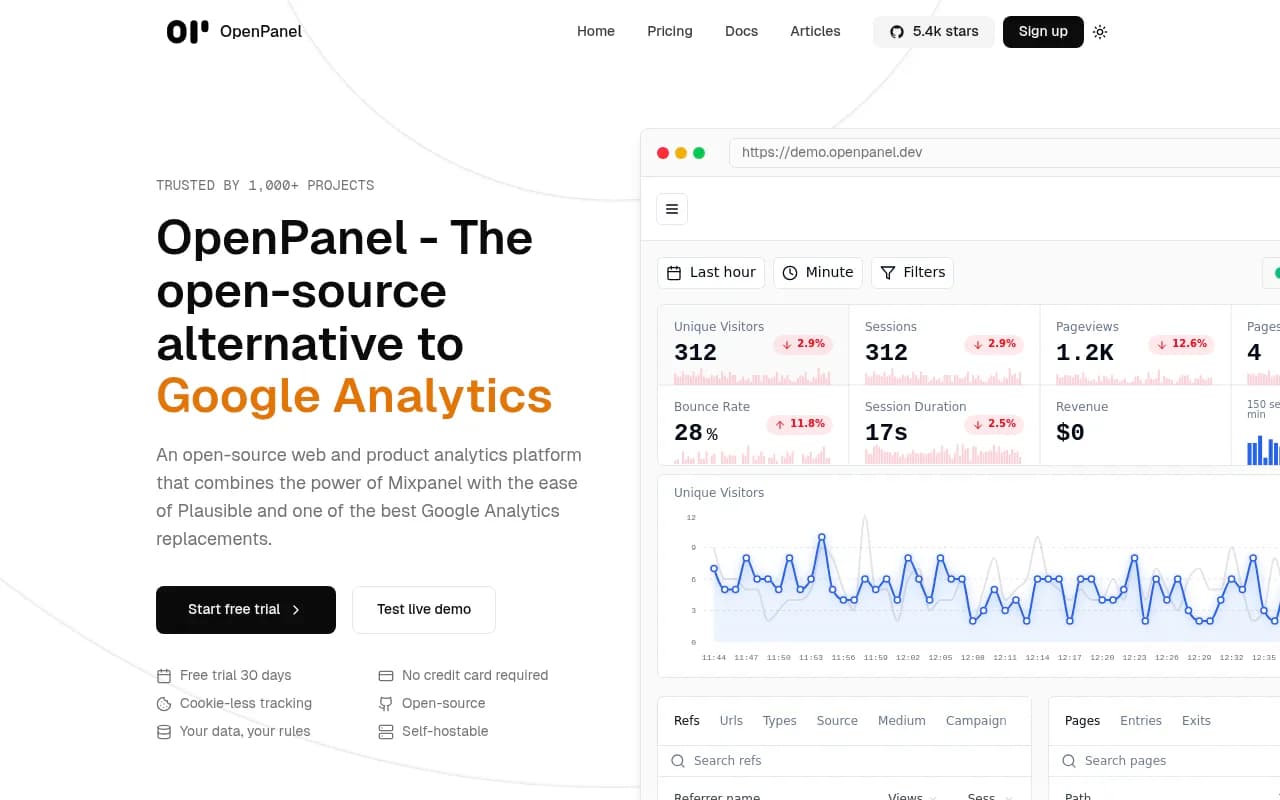
The web analytics side handles what you'd expect from a Google Analytics replacement: pageviews, sessions, bounce rates, traffic sources, device breakdowns, geographic data. But it does this without cookies, without fingerprinting, and without storing personally identifiable information by default. The tracker uses a daily-rotated hash of IP + User Agent to recognize returning visitors within a 24-hour window, then forgets them. This means you get accurate session tracking and basic retention metrics without needing cookie consent banners in most jurisdictions.
The Overview dashboard shows session duration, bounce rate, real-time active users, top pages, referral sources (with favicons pulled automatically), device/browser/OS breakdowns, and geographic distribution. It's clean, fast, and gives you the essentials at a glance. Unlike Plausible which keeps things intentionally minimal, OpenPanel lets you drill down -- click any metric to filter the entire dashboard by that dimension, or create custom date ranges and comparisons.
Traffic source attribution is solid. It automatically categorizes referrals as Direct, Organic (search engines), Social (Twitter, LinkedIn, etc.), or Referral, and shows you the specific domains sending traffic. UTM parameters are tracked automatically, so you can measure campaign performance without extra setup. For SEO-focused teams, it shows which search engines are driving traffic and integrates with Google Search Console for keyword data (though this requires the GSC integration setup).
Product Analytics (Event Tracking & User Journeys)
This is where OpenPanel separates itself from simple web analytics tools. You can track custom events -- button clicks, form submissions, feature usage, purchases, signups, anything -- and then build reports around those events. The event tracking is flexible: send events from client-side JavaScript, server-side Node/Python/Ruby SDKs, mobile apps (React Native, Swift, Kotlin), or directly via REST API.
Each event can carry custom properties (e.g. plan_type: 'pro', amount: 49, feature: 'export') which you then use to segment and filter reports. Want to see conversion rates for users who came from Twitter vs Google? Or compare feature adoption between free and paid users? You build those reports by combining event filters, property breakdowns, and user profile attributes.
The Profiles feature is particularly powerful for SaaS products. Once you call op.identify(userId, { email, name, plan, ... }), OpenPanel starts tracking that user's complete journey across sessions and devices. You see their full event timeline, which pages they visited, which features they used, revenue attributed to them, and any custom properties you've set (company size, signup date, subscription tier, etc.). This is core Mixpanel functionality that most privacy-focused tools don't offer because it requires persistent user IDs.
Funnel analysis lets you define multi-step conversion paths (e.g. Visited Pricing → Started Trial → Entered Payment → Completed Purchase) and see drop-off rates at each stage. You can segment funnels by any property -- compare conversion rates across traffic sources, device types, or user cohorts. Retention reports show how many users come back after their first visit, broken down by day/week/month.
Revenue Tracking
OpenPanel has built-in revenue tracking that connects events to dollar amounts. When you track a purchase or subscription event, you can attach a revenue property, and OpenPanel will aggregate this across your dashboards. You see total revenue, revenue per user, revenue by traffic source, revenue trends over time, and which events are driving the most value.
This is especially useful for SaaS products tracking MRR, e-commerce sites measuring conversion value, or any business that wants to connect analytics to actual money. You can filter any report by revenue -- for example, show only users who've generated over $100, or compare feature usage between high-value and low-value customers. Most open-source analytics tools don't handle revenue at all, making this a key differentiator.
Data Visualization & Dashboards
You can build custom dashboards with multiple chart types: line charts, bar charts, pie charts, tables, funnels, and metrics (single number displays). Each chart is a saved report that you can configure with filters, breakdowns, and date ranges. Dashboards are shareable -- you can make them public with a link, password-protect them, or keep them private to your team.
The chart builder is intuitive. You pick an event (or pageview), add filters (e.g. country = 'United States'), choose a breakdown dimension (e.g. device_type), and select a visualization. You can compare time periods (this week vs last week), apply formulas (conversion rate = event A / event B), and combine multiple metrics in one chart. It's not as advanced as Mixpanel's query builder but covers 90% of what most teams need.
Real-time data is a nice touch -- the "Active Now" counter shows how many users are currently on your site, and charts update live as new events come in. This is great for monitoring launches, campaigns, or just getting instant feedback on changes.
Integrations & Ecosystem
OpenPanel integrates with:
- Webhooks: Send events to your own systems in real-time. Useful for triggering automations, syncing to your CRM, or feeding data into custom pipelines.
- Slack: Get notifications when specific events fire (e.g. new signups, high-value purchases).
- Google Search Console: Import keyword and search performance data to see which queries drive traffic.
- Export API: Pull raw event data via API for custom analysis, data warehousing, or backup.
The platform has official SDKs for React, Next.js, Remix, Vue, Astro, React Native, Node, Express, Laravel, Rust, Ruby, Swift (iOS), and Kotlin (Android). There's also a simple script tag for plain HTML sites. Each SDK handles automatic pageview tracking, session management, and provides methods for custom event tracking and user identification. The JavaScript SDK is tiny (under 5KB gzipped) and loads asynchronously so it won't slow down your site.
One-click deployment is available for Coolify, Railway, and Vercel (for the cloud version). Self-hosting is documented with Docker Compose, Kubernetes, and manual setup guides. The stack is PostgreSQL + ClickHouse (for event storage) + Redis (for caching), so you'll need those running if you self-host.
Who Is It For
OpenPanel is ideal for:
- Indie hackers and solo founders building SaaS products who need more than basic web stats but can't justify $1,000+/month for Mixpanel. You get user profiles, event tracking, and funnels for $9-49/month or free if you self-host.
- Small dev teams (2-10 people) at early-stage startups who want to track product usage, measure feature adoption, and optimize conversion funnels without dealing with enterprise sales cycles or complex implementations.
- Privacy-conscious companies in Europe or regulated industries who need GDPR-compliant analytics but still want to understand user behavior. The cookieless tracking and self-hosting option make compliance straightforward.
- Agencies managing multiple client sites who want a single analytics platform they can white-label or deploy per-client. Unlimited projects and users mean you can onboard clients without worrying about seat licenses.
- Open-source projects and developer tools that want to track adoption and usage without compromising user trust. The fact that OpenPanel itself is open source resonates with this audience.
It's less suitable for:
- Enterprise teams needing advanced features like A/B testing, session replay, feature flags, or multi-touch attribution. Mixpanel, Amplitude, or Heap are better fits if you have the budget.
- Marketing teams heavily reliant on third-party ad platform integrations (Facebook Pixel, Google Ads conversion tracking). OpenPanel focuses on owned analytics, not ad tech.
- Non-technical users who need a fully managed, no-code setup. While the cloud version is easy, you'll still need a developer to implement event tracking and set up custom reports.
Pricing & Value
Cloud pricing is usage-based, starting at:
- $9/month for 10K events
- $19/month for 100K events
- $29/month for 250K events
- $49/month for 500K events
- $79/month for 1M events
- Scales up to $499/month for 50M events
Everything is unlimited except event volume: unlimited websites/apps, unlimited users, unlimited dashboards, unlimited charts, unlimited tracked profiles. No hidden fees, no seat licenses, no feature tiers. You get the full platform regardless of plan.
There's a 30-day free trial with no credit card required, so you can test it fully before committing.
For comparison, Mixpanel's Growth plan starts at around $20/month but quickly scales to hundreds or thousands per month as your event volume grows, and you hit feature limits (e.g. no group analytics, limited data retention). Amplitude's free tier is generous but paid plans start at $61/month and go up fast. Plausible is $9/month for 10K pageviews but doesn't do event tracking or user profiles at all.
Self-hosting is completely free with unlimited events. You just pay for your own server costs (a $20-40/month VPS can handle moderate traffic). This makes OpenPanel one of the most cost-effective options for high-volume projects -- if you're tracking millions of events per month, self-hosting saves thousands compared to cloud analytics tools.
Self-Hosting
The self-hosted version is fully featured -- you get everything the cloud version has, with no artificial limits. The setup requires Docker, PostgreSQL, ClickHouse, and Redis. The documentation provides Docker Compose files and step-by-step guides for common hosting providers (DigitalOcean, AWS, Hetzner). You can also deploy to Coolify with one click.
Data retention, backups, and scaling are your responsibility when self-hosting. ClickHouse (the event database) is designed for high-volume analytics and can handle billions of events, but you'll need to configure it properly and monitor performance. For teams without DevOps experience, the cloud version is the easier choice.
One major advantage of self-hosting: you can customize the codebase. Need a specific report type? Want to integrate with an internal tool? You can fork the repo and build it yourself. The MIT license allows commercial use and modification without restrictions.
Strengths
- Privacy-first without sacrificing functionality: You get user profiles and event tracking without cookies or invasive tracking. This is rare -- most tools make you choose between privacy and power.
- Transparent pricing: No hidden fees, no seat licenses, no feature tiers. You pay for events, everything else is unlimited. Self-hosting is free.
- Open source with active development: The GitHub repo is actively maintained with frequent updates. You can see the roadmap, report bugs, and contribute features.
- Beautiful, fast UI: The dashboard is genuinely pleasant to use -- clean design, fast load times, intuitive navigation. This matters when you're checking analytics daily.
- Flexible deployment: Cloud or self-hosted, your choice. No vendor lock-in.
Limitations
- No session replay: Unlike Mixpanel Enterprise or LogRocket, you can't watch recordings of user sessions. This is a big gap if you're debugging UX issues.
- No built-in A/B testing: You'll need a separate tool (Optimizely, VWO, GrowthBook) if you want to run experiments.
- Limited third-party integrations: No native connectors for CRMs, email tools, or ad platforms. You can use webhooks to build custom integrations, but it requires dev work.
- Newer platform: Launched in 2023, so the ecosystem and community are smaller than established players. Documentation is good but not as comprehensive as Mixpanel's.
Bottom Line
OpenPanel is the best option in 2026 for developers and small teams who need real product analytics (events, profiles, funnels, revenue tracking) but don't want to deal with enterprise pricing, privacy concerns, or vendor lock-in. It's not trying to replace Mixpanel for Fortune 500 companies running complex experiments -- it's built for the 95% of projects that need powerful, privacy-respecting analytics without the bloat.
If you're currently using Plausible or Fathom and wish you had event tracking and user profiles, or you're on Mixpanel's free tier and dreading the upgrade cost, OpenPanel is worth testing. The 30-day trial gives you full access, and if you like it, you can self-host for free or pay $9-49/month for most use cases. For high-volume projects, self-hosting makes it one of the most cost-effective analytics platforms available.
Best use case in one sentence: SaaS founders and dev teams who want Mixpanel-level product analytics with Plausible-level simplicity and pricing, plus the option to self-host for full data control.
Tags:
Frequently asked questions
What is OpenPanel and what does it do?
Is OpenPanel free to use?
How much does OpenPanel cost?
Who is OpenPanel best for?
Does OpenPanel use cookies or require cookie consent banners?
How does OpenPanel compare to Mixpanel?
Can I self-host OpenPanel on my own servers?
How many projects use OpenPanel?
Similar and alternative tools to OpenPanel