Preview Hunt Review 2026
Free tool for testing Product Hunt taglines, thumbnails, and media to optimize listing appearance before going live.
Key Takeaways:
- Free tool that simulates exactly how your Product Hunt listing will appear before you launch, eliminating guesswork and last-minute surprises
- Launch Kit generator automatically crops images to Product Hunt specs and bundles everything you need with a detailed launch guide
- Best for indie makers and startup founders preparing their first or next Product Hunt launch who want to maximize their chances of success
- Limitation: No A/B testing or analytics features -- it's purely a preview and preparation tool, not a performance tracker
- Bottom line: If you're launching on Product Hunt, this should be your first stop -- it's free, takes 5 minutes, and could be the difference between a mediocre launch and hitting #1 Product of the Day
Preview Hunt is a free web tool built specifically to help founders and makers prepare and optimize their Product Hunt launches before going live. Created by Max Rovensky and Andrey Azimov (both active in the Product Hunt community), it addresses a common pain point: you only get one shot at a Product Hunt launch, and there's no native way to preview how your listing will actually look until you hit submit. Preview Hunt became Product of the Day on Product Hunt itself, which speaks to how useful the community found it.
The tool is dead simple but solves a real problem. Product Hunt has specific image dimensions, character limits, and formatting quirks that can make or break your listing's visual appeal. A thumbnail that looks great on your computer might get cropped awkwardly on the actual Product Hunt page. A tagline that fits in your text editor might exceed the character limit. Preview Hunt lets you catch these issues before launch, not after.
Core Features:
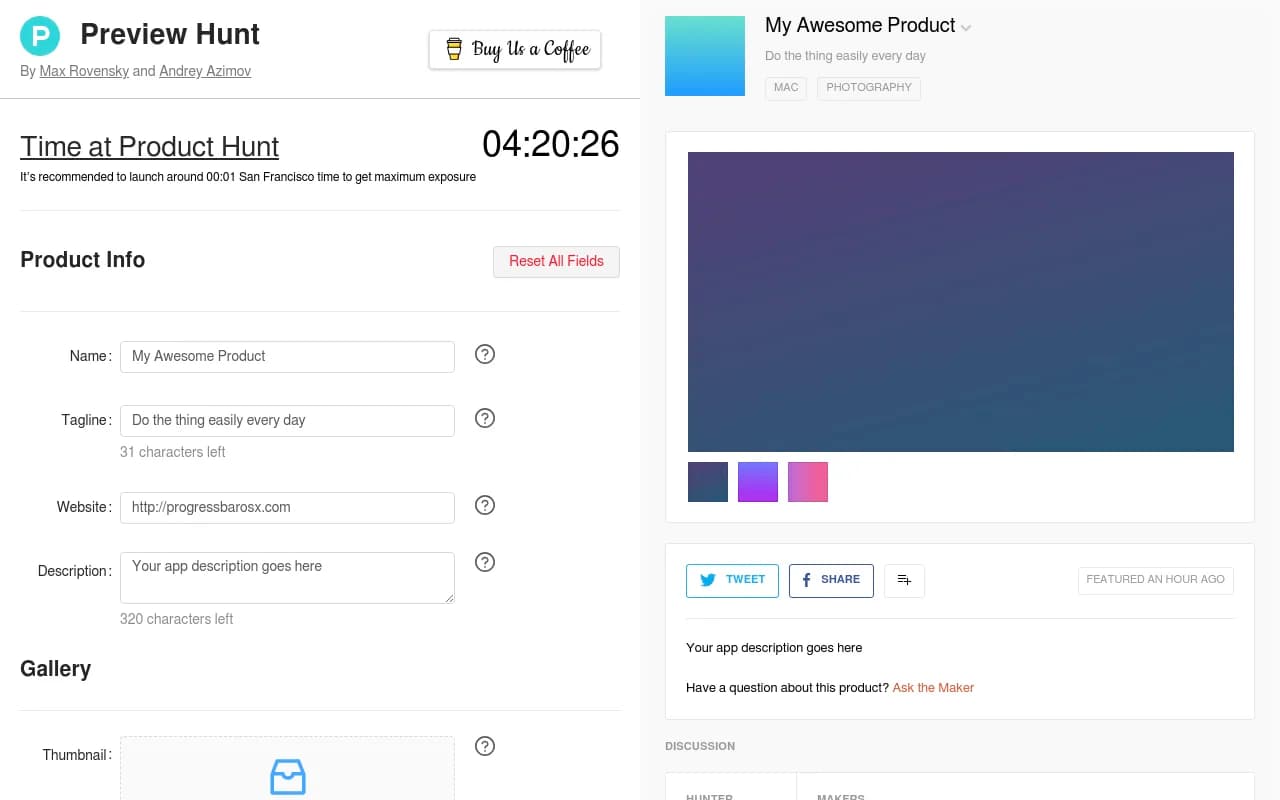
Product Info Testing -- Enter your product name, tagline (with a live character counter showing you have 60 characters max), website URL, and description (320 character limit displayed in real-time). The tool validates everything as you type, so you know immediately if something's too long or formatted incorrectly. This is particularly useful for the tagline, where every character counts and you want maximum impact without getting cut off.
Gallery Upload and Cropping -- Upload your thumbnail, video link, and gallery images directly into the tool. This is where Preview Hunt really shines: it shows you exactly how Product Hunt will crop and display your images. You can drag and drop files, and the tool provides a cropping interface that matches Product Hunt's aspect ratios. No more uploading a beautiful hero image only to discover Product Hunt cropped out the most important part. The thumbnail preview is especially critical since that's what appears in feeds and determines whether people click through.
First Comment Preview -- Product Hunt culture dictates that makers should post a detailed first comment explaining their product, the problem it solves, and what makes it special. Preview Hunt includes a field for drafting this comment and shows you how it will appear on your actual listing. This helps you structure your pitch and ensure it's compelling before launch day.
Launch Kit Generator -- Once you've filled everything out, Preview Hunt generates a downloadable Launch Kit. This is a zip file containing all your images properly cropped to Product Hunt specs, a text file with all your copy (tagline, description, first comment), and a detailed launch guide with best practices. This is incredibly useful if you're coordinating with a team or want to have everything ready to paste in quickly when you launch. The guide includes tips on timing (Product Hunt runs on San Francisco time, and launching around 00:01 PST gives you maximum exposure for the full day), how to rally your community, and what to do in the first few hours after going live.
Preview Page Creation -- The tool can generate a shareable preview page that looks exactly like your Product Hunt listing will look when live. This serves two purposes: you can share it with your team, advisors, or early supporters to get feedback before launch, and you can use it to validate Twitter cards and social sharing previews. When people share your Product Hunt link on Twitter or LinkedIn, the preview page lets you see exactly what the card will look like. This is huge for virality -- a broken or ugly Twitter card can kill your social traction.
Launch Timing Reminder -- At the top of the page, Preview Hunt displays the current time in San Francisco (Product Hunt's timezone) with a reminder that launching around 00:01 SF time maximizes your exposure. This is a small but thoughtful touch that prevents a common mistake: launching at midnight your local time and wondering why you're not getting traction (because it's 3pm in San Francisco and you're buried under other launches).
Who Is It For:
Preview Hunt is built for indie makers, solo founders, and small startup teams preparing to launch on Product Hunt. If you're a first-time launcher, this tool is essential -- it eliminates the anxiety of not knowing how your listing will look and gives you a structured way to prepare everything in advance. Even experienced launchers use it to test variations of taglines and thumbnails before committing.
It's particularly valuable for non-designers who might not have the skills to manually crop images to Product Hunt's exact specs or visualize how their assets will render. The tool does the heavy lifting for you.
Agencies or consultants who manage Product Hunt launches for clients will find the Launch Kit feature useful for organizing deliverables and ensuring nothing gets missed on launch day.
Who should NOT use this: If you're launching a complex product with multiple SKUs or variations, Preview Hunt won't help you decide which version to feature -- it's purely a preview tool, not a strategy or analytics platform. It also doesn't provide any post-launch tracking or performance metrics. For that, you'd need to use Product Hunt's native analytics or a third-party tool.
Integrations & Ecosystem:
Preview Hunt is a standalone web tool with no integrations. You don't need to connect any accounts or APIs -- just visit the site, fill in your info, and generate your preview. This simplicity is intentional: the tool is designed to be used in 5-10 minutes without any setup friction.
The generated preview page is a static HTML page you can share via a unique URL. It's not connected to Product Hunt's API, so it won't auto-update if you change your listing after launch. Think of it as a snapshot or mockup, not a live sync.
The Launch Kit is a downloadable zip file, so you can store it in Google Drive, Notion, or wherever you keep your launch assets.
Pricing & Value:
Preview Hunt is completely free. No freemium tiers, no paywalls, no "upgrade to unlock features." The creators built it as a community tool and monetize indirectly through affiliate links at the bottom of the page (Web3 Jobs, Sheet2Site). This makes it accessible to everyone, from bootstrapped solo founders to well-funded startups.
The value proposition is straightforward: spending 10 minutes in Preview Hunt could be the difference between a launch that flops and one that hits the front page. Given that a successful Product Hunt launch can drive thousands of visitors, hundreds of signups, and significant press coverage, the ROI is essentially infinite for a free tool.
Compared to hiring a designer to mock up your Product Hunt listing ($200-500) or launching blind and hoping for the best (high risk of a botched first impression), Preview Hunt is a no-brainer.
Strengths:
- Pixel-perfect accuracy -- The preview page looks exactly like the real Product Hunt listing, so there are no surprises when you go live
- Launch Kit is a huge time-saver -- Having all your assets pre-cropped and your copy organized in one place reduces launch day stress significantly
- Free and no-signup -- You can use it immediately without creating an account or entering payment info
- San Francisco time reminder -- Small detail that prevents a very common and costly mistake
- Twitter card validation -- Being able to test social sharing previews before launch is underrated but critical for virality
Limitations:
- No A/B testing -- You can't test multiple taglines or thumbnails against each other to see which performs better. You have to rely on your own judgment or feedback from others.
- No post-launch analytics -- Once you launch, Preview Hunt doesn't track how your listing is performing. You're on your own for monitoring upvotes, comments, and traffic.
- No collaboration features -- If you're working with a team, you can't invite collaborators or leave comments within the tool. You have to share the preview page link and coordinate feedback externally.
- Static preview only -- The preview page doesn't simulate interactive elements like upvoting, commenting, or the "Notify Me" button. It's purely a visual mockup.
Bottom Line:
If you're planning a Product Hunt launch, use Preview Hunt. It's free, takes less than 10 minutes, and eliminates the guesswork around how your listing will look. The Launch Kit alone is worth the visit -- having all your assets properly formatted and your copy organized in one place will make launch day significantly less stressful. The tool won't guarantee you hit #1 Product of the Day, but it will ensure you're not sabotaging yourself with a poorly formatted listing or a thumbnail that gets cropped awkwardly. Best use case in one sentence: Solo founders and small teams launching on Product Hunt for the first time who want to maximize their chances of a strong visual first impression without hiring a designer.
Similar and alternative tools to Preview Hunt