TextExpander Review 2026
Productivity tool for creating reusable text snippets and templates with team sharing capabilities for consistent communication workflows.
Key Takeaways:
• Best for teams with repetitive communication: Customer support, healthcare documentation, recruiting outreach, sales follow-ups, and operations teams that type the same messages repeatedly • Works everywhere: Unlike macro tools tied to specific apps, TextExpander works across email clients, CRMs, chat tools, browsers, EMRs, and any text field on Mac, Windows, Chrome, iOS, and Safari • Team collaboration built-in: Share snippet libraries across your organization, ensure everyone uses approved messaging, and update content centrally so the whole team stays in sync • Pricing: Individual $3.33/mo, Business $8.33/mo (up to 9 users), Growth $10.83/mo, Enterprise custom pricing. 30-day free trial, no credit card required • Limitations: Requires a subscription (no one-time purchase option), learning curve for advanced features like fill-in fields and nested snippets, and some users report occasional expansion delays in certain apps
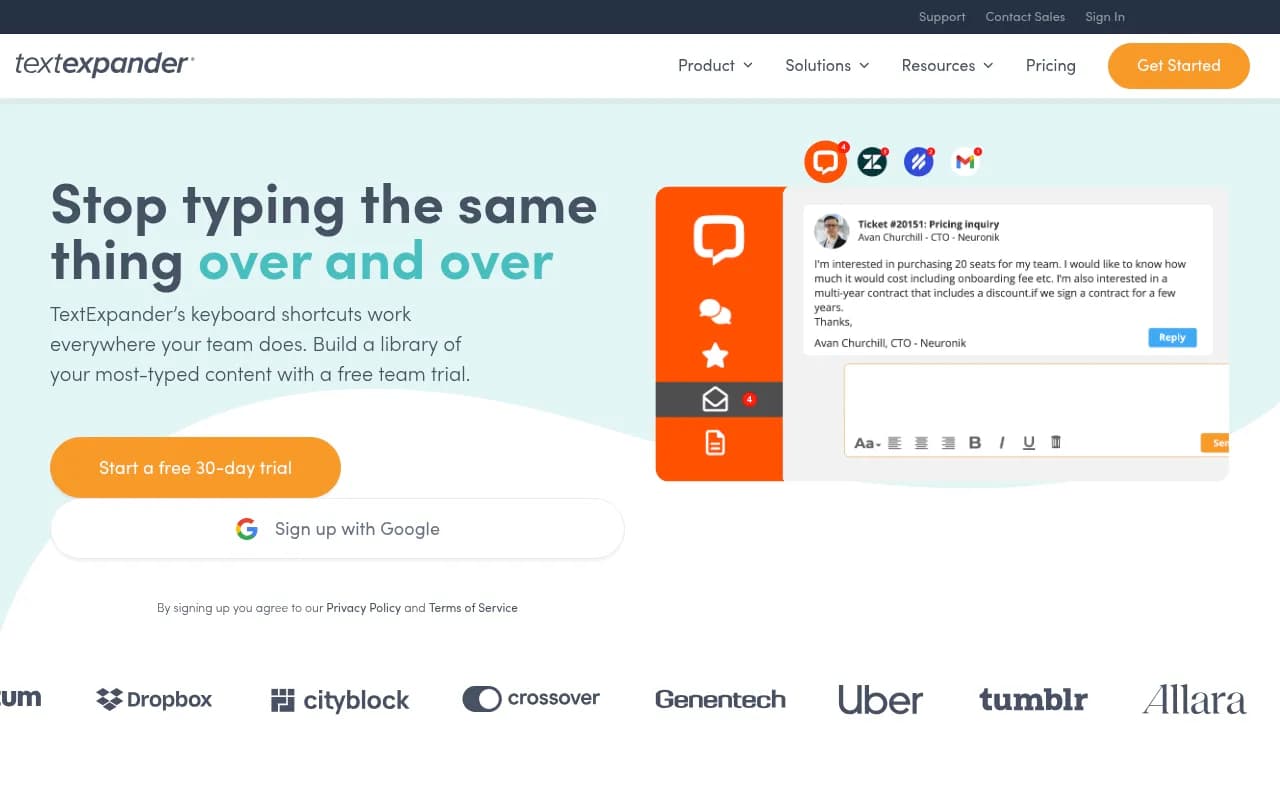
TextExpander is a text expansion and snippet management tool built by Smile Software, a company that's been refining productivity tools since 1997. The core idea is simple but powerful: you type a short abbreviation (called a "shortcut"), and TextExpander instantly replaces it with a full block of text -- an email template, a code snippet, a formatted paragraph, or even a fill-in-the-blank form. What started as a Mac-only utility has evolved into a cross-platform productivity platform used by over 200,000 professionals and teams at companies like Amazon, Shopify, Uber, Ring, and Virta Health.
The target audience is anyone who types the same thing more than twice. Customer support reps answering common questions. Healthcare providers documenting patient visits. Recruiters sending outreach emails. Sales teams following up with prospects. Developers inserting boilerplate code. Operations teams standardizing internal documentation. The tool shines brightest in high-volume communication roles where consistency and speed matter -- think support teams handling 50+ tickets a day or medical scribes documenting 20+ patient encounters.
TextExpander launched in 2006 as a Mac app and has steadily expanded to Windows (2020), Chrome (2021), iOS, and Safari. The company is SOC 2, SOC 3, and HIPAA compliant, making it viable for healthcare and enterprise environments. In 2024, they added AI-powered snippet suggestions and generation capabilities, positioning the tool as more than just a typing accelerator -- it's now a knowledge management layer for teams.
Snippet Creation & Management Creating a snippet takes seconds. You define a shortcut (like ";contact" or "//sig") and the content it should expand into. The content can be plain text, rich text with formatting, images, links, or even multi-line code blocks. You can organize snippets into groups (e.g. "Customer Support", "Sales Outreach", "Medical Templates") and nest groups for complex libraries. The snippet editor supports variables like date/time stamps, clipboard content, cursor positioning, and custom fill-in fields where you're prompted to enter specific details before the snippet expands. For example, a recruiting email snippet might have fill-in fields for candidate name, role, and interview time -- you type the shortcut, fill in the blanks, and the full email appears formatted and ready to send.
Fill-in Fields & Dynamic Content This is where TextExpander separates itself from basic text replacement tools. Fill-in fields let you create interactive templates. Type your shortcut, a popup appears asking for specific information ("Candidate Name:", "Meeting Date:"), you fill it in, and the snippet expands with your custom data inserted in the right places. You can set default values, create dropdown menus for common choices, and even use conditional logic to show/hide sections based on what you select. A support team might have a snippet for escalation emails with a dropdown to choose the department (Sales, Engineering, Billing) and the snippet adjusts the recipient and message accordingly. This turns snippets into mini-apps that adapt to context.
Cross-Platform & Universal Compatibility TextExpander works on Mac, Windows, Chrome (via extension), iOS, and Safari. The key differentiator: it works everywhere you type. Email clients (Gmail, Outlook, Apple Mail), CRMs (Salesforce, HubSpot), chat tools (Slack, Intercom, Zendesk), code editors (VS Code, Sublime), browsers, terminal windows, EMRs, and any text field in any app. This is a huge advantage over app-specific macro tools or built-in text replacement features that only work in certain environments. A customer support rep can use the same snippets in Zendesk, Slack, and email without switching tools or recreating content. A developer can expand code snippets in their IDE, terminal, and documentation tools with the same shortcuts.
Team Sharing & Collaboration The Business and Growth plans unlock team features. You create shared snippet groups that everyone on the team can access. When you update a snippet, it syncs to everyone's device automatically. This ensures the entire team uses the latest approved messaging -- no more outdated templates or inconsistent responses. Admins can control who has edit access to shared groups and who can only use them. You can also keep personal snippet groups private while accessing team libraries. A recruiting team might share a library of outreach templates, interview scheduling snippets, and rejection emails, while each recruiter maintains their own personal snippets for internal notes or follow-ups.
Analytics & Reporting TextExpander tracks how often each snippet is used, how much time it saves, and which team members are using which snippets. The dashboard shows total keystrokes saved, hours saved per user, and snippet usage trends over time. This data is useful for justifying the tool's ROI (Virta Health reported each team member saved 24 days per year), identifying which templates are most valuable, and spotting opportunities to create new snippets for common tasks. The Growth and Enterprise plans include advanced reporting with custom date ranges, CSV exports, and usage breakdowns by group or user.
AI-Powered Features In 2024, TextExpander added AI capabilities. The AI assistant can suggest snippets based on your typing patterns -- it notices when you type the same thing repeatedly and offers to turn it into a snippet. You can also use AI to generate snippet content from a prompt (e.g. "Create a follow-up email for candidates who didn't respond to the first outreach"). The AI writes the template, you review and edit, then save it as a snippet. This lowers the barrier to building a snippet library -- you don't have to write everything from scratch. The AI features are included in all paid plans and run on OpenAI's models, with data handling covered under TextExpander's SOC 2 and HIPAA compliance.
Search & Discovery When you have hundreds of snippets, finding the right one quickly matters. TextExpander includes a search palette (triggered by a keyboard shortcut) that lets you search snippets by name, abbreviation, or content. You can also browse by group or filter by recently used. The search is fuzzy, so you don't need to remember the exact shortcut -- type a few letters and it suggests matches. This is especially useful for new team members learning the snippet library or for infrequent snippets you don't have memorized.
Integrations & Ecosystem TextExpander doesn't have traditional integrations in the API sense -- it works at the OS level, so it integrates with everything by default. That said, it plays particularly well with tools like Salesforce, Zendesk, Intercom, Slack, Microsoft Office, Google Workspace, and EMR systems like Epic and Cerner. There's no API for external developers, but the tool's universal compatibility means you rarely need one. The Chrome extension works in web apps, the desktop apps work in native software, and the mobile apps work in iOS text fields (though mobile support is more limited due to OS restrictions).
Security & Compliance TextExpander is SOC 2 Type II, SOC 3, and HIPAA compliant. Snippets are encrypted in transit and at rest. For enterprise customers, the tool supports single sign-on (SSO) via SAML, SCIM provisioning for user management, and audit logs for compliance tracking. Healthcare organizations use TextExpander for clinical documentation because it meets HIPAA requirements and doesn't store PHI on external servers -- snippets expand locally on the user's device. The company is based in the US and stores data in US-based AWS data centers.
Who Is It For TextExpander is built for professionals and teams with high-volume, repetitive communication. The sweet spot is 5-50 person teams in customer support, healthcare, recruiting, sales, or operations where consistency and speed matter. Specific personas: customer support teams handling 30+ tickets a day and tired of copying templates from a Google Doc; healthcare providers documenting patient visits in EMRs without built-in macros; recruiting coordinators sending 50+ outreach emails a week; sales reps following up with prospects using the same qualification questions; operations teams standardizing internal documentation and onboarding materials. Solo users benefit too -- freelancers, consultants, writers, and developers who type the same emails, code snippets, or formatted text repeatedly.
Team size: works for solo users up to enterprise teams of 500+. The Individual plan is for solo professionals. Business and Growth plans are for teams of 2-50. Enterprise is for larger organizations needing SSO, SCIM, custom contracts, and dedicated support. Industry fit: especially strong in healthcare (clinical documentation), customer support (templated responses), recruiting (outreach and scheduling), and software development (code snippets and terminal commands).
Who should NOT use this: teams that rarely type the same thing twice, organizations with strict data residency requirements outside the US, or users looking for a free tool (TextExpander requires a paid subscription after the trial). If you only need basic text replacement without team sharing or advanced features, your OS's built-in text replacement (Mac System Preferences or Windows AutoHotkey) might be enough.
Pricing & Value Individual: $3.33/month billed annually ($39.96/year). Includes unlimited snippets, fill-in fields, cross-platform sync, and basic analytics. Good for solo users.
Business: $8.33/month per user billed annually ($99.96/year per user). Adds team sharing, shared snippet groups, admin controls, and usage reporting. Up to 9 users, then you need Growth or Enterprise.
Growth: $10.83/month per user billed annually ($129.96/year per user). Adds advanced reporting, priority support, and more granular admin controls.
Enterprise: Custom pricing based on team size and needs. Includes SSO, SCIM, custom contracts, dedicated account management, and advanced security features.
All plans include a 30-day free trial with no credit card required. Monthly billing is available at a higher rate (Individual $4.16/mo, Business $10.41/mo, Growth $13.54/mo).
Value assessment: At $8.33/month per user, TextExpander is cheaper than most productivity tools while delivering measurable time savings. Virta Health reported 24 days saved per employee per year -- even if your team saves just 30 minutes a day, that's 180+ hours per year per person, worth thousands of dollars in labor cost. The ROI is easy to justify for high-volume communication roles. Compared to competitors like PhraseExpress (similar pricing but Windows-focused) or aText (cheaper but Mac-only with no team features), TextExpander offers the best cross-platform support and team collaboration.
Strengths • Universal compatibility: Works in every app, on every platform, without app-specific setup or limitations • Team collaboration: Shared snippet libraries with automatic syncing ensure everyone uses the latest approved content • Advanced templating: Fill-in fields, conditional logic, and dynamic variables turn snippets into interactive templates, not just static text • Proven ROI: Customers report saving 6-24 days per year with measurable time savings and keystroke reduction • Enterprise-ready: SOC 2, SOC 3, HIPAA compliance, SSO, and SCIM make it viable for healthcare and large organizations
Limitations • Subscription-only: No one-time purchase option. If you stop paying, you lose access to your snippets (though you can export them). • Learning curve for advanced features: Fill-in fields, nested snippets, and conditional logic require time to master. Basic snippets are easy, but power users need to invest in learning. • Mobile limitations: iOS and Safari support is functional but less robust than desktop due to OS restrictions. Some apps don't support snippet expansion on mobile. • No offline snippet editing on web: The Chrome extension requires an internet connection to sync snippets. Desktop apps work offline but sync when reconnected. • Occasional expansion delays: Some users report snippets expanding slowly in certain apps (especially web-based tools) or conflicts with other text replacement tools.
Bottom Line TextExpander is the best text expansion tool for teams that need to type the same thing repeatedly while maintaining consistency. If your team sends 50+ templated emails a day, documents patient visits in an EMR, or answers the same support questions over and over, TextExpander will save hours every week and ensure everyone uses the same approved messaging. The cross-platform support, team sharing, and advanced templating features make it worth the subscription cost for high-volume communication roles. Solo users benefit too, but the real value unlocks when you share snippet libraries across a team and measure the collective time savings. Best use case in one sentence: customer support, healthcare, recruiting, or sales teams that need to communicate faster and more consistently without sacrificing personalization.
Tags:
Similar and alternative tools to TextExpander