Kajabi Review 2026
Kajabi is an all-in-one platform for knowledge entrepreneurs to build, sell, and market online courses, coaching programs, memberships, communities, newsletters, and digital downloads — replacing multiple tools with one connected system.
Key takeaways
- Kajabi replaces a stack of tools (course platform + email marketing + landing pages + payments + community) with one connected system
- Best suited for solo experts, coaches, and course creators who want to run a serious digital business without managing multiple subscriptions
- Pricing starts at $69/month (Kickstarter, billed annually) and scales to $149/month+ for the Basic plan with full features
- The all-in-one approach is genuinely convenient but comes at a higher price than piecing together cheaper individual tools
- Lacks the depth of dedicated tools in specific areas (e.g., email marketing compared to ActiveCampaign, community features compared to Circle)
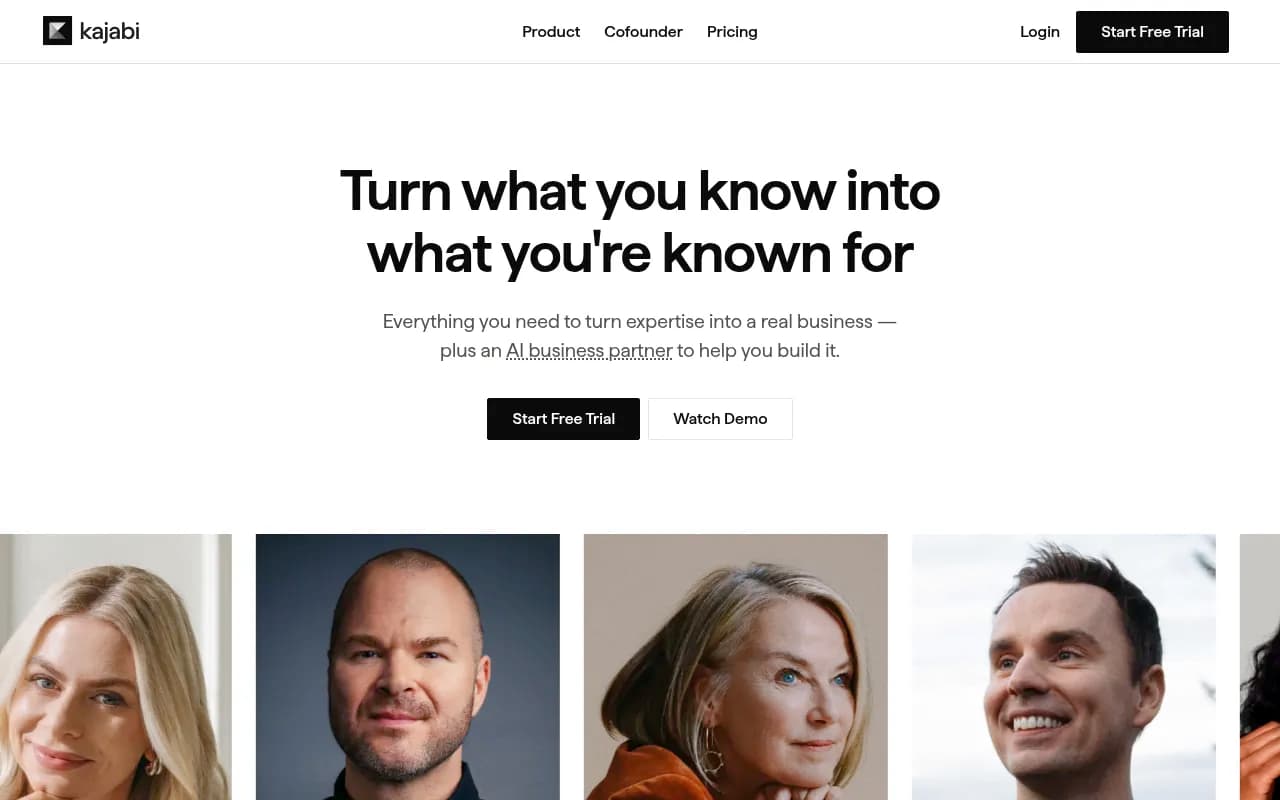
Kajabi has been around since 2010, and for a long time it was the default answer when someone asked "what platform should I use to sell an online course?" That reputation has held up reasonably well, though the product has evolved considerably. Today Kajabi positions itself as "the operating system for human expertise" -- a phrase that sounds like marketing speak but actually captures something real about what the platform tries to do. It's not just a course builder. It handles your website, email list, payment processing, marketing funnels, community, podcast hosting, and more, all under one login.
The company is based in Irvine, California, and has processed over $10 billion in revenue for its creators -- a number that gets cited a lot, and for good reason. That's a meaningful signal that real businesses are being built here, not just hobbyists uploading a few videos. Notable creators like Justin Welsh, Brendon Burchard, and Esther Perel use the platform, which gives it credibility in the coaching and expert-business space specifically.
The target audience is pretty specific: knowledge entrepreneurs. That means coaches, course creators, consultants, nutritionists, fitness trainers, educators, and anyone else whose business is built around selling what they know. If you're a software company or an e-commerce brand, Kajabi isn't for you. But if you're a solopreneur who wants to launch a course and build an email list without hiring a developer or subscribing to five different tools, this is one of the most complete options available.
Key features
Online courses and digital products
The course builder is Kajabi's original core product and still one of its strongest. You can structure content into modules and lessons, upload video (hosted directly on Kajabi), add quizzes, drip content on a schedule, and set completion requirements. The interface is clean and doesn't require any technical knowledge. Beyond courses, the platform supports coaching programs (with session scheduling and client management), memberships, communities, newsletters, downloadable files, and even podcast hosting. Each product type has its own dedicated setup flow, which keeps things organized.
Website and landing page builder
Every Kajabi account includes a full website builder with customizable themes. You can build your homepage, about page, blog, and sales pages all within the platform. The page builder uses a block-based editor that's reasonably flexible without being overwhelming. It's not as powerful as Webflow or even Squarespace for complex design work, but for a coach or course creator who needs a professional-looking site fast, it gets the job done. Landing pages for lead magnets and product launches are built the same way.
Email marketing and automations
Kajabi includes a full email marketing suite: broadcast emails, sequences, and visual automation workflows. You can trigger automations based on purchases, form submissions, course completions, and other events. The automation builder is visual and drag-and-drop, similar in concept to ActiveCampaign but less sophisticated. For most creators, it's more than enough. You can segment your list, tag contacts, and set up multi-step nurture sequences without leaving the platform.
Payments and checkout
Kajabi Payments is the platform's native payment processor, and it's worth paying attention to. Using Kajabi Payments (rather than Stripe or PayPal) gets you lower transaction fees and faster payouts. You can offer one-time payments, subscriptions, payment plans, and free trials. The checkout experience supports order bumps, upsells, and downsells -- the kind of conversion-focused features you'd normally need a dedicated cart tool like ThriveCart or SamCart for. Automated tax calculation is included, which saves a real headache for creators selling internationally.
Community
Kajabi's community feature lets you build a private, gated space for your members or students. You can create channels, post updates, run challenges, and host live events. It's a solid option for creators who want community as part of their offering without paying for a separate tool like Circle or Mighty Networks. That said, Circle's community features are more mature -- things like spaces, member directories, and event management are more developed there. Kajabi's community works well enough for most use cases, but power users may find it limiting.
Branded mobile app
This is a feature that sets Kajabi apart from many competitors. You can give your students and members a fully branded mobile app -- your logo, your colors, your name in the App Store. This is available on higher-tier plans and is a meaningful differentiator for creators who want to deliver a premium experience. Competitors like Teachable and Thinkific don't offer this at the same level.
AI-powered tools
Kajabi has been rolling out AI features across the platform. These include AI-assisted content creation for emails, landing pages, and course outlines, as well as an AI coaching assistant that can handle common student questions. The AI tools are genuinely useful for speeding up content creation, though they're not dramatically different from what you'd get using ChatGPT directly. The value is in the integration -- you don't have to leave the platform to use them.
Analytics and reporting
The analytics dashboard gives you a centralized view of revenue, subscriber growth, product engagement, and funnel performance. You can see which emails are getting opened, which pages are converting, and how students are progressing through your courses. It's not as deep as a dedicated analytics tool, but it covers the metrics that matter most for a knowledge business.
Who is it for
Kajabi is built for solo experts and small teams who are serious about monetizing their knowledge. The sweet spot is someone who has validated their expertise -- maybe they've been coaching clients one-on-one or building an audience on social media -- and now wants to scale by creating digital products. A nutritionist launching a 12-week program, a business coach building a membership community, a fitness trainer selling a self-paced course: these are the people Kajabi was designed for.
It also works well for creators who are currently running their business on a patchwork of tools. Justin Welsh's testimonial on the homepage is a good illustration -- he was using Zapier to connect multiple platforms and kept running into failures. Consolidating onto Kajabi simplified his operations significantly. If you're paying for Teachable + ConvertKit + a landing page builder + a community platform, the math on Kajabi's pricing often starts to look reasonable.
Where Kajabi is less appropriate: if you're just starting out and have no audience yet, the pricing can feel steep before you're generating revenue. There are cheaper ways to test a course idea (Gumroad, Podia, even a simple Stripe payment link). Kajabi makes more sense once you're generating consistent revenue and want to professionalize your setup. It's also not the right fit for large enterprises with complex needs, or for businesses that need deep customization and developer access.
Integrations and ecosystem
Kajabi's integration story is a bit of a double-edged sword. The whole pitch is that you don't need integrations because everything is built in. That's largely true, but there are gaps.
Native integrations include Stripe and PayPal for payments (alongside Kajabi Payments), Google Analytics, Facebook Pixel, Mailchimp (for those who want to keep their email list there), Drip, and ConvertKit. Zapier integration is available, which opens up connections to hundreds of other tools -- though as Justin Welsh noted, Zapier-based workflows can be fragile.
Kajabi has a REST API that developers can use to build custom integrations or pull data into other systems. It's not the most developer-friendly API in the world, but it covers the basics: managing members, products, and purchases programmatically.
There's no official browser extension. The mobile app is for students and members, not for creators managing their business. Creator-side management is done through the web interface.
Import tools let you bring in email lists (CSV), and there are migration guides for moving from platforms like Teachable or Thinkific. Exporting your data -- contacts, revenue reports, course content -- is possible, which matters if you ever want to leave.
Pricing and value
Kajabi's pricing has multiple tiers:
- Kickstarter: $69/month (billed annually) or around $89/month billed monthly. Covers 1 product, 1 website, 50 landing pages, 1,250 active members. Good for testing the platform.
- Basic: $149/month (billed annually) or around $199/month billed monthly. Covers 3 products, 1 website, unlimited landing pages, 10,000 active members, and the full marketing automation suite.
- Growth: Around $199/month (billed annually). Adds more products, more members, affiliate program, and advanced automations.
- Pro: Higher tier for larger operations with more products, members, and team members.
Annual billing saves a meaningful amount -- roughly $431/year on Basic and $600/year on Growth according to Kajabi's own pricing page.
There's a free trial available (typically 14 days), which is enough time to build out a basic product and test the interface.
Compared to competitors: Teachable's paid plans start cheaper but charge transaction fees on lower tiers. Thinkific has a free plan but lacks Kajabi's marketing and community features. Podia is cheaper but less feature-complete. If you're comparing Kajabi to the cost of running Teachable + ConvertKit + a community platform separately, Kajabi often wins on total cost -- and definitely wins on simplicity.
The honest caveat: if you're just starting out and not yet generating revenue, $149/month is a real commitment. The Kickstarter plan at $69/month is a reasonable entry point, but its product limits mean you'll likely need to upgrade as your business grows.
Strengths and limitations
What Kajabi does well:
- True all-in-one integration: Products, payments, email, pages, and community actually talk to each other. A purchase automatically enrolls someone in a course, adds them to a sequence, and grants community access -- no Zapier required.
- Branded mobile app: Few competitors offer this at any price point. For creators who want to deliver a premium, app-based experience, this is a genuine differentiator.
- Kajabi Payments: Lower fees and faster payouts compared to using Stripe through a third-party platform. The built-in upsell and order bump features are solid.
- Reliability and support: 24/7 human support is a real thing here, not just a chatbot. For non-technical creators who need help, this matters a lot.
- Product variety: Courses, coaching, communities, memberships, newsletters, downloads, podcasts -- the breadth of product types means you can build a multi-revenue-stream business without adding tools.
Where it falls short:
- Email marketing depth: Kajabi's email tools are good enough for most creators, but they're not ActiveCampaign or Klaviyo. Advanced segmentation, conditional logic in automations, and deliverability tooling are all more limited.
- Community features: Circle and Mighty Networks have more mature community products. If community is the core of your business (not just an add-on), you might find Kajabi's community module limiting.
- Price for beginners: The entry price is hard to justify before you're generating revenue. There's no free plan, and the Kickstarter tier has real product limits.
- Customization ceiling: The website and page builder covers most needs but hits a ceiling for anyone who wants truly custom design. You can't edit raw HTML/CSS freely the way you can with a dedicated CMS.
Bottom line
Kajabi is the right choice for knowledge entrepreneurs who are past the "testing an idea" stage and ready to run a real business. If you're generating consistent revenue from coaching, courses, or content and you're tired of managing multiple tools, Kajabi's all-in-one approach will genuinely simplify your operations and likely save you money on your total software stack.
The best use case in one sentence: a solo coach or course creator who wants to sell digital products, run email marketing, host a community, and manage payments from a single platform without hiring a developer or managing integrations.
Frequently asked questions
What is Kajabi?
How much does Kajabi cost?
Does Kajabi have a free plan?
What can you sell on Kajabi?
How does Kajabi compare to Teachable or Thinkific?
Does Kajabi have a mobile app?
Similar and alternative tools to Kajabi