Radar Review 2026
Location platform providing geocoding, reverse geocoding, geofencing, and trip tracking APIs. Built for developers adding location features to apps.
Key Takeaways:
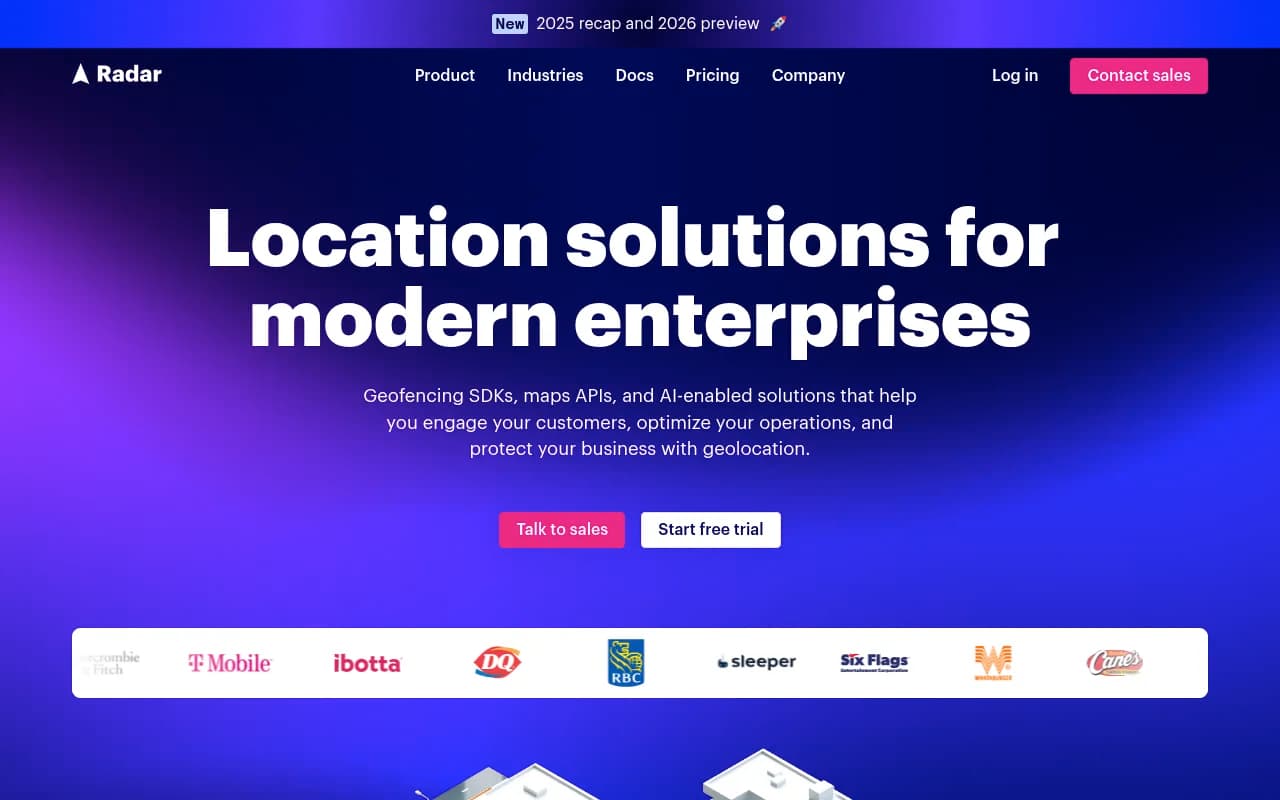
- Enterprise-grade geolocation platform processing billions of API calls daily from hundreds of millions of devices, used by T-Mobile, Dick's, Dairy Queen, Panera, Six Flags, and 17 of the top 30 quick-service restaurants
- Three core solutions: Engage (location-based marketing), Protect (geo-compliance and fraud detection), and Optimize (pickup, delivery, workforce management) -- plus underlying Geofencing and Maps platforms
- Developer-friendly with SDKs for iOS, Android, React Native, Flutter, and web, plus pre-built integrations that enable teams to ship in a single sprint
- Positioned as a cost-effective Google Maps and GeoComply alternative, claiming up to 50% savings by consolidating location infrastructure
- Pricing not publicly listed but marketed as "simple, fair, predictable" with free trial available
Radar is an enterprise geolocation platform that provides the infrastructure layer for location-based features in mobile and web applications. Founded as a developer-first alternative to legacy location platforms, Radar has grown into what it calls the world's first "Location OS" -- a unified system for geofencing, maps, geo-compliance, and location intelligence. The company serves major brands across restaurants (Panera, Dairy Queen), retail (Dick's Sporting Goods), gaming (Bet365), travel, and logistics, processing billions of API calls per day.
The platform is built around three high-level solutions (Engage, Protect, Optimize) that sit on top of two foundational products: a Geofencing Platform and a Maps Platform. This architecture lets companies use Radar for specific use cases (like curbside pickup notifications or geofenced promotions) or as a complete replacement for Google Maps Platform, Foursquare, or GeoComply.
Geofencing Platform: The Core Engine
Radar's geofencing capabilities are the foundation of the entire platform. The system tracks device location in real-time using GPS, WiFi, cell tower triangulation, and beacon signals, then triggers events when users enter or exit defined geographic boundaries. Unlike basic geofencing solutions that rely solely on GPS (which drains battery and is inaccurate indoors), Radar uses a hybrid approach that balances accuracy with battery efficiency.
Key geofencing features include:
- Custom geofence creation: Draw circular or polygon geofences around any location -- stores, venues, competitor locations, delivery zones, compliance boundaries. Geofences can be as small as 100 meters or span entire cities.
- Place geofences: Automatically geofence millions of POIs (points of interest) from Radar's database without manually drawing boundaries. Useful for triggering actions when users visit any Starbucks, any airport, or any gas station nationwide.
- Dwell time detection: Trigger events only after a user has been inside a geofence for a specified duration (e.g. 5 minutes). Filters out false positives from users just driving past.
- Confidence scores: Every geofence event includes a confidence level (low, medium, high) based on signal quality, so you can decide whether to act on uncertain detections.
- Background tracking: Continues monitoring location even when the app is closed or backgrounded, critical for curbside pickup alerts or delivery ETAs.
- Trip tracking: Monitors an entire journey from start to finish, calculating distance traveled, duration, and route taken. Used for mileage reimbursement, delivery tracking, and logistics optimization.
The geofencing engine is designed for massive scale -- Radar claims sub-second latency even during traffic spikes (like a major sporting event or Black Friday), and the system handles hundreds of millions of devices simultaneously.
Maps Platform: The Google Maps Alternative
Radar's Maps Platform is positioned as a cost-effective replacement for Google Maps Platform, offering geocoding, reverse geocoding, address autocomplete, routing, and base maps at a fraction of Google's price. The company explicitly markets this as a way to "save up to 50%" by consolidating maps and geofencing into a single vendor.
Maps capabilities include:
- Geocoding and reverse geocoding: Convert addresses to coordinates and vice versa. Supports international addresses with high accuracy.
- Address autocomplete: Predictive search-as-you-type for address entry, similar to Google Places Autocomplete but cheaper. Returns structured address components (street, city, state, postal code) for easy form population.
- Routing and directions: Calculate driving, walking, or cycling routes between two points. Returns turn-by-turn directions, estimated travel time, and distance. Supports multi-stop routes for delivery optimization.
- Distance matrix: Batch calculate travel times and distances between multiple origins and destinations. Used for service area analysis, delivery zone planning, and store locator "nearest location" features.
- Base maps: Embeddable map tiles for web and mobile apps. Customizable styling (light, dark, satellite) and supports overlays (markers, polygons, heatmaps).
- Places search and details: Search for businesses, landmarks, and POIs by name, category, or location. Returns detailed information including hours, phone numbers, ratings, and photos. Radar's POI database covers millions of locations globally.
The Maps Platform uses OpenStreetMap data as a foundation but augments it with proprietary datasets and machine learning to improve accuracy, especially for new construction and rural areas where OSM coverage is sparse.
Engage: Location-Based Marketing
Radar Engage is a turnkey solution for location-triggered marketing campaigns. It's designed for retail and restaurant brands that want to send push notifications, SMS, or in-app messages when customers are near a store, enter a geofenced area, or visit a competitor location.
Engage features:
- Automated campaigns: Set up rules like "send a 20% off coupon when a user enters a 1-mile radius of any store location" or "notify users when their curbside order is ready based on arrival detection."
- Competitor geofencing: Trigger promotions when users visit competitor locations. For example, a coffee chain could send a discount when someone visits a Starbucks.
- Audience segmentation: Target campaigns based on location history, visit frequency, dwell time, or custom user attributes. Example: only send offers to users who haven't visited in 30+ days.
- Multi-channel delivery: Integrates with push notification providers (OneSignal, Airship, Braze), SMS platforms (Twilio), and email marketing tools (SendGrid, Mailchimp).
- Attribution and analytics: Track campaign performance with metrics like geofence entry rate, conversion rate, and revenue per notification.
Engage is particularly popular with QSR (quick-service restaurant) brands for curbside pickup notifications and loyalty program engagement. Radar claims 17 of the top 30 QSRs use the platform, though specific names beyond Panera and Dairy Queen aren't disclosed.
Protect: Geo-Compliance and Fraud Detection
Radar Protect is built for industries with strict location-based compliance requirements -- primarily online gaming, sports betting, and financial services. It's positioned as a direct alternative to GeoComply, the incumbent in this space, offering similar fraud detection capabilities at a lower price point.
Protect features:
- Real-time location verification: Confirms a user's physical location before allowing access to geo-restricted content or services. Uses multiple signals (GPS, WiFi, IP address, cell tower) to detect spoofing attempts.
- Geofence-based access control: Automatically block or allow access based on whether a user is inside a defined boundary (e.g. only allow sports betting within state lines, block access from airports or military bases).
- Fraud detection: Identifies VPN usage, GPS spoofing, emulators, and other techniques used to fake location. Returns a fraud risk score with each location check.
- Compliance reporting: Generates audit logs and reports for regulatory bodies, showing exactly when and where each user accessed the service.
- Multi-jurisdiction support: Handles complex compliance scenarios like state-by-state sports betting regulations or country-specific content licensing.
Protect is used by gaming companies like Bet365 to ensure users are physically located in jurisdictions where online betting is legal. It's also used by streaming services to enforce content licensing restrictions and by financial institutions to detect account takeover fraud (e.g. a login from an impossible location).
Optimize: Pickup, Delivery, and Workforce Management
Radar Optimize is designed for operations teams managing pickup, delivery, field service, or fleet tracking. It combines real-time location tracking with ETA prediction, route optimization, and workforce visibility.
Optimize features:
- Curbside pickup detection: Automatically detects when a customer arrives at a store for pickup and notifies staff to bring out the order. No need for the customer to manually check in.
- Delivery tracking: Live map showing driver location, estimated arrival time, and delivery status. Customers receive automatic updates as the driver approaches.
- ETA prediction: Machine learning models predict arrival times based on real-time traffic, historical patterns, and driver behavior. More accurate than simple distance-based estimates.
- Route optimization: Calculates the most efficient multi-stop route for deliveries or service calls, minimizing drive time and fuel costs.
- Workforce visibility: Real-time dashboard showing the location of all field employees, useful for dispatching, safety monitoring, and time tracking.
- Proof of delivery: Captures timestamps, photos, and signatures when a delivery is completed, with location verification to prevent fraud.
Optimize competes with last-mile delivery platforms like Onfleet and Bringg, but Radar's advantage is the tight integration with its geofencing and maps infrastructure -- you're not stitching together multiple vendors.
Developer Experience and Integrations
Radar is explicitly built for developers, with SDKs for iOS (Swift/Objective-C), Android (Kotlin/Java), React Native, Flutter, Capacitor, and web (JavaScript). The SDKs handle the complexity of background location tracking, battery optimization, and permission management, so developers don't have to build this from scratch.
The documentation is thorough, with quickstart guides, code samples, and interactive API explorers. Radar also provides pre-built integrations with popular tools:
- Marketing automation: Braze, Airship, OneSignal, Iterable, Customer.io
- Analytics: Segment, Amplitude, Mixpanel, Google Analytics
- CRM: Salesforce, HubSpot
- Data warehouses: Snowflake, BigQuery, Redshift
- Webhooks: Push real-time location events to any HTTP endpoint for custom workflows
Radar's API is RESTful and well-documented, with client libraries in multiple languages. The platform also supports server-side location verification (useful for fraud detection) and batch geocoding for processing large address datasets.
Who Is Radar For?
Radar is designed for mid-market to enterprise companies with mobile apps or web applications that need location features. The ideal customer is a company with an engineering team that can integrate SDKs and APIs, not a small business looking for a no-code solution.
Primary user personas:
- QSR and retail chains with 50+ locations that want to send location-triggered promotions, enable curbside pickup, or track foot traffic to competitor stores. Examples: Panera (curbside pickup), Dairy Queen (loyalty offers), Dick's Sporting Goods (store locator and pickup).
- Gaming and betting operators that need geo-compliance and fraud detection to meet regulatory requirements. Radar Protect is a direct GeoComply alternative for companies like Bet365.
- Delivery and logistics companies managing fleets of drivers or field service technicians. Radar Optimize provides real-time tracking, ETA prediction, and route optimization.
- Travel and hospitality brands that want to enhance on-trip experiences with location-aware features (e.g. airport arrival notifications, hotel check-in reminders, local recommendations).
- Enterprise dev teams currently using Google Maps Platform, Foursquare, or Mapbox who want to consolidate vendors and reduce costs. Radar's pitch is that you can replace multiple location services with a single platform.
Radar is NOT a good fit for:
- Small businesses or solopreneurs without a development team. There's no drag-and-drop interface or Zapier-style automation builder.
- Consumer apps with minimal location needs. If you just need a basic store locator or static map, Radar is overkill (and likely too expensive).
- Companies that need hyper-local indoor positioning (like navigating inside a mall or airport terminal). Radar's geofencing works outdoors and in large buildings, but it's not a Bluetooth beacon or WiFi triangulation system for room-level accuracy.
Pricing and Value
Radar does not publish pricing on its website. The company offers a free trial (sign up at dashboard.radar.com) and requires contacting sales for a quote. Based on third-party sources and competitor comparisons, Radar's pricing is usage-based, likely structured around:
- Monthly active users (MAUs): The number of unique devices tracked per month
- API calls: Geocoding, routing, and places search requests
- Geofence events: The number of entry/exit triggers processed
Radar's marketing emphasizes "up to 50% savings" compared to Google Maps Platform, which suggests pricing is competitive with or below Google's rates. The platform is positioned as a cost-effective alternative for companies spending $10K-$100K+ per year on location services.
The value proposition is consolidation: instead of paying Google for maps, Foursquare for POI data, GeoComply for fraud detection, and Onfleet for delivery tracking, you pay Radar for all of it. This reduces vendor management overhead and often results in volume discounts.
Strengths
- Comprehensive platform: Radar is one of the few vendors offering geofencing, maps, geo-compliance, and delivery tracking in a single product. Most competitors specialize in one area.
- Enterprise-grade reliability: Processes billions of API calls per day with sub-second latency. Used by major brands that can't tolerate downtime.
- Developer-friendly: Excellent documentation, modern SDKs, and pre-built integrations make implementation faster than legacy platforms.
- Cost-effective: Positioned as a cheaper alternative to Google Maps Platform and GeoComply, with transparent pricing (once you talk to sales).
- Proven at scale: 17 of the top 30 QSRs and major brands like T-Mobile and Bet365 are public references, demonstrating the platform works for high-traffic applications.
Limitations
- No public pricing: Requiring a sales call to get a quote is a barrier for smaller companies or developers who want to self-serve.
- Not a no-code solution: You need a development team to integrate Radar. There's no visual campaign builder or drag-and-drop interface for non-technical users.
- Limited indoor positioning: Radar's geofencing works well outdoors and in large buildings, but it's not designed for room-level accuracy inside malls, airports, or office buildings. Companies needing that level of precision should look at Bluetooth beacon or WiFi-based systems.
- Newer player in geo-compliance: While Radar Protect is gaining traction, GeoComply is still the established standard in gaming and betting. Some operators may prefer the incumbent for regulatory reasons.
Bottom Line
Radar is the best choice for mid-market to enterprise companies that need a comprehensive location platform and have the engineering resources to integrate it. It's particularly strong for QSR and retail brands doing curbside pickup or location-based marketing, gaming operators needing geo-compliance, and logistics companies managing deliveries or field service. The platform's biggest advantage is consolidation -- replacing multiple location vendors with a single, cost-effective solution. If you're currently spending $10K+ per year on Google Maps Platform, Foursquare, or GeoComply, Radar is worth evaluating. Best use case in one sentence: Enterprise mobile apps that need geofencing, maps, and geo-compliance without the complexity and cost of stitching together multiple vendors.
Frequently asked questions
What is Radar and what does it do?
How much does Radar cost?
Is Radar free to use?
Who uses Radar?
What platforms and SDKs does Radar support?
How does Radar compare to Google Maps Platform?
What are Radar's main features?
Is Radar suitable for developers?
Similar and alternative tools to Radar