Topview AI Review 2026
AI video generator focused on creating product marketing videos for social platforms, streamlining scripting, creation, and editing into one workflow.
Key Takeaways:
- AI Video Agent approach: Unlike traditional video editors, Topview understands creative intent and autonomously handles scripting, scene generation, editing, and effects through natural language prompts
- Reference video cloning: Upload any video you like and Topview recreates the entire concept—shots, pacing, storytelling—with your product automatically inserted
- 10x faster, 80-90% cheaper: What takes agencies weeks and thousands of dollars now happens in minutes for a fraction of the cost
- Best for: E-commerce sellers, DTC brands, affiliate marketers, and agencies creating product videos, UGC content, and social ads at scale
- Limitations: Currently focused on marketing videos (product showcases, UGC, avatars); not yet built for long-form educational or entertainment content
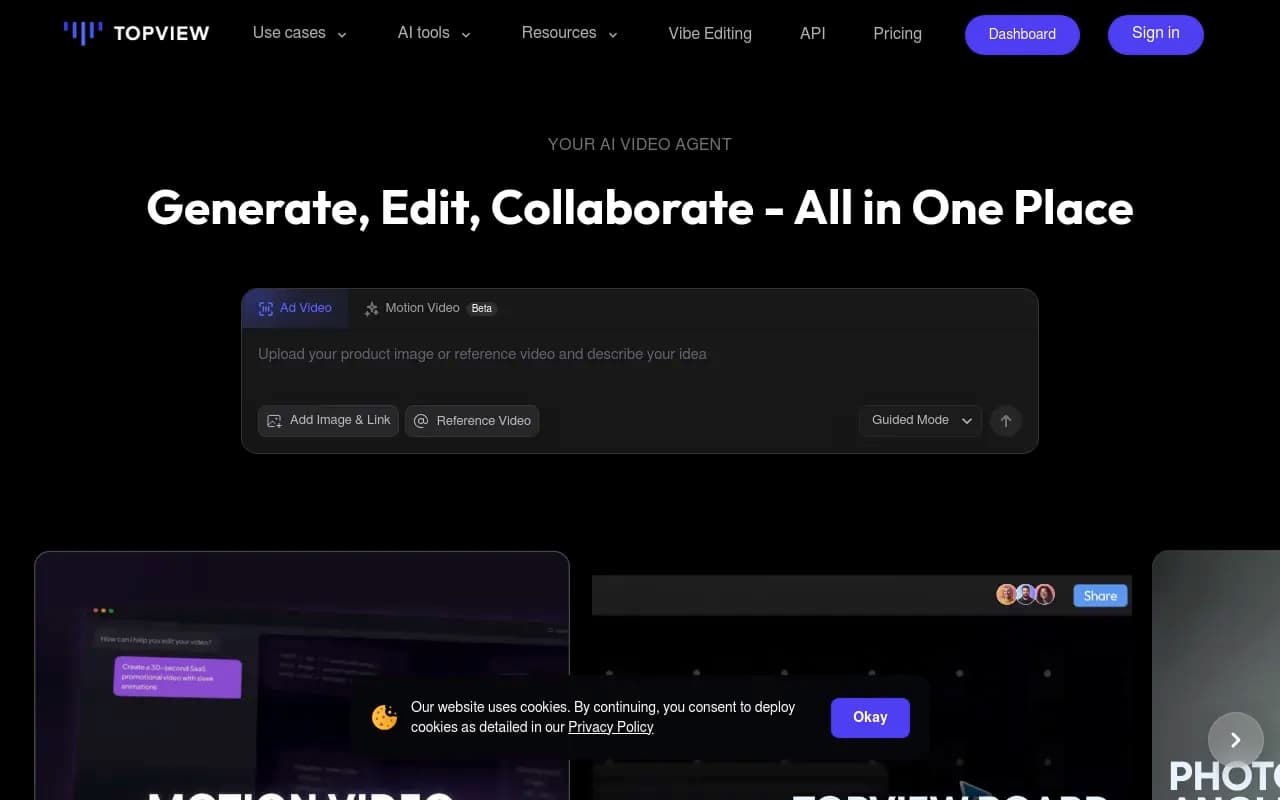
Topview AI positions itself as an "AI Video Agent" rather than just another video generator, and that distinction matters. The platform is built specifically for e-commerce brands, DTC companies, affiliate marketers, and agencies who need to produce high-converting product videos at scale without hiring production teams or learning complex editing software. Instead of manually placing clips, choosing transitions, and tweaking effects, you describe what you want in plain language and the AI handles the rest.
The platform launched as a response to the explosion of short-form video marketing on TikTok, Instagram Reels, and YouTube Shorts. Brands were struggling to keep up with content demand—professional video production was too slow and expensive, while DIY tools still required significant editing skills. Topview's solution: an AI agent that thinks like a creative director and executes like a production team.
Reference Video Cloning (The Standout Feature)
This is where Topview separates itself from competitors. You upload your product images or paste a product URL, then provide any reference video you like—a competitor's ad, a viral TikTok, a YouTube product review. Topview's AI analyzes the reference video's structure: camera angles, shot composition, pacing, transitions, storytelling flow, even the emotional arc. Then it recreates that entire video concept with your product.
This isn't simple template matching. The AI understands why the reference video works—the hook in the first 3 seconds, the product reveal timing, the call-to-action placement—and adapts those principles to your product. If the reference shows a hand holding a skincare bottle with a slow zoom, Topview generates that exact shot with your bottle. If there's a quick-cut montage of product features, the AI recreates that rhythm with your product's features.
The result is a complete, multi-shot video that feels professionally produced, not a single static clip with text overlays. Brands report this feature alone saves them 5-10 hours per video compared to manual editing.
AI Avatar & UGC-Style Content
Topview offers an extensive library of AI avatars across multiple personas: lifestyle/UGC creators, doctors/experts, business professionals, fitness trainers, fashion influencers, even anime characters and pets. You select an avatar, provide a script or talking points, and the AI generates a video of that avatar presenting your product.
The avatars support lip-sync in multiple languages, natural gestures, and realistic facial expressions. For UGC-style content, this means you can create authentic-looking testimonials and product reviews without hiring creators. The Product Avatar tool goes further—it generates an avatar interacting with your product using just one product image. The AI understands product dimensions and generates realistic hand movements, product handling, and demonstrations.
For brands running A/B tests on ad creative, this is massive. Instead of paying 10 different creators $200 each for testimonial videos, you generate 10 variations with different avatars, scripts, and styles in an afternoon.
Motion Video & Visual Effects (Beta)
The platform includes a Motion Video generator that creates any motion video from text prompts. Want a product floating through a surreal landscape? A time-lapse of your product being assembled? A satisfying ASMR unboxing? Describe it and the AI renders it.
Topview also offers pre-built visual effect templates: digital glitch effects, elemental transformations (dissolving into water, bursting into flames), cherry blossom disintegration, money rain, outfit changes, and more. These aren't simple filters—they're complex VFX sequences that would normally require After Effects skills. You apply them to your product videos with one click.
The Motion Control tool lets you copy motion from any reference video and apply it to your character or product. See a viral dance trend? Copy the motion and apply it to your avatar. See a competitor's product demo with smooth camera movements? Clone that motion for your product.
Topview Board (Collaborative Workspace)
Topview Board is the platform's project management hub where you generate, edit, and collaborate on videos. It's designed for teams—multiple users can work on the same project, leave comments, and iterate on video concepts in real-time. The interface is clean and intuitive: drag-and-drop product images, select templates or reference videos, adjust prompts, and preview results instantly.
The Board also includes specialized tools:
- Photo Angle Editor: Change the camera angle of any product image (front view to side view, top-down to 45-degree angle)
- Product Photography: Generate professional product photos with custom backgrounds and lighting
- Face Swap: Swap faces in existing videos or images
- AI Image Edit: Modify product images with text prompts (change colors, add props, adjust lighting)
Guided Mode vs. Instant Mode
Topview offers two creation workflows. Guided Mode is a step-by-step conversation with the AI—it asks about your product, target audience, video style, and desired outcome, then generates a video based on your answers. This is ideal for users new to video marketing who need guidance.
Instant Mode is for experienced users who know exactly what they want. Enter a detailed prompt ("Create a 15-second TikTok ad for a wireless charger, UGC style, female creator in her 20s, kitchen background, emphasize fast charging") and get a video instantly.
Both modes support iterative refinement. If the first result isn't perfect, you provide feedback ("make the hook more dramatic," "change the background to a coffee shop," "add text overlays with product specs") and the AI adjusts.
Who Is It For
Topview is purpose-built for e-commerce and performance marketing, not general video creation. The ideal users are:
- E-commerce sellers (Shopify, Amazon, Etsy) who need product videos for listings, ads, and social media. If you're selling physical products and struggling to create enough video content to test and scale ads, Topview solves that problem.
- DTC brands running paid social campaigns on Meta, TikTok, and YouTube. Brands report 30% higher conversion rates and 5x lower production costs compared to hiring agencies or creators.
- Affiliate marketers who promote products they don't physically own. Topview lets you create product videos from just a URL—no need to order samples or shoot footage.
- Agencies managing multiple clients. One agency reported growing their video production revenue by 80% while cutting labor costs by 50% using Topview.
- Solo founders and small teams (1-5 people) who can't afford a full-time video editor or production team.
Topview is not ideal for:
- Long-form content creators (YouTube videos over 5 minutes, documentaries, tutorials)
- Brands that need highly customized, artistic video work where every frame is art-directed
- Users looking for general-purpose video editing (trimming, color grading, audio mixing)—Topview is AI-first, not a manual editor
Integrations & Ecosystem
Topview is a standalone web app with no native integrations with e-commerce platforms, ad managers, or social media schedulers. You export videos as MP4 files and upload them manually to your platforms. This is a notable gap—competitors like Canva and Veed.io offer direct publishing to social media.
The platform does support bulk export and project organization, so agencies managing multiple clients can keep projects separated and export batches of videos at once.
No API is currently available, so you can't automate video generation programmatically. For high-volume users, this means you're limited to the web interface.
Pricing & Value
Topview uses a credit-based pricing model:
- Free Trial: 10 one-time credits to test the platform
- Pro Plan: $29/month for 80 credits (credits expire monthly)
- Business Plan: $75/month for 250 credits (credits expire monthly)
- Annual plans: Up to 47% discount (pricing not publicly listed, requires contact)
Credit costs vary by feature. A simple AI avatar video might cost 2-5 credits, while a complex multi-shot video with reference cloning could cost 10-15 credits. The pricing page doesn't clearly break down credit costs per feature, which makes it hard to estimate monthly usage.
Compared to hiring a video editor ($50-150/hour) or a production agency ($1,000-10,000 per video), Topview is dramatically cheaper. One case study showed an 80% reduction in video production costs. However, compared to other AI video tools (Synthesia at $22/month, Pictory at $23/month), Topview is positioned as a premium option.
The value proposition is strongest for users who need volume—if you're creating 20-50 product videos per month, the ROI is clear. If you only need 2-3 videos per month, cheaper alternatives might suffice.
Strengths
- Reference video cloning is genuinely innovative—no other tool does this as well
- Speed: 10x faster than manual editing, videos ready in minutes
- No learning curve: Natural language prompts mean anyone can start immediately
- Avatar quality: The AI avatars are realistic and diverse, with good lip-sync and gestures
- Visual effects library: Pre-built VFX that would normally require After Effects expertise
- Scalability: Generate dozens of video variations for A/B testing without additional cost
Limitations
- Narrow focus: Only built for marketing videos—not suitable for educational content, vlogs, or entertainment
- No integrations: Can't publish directly to social media or ad platforms
- Credit pricing opacity: Hard to predict monthly costs without testing
- Limited customization: While you can refine prompts, you can't manually edit individual frames or adjust timing precisely
- No API: High-volume users can't automate video generation
- Export limitations: No mention of resolution options, aspect ratio flexibility, or watermark removal on free tier
Bottom Line
Topview AI is best for e-commerce brands, DTC companies, and agencies that need to produce high-quality product videos at scale without hiring production teams. If you're running paid social ads and need to test 10-20 creative variations per week, Topview will save you thousands of dollars and dozens of hours. The reference video cloning feature alone justifies the price for performance marketers.
However, if you need general-purpose video editing, long-form content, or highly customized artistic work, look elsewhere. Topview is laser-focused on one use case—marketing videos for e-commerce—and it does that exceptionally well.
Tags:
Similar and alternative tools to Topview AI