WhatConverts Review 2026
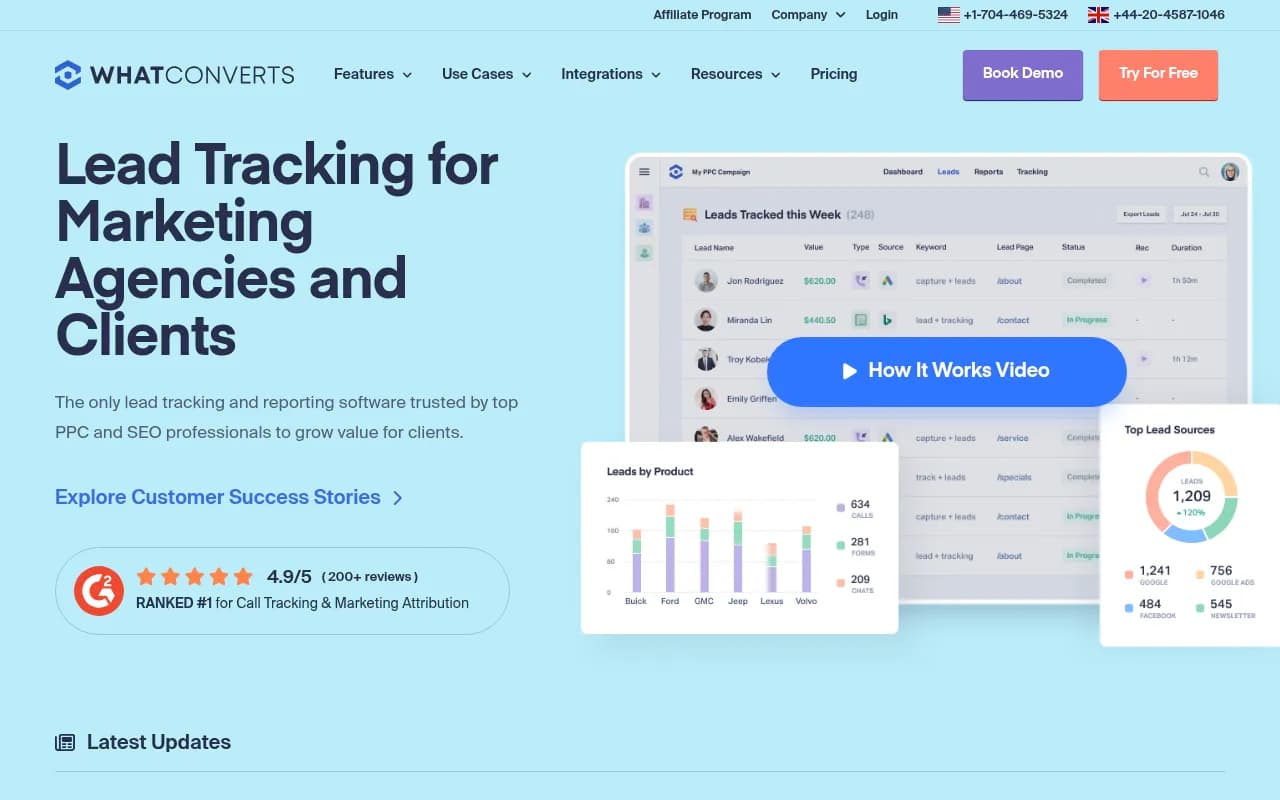
WhatConverts is a comprehensive lead tracking and attribution platform that captures phone calls, form submissions, chats, and eCommerce transactions, connecting each lead to its marketing source. Built for agencies, marketers, and businesses running multi-channel campaigns, it provides call recordi
Key Takeaways:
- All-in-one lead tracking: Captures calls (with recording & transcription), forms, chats, and transactions with full marketing attribution
- Built for agencies: Unlimited client accounts on agency plans, white-label reporting, and client-facing dashboards
- Deep attribution: Tracks leads back to specific campaigns, keywords, ad groups, and landing pages across Google Ads, Bing, Facebook, and more
- Limitations: Pricing can add up quickly with high call volumes; some advanced features locked to higher tiers
- Best for: Digital marketing agencies managing 5-50+ clients, in-house marketing teams tracking multi-channel campaigns, and service businesses (legal, medical, HVAC, real estate) where phone calls drive revenue
WhatConverts is a lead tracking and marketing attribution platform designed to answer one question: which marketing efforts are actually generating leads? Founded as a solution for agencies and marketers who needed more than Google Analytics could provide, it captures every inbound lead -- phone calls, form submissions, live chats, and eCommerce transactions -- and ties each one back to the campaign, keyword, and landing page that drove it. The platform is particularly strong in industries where phone calls matter (legal, medical, home services, automotive, real estate) and for agencies managing multiple clients who need to prove ROI with hard numbers.
WhatConverts is used by over 30,000 marketers and has earned a 4.9/5 rating on G2 (200+ reviews), ranking #1 in the call tracking and marketing attribution category. It's a U.S.-based company with phone support in both the U.S. and U.K.
Call Tracking with Dynamic Number Insertion The core feature is call tracking with dynamic number insertion (DNI). You get instant tracking numbers that WhatConverts automatically swaps onto your website based on the visitor's traffic source. If someone clicks a Google Ad, they see one number; if they arrive via organic search, they see another. Every call is recorded, transcribed, and tagged with full attribution data: campaign name, keyword, ad group, landing page, referrer, device type, location, and more. Call recordings are stored indefinitely and searchable by keyword within transcripts. You can also set up call flows (IVR menus) to route callers to the right department and track which path they took. Text message tracking is included -- inbound SMS to your tracking numbers are captured with the same attribution data as calls.
Form Tracking Across Any Platform WhatConverts tracks form submissions on any website platform (WordPress, Webflow, Squarespace, custom HTML, etc.) without requiring special plugins. You add a single tracking script to your site, then select which forms to monitor from the dashboard. Each form submission is logged with the visitor's full journey: all marketing touchpoints, pages visited, time on site, and conversion path. The platform supports multi-step forms, hidden fields, and conditional logic. You can also integrate with third-party form builders like Formstack, Formsite, Gravity Forms, and Typeform.
Chat and Live Chat Tracking Live chat tracking works with popular tools like Intercom, Drift, Olark, and LiveChat. WhatConverts captures chat transcripts and attributes them to the marketing source that brought the visitor to your site. This is useful for SaaS companies and service businesses that use chat as a primary lead capture method. You can qualify chat leads the same way you qualify calls and forms -- marking them as qualified, unqualified, or spam.
eCommerce and Transaction Tracking For eCommerce sites, WhatConverts tracks completed transactions with product details, order value, and full attribution. This goes beyond Google Analytics by connecting purchases to specific keywords and ad campaigns, even for returning visitors. You can see which PPC keywords are driving actual revenue, not just traffic. Integration with Shopify, WooCommerce, and custom checkout flows is supported.
Multi-Touch Attribution and Customer Journey Mapping On the Elite plan ($160/mo for individual businesses, $1,250/mo for agencies), WhatConverts captures the full customer journey -- every marketing touchpoint a visitor interacts with before converting. This includes first-click, last-click, and multi-touch attribution models. You see all the campaigns, ads, and content a lead engaged with across multiple sessions and devices. The platform tracks pages visited, time on each page, and actions taken (form views, button clicks, video plays). This is critical for businesses with longer sales cycles where leads interact with multiple channels before converting.
Lead Management and Qualification Every lead flows into a unified dashboard where you can search, filter, sort, and qualify. You can tag leads as "qualified," "unqualified," or "spam," assign dollar values, add notes, and export to CSV or push to your CRM. Lead Intelligence (Elite plan) lets you create custom rules to auto-qualify leads based on criteria like call duration, form fields, keyword, or traffic source. For example, you can automatically mark calls under 30 seconds as unqualified, or flag leads from specific zip codes as high-priority. This saves hours of manual review for agencies managing hundreds of leads per month.
Reporting and Dashboards WhatConverts includes pre-built reports for campaigns, keywords, landing pages, traffic sources, and lead types. The Report Builder (Pro plan and above) lets you create custom reports with drag-and-drop widgets, filters, and date ranges. You can schedule reports to send automatically via email (daily, weekly, monthly) to clients or stakeholders. Agency plans include white-label reporting -- remove WhatConverts branding and add your own logo. Reports can be embedded in client dashboards or exported as PDFs. Real-time reporting shows leads as they happen, with live notifications via email, Slack, or webhook.
Integrations with Ad Platforms and CRMs WhatConverts integrates directly with Google Ads, Bing Ads, and Facebook Ads to import campaign and keyword data. It also pushes conversion data back to these platforms so you can optimize for actual leads, not just clicks. CRM integrations include Salesforce, HubSpot, Pipedrive, Zoho, and 1,000+ others via Zapier. You can auto-sync leads to your CRM with custom field mapping, so your sales team sees full attribution data in their workflow. Google Analytics integration connects WhatConverts lead data to GA4 for unified reporting. Other notable integrations: AgencyAnalytics (for agency dashboards), Calendly (track booked appointments as leads), SimpleTexting (SMS campaigns), and Looker Studio (custom data visualization).
API and Developer Tools WhatConverts offers a full REST API for developers who want to build custom integrations or pull lead data into proprietary systems. The API supports lead retrieval, account management, and webhook subscriptions for real-time lead notifications. Documentation is clear and includes code examples in multiple languages. This is useful for enterprises with custom CRMs or agencies building white-label solutions.
Who Is WhatConverts For?
The primary audience is digital marketing agencies managing 5-50+ clients. Agency plans start at $500/mo and include unlimited client accounts, white-label reporting, and bulk lead management. Agencies use WhatConverts to prove ROI to clients by showing exactly which campaigns, keywords, and ads are generating qualified leads. It's especially popular with PPC agencies, SEO agencies, and full-service shops that need granular attribution data.
In-house marketing teams at mid-sized companies (50-500 employees) are another core user group. These teams run multi-channel campaigns (Google Ads, Facebook, SEO, email, direct mail) and need to know which channels are working. WhatConverts is common in industries like legal (law firms tracking consultation calls), medical (plastic surgeons, dentists, doctors tracking appointment requests), home services (HVAC, plumbing, roofing companies tracking service calls), real estate (agents tracking buyer/seller inquiries), automotive (dealerships separating sales calls from service calls), and finance/insurance (tracking quote requests).
Franchises with 10-100+ locations use WhatConverts to track marketing performance across all locations from a single dashboard. Each franchise location gets its own account with dedicated tracking numbers and reports, while the franchisor sees aggregated data.
Small businesses (1-10 employees) can use WhatConverts if they have a significant marketing budget and rely on inbound leads. However, the platform is overkill for businesses that only get a handful of leads per month or don't run paid advertising.
Who should NOT use WhatConverts: Businesses that don't track phone calls (e.g. pure eCommerce with no phone support), companies with very low lead volumes (under 20 leads/month), or teams that only need basic form tracking (Google Analytics or Hotjar would suffice). Also, if you're on a tight budget and only need call tracking, standalone call tracking tools like CallRail or CallTrackingMetrics may be more cost-effective.
Pricing Breakdown
WhatConverts uses a subscription model with usage-based billing. Plans are split into Individual Business and Agency tiers.
Individual Business Plans:
- Call Tracking: $30/mo -- call and SMS tracking only, no form or chat tracking
- Plus: $60/mo -- adds form and chat tracking, campaign/keyword reporting, Google Ads and Bing integration
- Pro: $100/mo -- adds call flows (IVR), custom report builder, scheduled reports, HIPAA compliance
- Elite: $160/mo -- adds multi-touch attribution, customer journey mapping, pages visited, lead intelligence (auto-qualification rules)
All plans include one account (one website/business). Usage charges apply for calls, forms, and chats beyond included limits. For example, the Plus plan includes $10 of usage credit per month; additional leads cost $0.05-$0.10 each depending on type. High call volumes can push monthly costs significantly higher.
Agency Plans:
- Plus: $500/mo -- unlimited client accounts, includes $250-$300 usage credit
- Pro: $800/mo -- unlimited accounts, includes $300-$400 usage credit, white-label reporting
- Elite: $1,250/mo -- unlimited accounts, includes $400+ usage credit, full feature set
Agency plans are designed for managing multiple clients. You can create separate accounts for each client with isolated data and reporting. Usage credit pools across all accounts, so if one client has a slow month, another can use the credit.
Free trial: 14 days, no credit card required. All features are available during the trial.
Compared to competitors: CallRail starts at $45/mo for call tracking but charges per number and per minute. CallTrackingMetrics starts at $49/mo but has more complex pricing. WhatConverts is competitively priced for agencies needing multi-client management, but can get expensive for high-volume call tracking compared to enterprise-focused tools like Invoca.
Strengths
- Unified lead tracking: Captures calls, forms, chats, and transactions in one platform -- no need to stitch together multiple tools
- Deep attribution: Tracks leads back to specific keywords, ad groups, and landing pages, not just traffic sources
- Agency-friendly: Unlimited client accounts, white-label reporting, and bulk management tools make it ideal for agencies
- Call quality: Call recordings, transcriptions, and searchable transcripts are excellent for lead qualification and training
- Customer support: Highly rated for responsive support via phone, email, and live chat
Limitations
- Pricing complexity: Usage-based billing can be confusing, and costs can spike with high call volumes. You need to monitor usage closely to avoid surprise bills.
- Learning curve: The platform has a lot of features, which means a steeper learning curve for new users compared to simpler tools like CallRail.
- Limited international coverage: Tracking numbers are available in the U.S., Canada, U.K., and Australia, but coverage is limited in other countries. If you need numbers in Europe or Asia, you'll need to check availability.
- No built-in CRM: WhatConverts is a tracking and reporting tool, not a CRM. You'll need to integrate with Salesforce, HubSpot, or another CRM to manage leads long-term.
Bottom Line
WhatConverts is the best choice for digital marketing agencies and in-house teams that need to prove ROI with granular attribution data. If you're running multi-channel campaigns and need to know which keywords, ads, and landing pages are generating qualified leads, this platform delivers. The combination of call tracking, form tracking, and multi-touch attribution in one tool is hard to beat. However, if you only need basic call tracking or have low lead volumes, simpler (and cheaper) alternatives like CallRail or Google Analytics may be sufficient. Best use case in one sentence: Agencies managing 10+ clients who need to show exactly which PPC keywords and campaigns are driving qualified phone calls and form submissions.
Similar and alternative tools to WhatConverts