Ruler Analytics Review 2026
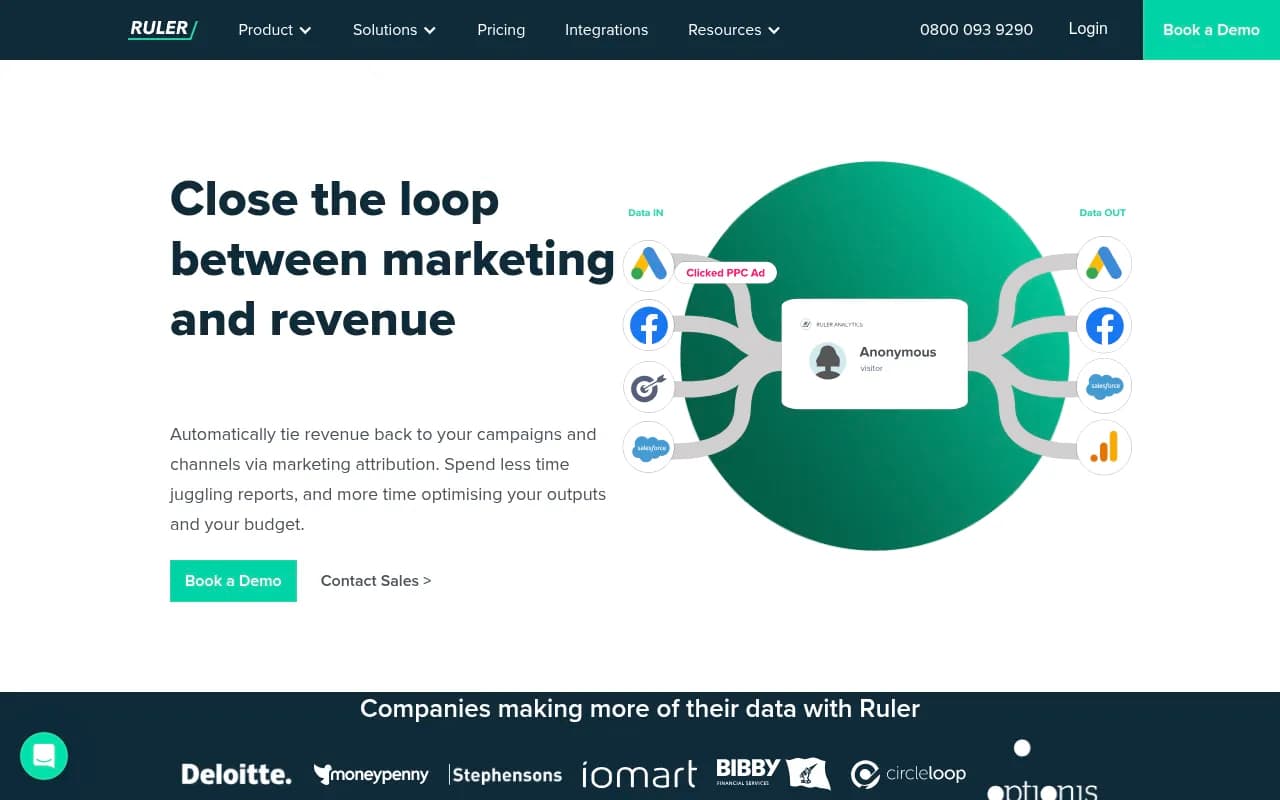
Ruler Analytics is a marketing attribution platform that tracks customer journeys from first click to closed sale. It connects website interactions (forms, calls, live chat) with CRM data to show which campaigns and channels drive real revenue, not just leads. Built for B2B teams running multi-chann
Key Takeaways:
• Ruler Analytics closes the attribution gap by connecting anonymous website visitors to CRM opportunities and closed revenue, showing which marketing touchpoints actually drive sales • Tracks forms, calls, and live chat automatically, then matches those leads to revenue in your CRM (HubSpot, Salesforce, Pipedrive, etc.) • Best for B2B marketing teams with longer sales cycles who need to justify budget and prove which channels contribute to pipeline • Pricing starts at £179/month for 5,000 monthly visits, scaling to £584/month for 50,000 visits • Limitations: UK-focused (phone number is 0800), primarily built for lead-gen businesses rather than ecommerce, and requires CRM integration to unlock full value
Ruler Analytics is a marketing attribution platform built to solve one of the hardest problems in B2B marketing: proving which campaigns actually drive revenue, not just form fills. It's designed for marketing teams running multi-channel campaigns (paid search, social, content, email) who need to connect their spend to closed deals in the CRM. The company is UK-based and serves clients like Deloitte, Moneypenny, and Stephensons -- primarily mid-market B2B companies with complex buyer journeys.
The core problem Ruler solves is the attribution gap. Google Analytics shows you traffic and conversions, your CRM shows you deals, but there's no native way to connect the two. A lead might click a Facebook ad, return via organic search, fill out a form, then close 60 days later. Without Ruler, you'd credit organic search (last click) and miss the Facebook ad's role entirely. Ruler tracks the full journey and attributes revenue back to every touchpoint, so you can see which channels are actually contributing to pipeline.
Lead Tracking Across Channels Ruler automatically tracks three core conversion types: form submissions, phone calls, and live chat sessions. For forms, it captures the visitor's full journey (every page view, referral source, campaign parameter) and passes that data into your CRM when the form is submitted. For calls, Ruler provides dynamic number insertion -- it swaps phone numbers on your website based on the visitor's source, so when someone calls, you know exactly which campaign drove it. For live chat (Intercom, Drift, Olark, LiveChat), Ruler captures the session and ties it to the visitor's marketing source.
This is different from basic call tracking tools (CallRail, CallTrackingMetrics) because Ruler doesn't stop at the lead. It waits for that lead to close in your CRM, then attributes the revenue back to the original touchpoint. Most call tracking tools tell you which campaign made the phone ring, but they can't tell you if that call turned into a £50k deal six months later. Ruler can.
CRM Integration and Revenue Attribution Ruler's real power comes from its CRM integrations. It supports HubSpot, Salesforce, Pipedrive, Zoho, Microsoft Dynamics, and others. When a lead converts (form, call, chat), Ruler creates or updates the contact in your CRM and appends the full marketing journey as custom fields. As that lead moves through your pipeline -- from MQL to SQL to opportunity to closed-won -- Ruler tracks the revenue and attributes it back to the campaigns that influenced the deal.
You can view this data in Ruler's dashboard (leads by source, opportunities by stage, revenue by channel) or push it into Google Analytics, Google Ads, Facebook Ads, and other platforms via server-side tracking. This means you can optimize your ad campaigns based on actual revenue, not just lead volume. If LinkedIn Ads drives 10 leads at £200 CPA but none close, while Google Ads drives 5 leads at £300 CPA but three turn into £100k deals, Ruler shows you that Google Ads is the better investment.
Attribution Models Ruler supports multiple attribution models: first click, last click, linear, time decay, and position-based (U-shaped). You can switch between models in the dashboard to analyze your data from different angles. First click shows which channels start the journey (useful for top-of-funnel budget decisions), last click shows what closes the deal (useful for bottom-of-funnel optimization), and linear gives equal credit to every touchpoint (useful for understanding the full journey).
This flexibility is important because different stakeholders care about different metrics. Your CEO might want to see last-click revenue (what directly closed deals), while your demand gen team wants to see first-click attribution (what's filling the top of the funnel). Ruler lets you build reports for both.
Customer Journey Visualization Ruler's customer journey report shows every step a lead took before converting: which pages they visited, which campaigns they clicked, how many sessions they had, and over what time period. This is especially valuable for B2B companies with long sales cycles (60-180 days), where a single lead might have 10+ touchpoints before closing. You can filter journeys by deal size, industry, or any CRM field to identify patterns -- for example, "leads who visit the pricing page twice are 3x more likely to close" or "deals over £50k always start with organic search."
This level of visibility helps you optimize the buyer journey itself, not just individual campaigns. If you notice that leads who engage with a specific piece of content (a case study, a webinar, a comparison page) close faster, you can promote that content more aggressively.
Integrations and Data Destinations Ruler integrates with 1,000+ apps via Zapier, plus native integrations with Google Analytics (GA4 and Universal Analytics), Google Ads, Facebook Ads, LinkedIn Ads, Microsoft Ads, HubSpot, Salesforce, Pipedrive, Stripe, ChartMogul, Tableau, Looker, Google Data Studio, Power BI, AWS Redshift, and SQL databases. The Google Analytics integration is particularly powerful: Ruler sends revenue data back to GA as custom events, so you can see revenue by source/medium in your standard GA reports. The Google Ads integration sends conversion values back to Google, enabling you to optimize campaigns for ROAS (return on ad spend) instead of just conversions.
For agencies managing multiple clients, Ruler supports multi-account setups where each client gets their own workspace with separate tracking, reporting, and integrations. You can white-label the dashboard and reports with your agency branding.
Opportunity Reporting Ruler's opportunity reporting shows your pipeline broken down by marketing source. You can filter by stage (MQL, SQL, opportunity, closed-won, closed-lost) and see which channels are contributing to each stage. This is critical for understanding lead quality, not just lead volume. If Facebook Ads drives 100 leads but only 2 become opportunities, while organic search drives 20 leads but 10 become opportunities, Ruler shows you that organic search delivers higher-quality leads.
You can also track velocity: how long it takes leads from each source to move through the pipeline. If LinkedIn leads take 90 days to close but Google Ads leads close in 30 days, that affects your cash flow and budget planning.
Who Is Ruler Analytics For? Ruler is built for B2B marketing teams at companies with 20-500 employees, typically in industries like SaaS, professional services, financial services, technology, and agencies. The ideal customer is running multi-channel campaigns (paid search, paid social, content marketing, email) with a sales cycle longer than 30 days and an average deal size over £5,000. If you're spending £10k+/month on marketing and you can't confidently say which channels drive revenue, Ruler is designed for you.
It's particularly strong for companies using HubSpot or Salesforce as their CRM, since those integrations are the most mature. If you're a solo marketer or a very small team (1-2 people), Ruler might be overkill -- you'd be better off with simpler tools like Google Analytics and basic UTM tracking. If you're an enterprise with a dedicated data team, you might outgrow Ruler and need a more customizable solution like Segment + a data warehouse.
Ruler is NOT ideal for ecommerce businesses with short sales cycles (1-2 days) and low average order values (under £100). It's built for lead-gen businesses where the conversion happens offline (phone call, demo, proposal) and the sale closes weeks or months later. If you're running a Shopify store, you'd be better off with native ecommerce attribution tools.
Pricing and Plans Ruler's pricing is based on monthly website traffic. The Small Business plan starts at £179/month for up to 5,000 monthly visits. The Medium Business plan is £584/month for up to 50,000 visits. The Large Business plan (for 50,000+ visits) requires a custom quote. All plans include form tracking, call tracking, live chat tracking, CRM integration, and attribution reporting. There are no per-seat fees -- unlimited users can access the platform.
Ruler doesn't advertise a free trial on the website, but you can book a demo to see the platform in action. Payment is monthly or annual (annual billing typically includes a discount). There are no setup fees, but implementation can take 1-2 weeks depending on how many integrations you need to configure.
Compared to competitors like HockeyStack (starts at $500/month), Dreamdata (starts at €999/month), or Bizible/Marketo Measure (starts at $3,000+/month), Ruler is positioned as a mid-market solution -- more affordable than enterprise platforms but more powerful than basic call tracking tools.
Strengths • Closed-loop attribution: Ruler actually connects leads to revenue, not just traffic to leads. This is the core differentiator vs Google Analytics or basic call tracking tools. • CRM-native reporting: You can view attribution data directly in HubSpot or Salesforce, so sales teams see the marketing source on every contact and deal. • Multi-channel tracking: Forms, calls, and live chat are all tracked automatically with no manual tagging required. • Flexible attribution models: Switch between first-click, last-click, linear, and other models to analyze data from different perspectives. • Strong integrations: Native connections to Google Analytics, Google Ads, Facebook Ads, and major CRMs mean you can push revenue data into the tools you already use.
Limitations • UK-focused: The company is based in the UK, the phone number is 0800 (UK-only), and most case studies are UK companies. International support exists but the product feels UK-centric. • Requires CRM integration: Ruler's value proposition depends on connecting leads to closed revenue in your CRM. If you don't use a CRM or your sales process is offline/manual, Ruler won't work well. • Not built for ecommerce: If you're running an online store with instant purchases, Ruler is overkill. It's designed for lead-gen businesses with longer sales cycles. • Learning curve: Setting up attribution models, configuring integrations, and interpreting multi-touch attribution data takes time. Expect a 2-4 week ramp-up period. • No mobile app: Ruler is web-only. You can't check reports on your phone unless you use a mobile browser.
Bottom Line Ruler Analytics is the right choice for B2B marketing teams who need to prove which campaigns drive revenue, not just leads. If you're spending £10k+/month on marketing, running multi-channel campaigns, and struggling to connect your CRM data to your analytics data, Ruler solves that problem. It's especially strong for companies using HubSpot or Salesforce who want attribution data visible directly in their CRM. The pricing is reasonable for mid-market companies (£179-£584/month), and the platform is mature with strong integrations.
Best use case in one sentence: B2B marketing teams with 30-180 day sales cycles who need to attribute closed revenue back to specific campaigns and optimize budget based on pipeline contribution, not just lead volume.
Tags:
Similar and alternative tools to Ruler Analytics