InVideo Review 2026
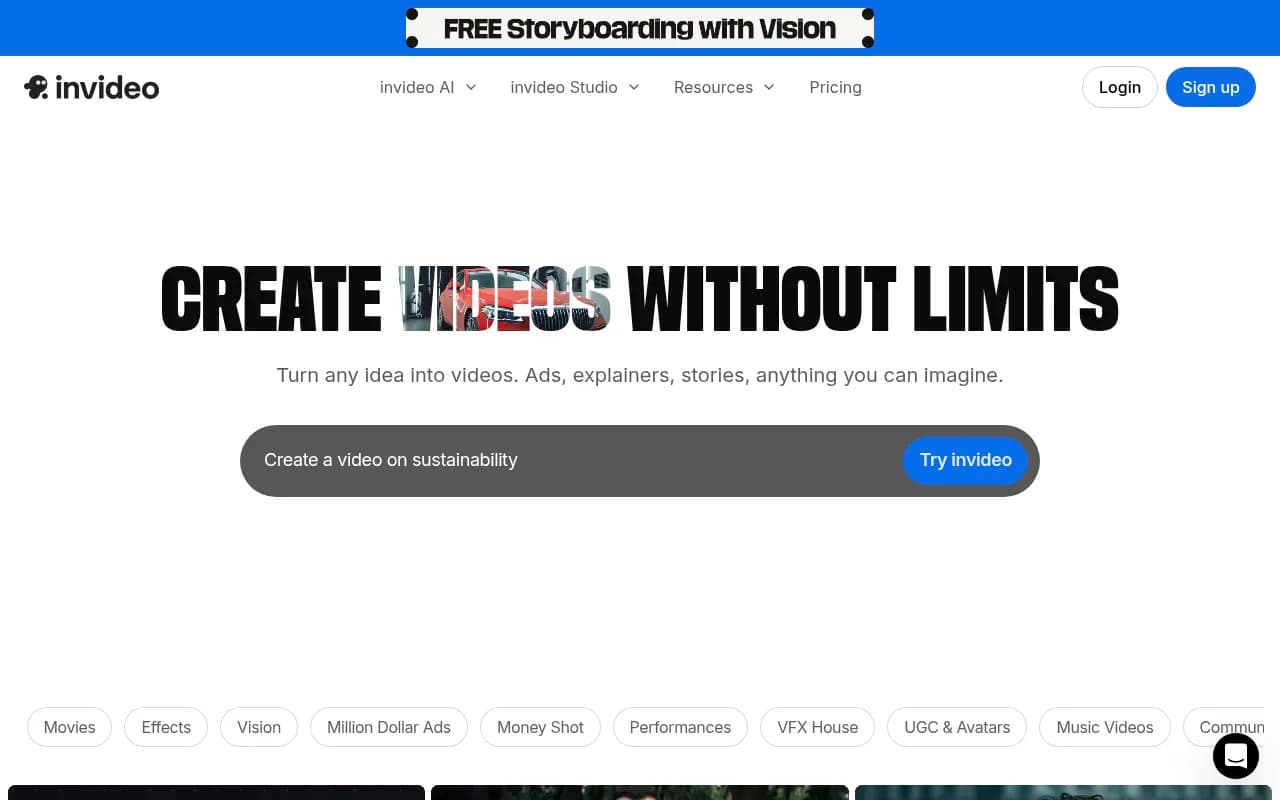
Powerful video editing tool that converts text to video using AI, designed for YouTubers, marketers, and brands creating content for online channels.
Summary
- Best for: Content creators, marketers, and agencies who need to produce high-quality videos quickly without traditional editing expertise
- Standout strength: Natural language editing that lets you modify videos by typing commands like "replace the cat with a snow leopard" or "add Spanish voiceover"
- Key limitation: Free tier is heavily restricted (2 video minutes per week, watermarked exports)
- Pricing: Freemium model starting at $28/month for Plus plan with 10 AI credits
InVideo has evolved from a template-based video editor into a comprehensive AI video creation platform that's making waves in the content creation space. Founded in 2017 and now serving over 10 million users across 190 countries, the platform has positioned itself as a serious alternative to traditional video editing software by letting users create and edit videos through text prompts rather than timeline manipulation.
What sets InVideo apart in the crowded AI video space is its dual approach: it offers both generative AI capabilities (creating videos from scratch via text prompts) and conversational editing (modifying existing videos through natural language commands). This combination makes it accessible to complete beginners while still offering enough depth for professional use cases.
Core Video Creation Capabilities
Text-to-Video Generation: The platform's flagship feature lets you describe a video concept in plain text and generates a complete video with footage, voiceover, music, and captions. You can specify style, tone, duration, and target platform (YouTube, TikTok, Instagram, etc.). The AI sources footage from stock libraries, writes a script, and assembles everything into a coherent narrative. In testing, the quality varies significantly based on prompt specificity -- vague prompts produce generic results, but detailed briefs with specific shot descriptions yield surprisingly professional output.
AI Avatars and UGC Creation: InVideo offers AI-generated presenters (avatars) that can deliver scripted content with realistic lip-sync and natural gestures. The platform includes both Express avatars (faster generation, simpler movements) and premium avatars with more nuanced expressions. This is particularly valuable for creating user-generated content (UGC) style ads without hiring actors. The UGC templates are pre-optimized for e-commerce and direct response advertising, with proven hooks and call-to-action structures.
Conversational Editing Interface: This is where InVideo truly differentiates itself. Instead of dragging clips on a timeline, you edit by typing commands: "Make the video 30 seconds shorter," "Change the background music to something more upbeat," "Add captions in yellow with black outline." The AI interprets your intent and executes the changes. It handles complex requests like "Replace all outdoor scenes with indoor equivalents" or "Translate the voiceover to Spanish while keeping the original pacing." The system isn't perfect -- it sometimes misinterprets ambiguous commands -- but when it works, it's dramatically faster than manual editing.
Template Library and Effects: Beyond AI generation, InVideo maintains a library of 5,000+ pre-built templates across categories like product demos, explainer videos, social media ads, and YouTube intros. The templates are fully customizable and serve as starting points for faster production. The platform also offers preset effects packages ("Drip Flip," "Hero Walk," "VHS," etc.) that apply cinematic transitions and visual treatments with one click.
Advanced Features for Professional Use
VFX House Tools: InVideo has introduced professional-grade post-production capabilities that compete with dedicated VFX software. These include:
- Relight: Change lighting conditions in existing footage (turn day scenes into golden hour or night)
- Inpaint and Cleanup: Remove unwanted objects or people from video frames
- AI Colorist: Apply professional color grading with natural language descriptions ("make it look like a Wes Anderson film")
- Prop Swap: Replace objects in scenes (swap a coffee cup with a wine glass)
- Key Lab: Advanced green screen keying with automatic edge refinement
- Virtual Production: Composite subjects into AI-generated backgrounds
These tools are genuinely impressive and would typically require Adobe After Effects or similar software. The AI handles the heavy lifting of masking, tracking, and blending.
Vision and Shot Control: For users who want more directorial control, InVideo offers "Vision" features that let you specify exact camera angles, shot compositions, and visual styles. You can create storyboards with specific shot lists ("wide establishing shot, medium close-up, over-the-shoulder") and the AI generates footage matching those specifications. The "Extract Shot" feature analyzes existing videos and recreates specific shots with different subjects or settings.
Multi-Language and Localization: The platform supports video creation and voiceover in 50+ languages. You can generate a video in English and then create localized versions in Spanish, French, Mandarin, etc., with matching voiceovers and translated captions. The lip-sync technology attempts to match avatar mouth movements to different languages, though results are more convincing in some language pairs than others.
Who Should Use InVideo
InVideo is ideal for several specific user groups:
YouTube Creators and Faceless Channels: If you're running educational channels, top-10 lists, or documentary-style content without appearing on camera, InVideo can produce your entire video pipeline. Creators report going from concept to published video in under an hour. The platform is particularly strong for channels in niches like finance, history, technology explainers, and travel content where stock footage and voiceover narration are the primary elements.
E-commerce Brands and DTC Companies: The UGC ad templates and product showcase features are built specifically for online retailers. You can create TikTok-style product demos, Instagram Reels, and Facebook ads without hiring UGC creators or video agencies. Brands selling on Shopify, Amazon, or their own stores use InVideo to maintain a constant flow of fresh ad creative for testing.
Marketing Agencies Managing Multiple Clients: Agencies appreciate the speed and the ability to produce client videos without dedicated video editors on staff. The Team plan ($899/month) includes 1,000 AI credits shared across team members, collaboration features, and white-label export options. Agencies serving local businesses (restaurants, real estate, service providers) find InVideo particularly valuable for creating social media content at scale.
Corporate Communications and Internal Training: Companies use InVideo for employee onboarding videos, product training, and internal announcements. The AI avatars eliminate the need for executives to record themselves, and the multi-language support helps global organizations create localized versions efficiently.
Who Should Look Elsewhere: If you're creating highly stylized, brand-specific content that requires precise control over every frame, InVideo's AI-generated approach may feel too automated. Professional video editors working on commercials, music videos, or narrative films will find the platform limiting. Similarly, if you need advanced motion graphics, 3D animation, or complex compositing beyond what the VFX tools offer, dedicated software like After Effects or DaVinci Resolve is more appropriate.
Integrations and Workflow
InVideo integrates with major stock footage providers (Storyblocks, Pixabay, Pexels) and pulls from these libraries during video generation. The platform offers direct publishing to YouTube, Facebook, Instagram, and TikTok, though many users prefer to download and upload manually for better control over metadata and scheduling.
The API is available for Enterprise customers, allowing integration with content management systems, marketing automation platforms, and custom workflows. Browser extensions are not currently offered, and mobile apps are limited to viewing and basic editing -- the full creation experience requires desktop access.
Export options include 1080p and 4K resolution (4K requires paid plans), with various aspect ratios (16:9, 9:16, 1:1, 4:5) optimized for different platforms. Videos export with or without watermarks depending on your plan.
Pricing Breakdown and Value Analysis
InVideo operates on a credit-based system where each AI generation or major edit consumes credits:
Free Plan: 2 video minutes per week, 1 AI credit per week, 4 exports per week with InVideo watermark. No access to generative features. This is essentially a trial tier -- not viable for regular production.
Plus Plan ($28/month or $336/year): 10 AI credits per month, 50 video minutes, unlimited exports without watermark, access to all templates and stock footage, 1 Express avatar. Good for individual creators producing 2-4 videos per week.
Max Plan ($50/month): 40 AI credits, 200 video minutes, priority generation queue, 5 Express avatars, advanced VFX tools. Suitable for professional creators or small agencies.
Generative Plan ($100/month): 100 AI credits, 500 video minutes, all premium avatars, API access, priority support. For power users and content studios.
Team Plan ($899/month): 1,000 shared credits, unlimited team members, collaboration features, white-label options, dedicated account manager. Enterprise-focused.
Compared to competitors like Synthesia ($29/month for basic AI avatars but limited editing), Pictory ($23/month for text-to-video but no avatars), or Descript ($24/month for editing but weaker AI generation), InVideo sits in the middle on pricing but offers the broadest feature set. The credit system can be confusing -- complex videos with multiple revisions consume credits quickly, and you may hit limits faster than expected.
The value proposition is strongest if you're replacing either: (1) hiring freelance video editors at $50-150 per video, or (2) spending 3-5 hours per video doing manual editing yourself. At that point, even the Max plan pays for itself with 2-3 videos per month.
Strengths
- Natural language editing genuinely works and saves massive amounts of time compared to timeline-based editing
- Comprehensive feature set covering everything from basic templates to advanced VFX in one platform
- Multi-language support with decent voiceover quality across 50+ languages
- Regular feature updates -- the platform has added significant capabilities (VFX tools, advanced avatars) in the past year
- Large template library with proven structures for different content types and platforms
Limitations
- Credit system can be confusing and restrictive -- you may run out faster than expected on lower tiers
- AI generation quality is inconsistent -- sometimes produces excellent results, other times generic or off-target output
- Limited brand customization -- while you can add logos and colors, creating truly unique branded content requires manual editing
- Avatar realism varies significantly -- premium avatars are convincing, but Express avatars have noticeable artificial qualities
- Learning curve for advanced features -- the VFX tools require understanding of concepts like keying, masking, and compositing
Bottom Line
InVideo is best for content creators, marketers, and agencies who need to produce video content consistently and quickly without deep video editing expertise. If you're creating YouTube videos, social media ads, product demos, or educational content where speed and volume matter more than frame-perfect artistic control, InVideo delivers exceptional value. The natural language editing interface is genuinely innovative and makes video creation accessible to non-editors.
However, if you're working on high-budget commercials, narrative films, or content where brand identity requires precise visual control, you'll find the AI-generated approach too automated. The platform works best when you embrace its AI-first workflow rather than trying to force it into traditional editing patterns.
For the target audience of digital marketers, YouTube creators, and small agencies, InVideo represents one of the most complete AI video solutions available in 2026. The Plus plan at $28/month is the sweet spot for individual creators, while agencies should evaluate the Team plan based on monthly video volume.
Tags:
Similar and alternative tools to InVideo