LivePlan Review 2026
Business planning software with AI capabilities to help startups create comprehensive business plans, financial projections, and pitch decks.
Key Takeaways:
- AI-trained specifically for business planning -- not generic ChatGPT, but trained on thousands of successful plans and 30+ years of planning expertise
- Automatic financial generation -- answer simple questions and get complete P&L, cash flow, and balance sheet without spreadsheet formulas
- Proven results -- companies using LivePlan grow 30% faster than those that don't plan, backed by research across 1M+ users
- All-in-one platform -- starts as a planning tool, evolves into performance tracking with QuickBooks/Xero integration and real-time dashboards
- Limitations: Premium features require annual commitment, AI assistant may need refinement for highly specialized industries, no mobile app for full planning experience
LivePlan has been helping entrepreneurs build fundable business plans since the early days of cloud-based business software. Owned by Palo Alto Software (founded in 1988), the platform has processed over 1 million business plans and evolved from a simple planning tool into a comprehensive business management platform. The company's research shows that businesses using LivePlan grow 30% faster than those operating without a formal plan -- a statistic they've validated across their massive user base.
The platform targets three distinct user groups: aspiring entrepreneurs organizing initial business ideas, startups actively seeking funding from banks or investors, and established businesses that need ongoing financial tracking and performance management. Unlike generic business planning templates or complex enterprise software, LivePlan occupies the sweet spot for small businesses and startups that need professional-grade output without hiring a CFO.
LivePlan Assistant (AI Planning Coach)
LivePlan's AI isn't just ChatGPT with a business planning prompt. The LivePlan Assistant is trained on thousands of successful business plans, SBA loan requirements, and investor expectations accumulated over 30+ years. When you're writing your market analysis or financial assumptions, the AI asks probing questions that force you to think through details you might miss: "How did you calculate your customer acquisition cost?" or "What happens to cash flow if sales are 20% lower in Q1?"
The AI spots potential red flags that would concern investors -- unrealistic growth projections, missing expense categories, weak competitive analysis. It doesn't write your plan for you (investors can spot AI-generated generic content), but it guides you through the thinking process like an experienced business advisor sitting next to you. The assistant integrates throughout the platform, offering contextual help whether you're building financials, writing your executive summary, or analyzing industry data.
Automatic Financial Statement Generation
This is where LivePlan truly shines for non-financial founders. Instead of wrestling with Excel formulas and accounting principles, you answer straightforward questions in plain English: How many units will you sell monthly? What's your average sale price? When do customers typically pay? LivePlan converts these inputs into the three core financial statements that banks and investors require: profit & loss statement, cash flow projection, and balance sheet.
The financial builder uses a visual, drag-and-drop interface. You can model different scenarios -- what if you hire that salesperson in month 6 instead of month 3? What if material costs increase 15%? The platform recalculates everything instantly, showing how changes ripple through your entire financial model. It handles complex accounting concepts like depreciation, amortization, and accrual vs. cash accounting automatically.
For product businesses, you can build detailed unit economics with cost of goods sold, inventory management, and production schedules. Service businesses can model billable hours, utilization rates, and project-based revenue. The system supports multiple revenue streams, seasonal variations, and growth curves that actually reflect how businesses scale (not just straight-line projections that scream "I've never run a business").
SBA-Approved Business Plan Builder
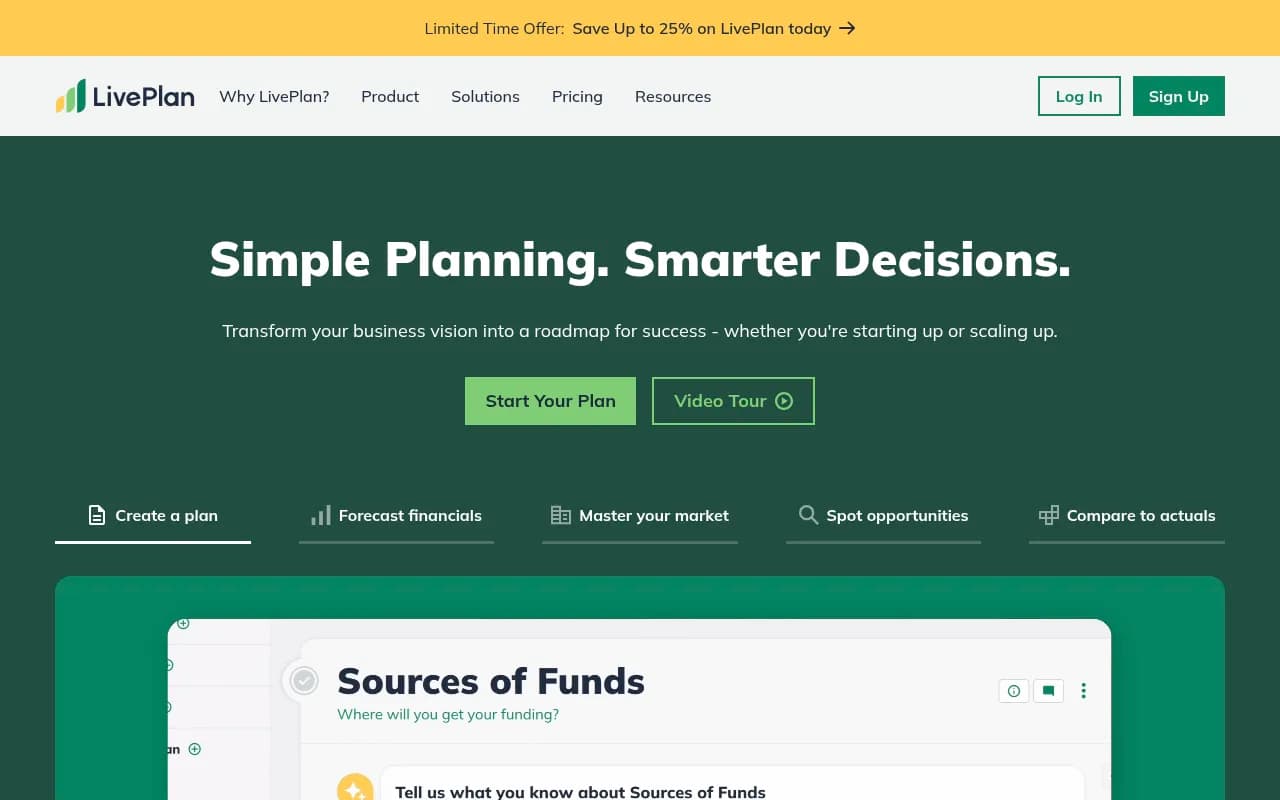
LivePlan's guided planning process walks you through every section of a complete business plan using a fill-in-the-blank approach. The platform provides section-by-section instructions, example text from real businesses in your industry, and prompts that ensure you cover everything lenders and investors expect to see.
Sections include: Executive Summary, Company Description, Market Analysis, Organization & Management, Products & Services, Marketing & Sales Strategy, Funding Requirements, and Financial Projections. Each section has contextual help explaining what to write, why it matters, and how much detail is appropriate. The platform enforces SBA formatting standards automatically, so your final document meets requirements for SBA loans without manual formatting.
Once your plan is complete, LivePlan generates multiple output formats with one click: full business plan PDF, executive summary, pitch deck presentation, and bank loan package. The pitch deck feature is particularly valuable -- it automatically pulls key metrics, charts, and highlights from your full plan into a visual presentation format suitable for investor meetings. You can customize the design, but the heavy lifting of translating a 30-page document into a compelling 10-slide deck is done for you.
Cash Flow Forecasting & Scenario Planning
LivePlan's cash flow forecasting shows your projected cash position month-by-month, highlighting potential shortfalls before they become emergencies. The visual dashboard displays cash on hand, cash in, cash out, and runway (how many months until you run out of money at current burn rate). This is critical for startups -- profitability and cash flow are different things, and many profitable businesses fail because they run out of cash.
You can model different scenarios: best case, worst case, and most likely case. What if that big client pays 60 days late instead of 30? What if you need to offer payment terms to close enterprise deals? The scenario planning helps you stress-test your assumptions and build contingency plans. For seasonal businesses (retail, tourism, agriculture), you can model the cash flow rollercoaster and plan financing needs accordingly.
Industry Benchmarks & Example Plans
LivePlan provides access to 550+ sample business plans from real companies across virtually every industry: restaurants, SaaS startups, retail stores, consulting firms, manufacturing, healthcare, and more. These aren't generic templates -- they're actual plans that secured funding, with real numbers and strategies you can learn from.
The industry data feature (powered by Palo Alto Software's research partnerships) provides benchmark metrics for your specific industry and business model: typical gross margins, operating expense ratios, growth rates, and key performance indicators. When you're building your financial projections, you can compare your assumptions against industry averages to ensure they're realistic. If you're projecting 80% gross margins in an industry where the average is 40%, you better have a compelling explanation for investors.
This benchmarking is invaluable for first-time entrepreneurs who don't know what "normal" looks like in their industry. It also helps when investors challenge your assumptions -- you can point to industry data showing your projections are conservative compared to comparable businesses.
QuickBooks & Xero Integration (Performance Tracking)
Once your business is operational, LivePlan transforms from a planning tool into a performance management dashboard. Connect your QuickBooks Online or Xero account, and LivePlan automatically imports actual financial data and compares it against your forecast. The dashboard shows variance analysis: where you're ahead of plan, where you're behind, and which metrics need attention.
The monthly review feature generates automated reports highlighting key insights: "Revenue is 15% above forecast, but customer acquisition cost increased 25%" or "Cash flow is tighter than projected due to slower collections." These insights help you course-correct quickly rather than discovering problems months later when reviewing annual financials.
For businesses with investors or boards, LivePlan generates professional investor update reports with one click. Instead of manually compiling metrics in PowerPoint every quarter, the platform pulls actual vs. forecast data, key milestones, and commentary into a formatted report. This saves hours and ensures consistent, professional communication with stakeholders.
Collaboration & Team Features
LivePlan supports multi-user collaboration, essential when you're building a plan with co-founders, advisors, or your accountant. You can assign different permission levels: some users can edit everything, others can only view or comment on specific sections. The activity feed shows who changed what and when, preventing the version control nightmare of emailing Word documents back and forth.
The commenting system lets advisors leave feedback directly in the plan: "This market size calculation seems high -- what's your source?" or "Consider adding a sensitivity analysis for this assumption." This keeps all feedback in context rather than scattered across emails and meetings.
Who Is LivePlan For?
LivePlan is purpose-built for three specific user groups, each with different needs:
Aspiring Entrepreneurs & Idea Stage: People with a business concept who need to organize their thinking and validate whether the idea is financially viable. Maybe you're a corporate employee planning to launch a side business, or you've been dreaming about opening a coffee shop for years. LivePlan helps you work through the details -- market research, competitive analysis, financial modeling -- to determine if the opportunity is real before you quit your job or invest savings. The platform's guidance and examples are particularly valuable when you've never written a business plan before.
Startups Seeking Funding: Founders actively raising money from banks, SBA lenders, angel investors, or VCs. You need a professional business plan and financial projections that meet institutional standards. LivePlan ensures your plan covers everything lenders require (SBA-approved format), your financials are complete and error-free (automatic generation), and your pitch deck is visually compelling (one-click creation). The industry benchmarks help you defend your assumptions when investors push back. This is LivePlan's core strength -- over 1 million entrepreneurs have used it to secure funding.
Established Businesses (1-50 employees): Operating companies that need ongoing financial planning and performance tracking. You're past the startup phase but don't have a full-time CFO or finance team. LivePlan's QuickBooks/Xero integration and dashboard features let you track actual vs. forecast, spot trends, and make data-driven decisions. The monthly review reports keep your team aligned on goals and progress. Many accounting firms and business advisors use LivePlan with their small business clients for this ongoing planning and tracking.
Who Should NOT Use LivePlan: Large enterprises with complex corporate structures, multiple subsidiaries, or sophisticated financial reporting needs should use enterprise FP&A software like Adaptive Insights or Anaplan. Businesses that only need basic bookkeeping (no planning or forecasting) are better served by QuickBooks or Xero alone. Highly technical startups in deep tech or biotech may find the industry examples and benchmarks less relevant, though the core planning framework still works.
Integrations & Ecosystem
LivePlan integrates directly with QuickBooks Online and Xero, the two dominant small business accounting platforms. The integration is read-only (LivePlan pulls data but doesn't write back to your accounting system), which is appropriate -- you don't want planning software messing with your books. The sync runs automatically, updating your LivePlan dashboard with the latest actuals.
Beyond accounting integration, LivePlan is a standalone platform. There's no Zapier integration, API access, or connections to CRM or project management tools. This is intentional -- LivePlan focuses on doing business planning and financial forecasting exceptionally well rather than trying to be an all-in-one business operating system. For most small businesses, the QuickBooks/Xero integration provides the essential data connection needed.
LivePlan is web-based (works in any browser on Mac, Windows, or Chromebook). There's no native mobile app for creating plans, though you can view your dashboard and reports on mobile. The planning experience requires a full keyboard and screen -- you're not going to write a business plan on your phone.
Pricing & Value
LivePlan offers two main tiers with monthly and annual billing options:
Standard Plan: $20/month (billed monthly) or $15/month (billed annually at $180/year). Includes full business plan builder, financial forecasting, pitch deck creation, sample plans, and industry benchmarks. This tier is designed for planning -- creating your initial business plan and financial projections. It does NOT include the performance tracking features (QuickBooks/Xero integration, dashboards, variance analysis).
Premium Plan: $40/month (billed monthly) or $30/month (billed annually at $360/year). Includes everything in Standard plus QuickBooks/Xero integration, performance dashboards, automated variance analysis, and monthly review reports. This tier is for established businesses that want ongoing financial management, not just one-time planning.
All plans include unlimited plans (you can create multiple business plans under one account), unlimited users/collaborators, and a 35-day money-back guarantee. The company frequently runs promotions offering 25-50% discounts for new customers, particularly targeting specific user segments (new business ideas, startups, established businesses) with tailored offers.
Value Assessment: For startups seeking funding, LivePlan is exceptional value. Hiring a consultant to write your business plan costs $2,000-$10,000. Hiring a fractional CFO to build financial models costs $150-$300/hour. LivePlan delivers professional-grade output for $15-$40/month. Even if you only use it for 3-6 months during your fundraising process, the ROI is massive.
For established businesses, the Premium plan at $360/year is competitive with basic financial dashboard tools, and significantly cheaper than fractional CFO services or enterprise FP&A software. The value depends on whether you'll actually use the performance tracking features -- if you just need annual planning, the Standard plan suffices.
Compared to competitors: Enloop (free to $40/month) offers automated plan generation but weaker financial modeling. Bizplan ($29/month) has a modern interface but lacks the depth of LivePlan's guidance and industry data. PlanGuru ($99-$199/month) is more powerful for complex financial modeling but has a steeper learning curve and targets accounting professionals more than entrepreneurs.
Strengths
AI trained specifically for business planning: Unlike generic AI tools, LivePlan's assistant understands SBA requirements, investor expectations, and common planning mistakes. It asks the right follow-up questions and spots issues that would concern lenders.
Automatic financial generation that actually works: The visual builder successfully abstracts complex accounting into simple questions. Non-financial founders can create legitimate financial statements without learning debits and credits.
Massive library of real examples: 550+ sample plans from actual funded businesses provides invaluable learning and benchmarking. You can see what worked for companies similar to yours.
Seamless evolution from planning to performance tracking: Most businesses use one tool for planning (Excel, consultants) and different tools for tracking (QuickBooks, spreadsheets). LivePlan does both, eliminating the gap between plan and execution.
SBA-approved formatting and output: Banks and SBA lenders see LivePlan-generated plans regularly and know they meet requirements. This credibility matters when you're asking for $100K+.
Limitations
Premium features require annual commitment for best pricing: The monthly pricing is nearly double the annual rate. For cash-strapped startups, $360 upfront (annual Premium) vs. $40/month is a meaningful difference, even though annual is better value.
No API or advanced integrations: Power users who want to connect LivePlan data to other tools (CRM, BI platforms, custom dashboards) are out of luck. It's a closed ecosystem beyond QuickBooks/Xero.
AI assistant still maturing: While better than generic AI for business planning, the assistant occasionally gives generic advice or misses industry-specific nuances. It's a helpful guide, not a replacement for domain expertise or advisor input.
Limited customization for complex businesses: Companies with multiple product lines, international operations, or complex revenue models may find the financial builder constraining. You can make it work, but it requires workarounds.
Bottom Line
LivePlan is the best business planning software for startups and small businesses that need to create fundable business plans and manage ongoing financial performance. The combination of AI-guided planning, automatic financial generation, SBA-approved formatting, and performance tracking in one platform is unmatched at this price point.
Buy LivePlan if you're seeking funding from banks or investors and need a professional business plan fast, or if you're an established small business (under 50 employees) that wants to track financial performance against plan without hiring a CFO. The Premium plan is worth it if you're already using QuickBooks or Xero and want automated performance tracking.
Skip LivePlan if you're a large enterprise, only need basic bookkeeping, or require deep financial modeling customization that goes beyond what the visual builder supports. Also skip if you're just kicking around a business idea casually -- the free trial is generous (35-day money-back guarantee), but there are free alternatives for very early exploration.
Best use case in one sentence: Startups raising their first $50K-$500K from banks or angels who need a complete, professional business plan and financial model in 2-4 weeks without hiring expensive consultants.
Tags:
Similar and alternative tools to LivePlan