ArcGIS Online Review 2026
Powerful cloud-based GIS for technical mapping, spatial analysis, and data visualization. Industry-standard tool for professional geographic work.
Key Takeaways:
- Industry-standard cloud GIS platform from Esri, trusted by FedEx, Marriott, government agencies, and thousands of organizations worldwide for mission-critical geospatial work
- Complete SaaS solution for data management, 2D/3D mapping, spatial analysis, field data collection, and team collaboration -- no infrastructure to maintain
- FedRAMP Moderate authorized with enterprise-grade security, authentication, and privacy controls that meet stringent government and corporate requirements
- Pricing starts at approximately $500/year per user for Creator user type (full capabilities), with Viewer and Field Worker types available at lower price points
- Best for: GIS professionals, government agencies, utilities, real estate firms, logistics companies, environmental organizations, and any team that needs location intelligence at scale
What ArcGIS Online Is and Who Built It
ArcGIS Online is the cloud-based flagship of Esri's ArcGIS platform -- the software that powers virtually every professional GIS operation worldwide. Esri, founded in 1969 and headquartered in Redlands, California, is the undisputed market leader in geographic information systems, with over 350,000 organizations using their technology. ArcGIS Online delivers the full power of ArcGIS as a managed software-as-a-service, eliminating the need for organizations to run their own GIS infrastructure while maintaining the advanced capabilities that GIS professionals require.
This isn't a lightweight mapping tool for casual users -- it's the platform that FedEx uses for logistics optimization, that the Government of Portugal deployed to rebuild wildfire resilience after devastating 2017 fires, that Marriott relies on to monitor risk across thousands of properties in hundreds of countries, and that conservation groups like Mara Elephant Project use to protect endangered wildlife in Kenya. When organizations need geospatial analysis they can stake critical decisions on, they turn to ArcGIS Online.
The target audience spans government agencies (federal, state, county, city), utilities and infrastructure operators, real estate and commercial property firms, logistics and transportation companies, environmental and conservation organizations, educational institutions, and enterprise teams in any industry where location matters -- which is virtually every industry. Team sizes range from small nonprofits with 5-10 users to federal agencies with thousands of licensed users across multiple departments.
Comprehensive Feature Breakdown
Cloud Data Management & Integration: ArcGIS Online serves as a centralized repository for all your geospatial data. Import data from shapefiles, geodatabases, CAD files, spreadsheets, real-time sensors, and dozens of other sources. The platform automatically synchronizes data across all connected apps and users, ensuring everyone works with the latest information. Connect to external databases, web services, and APIs to pull in live data feeds. Enrich your datasets with Esri's authoritative demographic, lifestyle, business, and environmental data covering the entire globe -- population statistics, consumer spending patterns, traffic volumes, land use classifications, elevation models, and more. Data storage scales automatically as your needs grow, with Esri managing all infrastructure, backups, and redundancy.
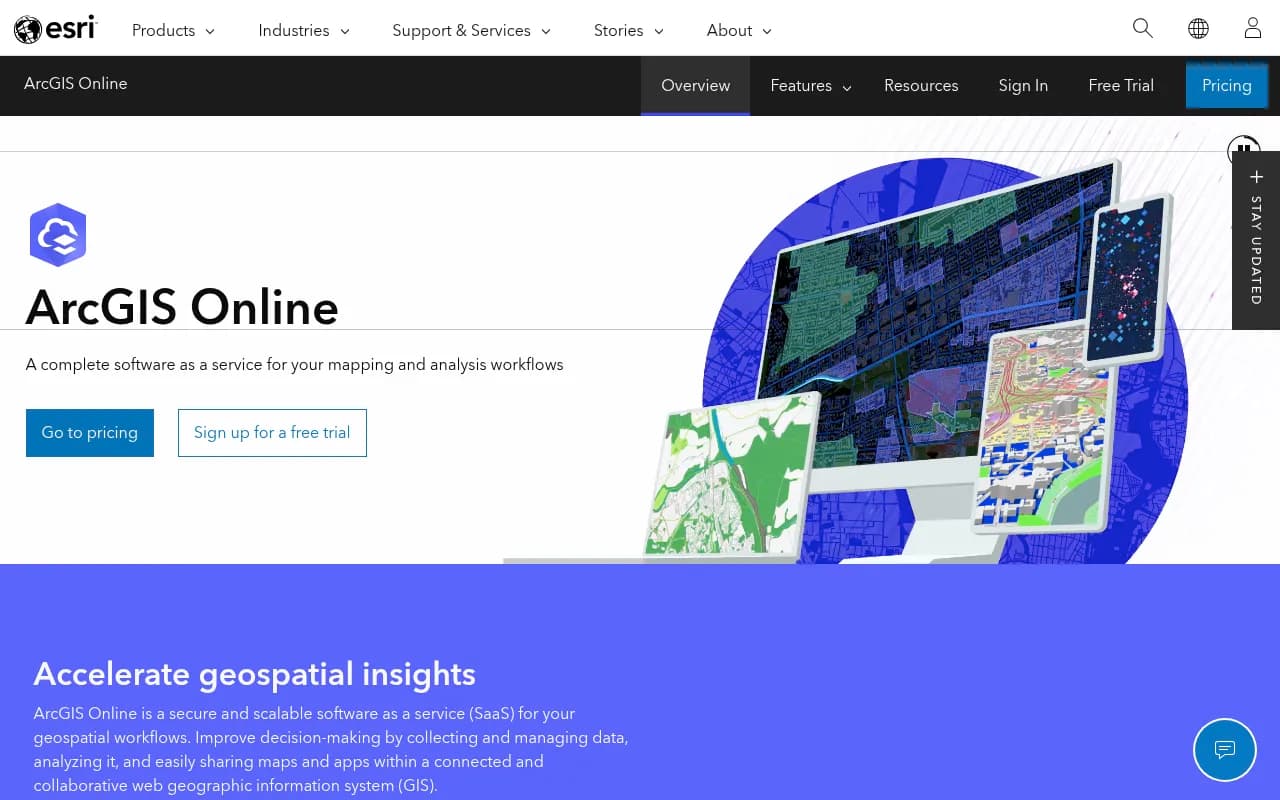
2D and 3D Mapping: Create publication-quality interactive maps in minutes using an intuitive web interface -- no coding required. Choose from dozens of professionally designed basemaps (streets, satellite imagery, topographic, ocean, terrain) or create custom basemaps that match your organization's branding. Style your data layers with smart mapping tools that automatically suggest optimal symbology based on your data type -- graduated colors for numeric values, unique symbols for categories, heat maps for density, etc. Build 3D scene viewers to visualize buildings, terrain, infrastructure, and other features in three dimensions with realistic lighting and shadows. Add pop-ups, labels, and interactive elements that reveal details when users click or hover. Maps are responsive and work seamlessly on desktop, tablet, and mobile devices.
Spatial Analysis Tools: Perform sophisticated geospatial analysis without writing code or learning complex GIS software. The analysis toolbox includes: proximity analysis (find features within a distance, create buffers, calculate travel time areas), overlay analysis (combine datasets to find intersections, unions, differences), pattern analysis (identify clusters, hot spots, outliers), suitability modeling (find optimal locations based on multiple weighted criteria), network analysis (calculate optimal routes, service areas, closest facilities), terrain analysis (slope, aspect, viewshed, watershed delineation), and statistical analysis (regression, correlation, summarization by area). Results update dynamically as you adjust parameters. For advanced users, integrate Python scripts and custom geoprocessing tools. Analysis runs on Esri's cloud infrastructure, so even computationally intensive operations complete quickly without taxing your local machine.
Field Data Collection: Deploy ArcGIS Field Maps and ArcGIS Survey123 to collect data in the field using smartphones and tablets, even when offline. Design custom data collection forms with validation rules, conditional logic, photo attachments, and GPS accuracy requirements. Field workers see their assigned tasks on a map, navigate to locations, capture observations, and sync data back to ArcGIS Online when connectivity returns. Managers monitor field operations in real-time, seeing where crews are working and what data they've collected. This replaces paper forms and manual data entry, dramatically improving accuracy and speed.
Real-Time Data & Dashboards: Ingest and visualize streaming data from IoT sensors, vehicle trackers, social media feeds, and other real-time sources using ArcGIS Velocity (available as an add-on). Build live dashboards with ArcGIS Dashboards that display key metrics, charts, gauges, and maps that update automatically as data changes. Dashboards are highly configurable -- embed them in websites, display them on wall monitors in operations centers, or share them with executives for at-a-glance situational awareness. Set up alerts that trigger when conditions meet specified thresholds.
Collaboration & Sharing: Control exactly who can access your content through a granular permissions system. Share maps and data with specific individuals, groups within your organization, partner organizations via distributed collaboration, or the public. Create organizational accounts with role-based access control -- administrators manage users and content, publishers create and share maps, viewers consume content, field workers collect data. Integrate with enterprise authentication systems (SAML, OAuth, Active Directory) for single sign-on. Collaborate with external organizations while maintaining data security through ArcGIS Hub and partner collaboration features.
Web App Builder & Experience Builder: Create custom web applications without coding using drag-and-drop app builders. Choose from dozens of configurable templates (story maps, crowdsourcing apps, situational awareness viewers, public information portals) or build fully custom apps with Experience Builder's flexible layout system. Add widgets for search, filtering, editing, printing, measurement, and dozens of other functions. Apps are responsive and accessible, meeting WCAG standards. Embed apps in your website or share standalone URLs. For developers, the ArcGIS API for JavaScript, Python, and REST APIs enable fully custom application development.
Content Library & Living Atlas: Access Esri's Living Atlas of the World -- the world's largest collection of authoritative geographic content. Includes global basemaps updated continuously, demographic and lifestyle data for 130+ countries, real-time traffic and weather, land cover classifications, historical imagery, 3D buildings for major cities, and thousands of curated datasets. Use this content directly in your maps or as context for your own data. Community-contributed content and industry-specific datasets (utilities, public safety, natural resources) are also available.
Extensions & Integrations: Extend capabilities with add-on products: ArcGIS Velocity for real-time and big data analytics, ArcGIS Insights for exploratory data analysis and business intelligence, ArcGIS Image for Esri for advanced imagery analysis, ArcGIS Indoors for indoor mapping and wayfinding, and ArcGIS Urban for 3D urban planning. Integrate with business systems via connectors for Microsoft Power BI, Tableau, Salesforce, ServiceNow, and others. Use Zapier or Microsoft Power Automate to build workflows that connect ArcGIS Online with thousands of other apps.
Who ArcGIS Online Is For
ArcGIS Online is built for organizations that need professional-grade GIS capabilities delivered as a managed cloud service. The primary user personas are GIS analysts and specialists who create maps and perform spatial analysis, field workers who collect data using mobile devices, managers and executives who consume maps and dashboards for decision-making, and developers who build custom geospatial applications.
Government agencies at all levels (federal, state, county, municipal) represent a massive user base -- using ArcGIS Online for emergency management, urban planning, infrastructure management, environmental monitoring, public health tracking, election administration, and countless other applications. Utilities and telecommunications companies use it to manage networks (electric grids, water systems, fiber optic cables), plan maintenance, respond to outages, and optimize service areas. Real estate and commercial property firms use it for site selection, market analysis, portfolio management, and property visualization. Logistics and transportation companies optimize routes, track assets, and analyze service coverage. Environmental and conservation organizations monitor ecosystems, track wildlife, plan restoration projects, and communicate findings to stakeholders and the public.
Team size matters less than use case -- ArcGIS Online scales from small nonprofits with a handful of users to federal agencies with thousands. Organizations typically start with 5-20 users and expand as they see value. The platform works for both centralized GIS teams that serve an entire organization and distributed models where many departments maintain their own geospatial data and apps.
Who should NOT use ArcGIS Online: Casual users who just need to embed a simple map on a website (Google Maps or Mapbox are simpler and cheaper), organizations with extremely basic mapping needs that don't require analysis or data management, teams that need full control over infrastructure and can't use SaaS (they should consider ArcGIS Enterprise for self-hosting instead), and budget-constrained small businesses or individuals (QGIS is a capable open-source alternative, though with a steeper learning curve and no managed cloud service).
Integrations & Ecosystem
ArcGIS Online integrates deeply with the broader ArcGIS ecosystem. ArcGIS Pro (the desktop GIS application) connects directly to ArcGIS Online, allowing users to author complex maps and perform advanced analysis locally, then publish results to the cloud. ArcGIS Field Maps, Survey123, QuickCapture, and Workforce apps all sync with ArcGIS Online for field data collection and mobile workforce management. ArcGIS StoryMaps creates narrative-driven web experiences that combine maps, text, images, and multimedia.
Business intelligence tools connect via native integrations: the ArcGIS Maps for Power BI visual brings spatial analysis into Microsoft Power BI dashboards, while connectors exist for Tableau and other BI platforms. Enterprise system integrations include Salesforce (ArcGIS Maps for Salesforce), ServiceNow, SAP, and Microsoft Dynamics. Automation platforms like Zapier, Microsoft Power Automate, and Make enable workflow automation without coding.
Developers access ArcGIS Online through comprehensive APIs: ArcGIS API for JavaScript for web apps, ArcGIS Runtime SDKs for native mobile apps (iOS, Android, .NET), ArcGIS API for Python for data science and automation, and REST APIs for any programming language. The ArcGIS Marketplace offers third-party extensions and integrations.
Data import/export supports virtually every geospatial format: shapefiles, file geodatabases, GeoJSON, KML, CAD files (DWG, DXF), spreadsheets (CSV, Excel), and connections to enterprise databases (SQL Server, Oracle, PostgreSQL). Export data in multiple formats for use in other systems.
Pricing & Value
ArcGIS Online pricing is based on user types -- role-based licenses that bundle specific capabilities. The primary user types are:
Creator (approximately $500/year): Full GIS capabilities including data management, map authoring, spatial analysis, app creation, and administration. For GIS professionals, analysts, and power users who create content.
GIS Professional (higher tier): Includes everything in Creator plus ArcGIS Pro desktop software for advanced analysis and cartography. Pricing varies based on licensing model.
Editor (mid-tier): Can edit data and create simple maps but has limited analysis capabilities. For users who primarily update existing datasets.
Field Worker (approximately $100-200/year): Mobile-focused license for data collection using Field Maps and Survey123. Cannot create maps or perform analysis.
Viewer (approximately $100/year): View-only access to maps and apps. For executives, managers, and staff who consume geospatial information but don't create it.
Organizations also purchase credits for consumption-based services like geocoding, routing, spatial analysis, and premium data access. Credit pricing varies but is generally affordable for typical usage -- geocoding 1,000 addresses costs about $4 in credits.
Enterprise and government customers typically negotiate custom pricing based on user count and specific requirements. Educational institutions receive significant discounts. A free public account allows limited exploration of the platform.
Compared to competitors: ArcGIS Online is premium-priced but delivers enterprise-grade capabilities that justify the cost for professional use. CARTO and Mapbox offer cloud mapping platforms at lower price points but lack the depth of analysis tools and enterprise features. QGIS is free and open-source but requires significant technical expertise and doesn't include cloud hosting or managed services. Google Maps Platform is cheaper for simple mapping but isn't designed for serious GIS work. For organizations that need professional geospatial analysis, the value proposition is strong -- you're paying for Esri's 50+ years of GIS expertise, continuous innovation, comprehensive support, and a platform trusted by virtually every government and major enterprise.
Strengths & Limitations
Strengths:
- Industry-standard platform: ArcGIS is the GIS that virtually all other GIS software is measured against. Skills are transferable, talent is available, and the ecosystem is mature.
- Comprehensive capabilities: From simple mapping to advanced spatial statistics, 3D visualization, real-time analytics, and custom app development -- all in one platform.
- Authoritative data: Living Atlas provides unmatched access to curated, high-quality global datasets that would cost millions to assemble independently.
- Enterprise-ready: FedRAMP authorized, SOC 2 compliant, supports enterprise authentication, meets government security requirements.
- Managed infrastructure: Esri handles all servers, updates, backups, and scaling -- you focus on analysis, not IT operations.
- Extensive training and support: Thousands of tutorials, courses, documentation pages, and an active user community. Professional support available.
Limitations:
- Price: Significantly more expensive than alternatives like Mapbox or CARTO. Small organizations and individuals may find it cost-prohibitive.
- Learning curve: While simpler than desktop GIS software, ArcGIS Online still requires GIS knowledge. Casual users may struggle with concepts like coordinate systems, spatial joins, and geoprocessing.
- Credit consumption: Some operations (geocoding, routing, analysis) consume credits, adding variable costs that can be hard to predict. Heavy users may face unexpected bills.
- Customization limits: While app builders are powerful, they can't match the flexibility of fully custom-coded applications. Developers may hit walls with the no-code tools.
- Vendor lock-in: Deep investment in the ArcGIS ecosystem makes switching to alternatives difficult. Proprietary formats and workflows create dependencies.
Bottom Line
ArcGIS Online is the right choice for organizations that need professional GIS capabilities without managing infrastructure -- government agencies, utilities, large enterprises, environmental organizations, and any team where location intelligence drives critical decisions. It's the platform you choose when mapping and spatial analysis are core to your mission, when you need enterprise-grade security and scalability, and when you want the confidence that comes from using the industry-standard solution trusted by hundreds of thousands of organizations worldwide.
Best use case in one sentence: Government agencies and enterprises that need to manage geospatial data, perform spatial analysis, and share location intelligence across teams with the reliability, security, and comprehensive capabilities that only the market-leading GIS platform can provide.
Frequently asked questions
What is ArcGIS Online?
How much does ArcGIS Online cost?
Is ArcGIS Online free?
Who should use ArcGIS Online?
What are the key features of ArcGIS Online?
Is ArcGIS Online secure for government and enterprise use?
What is the difference between ArcGIS Online user types?
Who makes ArcGIS Online?
Similar and alternative tools to ArcGIS Online