Mixpanel Review 2026
Event-based analytics platform helping teams understand user actions, retention patterns, and conversion funnels for growth.
Key Takeaways:
- Best for product teams and growth marketers who need self-serve analytics without waiting on data teams -- query billions of events in sub-second speed
- Strengths: Event-based tracking, powerful funnel/retention analysis, Session Replay, Metric Trees for governance, Experiments & Feature Flags, warehouse connectors (BigQuery, Snowflake), and AI-assisted workflows
- Limitations: Pricing scales quickly with event volume; steeper learning curve than simpler tools like Plausible; overkill for basic website analytics
- Pricing: Free tier (1M events/month), Growth from $24/mo, Enterprise custom -- costs rise with event volume but volume discounts available
- Ideal use case: SaaS products, mobile apps, and ecommerce sites that need to understand user journeys, optimize conversion funnels, and measure feature impact
Mixpanel is one of the most established product analytics platforms, founded in 2009 and now serving over 9,000 companies including DocuSign, Uber, Zynga, and Samsung. It pioneered event-based analytics -- tracking specific user actions (signups, clicks, purchases) rather than just pageviews -- which became the foundation for modern product analytics. The platform is built for product managers, growth marketers, and engineering teams who need to answer questions like "Why are users dropping off in onboarding?" or "Which features drive retention?" without writing SQL or waiting on data analysts.
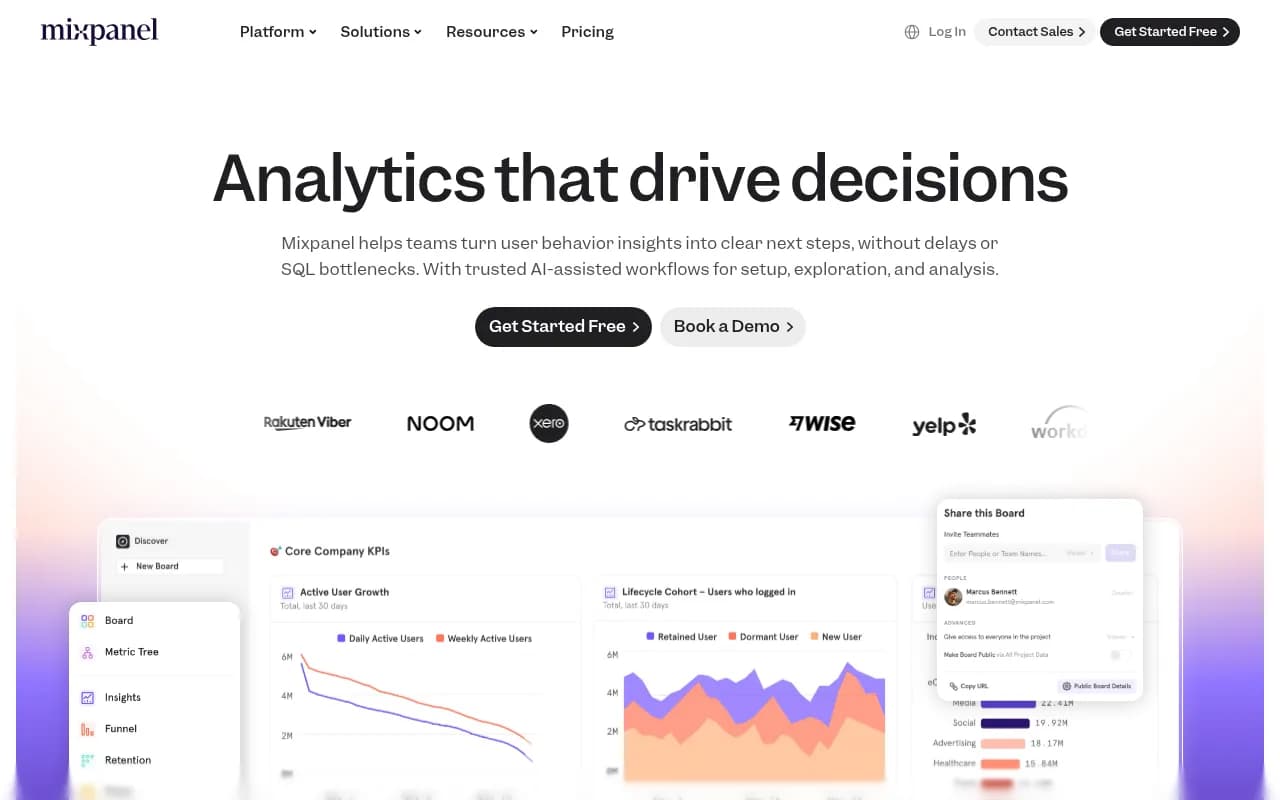
The core value proposition is speed and self-service. Mixpanel queries billions of events in under a second, letting non-technical teams explore data freely. You can segment users by any property (device type, subscription tier, geographic region), build conversion funnels, track cohort retention over time, and visualize user flows -- all through a visual interface. This democratizes analytics across the organization, not just the data team.
Core Features in Detail:
Event Tracking & Data Collection: Mixpanel uses an event-based model where you instrument your app to send events (e.g. "Video Played", "Checkout Started", "Feature Enabled") with custom properties (user ID, plan type, video duration, etc.). SDKs available for JavaScript, iOS, Android, Python, Node.js, and more. You can also import data from your data warehouse (BigQuery, Snowflake, Redshift) via warehouse connectors, or ingest from CDPs like Segment, mParticle, and RudderStack. This flexibility means you're not locked into Mixpanel's data collection -- use your existing stack and query it through Mixpanel's interface. Reverse ETL support lets you send Mixpanel insights back to your warehouse or operational tools.
Funnel Analysis: Build multi-step conversion funnels to see where users drop off. For example, track "Signed Up → Activated Offer → Completed Purchase" and segment by device (web vs mobile vs tablet) to identify that mobile users drop off 23% more at checkout. You can add unlimited steps, apply filters, compare time periods, and drill into individual user sessions. Funnel analysis is the bread-and-butter feature for optimizing onboarding flows, checkout processes, and feature adoption.
Retention Analysis: Cohort-based retention reports show how many users return after their first session, grouped by signup date or any custom event. See if users who completed onboarding in Week 1 have better 30-day retention than those who didn't. Track retention curves over weeks or months to spot churn risks early. You can also measure feature stickiness -- how often users engage with a specific feature after trying it once.
User Flows: Visualize the actual paths users take through your product. See the most common sequences of events leading to conversion or churn. For example, discover that users who view a product page, then add to cart, then view another product before checkout have higher completion rates than those who go straight to checkout. Flows help you understand non-linear journeys that funnels miss.
Session Replay: Watch recordings of real user sessions to see exactly what happened -- clicks, scrolls, form fills, errors. Mixpanel includes 20,000 monthly session replays free on all plans. You can filter replays by user segment (e.g. "users who abandoned cart") or specific events (e.g. "clicked checkout but didn't complete"). This qualitative layer complements quantitative funnel data -- you see the numbers AND the behavior. Session Replay integrates with funnel steps, so you can click into a drop-off point and watch what users did.
Metric Trees: A governance feature that defines your company's source-of-truth metrics in a hierarchical structure. For example, "Revenue" breaks down into "Subscription Revenue" and "One-Time Revenue", which further break into product lines. Teams across the company use the same definitions, preventing metric drift and conflicting reports. Metric Trees ensure everyone is aligned on what "Active User" or "Conversion Rate" actually means.
Experiments & Feature Flags: Run A/B tests and feature rollouts directly in Mixpanel. Create experiments, assign users to variants, and measure impact on key metrics (conversion, retention, revenue). Feature Flags let you toggle features on/off for specific user segments without deploying code. This is currently in beta but integrates tightly with Mixpanel's analytics -- you see experiment results in the same interface where you track product metrics.
AI-Assisted Workflows: Mixpanel's AI features help with setup (suggesting events to track based on your product), exploration (recommending relevant segments or breakdowns), and analysis (surfacing anomalies or trends). For example, if retention drops suddenly, the AI might flag it and suggest cohorts to investigate. This isn't full autopilot -- it's guardrails and suggestions to speed up analysis.
Boards & Collaboration: Create dashboards (called Boards) with multiple reports, share them with teammates, and set permissions (viewer, editor, admin). You can make Boards public or invite specific users. Boards support real-time collaboration -- multiple people can explore the same data simultaneously. This is critical for aligning cross-functional teams on product performance.
Integrations & Ecosystem: Mixpanel connects to 100+ tools including Segment, Amplitude (data import), Slack (alerts), Salesforce, HubSpot, Braze, Iterable, and more. Warehouse connectors let you query BigQuery, Snowflake, Databricks, or Redshift data directly in Mixpanel without moving it. API access for custom integrations and data exports. Mixpanel also offers a Looker Studio connector for custom reporting.
Who Is Mixpanel For:
Mixpanel is built for product-led companies where understanding user behavior drives growth. Primary personas include:
- Product Managers at SaaS companies (10-500 employees) who need to prioritize features based on usage data, measure feature adoption, and optimize onboarding flows. For example, a PM at a project management tool tracking which features correlate with paid conversions.
- Growth marketers running acquisition campaigns who need to measure conversion funnels from ad click to signup to activation. Mixpanel helps attribute revenue to campaigns and identify high-value user segments.
- Mobile app developers (gaming, fintech, social apps) tracking in-app events like level completions, purchases, or social shares. Mixpanel's mobile SDKs and push notification integrations make it a strong fit for app-first products.
- Data analysts and BI teams at mid-market or enterprise companies who want to empower non-technical teams with self-serve analytics while maintaining governance through Metric Trees and role-based access.
- Ecommerce teams optimizing checkout funnels, cart abandonment, and repeat purchase behavior. Mixpanel's event model tracks product views, add-to-cart, and purchase events with rich metadata (product ID, category, price).
Mixpanel scales from startups (free tier supports 1M events/month) to enterprises processing billions of events. Companies like DocuSign use it across 100+ stakeholders to track product metrics, resulting in 15% growth in accounts, 5% increase in upgrades, and 10% boost in first-time conversions.
Who Should NOT Use Mixpanel:
- Content publishers or bloggers who just need pageview analytics -- Google Analytics or Plausible are simpler and cheaper.
- Early-stage startups with no product-market fit yet -- you don't need advanced cohort analysis when you're still figuring out what to build.
- Teams without engineering resources to instrument events properly -- Mixpanel requires upfront setup (tracking plan, SDK integration) that simpler tools like Hotjar don't.
- Companies with strict data residency requirements in regions Mixpanel doesn't support (though they offer EU data hosting).
Integrations & Ecosystem:
Mixpanel integrates with major CDPs (Segment, mParticle, RudderStack), data warehouses (BigQuery, Snowflake, Redshift, Databricks), marketing tools (Braze, Iterable, Customer.io), CRMs (Salesforce, HubSpot), and collaboration platforms (Slack for alerts). The warehouse connectors are particularly powerful -- you can query your existing data warehouse through Mixpanel's interface without duplicating data. Reverse ETL support via Census, Hightouch, or Polytomic lets you send Mixpanel segments back to your warehouse or operational tools.
Mixpanel offers SDKs for JavaScript, iOS, Android, React Native, Flutter, Python, Node.js, Ruby, PHP, and Java. REST API for custom integrations. No official browser extension, but the platform is web-based and mobile-responsive.
Pricing & Value:
Mixpanel uses event-based pricing:
- Free Tier: 1M events/month, unlimited reports, 20K session replays/month, cohorts, funnels, retention analysis, and basic integrations. Good for startups or side projects.
- Growth Plan: Starts at $24/month (billed annually) for 10M events/month, then $0.28 per 1K additional events (volume discounts apply). Includes everything in Free plus data warehouse connectors, group analytics, and priority support. Some sources cite $299/month as the entry point, likely for higher event volumes.
- Enterprise Plan: Custom pricing for 100M+ events/month. Adds SSO/SAML, advanced permissions, audit logs, SLA guarantees, dedicated support, and HIPAA compliance. Designed for companies processing billions of events.
Pricing scales with event volume, which can get expensive fast. A company tracking 50M events/month might pay $1,000-2,000/month. However, Mixpanel offers volume discounts and annual billing discounts (typically 20% off). Session Replay is included (20K replays/month free, then pay-per-replay).
Value Assessment: Mixpanel is competitively priced against Amplitude (similar event-based pricing) and cheaper than enterprise tools like Adobe Analytics. It's more expensive than basic web analytics (Google Analytics is free, Plausible is $9/month) but offers far deeper product insights. For SaaS companies where a 5% improvement in conversion or retention translates to significant ARR, Mixpanel pays for itself quickly. DocuSign's case study shows measurable ROI (15% account growth, 10% conversion lift).
Strengths:
- Speed: Sub-second query times even on billions of events. You can explore data interactively without waiting.
- Self-Service: Non-technical teams can build reports, segment users, and analyze funnels without SQL or data team support.
- Flexibility: Event-based model tracks any user action, not just pageviews. Warehouse connectors let you query existing data.
- Session Replay: Combines quantitative funnel data with qualitative session recordings in one platform.
- Governance: Metric Trees and role-based access ensure data consistency across teams.
Limitations:
- Pricing Complexity: Event-based pricing can be unpredictable. High-traffic apps may hit expensive tiers quickly. You need to estimate event volume carefully.
- Learning Curve: More complex than simple analytics tools. Requires understanding events, properties, and tracking plans. Onboarding takes time.
- Setup Overhead: You must instrument events properly (tracking plan, SDK integration, QA). Garbage in, garbage out -- bad tracking yields bad insights.
- Not Ideal for Content Sites: Mixpanel is overkill for blogs or media sites that just need pageview analytics. Google Analytics or Plausible are better fits.
Bottom Line:
Mixpanel is the go-to product analytics platform for SaaS companies, mobile apps, and ecommerce businesses that need to understand user behavior at a granular level. It excels at answering "why" questions -- why users churn, why features aren't adopted, why funnels drop off -- through event tracking, cohort analysis, and session replay. The self-serve interface empowers product and marketing teams to explore data without bottlenecking on analysts, while Metric Trees and governance features keep enterprise teams aligned.
Best use case in one sentence: Mid-market SaaS companies (50-500 employees) optimizing product-led growth through funnel analysis, retention tracking, and experimentation -- where a 5-10% improvement in conversion or retention drives millions in ARR.
Tags:
Similar and alternative tools to Mixpanel