Optimal Workshop Review 2026
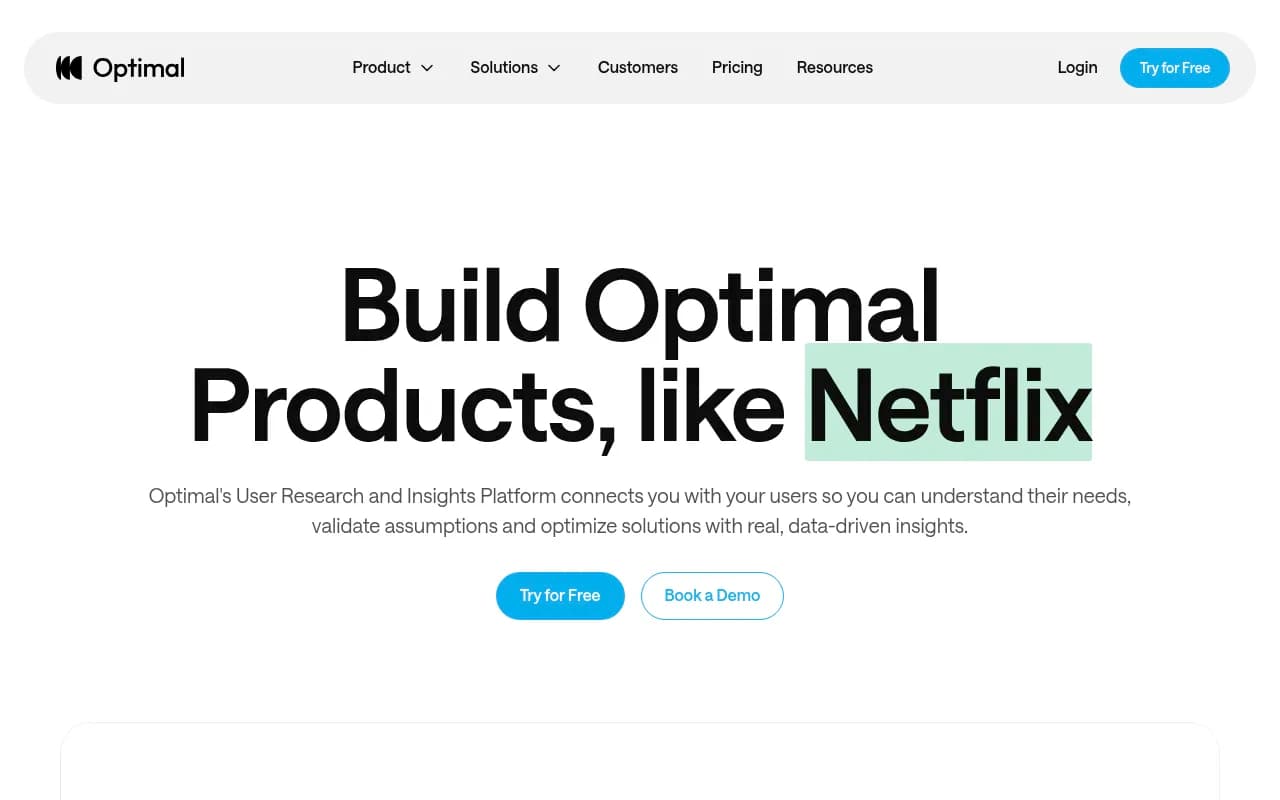
Optimal Workshop is a comprehensive UX research platform used by 650K+ product teams at Netflix, Apple, Uber, and Nike to validate designs, optimize information architecture, and gather user insights. From prototype testing and card sorting to AI-powered analysis and global participant recruitment (
Key Takeaways
- Comprehensive UX research suite with 8 specialized tools (prototype testing, card sorting, tree testing, surveys, interviews, first-click testing, live site testing, qualitative insights) in one platform -- no need to juggle multiple subscriptions
- Unlimited seats and responses at every pricing tier, making it cost-effective for teams that want to democratize research across product, design, marketing, and content teams
- 10M+ verified participants across 150+ countries with transparent pricing and fraud prevention -- no hidden per-session fees or quality surprises
- AI-powered analysis that surfaces themes, patterns, and stakeholder-ready reports automatically instead of dumping raw data
- Pricing starts at $199/month (annual billing only) for 5 studies per year with unlimited seats and responses -- higher tiers unlock more studies and advanced features
- Missing real-time collaboration features and some users report the interface feels dated compared to newer competitors like Maze or UserTesting
Optimal Workshop has been around since 2006, which makes it one of the oldest dedicated UX research platforms still actively developed. Founded in New Zealand, it's now used by over 650,000 product, design, and research professionals globally -- including household names like Netflix, Apple, Uber, Nike, Lego, and Toyota. The platform was built by researchers for researchers, and that shows in the depth of its specialized tools. Where newer platforms try to be everything to everyone, Optimal focuses specifically on the research methods that matter most for digital product teams: information architecture testing, prototype validation, and qualitative insights gathering.
The company's longevity is both a strength and a weakness. On one hand, they've had 17 years to refine methodologies like card sorting and tree testing -- techniques that are notoriously easy to mess up if you don't understand the underlying research principles. On the other hand, some parts of the interface feel like they haven't been updated since 2015, and the platform lacks some of the real-time collaboration features that newer tools like Maze or Dovetail offer out of the box.
Prototype Testing & Concept Validation
Optimal's prototype testing tool lets you import designs directly from Figma, upload static wireframes, or test interactive prototypes. You can run moderated or unmoderated sessions, capture screen and audio recordings, and watch exactly where users click, scroll, and get confused. The Figma integration is straightforward -- paste a link, Optimal imports the frames, and you can set up clickable hotspots or let users explore freely.
What sets this apart from competitors: you can test multiple design alternatives side-by-side with A/B testing built in. Most platforms make you run separate studies and manually compare results. Optimal shows you which variant performed better right in the results dashboard. You can also test mobile app concepts on actual devices (iOS and Android) through their mobile testing feature, which sends participants a link to test on their own phones.
The prototype testing tool includes task-based scenarios ("Find the pricing page and sign up for the Pro plan"), success/failure tracking, time-on-task metrics, and post-task satisfaction ratings. You can also add follow-up questions after each task to understand why users struggled or succeeded. The screen recordings are high quality and include audio if you enable microphone access, which is useful for moderated sessions or think-aloud protocols.
Limitations: The prototype testing tool doesn't support advanced interactions like drag-and-drop, multi-step forms with validation, or animations. If you need to test complex interactions, you're better off using a dedicated prototyping tool like ProtoPie or Principle and then importing the final prototype as a video or clickable demo. Also, the heatmap visualizations for click data are basic -- just dots on a screenshot, not the sophisticated heatmaps you get from tools like Hotjar or Crazy Egg.
Information Architecture Tools (Card Sorting & Tree Testing)
This is where Optimal really shines. Card sorting and tree testing are niche research methods that most general-purpose platforms either don't support or implement poorly. Optimal has been perfecting these tools for nearly two decades, and it shows.
Card Sorting helps you understand how users naturally categorize and label content. You give participants a set of cards (topics, features, content types) and ask them to group them into categories that make sense. Optimal supports three types: open card sorting (users create their own category names), closed card sorting (you provide predefined categories), and hybrid (a mix of both). The analysis tools automatically generate dendrograms (tree diagrams showing how users grouped items), similarity matrices (which items were frequently grouped together), and standardization grids (which category names were most popular). This is incredibly useful for designing navigation menus, organizing help documentation, or structuring product catalogs.
Tree Testing validates whether your proposed information architecture actually works. You upload your site structure (menu hierarchy, navigation tree), give participants tasks ("Where would you look to find your order history?"), and see if they can successfully navigate to the correct location. Optimal tracks success rates, time to completion, directness (how many wrong turns they took), and where people got lost. The results show you exactly which menu labels are confusing, which branches are dead ends, and which paths users expect but don't exist.
These two methods work best when used together: card sorting to discover how users think about your content, then tree testing to validate that your proposed structure matches those mental models. Optimal makes it easy to run both studies sequentially and compare results.
Competitors like UserZoom and Maze offer card sorting and tree testing, but their implementations are more basic. Optimal's analysis tools are more sophisticated, the visualizations are clearer, and the platform handles edge cases better (like participants who abandon tasks or create nonsensical categories).
Surveys & Interviews
Optimal's survey tool is solid but not groundbreaking. You can create multi-page surveys with skip logic, branching, and a variety of question types (multiple choice, rating scales, open-ended text, matrix questions). The survey builder is drag-and-drop, and you can preview how it looks on desktop and mobile before launching. You can also embed surveys on your website or send them via email.
The interview tool is more interesting. It's designed for remote moderated or unmoderated video interviews. Participants record themselves answering your questions (video and audio), and Optimal automatically transcribes the recordings using AI. The transcription quality is good -- not perfect, but better than YouTube's auto-captions. You can search transcripts for keywords, tag interesting moments, and create highlight reels by clipping segments from multiple interviews.
The AI-powered analysis feature (part of the Qualitative Insights tool) can analyze interview transcripts and survey responses to surface themes, sentiment, and patterns. It's not as sophisticated as dedicated qualitative analysis tools like Dovetail or Notably, but it's useful for quick insights when you don't have time to manually code hundreds of responses.
First-Click Testing & Live Site Testing
First-click testing measures where users click first when trying to complete a task. Research shows that if users' first click is correct, they're 87% more likely to complete the task successfully. Optimal's first-click tool shows participants a screenshot or live webpage and asks them to click where they would go to complete a specific task. You see heatmaps of where people clicked, success rates, and time to first click.
Live site testing (a newer feature launched in 2024) lets you test your actual website or web app without writing any code. You paste your site's URL, Optimal loads it in an iframe, and participants interact with it while you record their clicks, scrolls, and navigation paths. This is useful for testing existing sites or web apps that are already live, as opposed to prototypes or mockups. The tool tracks task completion, time on page, and user paths through your site.
Both tools are straightforward and work well, but they're not as feature-rich as dedicated usability testing platforms like UserTesting or Lookback. For example, you can't do live moderated sessions with video chat, and the session recordings don't include participant webcam footage (only screen recordings).
Qualitative Insights & AI Analysis
This is Optimal's answer to tools like Dovetail, Notably, and Aurelius. The Qualitative Insights tool is a centralized workspace where you can upload interview transcripts, survey responses, support tickets, customer feedback, and other qualitative data. The AI analysis engine automatically tags themes, extracts quotes, and generates summaries.
You can create custom tags, highlight key insights, and build reports that connect user feedback to product decisions. The tool also supports collaborative analysis -- multiple team members can tag and annotate the same data, and you can see who tagged what. This is useful for research teams that need to align on findings before presenting to stakeholders.
The AI-generated summaries are decent but not magical. They'll surface obvious themes ("users are frustrated with the checkout process") and pull representative quotes, but they won't catch subtle nuances or contradictions that a human researcher would notice. Think of it as a first pass that saves you time, not a replacement for actual analysis.
One nice feature: you can create a research repository where all your studies, insights, and reports live in one place. This helps with institutional knowledge -- new team members can search past research to see what's already been learned instead of re-running the same studies.
Participant Recruitment
Optimal's participant recruitment service (called Reframer) gives you access to 10M+ verified participants across 150+ countries. You can target by demographics (age, gender, location, income), behaviors (online shoppers, mobile app users, frequent travelers), and professional attributes (job title, industry, company size). The platform also supports niche audiences like healthcare professionals, enterprise software buyers, or parents of young children.
Pricing is transparent: you pay per participant, with costs varying based on targeting criteria and study length. Simple consumer studies start around $5-10 per participant, while niche B2B audiences can cost $50-100+ per participant. Optimal guarantees quality -- if a participant doesn't meet your screening criteria or provides low-quality responses, they'll replace them for free.
The recruitment process is fast. You define your audience, set your budget, and Optimal starts sending invites. Most studies fill within 24-48 hours, though niche audiences can take longer. You can also use your own participant panel if you prefer -- Optimal supports email invites, shareable links, and website embeds.
Compared to competitors: UserTesting and Respondent also offer participant recruitment, but their pricing is often higher and less transparent. Prolific is cheaper for simple consumer studies but doesn't support niche B2B audiences as well. Optimal's recruitment service is solid middle ground -- not the cheapest, not the most expensive, but reliable and well-integrated with the platform.
Integrations & Ecosystem
Optimal integrates with Figma (import designs), Slack (notifications when studies complete), Zapier (connect to 5,000+ apps), and Google Sheets (export data). There's also an API for custom integrations, though the documentation is sparse compared to more developer-friendly platforms.
You can export study results as CSV, PDF, or PowerPoint presentations. The PowerPoint export is particularly useful for stakeholder presentations -- it automatically generates slides with key findings, charts, and participant quotes. The PDF reports are also well-designed and suitable for sharing with executives or clients.
Optimal doesn't integrate with product management tools like Jira, Productboard, or Aha!, which is a missed opportunity. You have to manually copy insights from Optimal into your roadmap tool, which adds friction. Competitors like Dovetail and Maze have better integrations with product management workflows.
There's no mobile app for running studies or analyzing results on the go. Everything happens in the web browser, which is fine for most use cases but limiting if you want to review session recordings during your commute or present findings from a tablet.
Pricing & Value
Optimal's pricing is straightforward but inflexible. All plans require annual billing -- there's no monthly option. Here's the breakdown:
- Starter Plan: $199/month (billed annually at $2,388/year) -- 5 studies per year, unlimited seats, unlimited participant responses per study, all tools and study types, basic support
- Professional Plan: $499/month (billed annually at $5,988/year) -- 20 studies per year, everything in Starter, plus advanced analysis features, priority support, custom branding
- Enterprise Plan: Custom pricing -- unlimited studies, dedicated account manager, SSO, advanced security features, API access, custom contracts
The "5 studies per year" limit on the Starter plan is the biggest constraint. If you're running one study per quarter, you're fine. If you're doing continuous research (weekly or monthly studies), you'll hit the limit fast and need to upgrade. The good news: each study can have unlimited participants and unlimited responses, so you're not paying per session or per participant (unless you use the recruitment service, which is billed separately).
Compared to competitors:
- Maze starts at $99/month (monthly billing available) but charges per response -- you get 100 responses per month on the cheapest plan, then pay extra. For high-volume research, Optimal's unlimited responses are better value.
- UserTesting charges per session ($49-99 per participant for moderated tests, $10-30 for unmoderated). If you're running 50+ participant studies, Optimal is significantly cheaper.
- Dovetail starts at $29/month per user for qualitative analysis, but doesn't include prototype testing or IA tools. You'd need to combine Dovetail with another tool like Maze or UsabilityHub, which gets expensive.
- UsabilityHub (now part of Lyssna) starts at $75/month for 100 responses per month, similar to Maze's model.
Optimal's value proposition is strongest for teams that run multiple studies per year with large participant pools. If you're only doing occasional research with small sample sizes, cheaper tools like Maze or UsabilityHub might be better. If you need enterprise features like SSO, custom contracts, or dedicated support, Optimal's Enterprise plan is competitive with UserZoom and UserTesting but likely cheaper.
One frustration: the annual billing requirement. Most SaaS tools offer monthly billing at a slight premium, giving you flexibility to cancel if the tool doesn't work out. Optimal locks you in for a year, which is a barrier for smaller teams or agencies testing the platform.
Strengths
- Specialized IA tools (card sorting, tree testing) are best-in-class -- no other platform does these methods as well
- Unlimited seats and responses make it cost-effective for teams that want to democratize research across the organization
- Comprehensive toolset covers most UX research needs in one platform -- no need to juggle multiple subscriptions
- Participant recruitment is reliable, transparent, and well-integrated
- AI-powered analysis saves time on qualitative data, even if it's not as sophisticated as dedicated tools
Limitations
- Interface feels dated -- the UI hasn't kept pace with newer competitors like Maze, Dovetail, or UserTesting
- No real-time collaboration -- you can't co-analyze data or co-present findings with teammates in the platform
- Limited integrations -- missing connections to product management tools (Jira, Productboard, Aha!), design tools beyond Figma, and analytics platforms
- Annual billing only -- no monthly option, which is a barrier for smaller teams or agencies
- Prototype testing limitations -- doesn't support advanced interactions, animations, or complex form validation
- No mobile app -- everything happens in the web browser
Who Is It For
Optimal Workshop is best for mid-sized to large product teams (10-100+ people) that run regular UX research and want to democratize research across product, design, content, and marketing teams. The unlimited seats model makes it easy to give access to everyone who needs it without worrying about per-user costs.
It's particularly strong for teams that care about information architecture -- if you're redesigning navigation, organizing content, or structuring complex websites or apps, the card sorting and tree testing tools are worth the price of admission alone. Companies like Netflix, Uber, and Apple use Optimal specifically for these methods because they're hard to do well with general-purpose tools.
It's also a good fit for research teams that want a single platform for multiple research methods instead of juggling subscriptions to Maze (prototype testing), Dovetail (qualitative analysis), and UsabilityHub (first-click testing). The all-in-one approach simplifies procurement, reduces tool sprawl, and makes it easier to train new team members.
Who should NOT use Optimal: Freelancers or solo consultants who only run occasional research projects. The annual billing and $199/month minimum make it expensive for low-volume use. Agencies that bill research hours to clients might also find the pricing model awkward -- you can't easily pass through per-project costs when you're paying a flat annual fee. Teams that need cutting-edge collaboration features or real-time co-analysis should look at Dovetail or Notion-based research repositories instead.
Bottom Line
Optimal Workshop is a mature, comprehensive UX research platform that excels at information architecture testing and offers solid tools for prototype testing, surveys, interviews, and qualitative analysis. The unlimited seats and responses model makes it cost-effective for teams that run regular research with large participant pools, and the participant recruitment service is reliable and transparent.
The platform's biggest weaknesses are its dated interface, limited integrations, and inflexible annual billing. It's not the most modern or collaborative tool on the market, but it's reliable, well-supported, and backed by 17 years of research expertise.
Best use case in one sentence: Mid-sized to large product teams that run regular UX research (especially information architecture testing) and want a single platform with unlimited seats and responses instead of juggling multiple subscriptions.
Tags:
Frequently asked questions
What is Optimal Workshop used for?
How much does Optimal Workshop cost?
Does Optimal Workshop offer a free plan?
Who uses Optimal Workshop?
What makes Optimal Workshop different from competitors like Maze or UserTesting?
Does Optimal Workshop include participant recruitment?
How many team members can use Optimal Workshop?
Similar and alternative tools to Optimal Workshop