Simplified Review 2026
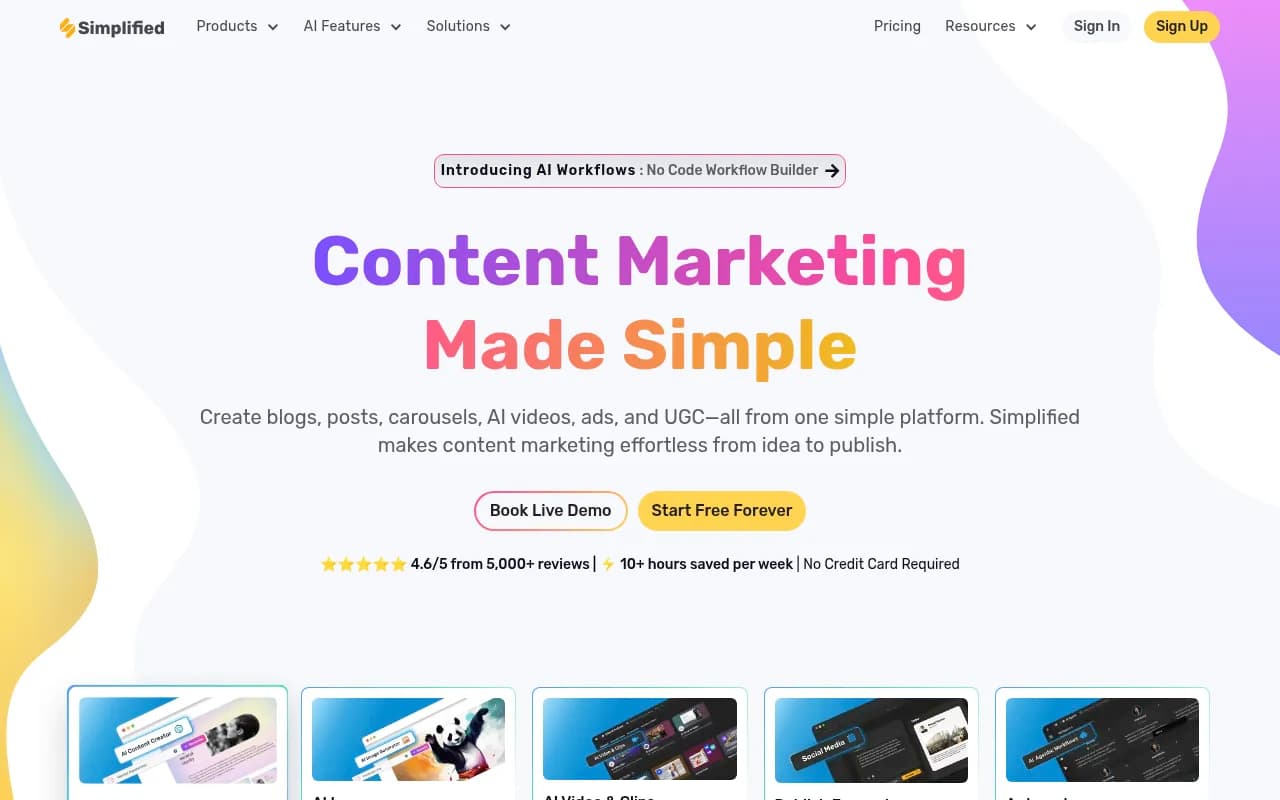
Simplified is a comprehensive AI-powered marketing platform that combines graphic design, video editing, AI writing, social media management, and project collaboration in one workspace. Built for solo creators, agencies, and marketing teams, it replaces 5+ tools with AI-driven content creation, 100k
Key Takeaways:
- All-in-one platform: Replaces Canva, Jasper, Descript, Buffer, and project management tools with a single AI-powered workspace
- Strengths: Massive template library (100k+), AI content generation across formats, real-time team collaboration, affordable pricing starting at $19/month
- Limitations: Feature breadth can feel overwhelming for beginners, some AI outputs require manual refinement, mobile app less robust than desktop
- Best for: Small marketing teams (2-10 people), agencies managing multiple clients, solo creators who need design + writing + social tools without juggling subscriptions
- Not ideal for: Enterprise teams needing advanced analytics, users wanting best-in-class performance in a single category (dedicated tools still edge out in specialization)
Simplified launched as a response to the fragmented marketing tech stack -- the reality where a single social post requires Canva for design, ChatGPT for copy, Descript for video, and Buffer for scheduling. Founded by TLDR Technologies, Inc. and used by millions of creators and businesses, it's positioned as the "stupid fast" alternative to tool sprawl. The pitch is simple: one login, one workspace, one workflow from idea to published content.
The platform targets three core audiences: solo creators tired of subscription fatigue, small marketing teams (2-10 people) who need to move quickly without specialized roles, and agencies juggling multiple client brands. It's not trying to be the deepest tool in any single category -- it's trying to be good enough across all of them that you stop switching tabs.
AI Video: Text-to-Video and Clip Repurposing
Simplified's video suite centers on two workflows: creating talking-head videos from scratch and repurposing long-form content into short clips. The AI Avatar feature lets you pick from a library of realistic avatars, paste a script, and generate a video in minutes -- no filming required. You can also clone your own voice (requires a few minutes of sample audio) and pair it with an avatar for personalized videos at scale. This is particularly useful for course creators, coaches, and B2B marketers who need explainer videos without hiring a videographer.
The AI Short Clips tool analyzes long videos (podcasts, webinars, YouTube uploads) and automatically identifies viral-worthy moments, complete with a "virality score" that predicts engagement potential. It handles cropping for vertical formats (Instagram Reels, TikTok, YouTube Shorts), adds animated captions, and exports ready-to-post clips. Compared to Descript or OpusClip, Simplified's clip detection is less sophisticated -- it occasionally misses context or cuts mid-sentence -- but the speed and integration with the rest of the platform make it a solid choice for teams prioritizing volume over perfection.
Other video capabilities include:
- Auto-generated subtitles in 30+ languages with customizable styles (think MrBeast-style animated captions)
- Stock footage library with millions of clips from Pexels, Pixabay, and Unsplash
- Background removal for green screen effects without a green screen
- Transitions, filters, and effects via a timeline editor that feels like a simplified Premiere Pro
The video editor itself is browser-based and surprisingly responsive for a web app, though rendering times for 1080p exports can stretch to 5-10 minutes depending on complexity. No 4K support yet.
AI Design: Canva Competitor with Generative Fill
The design editor is Simplified's most mature feature, and it shows. You get a drag-and-drop canvas with layers, masking, blend modes, and a Generative Fill tool that rivals Photoshop's -- select an area, describe what you want, and the AI fills it in. This is killer for product mockups, ad variations, and fixing stock photo backgrounds.
The AI Image Generator uses Stable Diffusion and DALL-E models under the hood. Prompts like "minimalist SaaS landing page hero image, blue gradient, 3D elements" produce usable results in 10-15 seconds. You can refine with style presets (photorealistic, illustration, 3D render, anime) and aspect ratios optimized for Instagram, Facebook ads, YouTube thumbnails, etc.
Key design features:
- 100k+ templates across categories: social posts, ads, presentations, thumbnails, infographics, email headers, print materials
- Brand Kit: Upload logos, set brand colors and fonts, and every AI generation automatically applies your brand guidelines
- Magic Resize: One-click adaptation of designs across 20+ formats (Instagram post → Story → LinkedIn banner)
- Background remover for product photos and portraits
- AI Photo Enhancer: Upscale images up to 4x resolution, restore old photos, and apply filters
The template quality is hit-or-miss -- trending categories (social media, YouTube thumbnails) have polished, modern designs, while niche categories (real estate flyers, church bulletins) feel dated. The library is searchable by keyword, color, and industry, which helps.
Compared to Canva, Simplified's editor is slightly less intuitive (more clicks to access certain features), but the AI integrations are deeper. Canva's Magic Studio is catching up, but Simplified's Generative Fill and AI image generation feel more tightly woven into the workflow.
AI Writer: Long-Form and Social Copy Generation
The AI Writer is built on GPT-4 and Claude models, with 90+ templates for specific use cases: blog posts, product descriptions, ad copy, email sequences, social captions, video scripts, and more. You input a topic or prompt, select a tone (professional, casual, witty, persuasive), and the AI generates a first draft in seconds.
For blog writing, the tool supports outlines, section-by-section generation, and SEO optimization (keyword density, meta descriptions, heading structure). A 1,500-word article takes about 2-3 minutes to generate, though you'll spend another 10-15 minutes editing for accuracy and voice. The output is coherent but generic -- it reads like a competent first draft, not a polished final piece. You'll need to inject personality, fact-check claims, and add specific examples.
The AI Bulk Post Generator is a standout for social media managers. Feed it a topic (e.g., "5 productivity tips for remote workers"), and it generates 10-30 variations across platforms -- Twitter threads, Instagram captions, LinkedIn posts, Facebook updates -- all adapted to each platform's tone and character limits. This is a massive time-saver for agencies managing multiple clients or brands running daily content calendars.
Other writing features:
- Rewrite and expand tools: Highlight text and ask the AI to make it shorter, longer, more formal, or more engaging
- Plagiarism checker: Scans content against billions of web pages (powered by Copyscape)
- Grammar and tone suggestions: Real-time feedback as you type
- 30+ language support: Generate content in Spanish, French, German, Portuguese, and more
The AI occasionally hallucinates facts or produces repetitive phrasing, so human oversight is non-negotiable. It's best used as a co-pilot, not an autopilot.
Social Media Management: Scheduling, Analytics, and Inbox
Simplified's social suite connects to Instagram, Facebook, Twitter/X, LinkedIn, TikTok, Pinterest, YouTube, and Google Business Profile. You can schedule posts individually or in bulk (CSV upload supported), preview how they'll look on each platform, and manage everything from a unified calendar view.
The AI Content Calendar suggests posting times based on your audience's activity patterns and auto-generates content ideas based on trending topics in your niche. You can also set up recurring post templates (e.g., "Motivational Monday" quotes) that auto-populate with AI-generated copy and images.
Key social features:
- Unified inbox: Respond to comments and DMs across platforms without switching apps
- Analytics dashboard: Track engagement, reach, clicks, and follower growth with exportable reports
- Hashtag generator: AI suggests 10-30 relevant hashtags based on your post content
- First comment scheduling: Auto-post a comment with links or CTAs immediately after publishing (Instagram workaround for link restrictions)
- Team collaboration: Assign posts for approval, leave feedback, and track revisions in real-time
The analytics are basic compared to Sprout Social or Hootsuite -- you get top-level metrics but limited audience segmentation or sentiment analysis. For small teams, it's sufficient. For agencies needing white-label reports or advanced attribution, you'll want a dedicated tool.
One limitation: TikTok and Instagram Reels require manual upload via mobile notification (API restrictions), so true one-click publishing isn't possible for short-form video.
Project Management and Team Collaboration
Simplified includes a lightweight project management layer that sits on top of the creative tools. You can create projects, assign tasks, set deadlines, and track progress in a Kanban-style board. It's not Asana or Monday.com, but it's enough to keep a small team organized without adding another tool to the stack.
The real-time collaboration is where this shines. Multiple team members can edit the same design, document, or video simultaneously -- think Google Docs but for marketing assets. You can leave comments, tag teammates, and see changes as they happen. Version history lets you roll back to previous drafts if someone makes a mistake.
For agencies, the client approval workflow is a game-changer. Share a design or post with a client via a shareable link, collect feedback in-line, and make revisions without email chains. Clients don't need a Simplified account to view or comment.
Integrations and Ecosystem
Simplified integrates with:
- Social platforms: Instagram, Facebook, Twitter, LinkedIn, TikTok, Pinterest, YouTube, Google Business Profile
- E-commerce: Shopify (product image generation and ad creation)
- Productivity: Slack (notifications for approvals and comments), Zapier (connect to 5,000+ apps)
- Storage: Google Drive, Dropbox (import assets directly)
- WordPress: Plugin for publishing blog posts directly from Simplified
The platform also offers a REST API for custom integrations and a Chrome extension for capturing web content (screenshots, text snippets) directly into your workspace. Mobile apps (iOS and Android) are available but lack feature parity with the desktop version -- you can view projects and approve posts, but complex editing requires a laptop.
Pricing and Value
Simplified operates on a freemium model:
- Free Forever: Unlimited designs, 10 AI-generated images/month, 5 social posts/month, 2,000 AI words/month, 1 user, 1 brand. Good for solo creators testing the platform.
- Small Team ($19/month): 50 AI images/month, 50 social posts/month, 20,000 AI words/month, 5 users, 3 brands, priority support. Best value for small teams.
- Business ($39/month): 100 AI images/month, 100 social posts/month, 50,000 AI words/month, 10 users, 5 brands, advanced analytics, API access.
- Growth ($79/month): 200 AI images/month, 200 social posts/month, 100,000 AI words/month, 25 users, 10 brands, white-label reports.
Annual billing saves 20%. Enterprise plans with custom limits and dedicated support are available on request.
Compared to competitors:
- Canva Pro ($13/month) + Jasper ($49/month) + Buffer ($6/month) = $68/month for similar functionality, but without video editing or project management
- Descript ($24/month) focuses only on video/audio editing
- Hootsuite ($99/month) is social-only with no creative tools
For teams needing 3+ tools, Simplified's pricing is competitive. The catch: you're trading best-in-class performance in any single category for good-enough performance across all of them.
Strengths
- Consolidation: Genuinely replaces 5+ tools for small teams, reducing subscription costs and context-switching
- Speed: AI generation is fast -- designs, copy, and videos in seconds, not hours
- Template library: 100k+ templates cover nearly every use case, with weekly additions
- Collaboration: Real-time editing and client approval workflows rival dedicated project management tools
- Freemium model: Generous free tier lets you test before committing
Limitations
- Jack-of-all-trades problem: No single feature is best-in-class. Canva's design editor is smoother, Jasper's AI writing is more nuanced, Descript's video editing is more powerful.
- AI quality variance: Generated content often needs significant editing. The AI is a starting point, not a finish line.
- Mobile app gaps: iOS/Android apps lack key features like video editing and advanced design tools.
- Learning curve: The breadth of features can overwhelm new users. The interface tries to do too much, making it harder to find specific tools.
- Analytics depth: Social media reporting is basic -- fine for small teams, insufficient for agencies needing granular insights.
Who Should Use Simplified
Buy this if you're:
- A solo creator or freelancer juggling design, writing, and social media without a budget for multiple subscriptions
- A small marketing team (2-10 people) that needs to move fast and can't afford specialized roles for design, video, and copywriting
- An agency managing 5-20 clients that needs a unified workspace for collaboration and client approvals
- A startup or small business prioritizing speed and cost savings over best-in-class tools in every category
Skip this if you're:
- An enterprise team needing advanced analytics, custom integrations, or white-label solutions (though Enterprise plans may address this)
- A specialist (e.g., professional video editor, senior copywriter) who needs the deepest feature set in your discipline
- A brand with complex approval workflows requiring granular permissions and compliance tracking
Bottom Line
Simplified is the Swiss Army knife of marketing tools -- not the sharpest blade in any single category, but the most convenient option when you need to do a little bit of everything. For small teams and solo creators drowning in subscriptions, it's a legitimate consolidation play that saves time and money. The AI features are genuinely useful (not just marketing fluff), the collaboration tools work well, and the pricing is fair.
Best use case in one sentence: Small marketing teams (2-10 people) who need to produce high-volume content across formats without hiring specialists or managing five different tools.
Tags:
Similar and alternative tools to Simplified