Agility CMS Review 2026
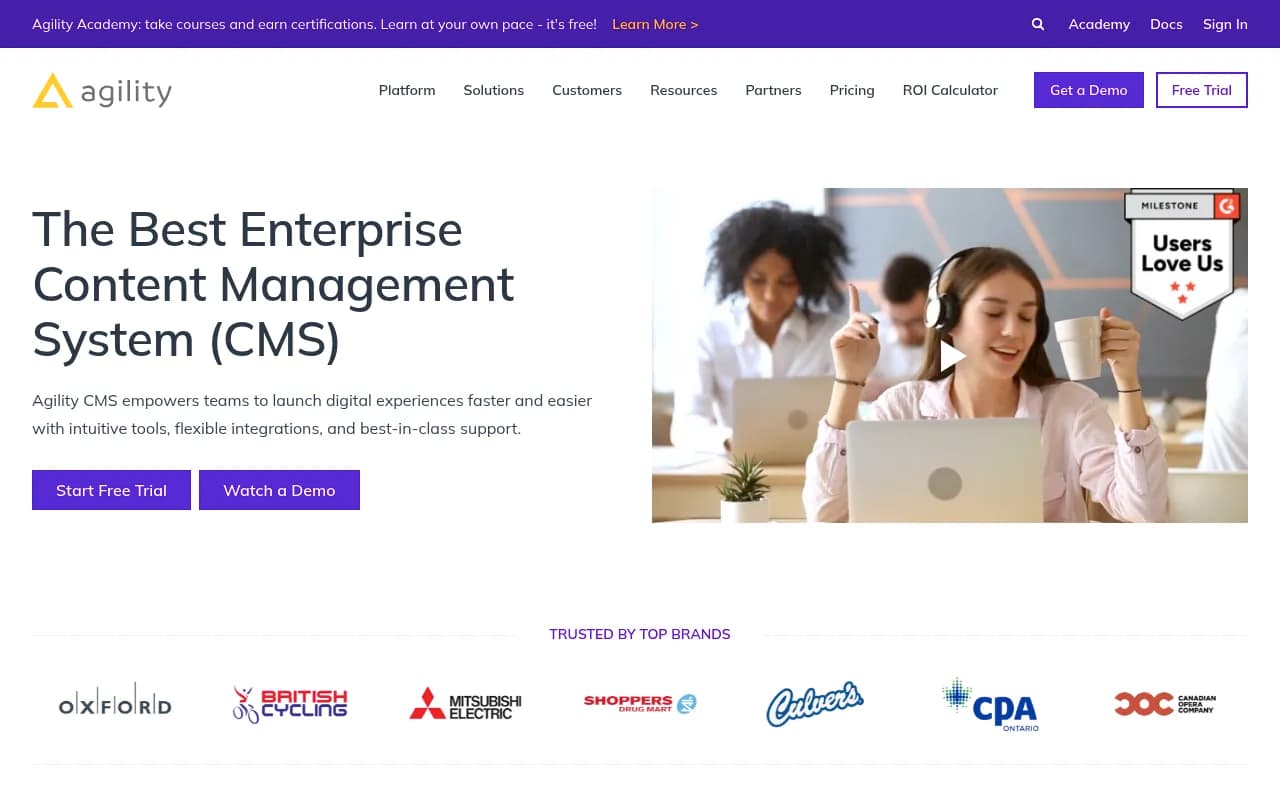
Agility CMS is a composable headless content management system trusted by global brands like Scotiabank, Cineplex, and Shoppers Drug Mart. Built for enterprise teams, it combines flexible headless architecture with intuitive content editing, 99.95% guaranteed uptime, SOC 2 compliance, and industry-l
Key Takeaways:
• Best for enterprise teams needing proven stability (99.95% uptime guarantee) and security (SOC 2, GovRAMP registered) with responsive human support • Headless architecture provides total flexibility to use any frontend framework while maintaining centralized content management • Premium pricing ($1,249-$2,499/month) reflects enterprise focus -- not ideal for small teams or startups on tight budgets • 20+ years in market means mature platform with deep integrations, but potentially less cutting-edge than newer competitors • Standout support model -- proactive team that learns your setup, not just ticket-based help or chatbots
Agility CMS positions itself as the enterprise-grade answer to content management chaos. Founded over two decades ago, it's evolved from a traditional CMS into a composable headless platform that powers digital experiences for major brands across retail, finance, healthcare, and government sectors. The company's client roster -- Scotiabank, Cineplex, Shoppers Drug Mart, Culver's, Hockey Canada -- signals its sweet spot: organizations where downtime isn't an option and security compliance is non-negotiable.
The platform targets mid-to-large enterprises (typically 50+ employees) managing multiple websites, applications, or digital properties. Marketing teams get intuitive content editing tools that don't require developer handholding, while development teams get the architectural freedom of a true headless CMS. The pricing reflects this positioning -- starting at $1,249/month for the Starter plan (up to 10 users), scaling to $2,499/month for Pro, with custom Enterprise pricing above that. A free trial is available, but this is clearly not a tool for bootstrapped startups or small businesses.
Headless Architecture & Developer Experience
Agility CMS implements a fully decoupled headless architecture, meaning content lives in the CMS while your frontend can be built with any technology stack -- React, Next.js, Vue, Angular, .NET, or whatever your team prefers. The content is delivered via RESTful APIs and GraphQL, giving developers complete control over how content renders across web, mobile apps, IoT devices, or digital signage.
The platform provides SDKs for popular frameworks including Next.js, Gatsby, and Nuxt, plus starter templates to accelerate project launches. Developers can define custom content models (they call them "Content Definitions") that structure exactly what fields editors can populate -- text, rich text, images, relationships to other content, custom JSON, etc. This flexibility means you're not fighting against rigid templates or pre-built page builders.
One practical advantage: the decoupled setup means content editors can work on updates in the CMS while developers simultaneously refactor the frontend, ship new features, or migrate to new frameworks -- without blocking each other. For agencies managing multiple client sites, this parallel workflow significantly reduces project timelines.
The API performance is solid, with content delivery via CDN and caching strategies built in. Webhook support allows you to trigger builds, invalidate caches, or sync content to other systems whenever content changes. The GraphQL implementation is particularly useful for complex queries that need to pull related content across multiple content types in a single request.
Content Editing & Management Experience
While the backend is headless, Agility CMS provides a visual page builder called "Page Management" that lets editors see a preview of how content will look on the live site. This bridges the gap between traditional WYSIWYG editors (where what you see is exactly what you get) and pure headless systems (where editors work with abstract fields and hope for the best).
Editors work with "Modules" -- reusable content components like hero sections, article lists, testimonial blocks, or custom components your developers build. They can drag and drop these modules onto pages, fill in the content fields, and preview changes before publishing. For teams migrating from WordPress or other traditional CMSs, this visual approach significantly reduces the learning curve.
Content workflows include approval chains, scheduled publishing, version history, and rollback capabilities. Multi-language support is built in, with editors managing translations for each content item. The interface for managing large content libraries includes filtering, tagging, and search -- though some users note that navigating deeply nested content structures can get cumbersome compared to more modern interfaces.
One standout feature: Shared Content allows you to create content items (like author bios, product specs, or legal disclaimers) that can be referenced across multiple pages. Update it once, and the change propagates everywhere it's used -- a huge time-saver for maintaining consistency across large sites.
Security, Compliance & Uptime
Agility CMS's enterprise credentials shine here. The platform is SOC 2 Type II certified and GovRAMP registered, making it suitable for government agencies and heavily regulated industries like healthcare and finance. Data is encrypted in transit and at rest, with role-based access controls that let you define granular permissions for different user groups.
The 99.95% uptime guarantee is backed by SLA agreements, with infrastructure hosted on Microsoft Azure across multiple regions for redundancy. For context, that's roughly 4.4 hours of allowed downtime per year -- acceptable for most enterprise use cases, though not quite the 99.99% (52 minutes/year) that some mission-critical applications demand.
SSO integration supports SAML 2.0, allowing enterprises to connect Agility CMS to their existing identity providers (Okta, Azure AD, etc.). Audit logs track who changed what content and when, which is essential for compliance and troubleshooting. Two-factor authentication is available for additional account security.
For organizations dealing with GDPR, CCPA, or other data privacy regulations, Agility CMS provides data residency options (choose where your content is hosted) and tools to manage user consent and data deletion requests.
Integrations & Ecosystem
Agility CMS integrates with the tools enterprise teams already use. E-commerce integrations include Shopify, BigCommerce, and custom commerce platforms via API. The Shopify integration is particularly well-documented, with tutorials showing how to build product catalogs, shopping experiences, and checkout flows that pull product data from Shopify while managing marketing content in Agility.
Marketing automation connections include HubSpot, Marketo, and Salesforce Marketing Cloud, allowing you to sync content, trigger campaigns, or personalize experiences based on CRM data. Analytics integrations cover Google Analytics, Adobe Analytics, and custom tracking implementations.
For developers, Zapier support opens up 5,000+ app integrations without custom code. The REST and GraphQL APIs are well-documented, with Postman collections and interactive API explorers. Webhooks can trigger actions in external systems whenever content is published, updated, or deleted.
DAM (Digital Asset Management) integration is available with platforms like Cloudinary, Bynder, and Aprimo, though some users note that the native media library could be more robust for teams managing thousands of images and videos. The workaround is to use a dedicated DAM and reference assets in Agility via URLs.
Agility also offers Agility Sync, a tool that lets you sync content between instances (useful for staging/production workflows or multi-region deployments). The CLI tools support scripting and automation for tasks like bulk content imports, schema migrations, or automated testing.
Support & Customer Success
This is where Agility CMS differentiates itself most clearly from competitors. The company emphasizes "best-in-class support" and "a proactive team that works as an extension of yours" -- and customer reviews consistently validate this claim. Unlike platforms where support means submitting tickets into a black hole or chatting with a bot that doesn't understand your question, Agility assigns dedicated support engineers who learn your specific setup.
Support channels include email, phone, and a customer portal. Response times are fast (often same-day for non-critical issues, faster for urgent problems), and the support team includes people who actually understand CMS architecture, not just first-level script-readers. For Enterprise customers, dedicated Customer Success Managers provide strategic guidance, quarterly business reviews, and proactive optimization recommendations.
The Agility Academy offers free courses and certifications covering content modeling, API usage, frontend development, and best practices. The documentation is thorough, with code examples in multiple languages and frameworks. The community isn't as large or active as open-source platforms like Strapi or Contentful, but the official support more than compensates.
One practical example from customer reviews: when a retail client needed to launch a campaign on an aggressive timeline, Agility's support team jumped on calls to help architect the solution, troubleshoot integration issues, and even review code -- going well beyond typical vendor support.
Who Is Agility CMS For?
Agility CMS is purpose-built for enterprise marketing and development teams managing complex, multi-site digital ecosystems. Specific personas who benefit most:
Enterprise marketing teams (50-500+ employees) at organizations like banks, retailers, healthcare systems, or government agencies who need a CMS that won't go down during peak traffic, meets strict security requirements, and provides responsive support when issues arise. These teams typically manage 5-20+ websites or applications, need multi-language support, and require approval workflows for content changes.
Digital agencies serving enterprise clients who want a reliable platform they can standardize on across multiple projects. Agencies appreciate the white-label capabilities, multi-tenant architecture (manage multiple client sites from one dashboard), and the fact that Agility's support team helps with client issues instead of forcing the agency to be the middleman.
Development teams at mid-to-large companies who want the flexibility of headless architecture without the operational burden of managing open-source infrastructure. They value the mature API, solid documentation, and the ability to use modern frontend frameworks while giving content editors a user-friendly interface.
Industries where Agility particularly shines: financial services (banks, insurance), retail and e-commerce, healthcare, government, education, and hospitality. These sectors prioritize security, compliance, uptime, and support over cutting-edge features or the lowest possible price.
Who should NOT use Agility CMS:
Startups and small businesses with limited budgets -- at $1,249/month minimum, there are far more cost-effective options like Strapi (open-source), Sanity (starts at $99/mo), or even WordPress with a headless plugin. Unless you're a well-funded startup with enterprise clients from day one, Agility's pricing doesn't make sense.
Solo developers or small teams (1-5 people) building simple websites or blogs -- you don't need enterprise-grade security, guaranteed uptime, or dedicated support for a portfolio site or small business website. Use Contentful, Sanity, or even a static site generator with markdown files.
Teams that prioritize open-source for philosophical reasons or to avoid vendor lock-in -- Agility is proprietary SaaS. If you want full control over your CMS codebase and infrastructure, look at Strapi, Directus, or Payload CMS.
Organizations needing cutting-edge AI features -- while Agility is solid and mature, it's not leading the pack on AI-powered content generation, automated SEO optimization, or advanced personalization compared to newer platforms like Builder.io or Contentstack.
Pricing & Value
Agility CMS offers three main tiers:
Starter: $1,249/month -- Supports up to 10 users, includes core CMS features, API access, and standard support. Suitable for single-site deployments or small teams testing the platform. Free trial available.
Pro: $2,499/month -- Expands user limits, adds advanced features like Agility Sync, enhanced security options, and priority support. This tier fits teams managing multiple sites or applications with moderate complexity.
Enterprise: Custom pricing -- For large organizations needing dedicated infrastructure, custom SLAs, advanced security features, SSO, dedicated Customer Success Managers, and white-glove onboarding. Pricing typically starts around $5,000-$10,000/month depending on scale and requirements.
All plans include the core headless CMS, API access, CDN delivery, and basic integrations. Higher tiers add user seats, environments (staging/production), and support levels.
Value assessment: Compared to competitors, Agility sits in the premium tier. Contentful's Team plan starts at $489/month, Sanity at $99/month, and open-source Strapi is free (though you pay for hosting and support). However, Agility's pricing includes the support and stability that enterprise teams actually need -- when you factor in the cost of downtime, security breaches, or developer time spent troubleshooting, the premium makes sense for the target audience.
For agencies, the multi-tenant capabilities and white-label options provide additional value -- you can manage 10+ client sites from one dashboard and bill clients separately, making the per-site cost more reasonable.
The main pricing complaint from users: the entry tier is too expensive for mid-market companies (20-50 employees) who need more than a simple CMS but can't justify $15,000+/year. There's a gap between Agility's Starter plan and more affordable options like Sanity or Contentful.
Strengths & Limitations
What Agility CMS does exceptionally well:
• Proven stability and uptime -- 20+ years in business, 99.95% SLA, trusted by brands where downtime costs millions. This isn't a startup that might pivot or shut down.
• Enterprise-grade security and compliance -- SOC 2, GovRAMP, SAML SSO, audit logs, data residency options. Passes procurement reviews at banks and government agencies.
• Support that actually helps -- dedicated engineers who learn your setup, proactive outreach, fast response times. Consistently praised in customer reviews.
• Mature integrations and documentation -- well-tested connections to e-commerce, marketing automation, and analytics platforms. Comprehensive docs with real code examples.
• Visual editing for non-technical users -- the page builder bridges the gap between traditional CMS ease-of-use and headless flexibility, reducing training time for content teams.
Honest limitations and areas where competitors are stronger:
• Pricing excludes smaller organizations -- at $1,249/month minimum, it's out of reach for startups, small businesses, and bootstrapped projects. Contentful, Sanity, and Strapi offer more accessible entry points.
• Interface feels dated compared to newer platforms -- while functional, the UI isn't as sleek or intuitive as Builder.io, Sanity, or Contentstack. Some users report that navigating large content libraries or complex content models can feel clunky.
• Limited AI and personalization features -- competitors like Contentstack and Uniform offer more advanced AI-powered content recommendations, automated SEO, and dynamic personalization. Agility focuses on core CMS functionality rather than cutting-edge features.
• Smaller community and ecosystem -- being proprietary and enterprise-focused means fewer open-source plugins, community themes, or third-party extensions compared to WordPress, Strapi, or even Contentful.
Bottom Line
Agility CMS is the right choice for enterprise teams and agencies who need a headless CMS they can actually rely on -- where uptime, security, and responsive support matter more than having the newest AI features or the lowest price. If you're managing digital experiences for a bank, retailer, healthcare system, or government agency, Agility's track record and compliance credentials justify the premium. The support alone -- real humans who proactively help you succeed -- is worth the price difference for teams where developer time is expensive and downtime is unacceptable.
Skip it if you're a startup, small business, or solo developer looking for an affordable headless CMS to experiment with. In that case, start with Sanity, Strapi, or Contentful and upgrade to Agility when you reach enterprise scale and need the stability and support to match.
Best use case in one sentence: Enterprise marketing teams at regulated or high-traffic organizations who need a proven, secure headless CMS with support that actually solves problems, not just logs tickets.
Similar and alternative tools to Agility CMS