FigJam Review 2026
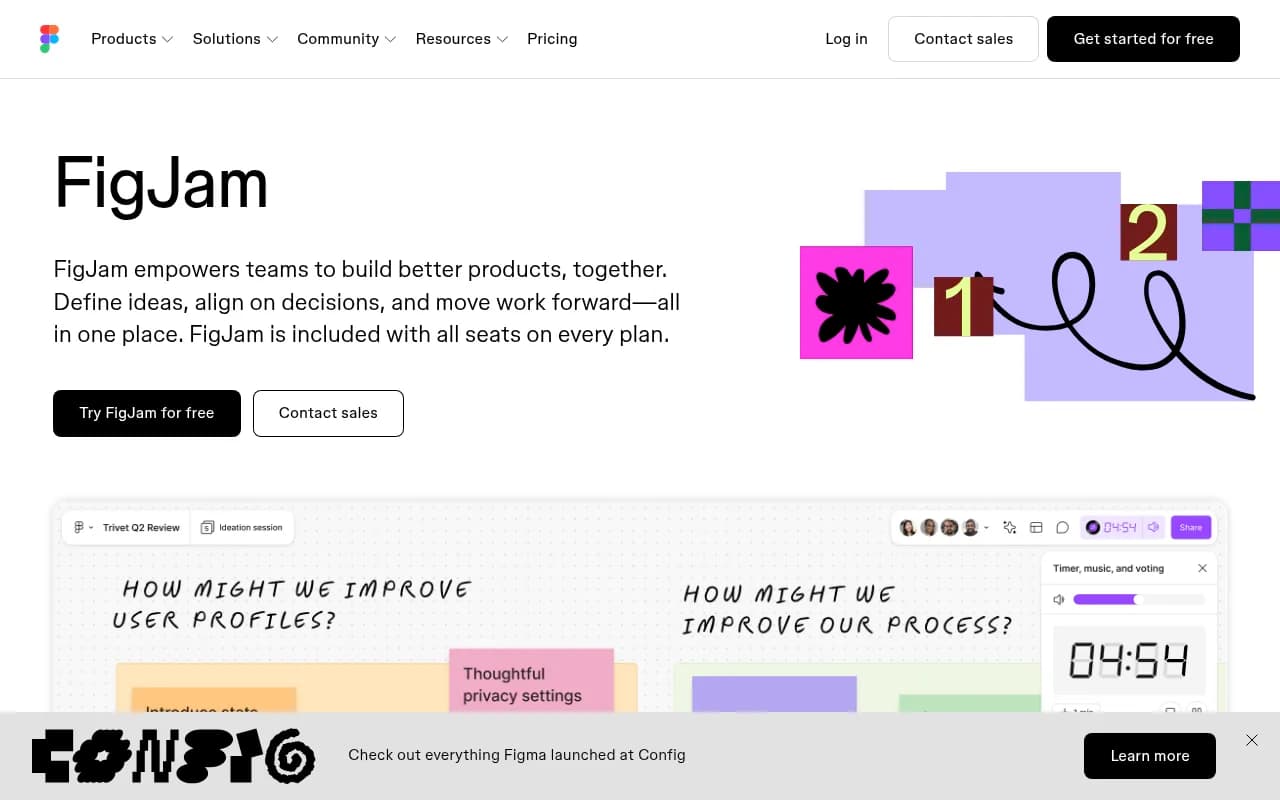
A collaborative whiteboard for brainstorming, meetings, and ideation. Tight integration with Figma makes it popular with design teams for workshops and retrospectives.
Key takeaways
- FigJam is included at no extra cost with every Figma plan -- if your team already pays for Figma, you already have it
- The Figma integration is genuinely seamless: design files and jam boards live in the same workspace, which is a real advantage over standalone whiteboard tools
- AI features (template generation, sticky-note sorting, action-item summarization) are practical and save real time in workshops
- The free tier is genuinely usable for small teams, though you hit the three-file cap quickly
- Competitors like Miro and Mural have deeper facilitation toolkits and more mature enterprise controls; FigJam wins on simplicity and Figma ecosystem fit
FigJam is Figma's online collaborative whiteboard, launched in 2021 as a companion product to Figma Design. The idea was straightforward: design teams were already using Figma for high-fidelity work, but they kept jumping to Miro or Mural for the fuzzy front-end stuff -- brainstorming, retros, planning sessions. FigJam was built to close that gap and keep everything in one place.
The target audience is broad on paper but specific in practice. FigJam works best for product and design teams who live in Figma already, cross-functional teams running agile ceremonies, and anyone who needs a shared visual space for remote or hybrid meetings. It's less suited to teams with no Figma footprint who want a standalone whiteboard -- in that case, Miro or Mural are more natural starting points.
Since launch, FigJam has grown steadily. Figma added AI features in 2024 and has continued expanding the widget and plugin ecosystem. The 2026 Config announcements included FigJam's integration with coding agents, letting teams generate diagrams that map what an AI agent is building -- a genuinely interesting direction that most whiteboard tools haven't touched yet.
Key features
Infinite canvas with real-time multiplayer
The core of FigJam is an infinite canvas where any number of collaborators can work simultaneously. Cursors are visible in real time, labeled with names, and the experience is smooth even with large groups. Unlike Figma Design, the canvas here is intentionally lower-fidelity -- it's optimized for speed and expression, not pixel precision. You get sticky notes, shapes, connectors, freehand drawing, and text, all snapping to a grid when you want structure and flowing freely when you don't.
AI-powered template and visual generation
Type a prompt and FigJam generates a meeting template, timeline, or diagram in seconds. This isn't just a novelty -- in practice it cuts the "blank canvas paralysis" that kills workshop momentum. You can add specificity iteratively: start with "sprint retrospective" and then refine to "retrospective for a 6-person mobile team, 2-week sprint." The AI also sorts sticky notes into themes automatically and summarizes board output into action items, which is genuinely useful at the end of a long session.
300+ ready-made templates
The template library covers the full range of team rituals: project kickoffs, flow charts, customer journey maps, standups, retrospectives, roadmap reviews, Gantt charts, and more. Templates are duplicatable with one click and fully editable. You can also save your own templates, which is useful for agencies or teams running the same workshop format repeatedly.
Diagramming with smart connectors
FigJam's diagramming tools are solid for process flows, user flows, and system diagrams. Shapes snap to the grid, connectors attach to anchor points and reroute automatically when you move elements, and there's a decent shape library. It's not Lucidchart -- you won't be building complex ERDs or network diagrams here -- but for the kind of diagrams that come up in product and engineering conversations, it covers the ground.
Widgets and plugins ecosystem
The Figma Community hosts hundreds of FigJam widgets -- interactive elements that run inside the board. The Asana widget lets you create and track tasks without leaving FigJam. There are voting widgets, timer widgets, Bitmoji avatars, and a lot of community-built tools for specific workshop formats. Plugins extend functionality further. This ecosystem is smaller than Miro's but growing, and the quality of the official integrations (Asana, Jira, GitHub) is high.
Spotlight mode and facilitation tools
Spotlight mode lets a facilitator direct everyone's attention to a specific part of the board -- useful in large group sessions where participants might be scattered across the canvas. Combined with audio, live chat, comments, stamps, and reaction emotes, FigJam has enough facilitation tooling for most workshop scenarios. The "high five" reaction is a small thing but it genuinely makes remote sessions feel more human.
Guest access without login
You can invite external participants to contribute to a FigJam file for 24 hours without requiring them to create a Figma account. For client workshops or cross-company sessions, this removes a real friction point. Miro has a similar feature but FigJam's implementation is cleaner.
iPad app with Apple Pencil support
FigJam has a dedicated iPad app that supports freehand sketching with Apple Pencil. It's designed for solo ideation -- sketching rough ideas before bringing them into a collaborative session. The handwriting-to-text conversion works well. This is a feature Miro also offers but FigJam's version feels more polished on Apple hardware.
Coding agent integration
The newest capability, announced at Config 2026, lets FigJam generate diagrams from AI coding agent outputs. If your team is using an AI agent to build features, FigJam can visualize what's being built and keep non-technical stakeholders oriented. It's early-stage but points to an interesting direction for whiteboard tools in an AI-first development workflow.
Who is it for
FigJam is the obvious choice for product and design teams already using Figma. If your designers are in Figma daily, adding FigJam to the workflow costs nothing (it's included in every plan) and eliminates the context switch to a separate whiteboard tool. Product managers running sprint ceremonies, UX researchers mapping user journeys, and design leads facilitating critique sessions will all find it fits naturally into existing habits.
It also works well for cross-functional teams at mid-size companies (50-500 people) where the design team has enough influence to pull other functions -- engineering, product, marketing -- into a shared tool. The low barrier to guest access helps here: you don't need everyone on a paid Figma seat to run a workshop.
Teams that should look elsewhere: organizations that need advanced facilitation features like timed voting, breakout rooms, or complex facilitation scripts will find Miro or Mural more capable. Enterprise teams with strict SSO, audit log, and data residency requirements may also find Figma's enterprise controls less mature than Miro's. And if your team has zero Figma footprint and no plans to adopt it, FigJam's main advantage (the Figma integration) disappears -- at that point, Miro's larger template library and more powerful diagramming make it a stronger standalone choice.
Integrations and ecosystem
FigJam's most important integration is with Figma Design itself. Boards and design files live in the same workspace, you can embed Figma frames directly into a FigJam board, and moving from ideation to design is a matter of opening a new tab rather than switching tools.
Beyond Figma, the key integrations are:
- Jira: Create and track Jira issues directly from the board. Useful for sprint planning and retros where action items need to become tickets immediately.
- Asana: The Asana widget lets you pull in tasks and create new ones without leaving FigJam.
- GitHub: Connect repositories and reference issues in the board context.
- Bitmoji: Personalized avatars that show up on your cursor -- trivial but surprisingly good for team culture in remote settings.
- Zoom and Microsoft Teams: FigJam can be used alongside video calls, though there's no deep native integration (you share your screen or send a link).
The Figma Community widget and plugin marketplace adds hundreds of third-party tools. There's no Zapier or Make integration for FigJam specifically (those connect to Figma's broader API), and the REST API is primarily oriented toward Figma Design rather than FigJam boards. For teams that need to automate whiteboard workflows programmatically, this is a gap.
FigJam is available on web (all browsers), desktop (Mac and Windows via the Figma desktop app), and iPad (dedicated app on the App Store). There's no Android app.
Pricing and value
FigJam's pricing is tied to Figma's plan structure, which is actually its biggest value proposition:
- Starter (Free): FigJam is included. You get 3 FigJam files, unlimited collaborators on those files, and access to templates and widgets. The 3-file limit is the main constraint -- you'll hit it fast if you run regular workshops.
- Figma Professional ($15/editor/month, billed annually): Unlimited FigJam files, unlimited version history, and access to all AI features. This is the tier most small-to-mid teams land on.
- Figma Organization ($45/editor/month, billed annually): Adds org-wide libraries, centralized admin, SSO, and advanced security controls.
- Figma Enterprise ($75/editor/month, billed annually): Full enterprise controls, dedicated support, and advanced compliance features.
Viewers and guests are free on all plans. The 24-hour guest access for external collaborators doesn't count against your seat count.
For comparison, Miro's Team plan runs $10/editor/month (billed annually) for unlimited boards, which is cheaper if you only need the whiteboard. But if your team is already paying for Figma Professional, FigJam costs nothing extra -- that's a hard argument to beat. Mural starts at $12/editor/month. Neither Miro nor Mural includes a full design tool in the same subscription.
The AI features (template generation, sticky sorting, summarization) are included in paid plans without a separate AI add-on fee, which is better than some competitors who charge extra for AI capabilities.
Strengths and limitations
What FigJam does well:
- The Figma integration is genuinely seamless. No other whiteboard tool can match the experience of moving from a FigJam brainstorm directly into a Figma design file in the same workspace.
- The AI features are practical, not gimmicky. Generating a custom template from a prompt and auto-sorting stickies into themes both save real time in workshop settings.
- Guest access without login is well-implemented and removes a common friction point in client-facing or cross-company sessions.
- The iPad app with Apple Pencil support is polished and actually useful for solo ideation.
- Included in all Figma plans -- for teams already paying for Figma, the value calculation is simple.
Where it falls short:
- Miro has a significantly larger template library, more mature facilitation features (timed voting, breakout frames, presentation mode), and a bigger third-party widget ecosystem. Teams running complex multi-day workshops will feel FigJam's limits.
- Enterprise controls lag behind Miro. Advanced audit logs, granular permissions, and data residency options are less developed, which matters for regulated industries.
- The diagramming tools are adequate for product and process flows but not for technical diagrams (ERDs, network topologies, UML). Lucidchart or draw.io are better for that use case.
- No Android app, which is a gap for teams with mixed device environments.
- The API is Figma-centric and not well-suited to automating FigJam-specific workflows.
Bottom line
FigJam is the right whiteboard for teams already in the Figma ecosystem. The zero-extra-cost inclusion in Figma plans, the seamless design file integration, and the genuinely useful AI features make it an easy default for product and design teams running workshops, retros, and planning sessions. If you're evaluating whiteboards from scratch with no Figma context, Miro's broader feature set and larger template library make it the stronger standalone choice -- but for Figma shops, switching to Miro means paying for a second tool to do something FigJam already handles well enough.
Best for: Product and design teams at Figma-first organizations who want brainstorming, diagramming, and agile ceremonies in the same workspace as their design files.
Frequently asked questions
Is FigJam free to use?
Do collaborators need a Figma account to use FigJam?
How does FigJam compare to Miro?
What AI features does FigJam include?
Does FigJam have a mobile app?
What integrations does FigJam support?
Similar and alternative tools to FigJam