Google Cloud BigQuery Review 2026
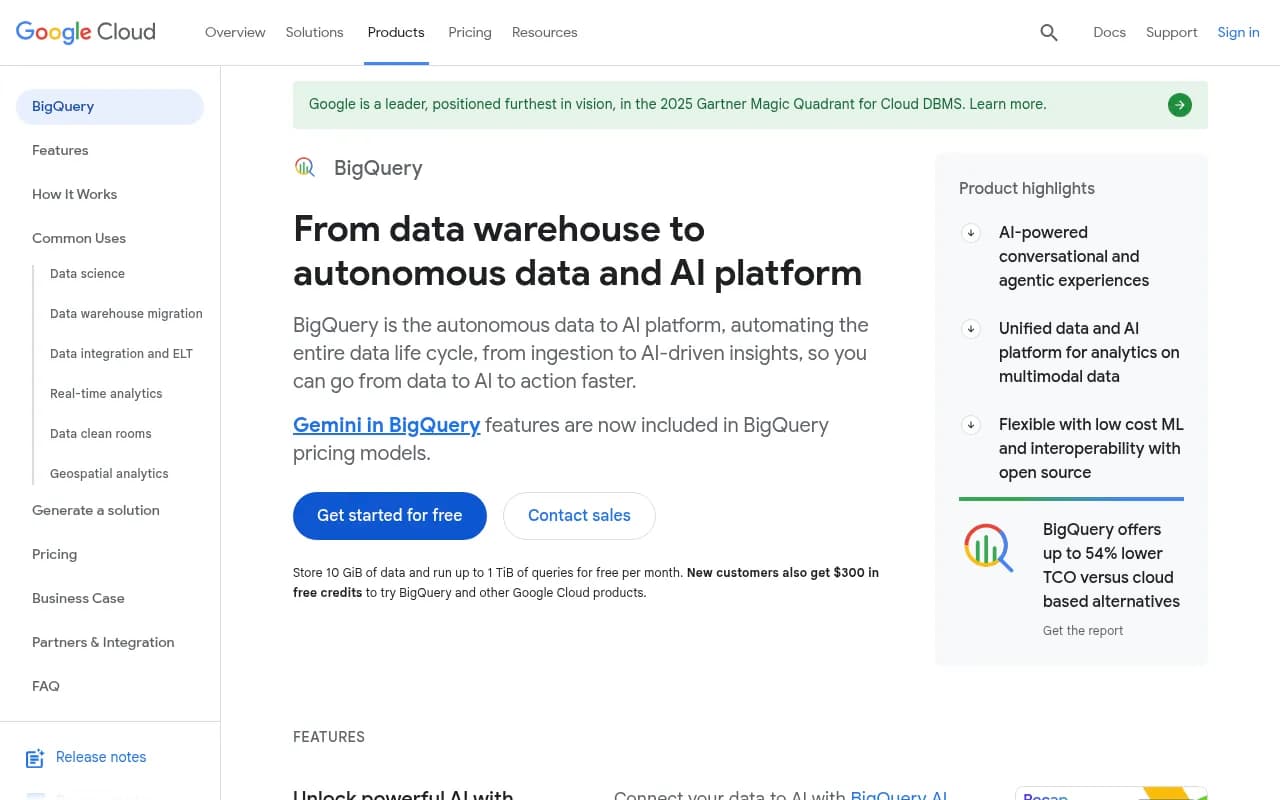
Run super-fast SQL queries on massive datasets. Process petabytes of data with built-in machine learning and real-time analytics capabilities.
Key Takeaways:
- Fully serverless data warehouse with automatic scaling and no infrastructure to manage — just run SQL queries on petabytes of data
- Native AI integration with Gemini, built-in ML models, and vector search for generative AI applications
- Decoupled storage and compute architecture keeps costs low while handling massive workloads
- Strong ecosystem with 100+ partner integrations for ETL, BI, governance, and ML tools
- Free tier includes 10 GiB storage and 1 TiB queries per month; new customers get $300 in credits
Google Cloud BigQuery is Google's fully managed, serverless enterprise data warehouse built for organizations that need to analyze massive datasets without managing infrastructure. Launched in 2011 and continuously evolved, BigQuery now serves tens of thousands of customers — from startups to Fortune 500 companies like Mattel, Deutsche Telekom, and Shopify. It's positioned as an "autonomous data to AI platform" that handles the entire data lifecycle from ingestion to AI-driven insights. In the 2025 Gartner Magic Quadrant for Cloud DBMS, Google is positioned as a Leader, furthest in vision.
What sets BigQuery apart from traditional data warehouses (and competitors like Snowflake, Databricks, or Redshift) is its serverless architecture. You don't provision clusters, tune performance, or manage capacity — BigQuery automatically scales compute resources based on query complexity and data volume. Storage and compute are decoupled, so you only pay for what you use. This makes it ideal for organizations with unpredictable workloads or those who want to avoid the operational overhead of managing a data warehouse.
BigQuery's real differentiator in 2026 is its deep integration with Google's AI stack. With native Gemini AI features, you can run conversational queries, generate SQL from natural language, and build generative AI applications directly on your data warehouse. Built-in machine learning lets you train models using SQL (no Python required), and vector search capabilities support RAG (retrieval-augmented generation) workflows for LLM applications. This positions BigQuery not just as a data warehouse, but as a complete data-to-AI platform.
Serverless Architecture and Performance
BigQuery's architecture is built on Google's internal technologies — Borg (cluster management), Colossus (distributed storage), Jupiter (networking), and Dremel (query execution). When you run a query, BigQuery dynamically allocates compute resources (called "slots") across thousands of machines, executes the query in parallel, and returns results in seconds — even on petabyte-scale datasets. This is fundamentally different from traditional data warehouses where you provision fixed-size clusters.
Storage is columnar and compressed, reducing costs by up to 80% compared to uncompressed formats. Data is automatically replicated across multiple zones for durability, and you can enable cross-region replication for disaster recovery. BigQuery also supports managed disaster recovery with automatic failover in case of a regional outage — a feature most competitors charge extra for.
Performance is consistently fast because BigQuery uses a distributed execution model. Queries are broken into stages, each stage runs on hundreds or thousands of workers, and results are aggregated in real time. For most queries, you'll see sub-second latency on datasets with billions of rows. If you need guaranteed performance, you can reserve dedicated slots (compute capacity) instead of using the on-demand model.
Built-in AI and Machine Learning
BigQuery AI is where the platform really shines in 2026. You can train, evaluate, and deploy machine learning models directly in BigQuery using SQL — no need to export data to a separate ML platform. Supported models include linear regression, logistic regression, k-means clustering, time series forecasting (including the pre-trained TimesFM model), and more. Models integrate with Vertex AI Model Registry for advanced MLOps workflows.
Generative AI capabilities are built into SQL with native AI functions. You can summarize text, perform sentiment analysis, generate embeddings, and run vector search — all without moving data out of BigQuery. For example, you can generate embeddings for product descriptions, store them in BigQuery, and use vector search to power semantic search or recommendation engines. This is critical for building RAG applications where you need to retrieve relevant context from large datasets to feed into LLMs.
BigQuery also includes AI agents that automate common workflows. The Data Engineering Agent helps with data preparation, error detection, and pipeline building. The Data Science Agent streamlines the ML lifecycle from exploratory data analysis to running predictions. The Conversational Analytics Agent lets non-technical users ask questions in plain language and get answers without writing SQL. These agents are powered by Gemini and included in BigQuery pricing — no separate AI platform subscription required.
Open Formats and Interoperability
BigQuery supports Apache Iceberg tables through BigLake, making it easy to work with open table formats. You can run SQL queries on Iceberg tables stored in Google Cloud Storage, AWS S3, or Azure Blob Storage without copying data into BigQuery. This is important for organizations that want to avoid vendor lock-in or need to share data across multiple platforms.
You can also run serverless Spark jobs alongside SQL workloads in BigQuery. Spark jobs share the same security, governance, and metadata as SQL queries, so you don't need to manage separate infrastructure. This makes BigQuery a true lakehouse platform — combining the flexibility of a data lake with the performance and governance of a data warehouse.
BigQuery integrates with 100+ partner tools for ETL (Fivetran, Matillion, Airbyte), BI (Tableau, Looker, Power BI), governance (Alation, Collibra), and ML (Databricks, DataRobot). It also has native connectors for Google Workspace, Google Ads, Google Analytics 4, and other Google Cloud services. For custom integrations, BigQuery provides REST and gRPC APIs, client libraries in Python, Java, Node.js, Go, and more, plus JDBC/ODBC drivers for legacy tools.
Real-Time Analytics and Streaming
BigQuery supports real-time data ingestion through multiple methods. The Storage Write API lets you stream data into BigQuery with low latency and high throughput. Pub/Sub BigQuery subscriptions automatically write Pub/Sub messages to BigQuery tables as they arrive. For CDC (change data capture), Datastream replicates changes from MySQL, PostgreSQL, Oracle, and SQL Server databases into BigQuery in near real-time.
BigQuery continuous queries let you build streaming pipelines using SQL. You can define a query that runs continuously, processes new data as it arrives, and writes results to a destination table. This is useful for real-time dashboards, alerting, or feeding data into downstream systems. Shopify uses this feature to improve consumer search intent with real-time ML models.
For more complex streaming workloads, you can use Dataflow (Google's managed Apache Beam service) or Managed Service for Apache Kafka. Both integrate natively with BigQuery, so you can build end-to-end streaming pipelines without managing infrastructure.
Data Governance and Security
BigQuery provides enterprise-grade governance through Dataplex Universal Catalog. All metadata, data profiling, data quality checks, and lineage tracking are integrated into the BigQuery experience. You can use semantic search (powered by Gemini) to discover datasets, automatically document tables and columns, and track data lineage across your entire data estate.
Security is built-in at every layer. Data is encrypted at rest and in transit by default. You can use customer-managed encryption keys (CMEK) for additional control. BigQuery integrates with Google Cloud IAM for fine-grained access control — you can grant permissions at the project, dataset, table, or even column level. Row-level security lets you filter data based on user attributes, and column-level security masks sensitive fields.
For compliance, BigQuery supports HIPAA, PCI-DSS, SOC 2, ISO 27001, and other certifications. You can enable audit logs to track all queries, data access, and configuration changes. BigQuery also supports VPC Service Controls to restrict data exfiltration and Private Service Connect for private connectivity.
Data Clean Rooms and Collaboration
BigQuery data clean rooms let you collaborate with partners without sharing raw data. You create a low-trust environment where both parties can run queries on shared datasets, but the underlying data never leaves your control. BigQuery enforces privacy-enhancing transformations (like aggregation or anonymization) and monitors usage to detect privacy threats. This is useful for advertising, healthcare, and financial services use cases where data sharing is restricted by regulation or competitive concerns.
Geospatial Analytics
BigQuery has native support for geospatial data types and functions. You can store and query geographic data (points, lines, polygons) using SQL, perform spatial joins, calculate distances, and visualize results on a map. BigQuery integrates with Google Earth Engine for planetary-scale satellite imagery analysis, and with Google Maps Platform for Places, Routes, and Street View data. This makes it a powerful platform for logistics, real estate, environmental monitoring, and urban planning use cases.
Migration and Tooling
BigQuery Migration Services provides a comprehensive set of tools for migrating from legacy data warehouses (Teradata, Netezza, Oracle) or cloud competitors (Snowflake, Redshift, Databricks). The service includes a free migration assessment, an interactive SQL translator that converts queries from other SQL dialects to BigQuery SQL, and automated schema and data migration. Google also offers migration incentives (credits or discounts) for qualifying customers.
For development, BigQuery integrates with Colab Enterprise notebooks (Jupyter-based), BigQuery DataFrames (a Pandas-like API for Python), and dbt for data transformation workflows. You can also use the BigQuery Studio UI for interactive query development, or connect via the bq command-line tool.
Who Is BigQuery For?
BigQuery is best suited for:
- Enterprise data teams (50+ people) managing petabyte-scale datasets across multiple business units. If you're running a traditional data warehouse and hitting performance or cost limits, BigQuery is a strong migration target.
- Data science and ML teams who want to train models on large datasets without moving data to a separate platform. The built-in ML and Gemini AI features make it easy to go from data to insights to production models.
- SaaS companies and digital platforms with high-volume, unpredictable workloads. The serverless model means you don't overprovision capacity, and you only pay for what you use.
- Organizations building generative AI applications that need vector search, embedding generation, and RAG workflows. BigQuery's native AI functions and Gemini integration make it a strong choice for AI-first companies.
- Multi-cloud or hybrid environments where you need to query data across Google Cloud, AWS, and Azure. BigQuery's support for external tables and Iceberg makes this easier than most competitors.
BigQuery is not ideal for:
- Small teams or startups with datasets under 100 GB. The free tier is generous, but if you're just getting started, a simpler tool like PostgreSQL or a lightweight BI platform might be more appropriate.
- Transactional workloads (OLTP). BigQuery is optimized for analytical queries (OLAP), not high-frequency inserts, updates, or deletes. Use Cloud SQL or Spanner for transactional workloads.
- Teams that need full control over infrastructure. BigQuery is serverless by design — you can't SSH into servers or tune low-level performance settings. If you need that level of control, consider self-managed options like Databricks or Trino.
Integrations and Ecosystem
BigQuery has one of the richest ecosystems in the data warehouse space. Key integrations include:
- ETL/ELT: Fivetran, Matillion, Airbyte, Stitch, Talend, Informatica, Snaplogic, dbt, Datastream (CDC)
- BI and Visualization: Looker (Google's BI platform), Tableau, Power BI, Qlik, Sigma, ThoughtSpot, Mode, Metabase
- Data Governance: Alation, Collibra, Dataplex, Privacera, Immuta
- ML and Advanced Analytics: Vertex AI, Databricks, DataRobot, Dataiku, Hex, Deepnote, Neo4j
- Data Quality: Monte Carlo, Soda, Anomalo, Datadog, New Relic
- Reverse ETL: Census, Hightouch, Rudderstack
- Streaming: Pub/Sub, Dataflow, Kafka (via Confluent or Aiven)
BigQuery also provides REST and gRPC APIs, client libraries in 10+ languages, JDBC/ODBC drivers, and a BigQuery MCP server for custom agent development. The API is well-documented and widely used — many SaaS platforms offer native BigQuery export as a feature.
Pricing and Value
BigQuery pricing is based on four components:
-
Compute (analysis): On-demand pricing starts at $6.25 per TiB scanned (first 1 TiB per month is free). For predictable workloads, you can buy reserved slots (capacity-based pricing) starting at $0.04 per slot hour. BigQuery Editions (Standard, Enterprise, Enterprise Plus) bundle compute, Gemini AI features, and additional capabilities.
-
Storage: Logical storage (uncompressed) costs $0.01 per GiB per month. Physical storage (compressed, for data older than 90 days) costs $0.02 per GiB per month. The first 10 GiB is free each month.
-
Data ingestion: Batch loading from Cloud Storage is free. Streaming inserts cost $0.01 per 200 MiB. The Storage Write API costs $0.025 per GiB (first 2 TiB per month are free).
-
Data extraction: Batch export to Cloud Storage is free. Streaming reads via the Storage Read API cost $1.10 per TiB.
New customers get $300 in free credits to try BigQuery and other Google Cloud products. The free tier (10 GiB storage, 1 TiB queries per month) is permanent and doesn't expire.
Compared to Snowflake or Databricks, BigQuery is often 30-50% cheaper for similar workloads, especially if you optimize query patterns and use compressed storage. An ESG study found BigQuery offers up to 54% lower TCO versus cloud-based alternatives. The serverless model also eliminates the cost of idle capacity — you only pay when queries are running.
Strengths
- True serverless architecture: No clusters to manage, automatic scaling, and you only pay for what you use. This is a huge operational advantage over competitors.
- Best-in-class AI integration: Native Gemini AI, built-in ML models, vector search, and AI agents make it the strongest data-to-AI platform in 2026.
- Performance at scale: Consistently fast queries on petabyte-scale datasets, thanks to Google's distributed infrastructure.
- Open formats and interoperability: Support for Iceberg, Spark, and 100+ partner integrations means you're not locked into Google's ecosystem.
- Generous free tier: 10 GiB storage and 1 TiB queries per month is enough for small projects or proof-of-concepts.
Limitations
- Not ideal for OLTP workloads: BigQuery is optimized for analytics, not transactional queries. If you need high-frequency inserts/updates, use a different database.
- Learning curve for cost optimization: On-demand pricing can get expensive if you're not careful about query patterns. You need to understand partitioning, clustering, and query optimization to keep costs low.
- Less control than self-managed options: Serverless means you can't tune low-level performance settings or customize the execution engine. This is a trade-off for simplicity.
Bottom Line
BigQuery is the best choice for organizations that want a fully managed, serverless data warehouse with deep AI integration. If you're migrating from a legacy data warehouse, building generative AI applications, or need to analyze petabyte-scale datasets without managing infrastructure, BigQuery is a strong pick. The combination of serverless architecture, built-in ML, Gemini AI, and open format support makes it the most complete data-to-AI platform in 2026. It's especially compelling for teams that want to move fast and avoid the operational overhead of managing clusters, tuning performance, or integrating separate AI platforms.
Similar and alternative tools to Google Cloud BigQuery