Key takeaways
- Promptwatch Data shows Meta-WebIndexer going from roughly 2.2% of tracked AI crawler requests in mid-July 2026 to a peak of 37.8% on August 9, 2026. That is about 1 in 50 requests to more than 1 in 3.
- Meta runs several crawlers with separate user-agent tokens. Blocking
meta-externalagent(training) does not blockmeta-webindexer(search indexing), and the reverse is also true. - Meta says allowing Meta-WebIndexer helps it cite and link to your content in Meta AI's responses. Blocking it likely means fewer citations there, though that is an inference from Meta's wording.
- Some Meta fetchers, like Meta-ExternalFetcher and FacebookExternalHit, can bypass robots.txt. If you want them gone, you need server, CDN, or WAF rules.
- Verify traffic by IP range or ASN (AS32934), not just by user-agent string, because user agents are easy to fake.
What actually happened
Promptwatch published a short data report on August 10, 2026 that got a lot of attention from people who watch server logs. In mid-July, Meta-WebIndexer made up about 2.2% of the AI crawler requests in Promptwatch's logs. The share sat around 2% until July 17, spiked to roughly 23% between July 20 and 22, then climbed again from August 5 to a peak of 37.8% on August 9. August 10 was a partial day.
That is a roughly 17x increase from a single crawler in under a month, and it made Meta-WebIndexer the heaviest AI crawler in that data set. You can see the daily chart in Promptwatch's Meta-WebIndexer report.
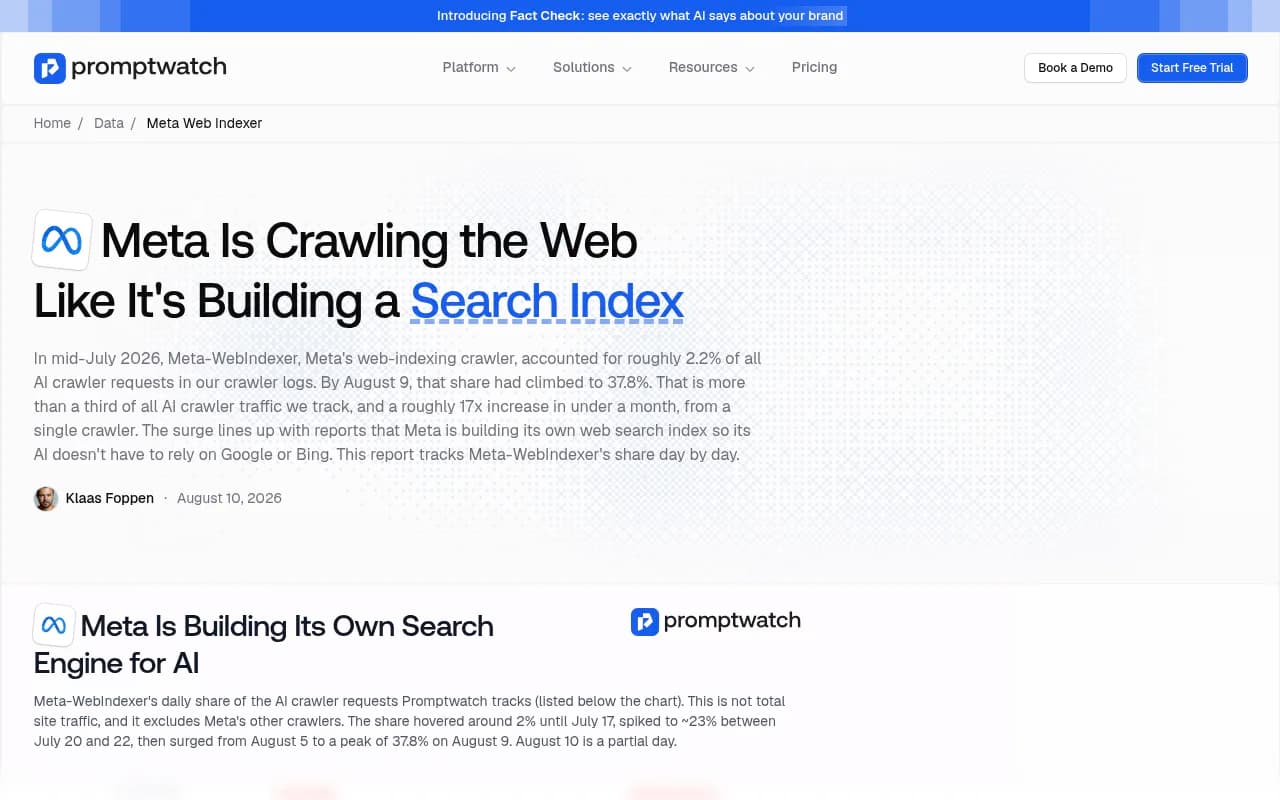
Two caveats before you panic or celebrate. First, the percentage is a share of tracked AI crawler requests, not of total site traffic. Second, the report links the surge to reports that Meta is building its own web search index so Meta AI does not depend on Google or Bing. That is an inference. Meta has not confirmed it. What Meta does document is the purpose of the crawler: improving Meta AI search result quality.
The Meta crawler family, and which one is which
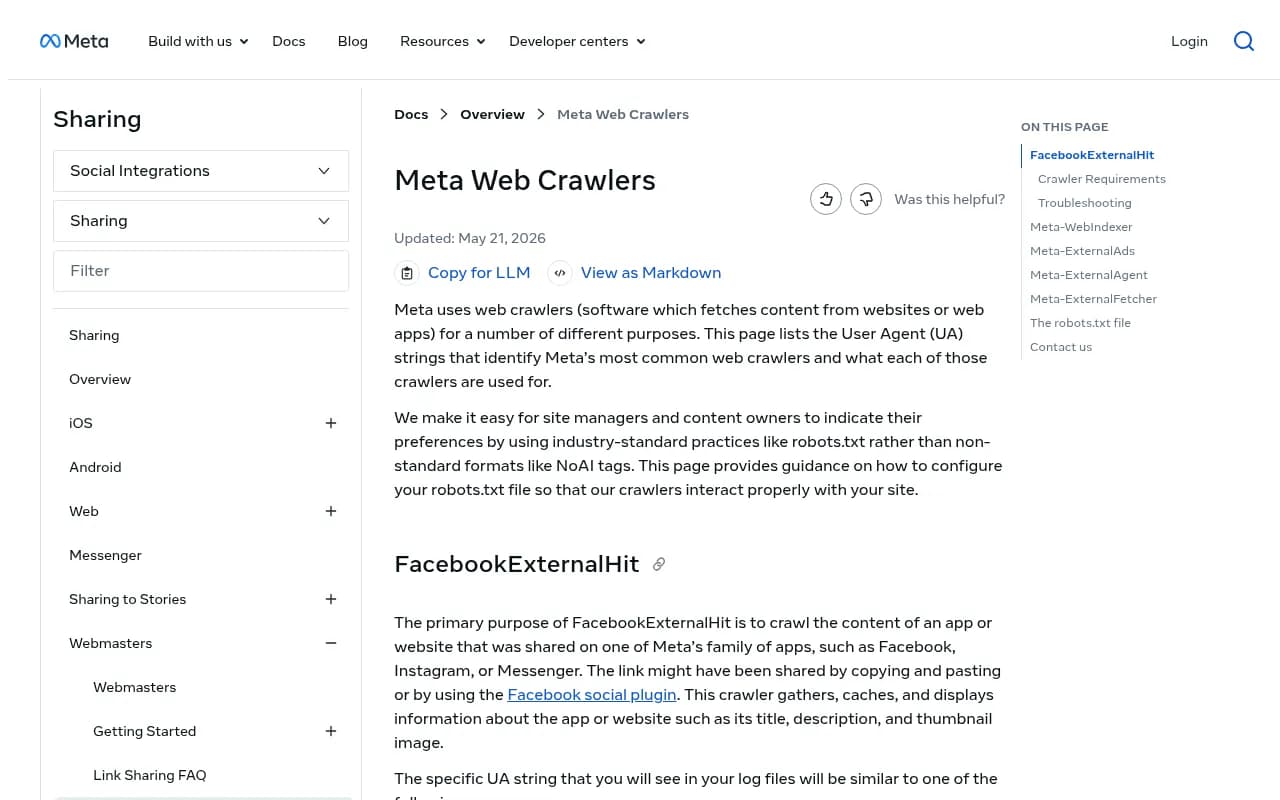
Most of the confusion in forums comes from lumping every Meta bot together. Meta's own web crawler documentation, last updated May 21, 2026, lists them separately.
| Crawler | User-agent token | What it does | Respects robots.txt? |
|---|---|---|---|
| Meta-WebIndexer | meta-webindexer/1.1 | Improves Meta AI search quality; lets Meta cite and link to your content | Yes |
| Meta-ExternalAgent | meta-externalagent/1.1 | Trains foundation AI models or indexes content to improve products | Yes |
| Meta-ExternalAds | meta-externalads/1.1 | Crawls for advertising and business products | Yes |
| Meta-ExternalFetcher | meta-externalfetcher/1.1 | Fetches individual links at a user's request, including agentic tasks | May bypass |
| FacebookExternalHit | facebookexternalhit/1.1 | Builds link previews for Facebook, Instagram, Messenger shares | May bypass for security checks |
Promptwatch's report also counts FacebookBot among the Meta crawlers, which Meta's page does not list. If you see it in your logs, treat it as part of the same family but check it separately.
The practical point: because each bot has its own token, you can allow indexing and refuse training, or the reverse. Meta-WebIndexer is the one that matters if you care about being cited inside Meta AI answers. The ppc.land write-up of the surge makes the same point about separate tokens.
Step 1: check your logs
Start with whatever you already have. Raw access logs, a CDN log export, or a hosting panel will do. You are looking for the tokens above.
Quick grep on Nginx or Apache logs
# Count requests per Meta crawler over the current log file
grep -iE "meta-webindexer|meta-externalagent|meta-externalfetcher|meta-externalads|facebookexternalhit|facebookbot" access.log \
  | grep -ioE "meta-[a-z]+|facebookexternalhit|facebookbot" \
  | tr 'A-Z' 'a-z' | sort | uniq -c | sort -rn
# Top paths hit by Meta-WebIndexer
grep -i "meta-webindexer" access.log | awk '{print $7}' | sort | uniq -c | sort -rn | head -25
# Hourly request pattern, to spot bursts
grep -i "meta-webindexer" access.log | awk '{print substr($4,2,14)}' | sort | uniq -c
The third command is the one that tells you whether this is a steady drip or a burst. Several site owners reported bursts, not drips.
What to measure
- Requests per day for each Meta token, compared with the same numbers a month ago
- Bandwidth, not just request count. One wiki owner measured 230,743 requests and 12.15 GB from
meta-webindexerin about a day and a half in late July 2026, on a site with only 4,814 articles. - Whether the bot ever requests
/robots.txt. In that same case, not one of the 230,743 requests fetched it. - Error rates (429, 5xx). If the crawler is causing errors, you have a capacity problem, not just a statistics curiosity.
- Which URL patterns it hits. Faceted navigation, calendar pages, and search results pages tend to absorb the most wasted crawl.
Cost matters if you pay per request
The wiki owner above reported roughly £25 a month in extra AWS charges. That is small in absolute terms, and it is exactly the kind of cost a volunteer-run site notices. A separate Reddit thread reported 7.9 million hits and 900+ GB in 30 days, though the poster attributed that one to Meta-ExternalAgent, not Meta-WebIndexer. Same company, different bot, same lesson: read the user agent before you decide what to block.
Step 2: verify it is really Meta
User-agent strings are trivially spoofed, so a log full of meta-webindexer does not prove anything by itself. Check the source IPs.
# Look up who owns an IP
whois 203.0.113.10 | grep -iE "netname|origin|descr"
In the wiki case, the registry listed the range as netname FB-BLOCK, description "Meta Route", announced by AS32934, which is Facebook, Inc. That is what a real Meta crawler looks like. If the IP does not resolve to Meta's ASN, you are looking at an impostor, and the right response is a WAF rule rather than a robots.txt line.
Meta itself recommends allow-listing either its user-agent strings or, more securely, its IP addresses. Use the IP route if you need to be strict.
If you would rather not do this by hand, tools built for crawler analytics do the IP verification for you. Promptwatch has AI crawler logs that check each visit against the operator's published IP ranges, so spoofed bots are filtered out, and it shows which pages each crawler read and which errors it hit.

For a more developer-oriented angle, a log analyzer or crawler such as [tool:jetoctopus] covers large-site log analysis, and [tool:screaming-frog] can help you see what a crawler would find on your own pages.
Step 3: decide what you want
There is no universally right answer. It depends on whether Meta AI is a surface you care about and whether your infrastructure can take the load.
Option A: allow Meta-WebIndexer
Meta says allowing the crawler helps it cite and link to your content in Meta AI's responses. If your audience uses Meta AI inside Facebook, Instagram, WhatsApp, or Messenger, being indexed is a precondition for being cited. The Promptwatch report frames it the same way: if Meta ships its own search engine, whether your content was crawled during the build-out determines whether you can show up in it.
I would lean toward allowing it if you are a publisher, ecommerce brand, or a B2C company, provided it is not hurting your server.
Option B: allow but throttle
If the volume is the issue, you have a few moves that keep you in the index:
- Add a
Crawl-delayline. Not every crawler honors it, and Meta's documentation does not promise it, so treat it as a hint. - Rate limit by ASN or user agent at your CDN. A 429 response tells a well-behaved crawler to back off.
- Fix the waste. Block internal search, faceted URLs, and infinite calendars for all bots, which helps every crawler and your own crawl budget.
- Serve cacheable responses so repeated hits cost you almost nothing.
Option C: block it
If you do not want to be in Meta AI results, or the cost is unjustifiable, blocking is a one-line robots.txt change.
# Block Meta's search indexer
User-agent: meta-webindexer
Disallow: /

# Block Meta's training crawler (separate token)
User-agent: meta-externalagent
Disallow: /
Meta notes that crawlers may cache robots.txt for up to 24 hours, so give it a day before you decide it did not work. Meta's contact for crawler questions is [email protected].
Be honest with yourself about the tradeoff. Blocking Meta-WebIndexer probably means you will not be cited in Meta AI. That is my reading of Meta's wording, not a documented guarantee.
Option D: mix and match
This is where the separate tokens earn their keep. A common pattern is to allow the indexer, which can send citations, and refuse the training crawler.
User-agent: meta-webindexer
Allow: /

User-agent: meta-externalagent
Disallow: /
Whether that suits you depends on your position on training data, which is a business and legal question rather than a technical one.
The traps that catch people
| Mistake | Why it bites |
|---|---|
Blocking meta-externalagent and assuming Meta is gone | meta-webindexer is a different token and keeps crawling |
| Relying on robots.txt for Meta-ExternalFetcher | Meta says it may bypass robots.txt; you need server, CDN, or WAF rules |
| Blocking FacebookExternalHit | Link previews on Facebook, Instagram, and Messenger stop working |
| Trusting the user agent | Spoofing is easy; verify by IP or ASN AS32934 |
| Blocking by ASN wholesale | You may block legitimate link-preview fetches along with indexing |
| Changing robots.txt and checking in an hour | Meta may cache the file for up to 24 hours |
The FacebookExternalHit one is worth dwelling on. It has requirements of its own: gzip and deflate support, Open Graph tags inside the first 1 MB, and a response within a few seconds. If you rate limit too hard and it times out, your shared links will look broken on social platforms. You can test with Meta's curl simulation and force a re-crawl with the Sharing Debugger.
How this fits into the bigger crawler picture
Meta-WebIndexer's surge is one part of a shifting crawler mix. Promptwatch's AI crawler traffic report covers IP-verified weekly requests from OpenAI, Anthropic, Google, Perplexity, and Mistral from June 8 to September 6, 2026. OpenAI's share of verified requests there fell from 94.8% in the week of June 8 to 79.8% in the week ending September 6. I did not confirm whether that report breaks out Meta, so do not read it as Meta data.
The report's advice is still useful here: compare your own logs with the overall mix. A provider that is big in the mix but near zero in your logs suggests you are blocked or unreachable for that provider. For Meta, the same logic applies in reverse. If you wanted to be indexed and see nothing from meta-webindexer, check your robots.txt, your firewall, and your CDN bot rules.
This is also a reminder that crawling is not citing. A bot reading your pages is a necessary step, not proof that Meta AI will mention you. Promptwatch Data's ChatGPT citation share by content type report shows how much the content type matters once a model has crawled you. Product pages led at 22.4% of ChatGPT citations from Sep 28 to Oct 4, 2026. Meta AI will have its own pattern, and nobody has published it yet.
Step 4: build a lightweight monitoring habit
One-off log checks go stale fast. The Meta numbers moved from 2% to 23% to 38% over a few weeks, which is faster than most teams review logs.
- Set a weekly report of requests and bytes per AI crawler token.
- Alert when any single bot exceeds a share you consider normal, say 20% of bot requests or a bandwidth threshold.
- Review robots.txt quarterly. New tokens appear, and Meta added documented crawlers such as Meta-ExternalAds that you may not have rules for.
- Track outcomes, not just inputs. Look at whether AI referrals and citations appear after you open the door.
For the outcome side, a few options in the catalog help. [tool:siteline-ai] focuses on AI agent traffic analytics, [tool:scriptbee] advertises AI crawler monitoring, and [tool:xseek] pairs rank tracking with GPTBot monitoring. Promptwatch goes further by connecting crawler logs to citations and visitor analytics, so you can tell an access problem from a content problem. Its Agentic Readiness Check and AI Crawler URL Inspector are free ways to see which crawlers can read a given page. The AI bots directory lists 400+ crawlers with robots.txt guidance if you want to check other tokens.
If you are comparing options in this category, the directory at bestgeosoftware.com lists GEO platforms side by side.
| Need | Option |
|---|---|
| Raw log analysis on a large site | [tool:jetoctopus] or your own grep/BigQuery pipeline |
| IP-verified AI crawler logs plus citations and traffic | [tool:promptwatch] |
| AI agent traffic analytics | [tool:siteline-ai] |
| Simple AI crawler monitoring | [tool:scriptbee] |
| Crawling your own site to see what bots see | [tool:screaming-frog] |
A sensible default for most sites
If I had to give one recommendation without knowing your site, it would be this:
- Pull 30 days of logs and count requests and bytes per Meta token.
- Verify a sample of IPs against AS32934.
- Fix crawl waste (faceted URLs, internal search) for all bots.
- Allow
meta-webindexerif you want a shot at Meta AI citations, and rate limit at the CDN if load is a problem. - Decide separately on
meta-externalagentbased on your stance on training. - Use CDN or WAF rules, not robots.txt, for the fetchers that may bypass it.
- Recheck in two weeks. The numbers have moved fast and may keep moving.
Meta might launch a search product, or it might not. The data says the crawling is real and at scale. What you do about it is a business call, and you can only make it well if you know what is actually hitting your server.
If you want help auditing crawler access as part of a wider AI search plan, 1001 SEO Media runs technical SEO and generative engine optimization work for brands, and the team uses Promptwatch for AI visibility.