MailerSend Review 2026
Email delivery service combining transactional and marketing capabilities with robust API, templates, analytics, and high deliverability rates.
Key Takeaways:
• Best for: Developers, SaaS companies, and agencies needing reliable transactional email delivery with easy API integration and scalable pricing • Standout features: 7 official SDKs, inbound email routing, multiple domain management, drag-and-drop template builder, and real-time analytics • Pricing: Free tier with 500 emails/month, paid plans from $7/month (5,000 emails), scales to enterprise with dedicated IPs • Limitations: Fewer marketing automation features than dedicated marketing platforms, SMS credits limited on lower tiers • Bottom line: Excellent choice for transactional email with developer-first approach, competitive pricing, and strong deliverability rates
MailerSend is a transactional email delivery platform launched by the team behind MailerLite, one of the most popular email marketing tools. While MailerLite focuses on marketing campaigns and newsletters, MailerSend was built specifically for developers and product teams who need to send transactional emails—password resets, order confirmations, shipping notifications, account alerts, and other automated messages triggered by user actions.
The platform has quickly gained traction among startups, SaaS companies, and agencies, earning High Performer badges on G2 across multiple categories. It's designed to be the middle ground between basic SMTP services and enterprise-grade email infrastructure—powerful enough for serious applications but accessible enough for small teams and solo developers.
MailerSend targets developers building web applications, SaaS founders scaling their products, agencies managing multiple client domains, and small-to-medium businesses that need reliable transactional email without the complexity of enterprise solutions. The platform emphasizes ease of integration, transparent pricing, and deliverability, with a 99.5% uptime SLA and 24/7 technical support.
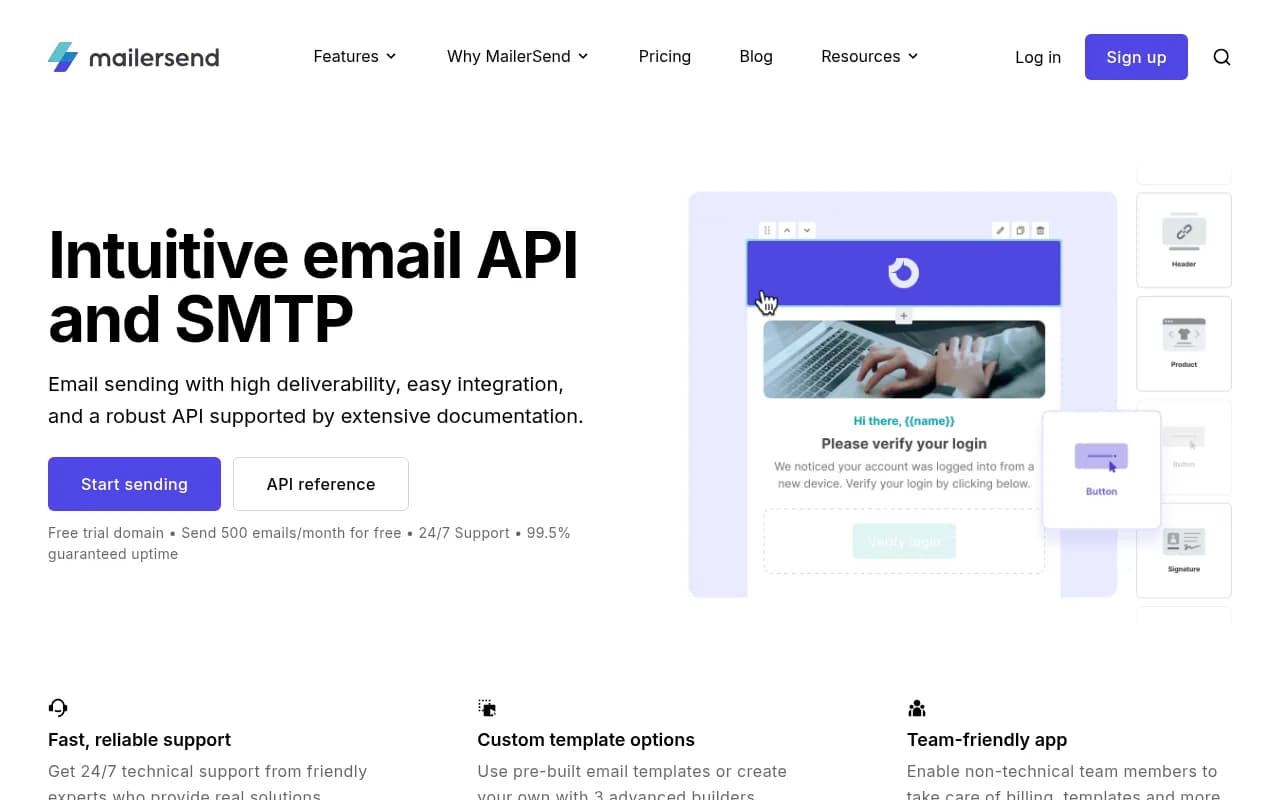
Email API & SMTP Relay MailerSend offers both a RESTful API and SMTP relay for sending emails. The API is well-documented with interactive examples and supports all major programming languages through official SDKs: Node.js, PHP, Laravel, Python, Ruby, Go, and Java. Each SDK is actively maintained on GitHub and includes comprehensive code samples. The SMTP relay option lets you plug MailerSend into existing applications without code changes—just update your SMTP credentials and start sending. This is particularly useful for WordPress sites, legacy applications, or tools that don't support custom APIs. The platform handles authentication, rate limiting, and retry logic automatically, so you don't have to build that infrastructure yourself.
Dynamic Email Templates MailerSend includes three template builders: a drag-and-drop visual editor for non-technical users, an HTML editor for developers who want full control, and a rich text editor for simple text-based emails. Templates support dynamic variables (like {{user.name}} or {{order.total}}) that get replaced with actual data when you send. You can create reusable templates, version them, and manage them through the web interface or API. The template system also supports conditional content blocks, so you can show/hide sections based on user data. For teams, this means marketers can design templates without bothering developers, and developers can trigger sends via API without worrying about email design.
Inbound Email Routing Unlike many transactional email services that only handle outbound sending, MailerSend includes inbound email routing. You can receive emails at your domain and route them to webhooks, forward them to other addresses, or process them programmatically. This is useful for building features like support ticket systems (replies go to your app), email-to-task converters, or any workflow that needs to parse incoming messages. The inbound routing includes spam filtering, attachment handling, and full header access. You configure routes through the dashboard and receive parsed email data as JSON via webhook.
Multiple Domain Management MailerSend lets you add and verify multiple sending domains under one account. Each domain gets its own DKIM, SPF, and DMARC records for authentication. This is critical for agencies managing client emails, SaaS companies with white-label products, or businesses running multiple brands. You can assign different team members access to specific domains, track analytics per domain, and maintain separate sender reputations. The domain verification process is straightforward—add DNS records, wait for propagation, and MailerSend confirms authentication. The platform also provides a trial domain for testing before you set up your own.
Email Verification & Validation Built-in email verification helps you validate email addresses before sending, reducing bounces and protecting your sender reputation. You can verify emails individually through the dashboard or in bulk via API. The verification checks syntax, domain validity, mailbox existence, and identifies disposable/temporary email addresses. Each plan includes verification credits (10 on Free, 100 on Hobby, 400 on Professional). This feature is particularly valuable for user registration flows, lead capture forms, or cleaning imported contact lists.
Analytics & Activity Logs MailerSend tracks every email with detailed analytics: delivered, opened, clicked, bounced, complained, and unsubscribed. The dashboard shows real-time metrics, delivery rates, and engagement trends. You can drill down to individual messages, see full SMTP logs, and export data for external analysis. Webhook support lets you receive real-time notifications when events occur (like a user clicks a link or an email bounces), so you can trigger follow-up actions in your application. API logs are retained for 7 days on standard plans and 14 days on Enterprise, giving you visibility into every API request and response.
Deliverability Features MailerSend emphasizes deliverability with dedicated infrastructure, automatic IP warm-up, bounce handling, and suppression list management. The platform monitors sender reputation, provides deliverability tips in the dashboard, and offers dedicated IPs on Enterprise plans for high-volume senders who want full control over their reputation. The 99.5% uptime guarantee is backed by redundant infrastructure and real-time monitoring. MailerSend also handles unsubscribe links automatically (required by law in many jurisdictions) and manages bounce/complaint suppression to prevent sending to invalid addresses.
Team Collaboration & User Management The platform includes role-based access control, letting you invite team members with different permission levels: Admin, Developer, or Billing. Non-technical team members can manage templates, view analytics, and handle billing without accessing API keys or domain settings. This separation of concerns is useful for agencies where account managers need visibility but shouldn't touch technical configurations. Activity logs show who made what changes, providing an audit trail for compliance and troubleshooting.
Integrations & Ecosystem MailerSend integrates with popular platforms through official plugins and third-party tools. Notable integrations include Firebase (for serverless email sending), Supabase (for backend-as-a-service projects), WordPress (official SMTP plugin), Zapier (for no-code workflows), and Slack (for delivery notifications). The platform also works with n8n and Relay.app for workflow automation. All integrations are documented with setup guides and code examples. The API-first design means you can integrate MailerSend with virtually any tool that supports webhooks or REST APIs.
SMS Sending (Beta) MailerSend recently added SMS sending capabilities, allowing you to send transactional text messages alongside emails. SMS credits are included in paid plans (100-150 per month depending on tier) with overage pricing at $1.40 per 100 messages. This is useful for two-factor authentication, delivery alerts, or any notification where SMS is more reliable than email. The SMS API follows the same structure as the email API, making it easy to add SMS to existing workflows.
Who Is It For
MailerSend is ideal for developers building SaaS applications who need a reliable, well-documented email API without the complexity of managing their own SMTP infrastructure. If you're launching a product and need to send password resets, order confirmations, or account notifications, MailerSend handles the infrastructure, deliverability, and compliance so you can focus on your core product.
It's also a strong fit for digital agencies managing 5-50 client websites or applications. The multiple domain feature lets you keep client emails separate, assign team access per domain, and maintain individual sender reputations. The transparent pricing and free tier make it easy to start small and scale as client needs grow.
Small-to-medium SaaS companies sending 10,000-500,000 emails per month will find the pricing competitive and the feature set comprehensive. You get enterprise-grade deliverability, detailed analytics, and 24/7 support without the six-figure contracts required by enterprise email providers.
MailerSend is less suitable for companies primarily focused on marketing campaigns, newsletters, or drip sequences. While it can handle these use cases, dedicated marketing platforms like MailerLite, Mailchimp, or ActiveCampaign offer more sophisticated segmentation, A/B testing, and automation workflows. MailerSend's strength is transactional email—messages triggered by user actions, not bulk marketing sends.
Large enterprises sending millions of emails per day with complex compliance requirements should consider the Enterprise plan, which includes dedicated IPs, extended log retention, and priority support. However, if you need advanced features like predictive sending, AI-powered optimization, or deep CRM integrations, you might be better served by enterprise-focused platforms like SendGrid or Amazon SES with additional tooling.
Integrations & Ecosystem
MailerSend provides 7 official SDKs maintained on GitHub: Node.js, PHP, Laravel (separate from PHP), Python, Ruby, Go, and Java. Each SDK is actively updated and includes comprehensive documentation with code examples. The Laravel integration is particularly polished, leveraging Laravel's native mail system so you can use MailerSend with minimal configuration changes.
The platform integrates with Firebase for serverless email sending in Firebase Functions, Supabase for backend-as-a-service projects, and WordPress through an official SMTP plugin. For no-code workflows, Zapier integration lets you trigger emails from 5,000+ apps without writing code. Slack integration sends real-time notifications when emails are delivered, opened, or bounced.
The REST API is well-documented at developers.mailersend.com with interactive examples, authentication guides, and rate limit details. Webhook support lets you receive real-time events (delivered, opened, clicked, bounced, complained, unsubscribed) at your endpoint, enabling you to trigger follow-up actions in your application.
MailerSend also supports standard SMTP, so it works with any application or service that can send email via SMTP—no custom integration required. This includes legacy systems, WordPress, Drupal, Magento, and countless other platforms.
API rate limits are generous: 120 requests per minute on Free/Hobby, 600 per minute on Starter, and 3,000 per minute on Professional. Enterprise plans get custom rate limits. The API returns detailed error messages and status codes, making debugging straightforward.
Pricing & Value
MailerSend offers four pricing tiers plus custom Enterprise plans:
Free: $0/month, 500 emails/month, 10 email verification credits. Includes trial domain, basic analytics, and 24/7 support. Perfect for testing, personal projects, or very low-volume applications.
Hobby: $7/month (or $5.60/month billed annually), 5,000 emails/month, 100 verification credits. Designed for side projects and small applications. Overage pricing is $1.20 per 1,000 additional emails.
Starter: $35/month (or $28/month annually), 50,000 emails/month, 100 SMS credits, 100 verification credits. Best for growing startups and small businesses. Overage is $0.95 per 1,000 emails. Includes all core features like inbound routing, multiple domains, and advanced analytics.
Professional: $110/month (or $88/month annually), 50,000 emails/month, 150 SMS credits, 400 verification credits. Designed for agencies and white-label resellers. Overage is $0.80 per 1,000 emails. Includes priority support and higher rate limits.
Enterprise: Custom pricing. Includes everything in Professional plus 14-day API log retention (vs 7 days), dedicated IP addresses, enterprise-grade SLA, and dedicated account management. Designed for companies sending millions of emails per month or with specific compliance requirements.
Annual plans save 20% compared to monthly billing. All plans include 24/7 support, 99.5% uptime guarantee, unlimited domains, and access to all core features. The main differences between tiers are email volume, SMS credits, verification credits, and support priority.
Compared to competitors, MailerSend's pricing is competitive. SendGrid charges $19.95/month for 50,000 emails (but with fewer features and no SMS). Postmark charges $15/month for 10,000 emails. Amazon SES is cheaper per email ($0.10 per 1,000) but requires significant technical setup and doesn't include templates, analytics, or support. Mailgun's pricing is similar to MailerSend but with a more complex pricing structure.
The free tier is genuinely useful for testing and small projects—500 emails/month is enough for a personal blog, portfolio site, or early-stage MVP. The Hobby tier at $7/month is excellent value for side projects and small SaaS applications. The Starter tier at $35/month (or $28 annually) is the sweet spot for most growing businesses.
Strengths & Limitations
Strengths: • Developer experience: Excellent API documentation, 7 official SDKs, and straightforward integration. Most developers can send their first email within 15 minutes. • Deliverability: Strong infrastructure with 99.5% uptime guarantee, automatic bounce handling, and dedicated IPs on Enterprise plans. User reviews consistently praise deliverability rates. • Transparent pricing: No hidden fees, clear overage costs, and generous free tier. Annual plans offer 20% savings. • Inbound routing: Unlike most transactional email services, MailerSend handles incoming emails, making it possible to build two-way email workflows. • Support quality: 24/7 technical support with fast response times, even on free plans. Users consistently mention helpful, knowledgeable support staff.
Limitations: • Marketing features: Limited compared to dedicated marketing platforms. No advanced segmentation, A/B testing, or drip campaign builders. If you need sophisticated marketing automation, you'll need a separate tool. • SMS pricing: SMS credits are limited on lower tiers (100-150/month) and overage is relatively expensive at $1.40 per 100 messages. If SMS is a primary channel, dedicated SMS providers may be more cost-effective. • Log retention: API logs are only retained for 7 days on standard plans (14 days on Enterprise). If you need longer retention for compliance or debugging, you'll need to export logs regularly. • No predictive sending: Unlike enterprise platforms, MailerSend doesn't offer AI-powered send-time optimization or predictive analytics. You control when emails are sent.
Bottom Line
MailerSend is an excellent transactional email platform for developers, SaaS companies, and agencies who need reliable email delivery with minimal setup complexity. The combination of robust API, generous free tier, transparent pricing, and strong deliverability makes it a top choice for teams building applications that send automated emails.
You should choose MailerSend if you're building a SaaS product, managing multiple client domains, or need a developer-friendly alternative to enterprise email platforms. The platform handles the infrastructure, deliverability, and compliance so you can focus on your core product.
Best use case in one sentence: Transactional email delivery for SaaS applications and agencies that need reliable infrastructure, excellent developer experience, and transparent pricing without enterprise complexity.
Tags:
Similar and alternative tools to MailerSend