Microsoft Clarity Review 2026
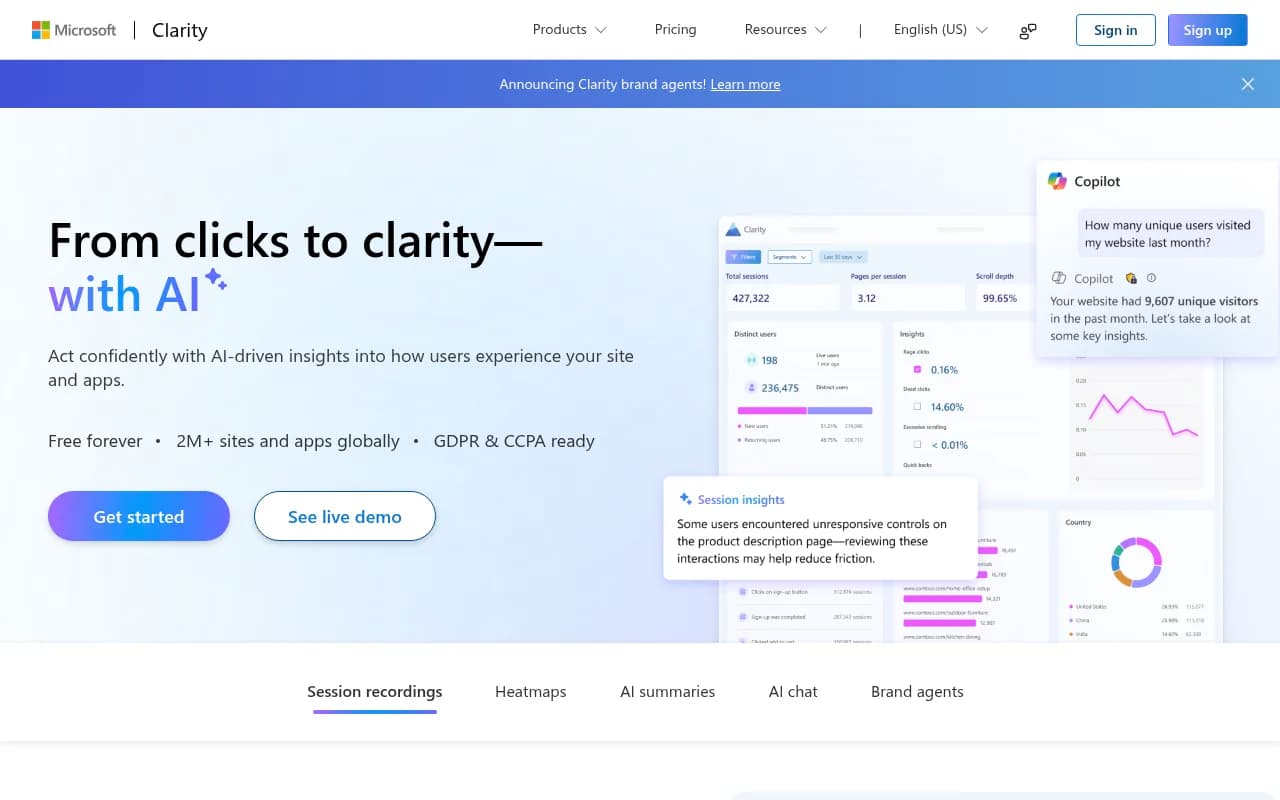
Microsoft Clarity is a free, unlimited user behavior analytics tool with session recordings, heatmaps, AI summaries, and AI chat. Used by 2M+ sites, it helps marketers, developers, and product teams understand real user behavior with no traffic limits or paid tiers.
Key takeaways
- Completely free, no traffic limits -- every feature is available at zero cost, which is genuinely unusual in the behavior analytics space
- AI-powered analysis sets it apart from older tools: one-click summaries, conversational data querying, and the new Brand Agents feature for on-site shopping assistance
- Solid for most teams, but lacks the depth of paid competitors like Hotjar or FullStory when it comes to funnel analysis, advanced segmentation, and enterprise-grade data controls
- Mobile SDK support (Android, iOS, Flutter, React Native) makes it more versatile than many free alternatives
- Not a Promptwatch competitor -- Clarity focuses on on-site user behavior, not AI search visibility or brand monitoring in LLMs
Microsoft Clarity is a free user behavior analytics tool built and maintained by Microsoft. It launched publicly around 2020 and has since grown to cover more than 2 million sites and apps globally. The pitch is simple: understand what real users do on your website through session recordings, heatmaps, and increasingly, AI-driven analysis -- all without paying anything or hitting traffic caps.
The target audience is broad by design. Clarity works for solo developers who want to debug UX issues, digital marketing managers who need to justify redesign decisions to stakeholders, and product teams at mid-sized companies who want behavioral data without a $400/month Hotjar bill. Because it's free and backed by Microsoft's infrastructure, it's also become a go-to for agencies that need to deploy analytics across dozens of client sites without worrying about per-seat or per-site pricing.
The context matters here: behavior analytics tools like Hotjar, FullStory, and Mouseflow have historically been expensive enough that smaller teams either skipped them or used watered-down free tiers. Clarity came in and removed the pricing barrier entirely. That alone explains a lot of its adoption. But Microsoft has been steadily adding AI features -- Copilot-powered summaries, conversational data chat, and now Brand Agents -- that make it more than just a free Hotjar clone.
Key features
Session recordings are the core of Clarity. Every user session is recorded as a video replay showing mouse movements, clicks, scrolls, and navigation paths. The recordings capture rage clicks (repeated frustrated clicking), dead clicks (clicks on non-interactive elements), and excessive scrolling -- all automatically flagged so you don't have to watch hours of footage to find problems. A "Highlights" feature extracts the most significant moments from each session, which is genuinely useful when you're triaging dozens of recordings at once. Recordings are stored for 30 days by default.
Heatmaps aggregate click, scroll, and movement data across all sessions into visual overlays on your actual pages. Clarity generates three types: click maps (where users tap or click), scroll maps (how far down users typically reach), and area maps (engagement by page region). One useful detail: heatmaps update in near real-time and don't require you to set up separate "experiments" in advance -- they're always running. You can also compare heatmaps across different page versions, which helps when evaluating A/B test results or redesigns.
AI summaries are a relatively recent addition and one of the more practical AI features I've seen in this category. With one click, Clarity generates a plain-English summary of what the heatmap or session data shows -- identifying patterns like "users frequently rage-click the navigation menu on mobile" or "most visitors drop off before reaching the CTA." This saves meaningful time compared to manually interpreting raw data, especially for teams that need to communicate findings to non-technical stakeholders.
AI chat (Copilot integration) lets you ask questions about your data in natural language. You can type something like "which pages have the highest rage click rate this week?" or "how does mobile scroll depth compare to desktop?" and get a direct answer. It's backed by Clarity's own data rather than a generic LLM, so the answers are grounded in your actual site metrics. The feature also doubles as built-in product support -- you can ask how to set up filters or interpret specific metrics.
Brand Agents is the newest and most ambitious feature. It lets you deploy an AI assistant on your website that represents your brand, guides shoppers through product decisions, and uses real-time behavioral signals from Clarity to personalize interactions. Think of it as a conversion-focused chatbot that's informed by what the current user is actually doing on the page. It's clearly aimed at e-commerce and retail sites. This is a significant expansion beyond pure analytics into active conversion optimization.
Mobile SDK extends Clarity to native and cross-platform apps. The SDK supports Android, iOS, Flutter, and React Native with a low-code setup. Session recordings and heatmaps work on mobile just as they do on web, which is genuinely useful for teams building apps alongside websites. The SDK is designed to be lightweight -- Microsoft emphasizes minimal performance and bandwidth impact, which matters for mobile where every kilobyte counts.
MCP server and browser extension are two newer additions to the "Clarity connected" ecosystem. The MCP (Model Context Protocol) server lets you pull Clarity analytics directly into AI tools you already use -- so if you're working in an AI coding assistant or data tool that supports MCP, you can query your Clarity data without leaving that environment. The browser extension overlays live engagement data on any page you're browsing, so you can see heatmap data in context while actually navigating your site.
Google Analytics integration is worth calling out specifically because it's one of the most-used integrations. Clarity connects to GA4 and Universal Analytics, letting you jump from a GA session to the corresponding Clarity recording with one click. This closes a major gap: GA tells you that users dropped off on a page, Clarity shows you exactly what they were doing before they left.
Predictive heatmaps generate estimated heatmap data for pages that don't yet have enough real traffic to produce meaningful maps. This uses machine learning trained on Clarity's broader dataset. It's useful for new pages or low-traffic sites, though the predictions are obviously less reliable than real data.
Who is it for
Clarity fits best for small to mid-sized teams that want behavioral data without a dedicated analytics budget. A digital marketing manager at a 20-person e-commerce company, for example, gets session recordings and heatmaps that would cost $99-$400/month on competing tools -- for free. The AI summaries make it accessible even if nobody on the team has a deep analytics background.
Agencies deploying analytics across multiple client sites are another strong fit. Because there's no per-site pricing and no traffic limits, you can instrument 50 client sites without any incremental cost. The Google Analytics integration means Clarity slots into existing reporting workflows rather than replacing them.
Developers and product teams at early-stage startups also benefit. When you're iterating quickly on a product and need to understand where users get confused, Clarity's session recordings are a fast way to get qualitative signal without setting up elaborate tracking infrastructure.
Who should probably look elsewhere: enterprise teams with strict data governance requirements may find Clarity's data controls too limited. FullStory and Heap offer more granular data retention policies, role-based access controls, and compliance tooling that large organizations often need. Teams that want deep funnel analysis, cohort tracking, or event-based analytics will also hit Clarity's ceiling quickly -- it's a behavior visualization tool, not a full product analytics platform. If you need the depth of Mixpanel or Amplitude alongside behavior data, you'll need to run those separately.
Integrations and ecosystem
Clarity's integration list covers the most common analytics and marketing stacks:
- Google Analytics (GA4 and UA): Bidirectional linking between sessions and GA data
- Google Ads and Microsoft Advertising: Connect ad campaign data to on-site behavior
- Shopify: Native integration for e-commerce session tracking
- WordPress: Plugin available for one-click setup
- Wix, Squarespace, Webflow: Supported via tag/script installation
- Segment: Send Clarity data to your data warehouse via Segment
- Optimizely and other A/B testing tools: Compare heatmaps across experiment variants
The MCP server is a newer developer-facing integration that lets AI tools query Clarity data directly. This is a forward-looking move -- as more development and analysis workflows incorporate AI assistants, having your analytics accessible via MCP means you can ask questions about user behavior from within tools like Cursor or Claude without switching contexts.
The browser extension (Chrome) overlays live Clarity data on pages as you browse them, which is a practical quality-of-life feature for anyone doing regular UX audits.
There's no native Slack integration for alerts, which is a gap compared to Hotjar. API access exists but is more limited than enterprise-tier competitors -- you can export data but the API isn't as fully featured as FullStory's or Heap's.
Mobile SDK platforms: Android, iOS, Flutter, React Native. More platforms are listed as "coming soon."
Pricing and value
Clarity is free. Not "free tier with limits" -- genuinely free with no traffic caps, no session recording limits, and no features locked behind a paywall. Microsoft has stated this is intentional and permanent ("free forever").
There are no paid tiers. The Brand Agents feature appears to be part of the free product as well, though it's new enough that the long-term monetization strategy around it isn't fully clear.
For comparison:
- Hotjar: Free tier capped at 35 daily sessions; paid plans start at $32/month for 100 daily sessions
- FullStory: No meaningful free tier; enterprise pricing typically starts in the thousands per month
- Mouseflow: Free tier limited to 500 recordings/month; paid from $31/month
- Lucky Orange: Free tier at 500 sessions/month; paid from $32/month
The value proposition at $0 is hard to argue with. The honest caveat is that Microsoft's business model here is presumably about data (Clarity's privacy policy notes that Microsoft may use aggregated, anonymized data for product improvement) and ecosystem lock-in (keeping users in Microsoft's analytics and advertising ecosystem). That's worth knowing, but it's a trade-off most teams will happily make.
Strengths and limitations
What Clarity does well:
- The price is genuinely unbeatable. No other tool in this category offers unlimited session recordings and heatmaps for free. For budget-conscious teams, this is the whole argument.
- AI summaries are actually useful. Unlike some AI features that feel bolted on, the one-click summaries save real time and make findings communicable to non-analysts.
- Setup is fast. A single JavaScript snippet or CMS plugin, and you're collecting data within minutes. The Google Analytics integration is particularly smooth.
- Mobile SDK coverage is broader than most free tools offer, making Clarity viable for teams with both web and app products.
- Scale without worry. High-traffic sites don't need to think about session sampling or overage charges, which is a real operational relief.
Honest limitations:
- Data retention is 30 days. Paid competitors like FullStory offer much longer retention windows. If you need to look back at sessions from three months ago, Clarity won't have them.
- Segmentation and filtering are basic. You can filter by device, browser, country, and a few behavioral signals, but you can't build complex user segments based on custom events or user properties the way you can in FullStory or Heap. Teams doing serious UX research will feel this ceiling.
- No funnel analysis or conversion tracking. Clarity shows you what users do, but doesn't let you define conversion funnels, track goal completions, or measure drop-off rates across multi-step flows. You need a separate tool for that.
- Privacy controls are limited for enterprise. Data masking is available but the granularity of access controls and data governance features doesn't match what large organizations typically require.
Bottom line
Microsoft Clarity is the obvious first choice for any team that wants session recordings and heatmaps without a budget conversation. It's free, it scales, and the AI features are genuinely useful rather than decorative. The 30-day data retention and limited segmentation mean it's not a replacement for FullStory or Heap at the enterprise level, but for the vast majority of websites -- small businesses, growing startups, agencies managing client sites -- it covers the core use cases completely.
Best use case in one sentence: deploy it on every site you manage as a baseline behavior analytics layer, then add a more specialized tool only if you hit its segmentation or retention limits.
Tags:
Frequently asked questions
Is Microsoft Clarity really free?
How does Microsoft Clarity compare to Hotjar?
How long does Clarity store session recordings?
Does Microsoft Clarity work on mobile apps?
Is Microsoft Clarity GDPR compliant?
What are Clarity's Brand Agents?
Similar and alternative tools to Microsoft Clarity