Publer Review 2026
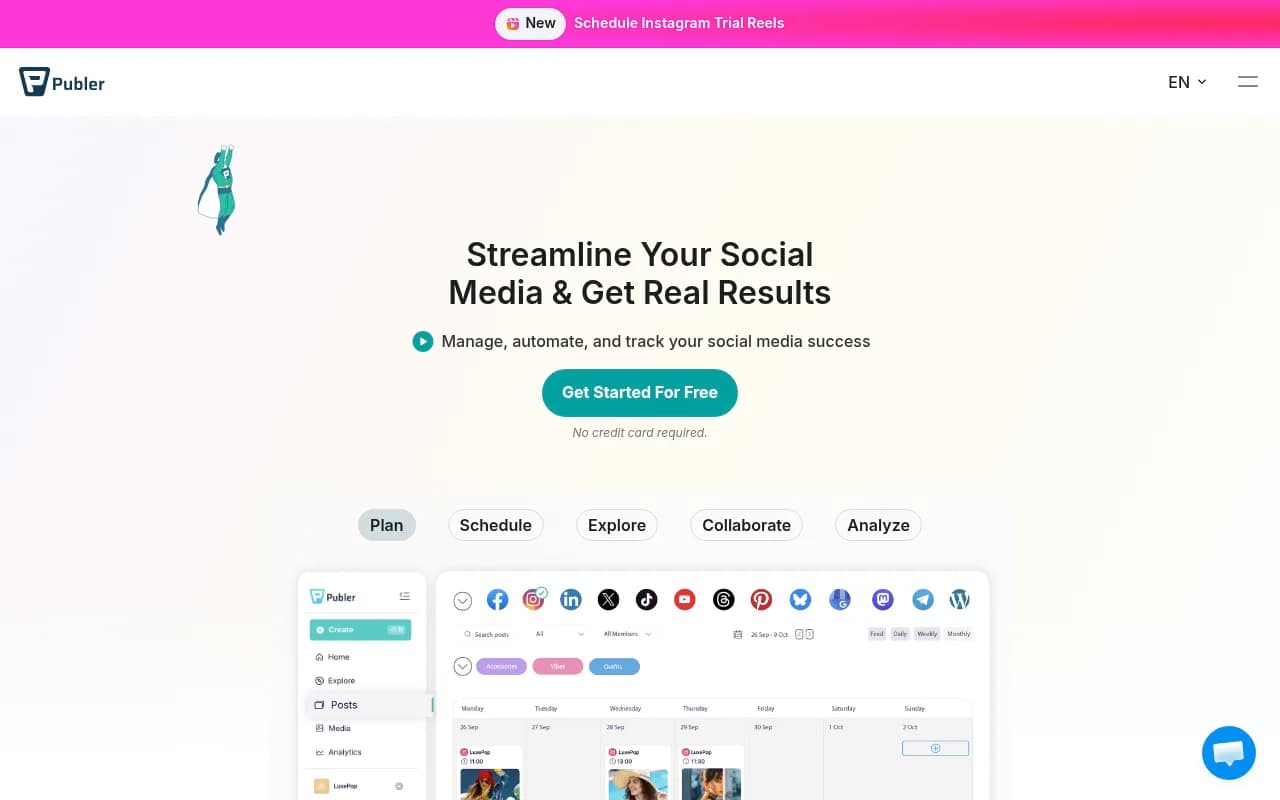
Publer is a social media management platform for scheduling posts, collaborating with teams, and tracking performance across Facebook, Instagram, LinkedIn, TikTok, YouTube, X, and Google Business. Trusted by 500K+ users, it offers bulk scheduling, AI content tools, analytics, and agency features.
Key Takeaways
- All-in-one platform for scheduling and managing posts across 7+ social networks with drag-and-drop calendar
- Strong automation features: bulk CSV uploads, auto-scheduling, content recycling, and AI writing assistant
- Generous free tier (3 social accounts, 10 posts/month) with affordable paid plans starting at $12/month
- Built for agencies and teams with workspaces, client approvals, and white-label reporting
- Missing advanced social listening and competitor tracking found in enterprise tools like Sprout Social or Hootsuite
Publer is a social media scheduling and management platform built for marketers, agencies, and businesses that need to maintain consistent posting across multiple platforms without the enterprise price tag. Founded over 13 years ago, it's grown to serve 500,000+ users who collectively have 1.5 million posts currently scheduled. The platform connects Facebook, Instagram, LinkedIn, TikTok, YouTube, X (Twitter), and Google Business Profile -- covering the core networks most businesses actually use.
What sets Publer apart in a crowded market is its focus on practical automation and team collaboration without overwhelming users with features they'll never touch. The interface is clean and fast, the pricing is transparent, and the feature set hits the sweet spot between "too basic" and "enterprise bloat." It's particularly popular with digital agencies managing multiple client accounts, small business owners juggling 5-10 social profiles, and content creators who batch-create content weeks in advance.
Multi-Platform Scheduling with Visual Calendar
The core scheduling experience revolves around a drag-and-drop calendar that shows all your planned posts across networks in one view. You can create a post once and publish it to multiple platforms simultaneously, with platform-specific customizations (different captions for LinkedIn vs Instagram, different image crops for each network, first comment scheduling for Instagram). The calendar supports day/week/month views and color-coding by account or content type.
What actually works well: you can duplicate posts, move them between time slots by dragging, and see preview thumbnails of how each post will appear on each platform before it goes live. The preview feature is surprisingly accurate -- it catches character limits, hashtag formatting issues, and image ratio problems that would otherwise cause posts to fail.
Bulk Scheduling and CSV Import
For users managing high volumes of content, Publer supports bulk uploads via CSV files. You prepare a spreadsheet with columns for post text, media URLs, publish times, and target accounts, then import the entire batch in one go. This is a lifesaver for agencies onboarding new clients with months of pre-planned content, or e-commerce brands scheduling product launches across dozens of posts.
The system also supports RSS feed automation -- you can connect a blog RSS feed and have Publer automatically create and schedule social posts whenever new articles are published. Useful for content marketers who want their blog posts to hit social channels without manual intervention.
AI Content Assistant
Publer includes an AI writing tool that generates post captions, suggests hashtags, and can rewrite existing text in different tones (professional, casual, humorous). It's powered by GPT models and works directly in the post composer. You give it a topic or paste a URL, and it drafts a caption with relevant hashtags.
In practice, the AI output is decent for first drafts but needs human editing -- it tends toward generic marketing speak and doesn't capture brand voice without heavy prompting. The hashtag suggestions are hit-or-miss; they're relevant but not always optimized for reach. Still, it's faster than staring at a blank text box, and the feature is included in all paid plans (not gated behind a premium tier like some competitors).
Content Recycling and Evergreen Posts
One of Publer's standout automation features is content recycling. You can mark posts as "evergreen" and set them to automatically repost on a schedule (weekly, monthly, quarterly). The system tracks when each post was last published and rotates through your evergreen library to avoid repetition.
This is particularly useful for:
- SaaS companies reposting product tips and feature highlights
- Agencies managing evergreen content for local businesses (hours, services, testimonials)
- Creators who want to resurface top-performing content without manual reposting
You can set recycling rules per post (how often, which accounts, which time slots) and pause/resume recycling at any time. The system won't recycle a post if it's already scheduled manually, preventing duplicates.
Analytics and Reporting
Publer pulls performance data from each connected platform and displays it in a unified analytics dashboard. You see post-level metrics (reach, engagement, clicks) and account-level trends (follower growth, best posting times, top-performing content types). The data is presented in charts and tables that you can filter by date range, account, or content type.
For agencies, the reporting feature generates white-label PDF reports that you can customize with your logo and send to clients. Reports include performance summaries, top posts, and growth metrics. You can schedule reports to generate and email automatically on a monthly basis.
What's missing: Publer doesn't offer social listening, sentiment analysis, or competitor benchmarking. If you need to track brand mentions, monitor competitor activity, or analyze audience sentiment, you'll need a separate tool like Brandwatch or Sprout Social. Publer's analytics are limited to your own accounts' performance data.
Team Collaboration and Approval Workflows
Publer supports multi-user workspaces with role-based permissions (admin, manager, contributor). Team members can draft posts, leave internal notes, and request approval before scheduling. Admins can review pending posts, suggest edits, and approve or reject with comments.
The approval workflow is straightforward: contributors create posts and submit for review, managers get notified, they approve or request changes, and the post moves to the scheduled queue. There's no complex multi-stage approval pipeline like Planable offers, but for most teams (agency + client, marketing manager + content writer), the two-tier system is sufficient.
Workspaces keep client accounts separated -- each workspace has its own connected social accounts, team members, and content library. Agencies can create a workspace per client and invite the client as a viewer to see scheduled posts and reports without giving them access to other clients' content.
Browser Extension and Mobile App
Publer offers a Chrome/Firefox extension that lets you share web content to your social accounts with one click. You're browsing an article, click the extension icon, and it opens a post composer pre-filled with the article title, URL, and an image. You can edit the caption, select accounts, and schedule or publish immediately.
The mobile app (iOS and Android) provides full scheduling and management capabilities on the go. You can create posts with photos from your camera roll, respond to comments, check analytics, and approve pending posts. The app is well-reviewed (4.5+ stars) and doesn't feel like a stripped-down version of the web platform.
Link in Bio Tool
Publer includes a free Link in Bio page builder for Instagram. You get a customizable landing page with multiple links, buttons, and embedded content (videos, images, contact forms). The page is hosted on a publer.io subdomain (or your custom domain on higher plans).
This competes directly with Linktree and Beacons. Publer's version is more basic -- fewer design templates, no advanced analytics on link clicks -- but it's included free with all plans and integrates with your scheduled Instagram posts (you can auto-update the Link in Bio when certain posts go live).
Integrations and API
Publer integrates with:
- Canva: Design graphics in Canva and import them directly into Publer posts
- Google Drive and Dropbox: Attach media from cloud storage
- Zapier: Trigger post creation from other apps (new Airtable row = new social post)
- Bitly: Auto-shorten URLs in posts
- Unsplash and Giphy: Search and insert stock photos or GIFs in the post composer
The platform also offers a REST API for developers who want to build custom integrations or automate posting from their own systems. API access is available on Business and higher plans.
What's notably absent: no direct integration with social listening tools, CRM platforms (HubSpot, Salesforce), or e-commerce systems (Shopify, WooCommerce). If you need those connections, you'll route through Zapier or use the API.
Who Is It For
Publer is built for three main user groups:
Digital agencies managing 10-50 client accounts: The workspace system, client approval workflows, and white-label reporting make it easy to keep clients separated and deliver monthly reports without manual work. Agencies particularly value the bulk scheduling and content recycling features for managing repetitive posting schedules across multiple clients. The pricing scales reasonably -- you're not paying per client account like some competitors.
Small business owners and solopreneurs juggling 3-10 social profiles: If you're running a local business, e-commerce store, or personal brand and need to stay active on Facebook, Instagram, LinkedIn, and Google Business without spending hours daily, Publer's automation features (auto-scheduling, recycling, AI captions) let you batch-create a month of content in one sitting. The free tier is genuinely usable for testing, and the $12/month plan covers most small business needs.
Content creators and influencers who batch-produce content: YouTubers, podcasters, and bloggers who create content in batches and need to promote it across social channels benefit from the RSS automation, bulk scheduling, and Link in Bio features. The mobile app makes it easy to schedule posts on the go, and the analytics help identify which platforms and content types drive the most traffic back to your main content.
Who should skip it: Enterprise marketing teams at large corporations will find Publer too limited. There's no social listening, no advanced sentiment analysis, no integration with enterprise CRMs or marketing automation platforms. If you need to track brand mentions across the web, monitor competitor activity, or tie social performance to revenue in Salesforce, you need Sprout Social, Hootsuite, or Brandwatch. Publer is a scheduling and publishing tool, not a full social media intelligence platform.
Pricing and Plans
Publer offers a free tier and three paid plans:
Free: 3 social accounts, 10 scheduled posts per month, basic analytics, 1 workspace. Good for personal use or testing the platform.
Professional ($12/month): 10 social accounts, unlimited scheduled posts, AI assistant, content recycling, bulk scheduling, analytics, 1 workspace, 3 team members. This is the sweet spot for small businesses and solo marketers.
Business ($24/month): 25 social accounts, all Professional features, 5 workspaces, 10 team members, white-label reports, priority support. Designed for agencies and growing teams.
Enterprise (custom pricing): Unlimited accounts, workspaces, and team members, dedicated account manager, custom integrations, SLA. For large agencies and corporations.
All paid plans include a 7-day free trial. Annual billing gets you 2 months free (effectively 17% off). Pricing is per workspace, not per user or per social account, which makes it more affordable than competitors like Hootsuite (which charges per user) or Later (which charges per social set).
Compared to competitors: Buffer charges $6/month for 3 accounts but limits you to 10 posts per account per month (30 total). Hootsuite starts at $99/month for 10 accounts and 1 user. Sprout Social starts at $249/month per user. SocialPilot is closer at $30/month for 10 accounts but lacks some of Publer's automation features. Publer sits in the affordable middle ground with a strong feature set.
Strengths
Practical automation that saves real time: The combination of bulk scheduling, content recycling, auto-scheduling, and AI captions means you can set up weeks of content in one session and let the system handle the rest. Users consistently report saving 5+ hours per week compared to manual posting.
Clean, fast interface: The platform is responsive and doesn't feel bloated. You can create and schedule a post in under a minute. The drag-and-drop calendar is intuitive, and the post previews are accurate.
Generous free tier and affordable paid plans: The free plan is actually usable (not a 14-day trial), and the $12/month Professional plan covers most small business needs. Pricing scales reasonably as you add accounts and team members.
Strong agency features: Workspaces, client approvals, white-label reports, and per-client billing make it easy to manage multiple clients without chaos. The ability to invite clients as viewers (without giving them edit access) is a nice touch.
Reliable posting: Posts go out on time, and the platform handles platform-specific quirks (Instagram first comments, LinkedIn character limits, TikTok video specs) without manual intervention. The error handling is good -- if a post fails, you get a notification with a clear explanation.
Limitations
No social listening or competitor tracking: Publer only shows data for your own accounts. If you need to monitor brand mentions, track competitor activity, or analyze industry trends, you need a separate tool. This is a significant gap compared to enterprise platforms like Sprout Social or Hootsuite.
Analytics are basic: You get standard metrics (reach, engagement, clicks) but no advanced analysis like sentiment scoring, audience demographics, or content performance predictions. The reporting is sufficient for client updates but not for deep strategic insights.
AI content quality is inconsistent: The AI writing assistant produces generic captions that need heavy editing to match brand voice. It's faster than starting from scratch, but don't expect publication-ready copy.
Limited platform coverage: Publer supports the major networks but doesn't cover Pinterest, Threads, Mastodon, or niche platforms. If your audience is on those networks, you'll need a different tool or manual posting.
No built-in image editing: While you can import from Canva, there's no native photo editor in Publer. You need to edit images externally before uploading. Competitors like Later and Planable offer basic cropping and filters in-platform.
Bottom Line
Publer is a solid choice for agencies, small businesses, and content creators who need reliable multi-platform scheduling with strong automation features at a reasonable price. It handles the core job -- planning, scheduling, and publishing social content -- very well, with practical features like bulk uploads, content recycling, and team collaboration that save real time.
The platform shines when you need to manage 5-25 social accounts across multiple clients or brands, batch-create content weeks in advance, and automate repetitive posting without manual intervention. The pricing is fair, the interface is fast, and the feature set hits the practical middle ground between "too basic" and "enterprise overkill."
Skip it if you need advanced social listening, competitor analysis, or deep audience insights. Publer is a scheduling and publishing tool, not a social intelligence platform. For those capabilities, look at Sprout Social, Brandwatch, or Hootsuite.
Best use case in one sentence: Agencies and small businesses that need affordable, reliable multi-platform scheduling with strong automation and team collaboration features.
Frequently asked questions
What is Publer and what does it do?
Is Publer free to use?
What social media platforms does Publer support?
How much does Publer cost?
Who is Publer best for?
What are the key features of Publer?
Can you schedule posts to multiple social media platforms at once with Publer?
Does Publer offer team collaboration features?
How does Publer compare to Hootsuite and Sprout Social?
What automation features does Publer provide?
Similar and alternative tools to Publer