ActivTrak Review 2026
Tracks employee activity and app usage to surface productivity insights. Used by HR and IT teams to understand how work happens and where time goes.
Key takeaways
- ActivTrak goes well beyond basic employee monitoring -- it positions itself as a "work intelligence" platform with AI adoption tracking, productivity coaching, and executive-level reporting built in
- Trusted by 9,500+ organizations with a free tier available (up to 3 users), making it accessible for small teams testing the waters
- Pricing is per-user and scales from $0 to $19/month, which is competitive for what's included at the Professional tier
- The AI Insights module is a genuine differentiator in 2026 -- most workforce analytics tools don't yet track which AI tools employees use or whether those tools are actually improving output
- Privacy stance is stronger than most competitors: no keystroke logging, no email monitoring, no video recording -- a meaningful distinction in a category that often draws employee pushback
ActivTrak started as a fairly straightforward employee monitoring tool -- the kind IT managers used to catch people watching YouTube during work hours. That's not what it is anymore. The Austin-based company has spent the last few years repositioning itself as a "work intelligence" platform, and the 2026 version of the product reflects that shift pretty clearly. It now covers workforce planning, AI tool adoption measurement, productivity coaching, and executive reporting alongside the activity tracking it was originally known for.
The target audience has shifted accordingly. ActivTrak is now pitched at HR leaders, operations executives, and IT teams at mid-market companies -- organizations with 50 to 5,000 employees that need objective data on how work happens but don't have the budget or appetite for enterprise workforce management suites. The 9,500+ customer count includes healthcare systems, logistics companies, manufacturers, and financial services firms, which tells you something about where it fits: industries where productivity and compliance both matter, and where remote or hybrid work has made visibility harder to maintain.
The company has been around since 2009 and has gone through several product iterations. The current "work intelligence" framing is the most ambitious version yet, and it's backed by what ActivTrak claims is 11 exabytes of work data processed monthly -- a number that, if accurate, gives their benchmarks and AI models a meaningful data advantage over newer entrants in the space.
Key features
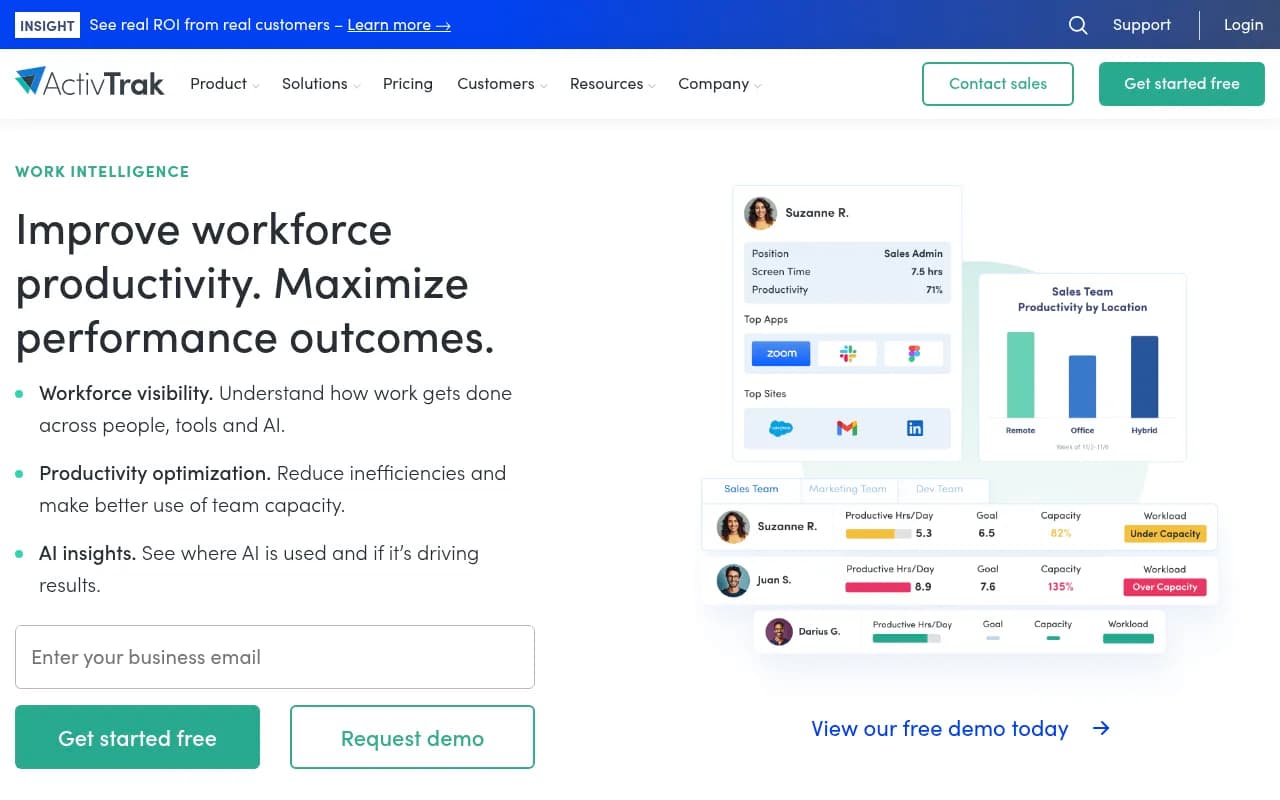
Behavioral activity capture is the foundation everything else is built on. ActivTrak installs a lightweight agent on employee devices (Windows and Mac) that tracks which applications and websites are used, for how long, and when. This isn't screen recording or keystroke logging -- it's app-level and URL-level data. You see that someone spent 3.2 hours in Salesforce and 47 minutes on ESPN.com, not what they typed or what their screen looked like. The agent runs silently in the background and captures data continuously during work hours.
- Tracks active vs. passive vs. idle time (passive means the app is open but the user isn't interacting)
- Classifies apps and websites as productive, unproductive, or neutral based on customizable rules
- Captures location data for hybrid/remote policy compliance
- Schedule adherence tracking shows who's working when they're supposed to be
AI Insights is the feature that feels most relevant in 2026. As organizations roll out Copilot, Cursor, ChatGPT, Claude, and other AI tools, there's a real question about whether those investments are paying off. ActivTrak now tracks AI tool usage at the same level of detail as any other application -- you can see which employees are using which AI tools, how often, and whether their productivity metrics are improving as a result. The dashboard shows adoption levels (low, mid, high) across your workforce and lets you compare AI-heavy users against baseline productivity scores.
- Tracks ChatGPT, Claude, Gemini, Copilot, Cursor, and other AI tools natively
- Adoption segmentation helps identify power users vs. non-adopters
- Correlates AI tool usage with productivity outcomes -- not just usage counts
Productivity Optimization and coaching is where ActivTrak tries to move from monitoring to action. The coaching dashboard categorizes employees into statuses like "improving," "recurring decline," and "new decline" based on observed productivity patterns. Managers get specific coaching recommendations tied to the data -- not generic advice, but suggestions grounded in what that particular employee's activity patterns look like.
- Benchmarks individual performance against team and role averages
- Goal-tracking lets managers set productivity targets and monitor progress
- The AI productivity coach surfaces specific employees who need attention and why
- Highlights patterns like high passive time, low focus, or high utilization (which can indicate burnout risk)
Executive Insights packages workforce data into boardroom-ready reporting. This is clearly aimed at getting ActivTrak into conversations at the VP and C-suite level, not just with IT managers. The dashboards show cross-team performance, capacity utilization, and cost savings in formats that don't require you to understand the underlying data model.
- Org-level productivity views with drill-down to team and individual
- ROI calculators that translate productivity data into dollar figures
- Designed for quarterly business reviews and workforce planning discussions
Workforce Management covers the operational side: schedule adherence, location policy compliance, and work pattern analysis. If you have a hybrid policy that requires employees to be in the office three days a week, ActivTrak can tell you whether that's actually happening. If you're trying to understand whether a particular team is overloaded or underutilized, the capacity analysis gives you data to work with.
- Schedule policy adherence reports show on-time vs. late arrivals and early departures
- Location tracking for hybrid compliance (office vs. remote)
- Work pattern analysis across teams, roles, and time periods
Technology Usage and Compliance addresses the SaaS sprawl problem. Most mid-market companies are paying for software licenses that a significant portion of their workforce never uses. ActivTrak shows you exactly which applications are being used, by whom, and how much -- so you can make informed decisions about renewals, consolidations, and adoption initiatives.
- App usage reports broken down by employee, team, and time period
- License utilization analysis to identify underused subscriptions
- Policy enforcement for blocking or flagging specific websites or applications
- Risk categorization for websites and applications
Work Advisor is ActivTrak's conversational AI assistant, introduced relatively recently. Instead of digging through dashboards manually, you can ask Work Advisor questions in plain language -- "Which teams have the lowest focus time this quarter?" or "Are there staffing gaps on the support team?" -- and get answers grounded in your actual workforce data. It's a meaningful usability improvement for managers who aren't data analysts.
- Natural language queries against your workforce data
- Answers include the underlying data, not just conclusions
- Covers work habits, attendance, staffing needs, and productivity trends
Privacy controls deserve specific mention because they're a genuine differentiator. ActivTrak explicitly does not do keystroke logging, email monitoring, camera access, personal device monitoring, or video recording. Role-based access controls let you limit who sees what data, and there are configurable privacy modes that can anonymize or aggregate data for certain use cases. In a category where employee trust is a real concern, this matters.
Who is it for
ActivTrak fits best at mid-market companies -- roughly 50 to 2,500 employees -- where leadership needs workforce visibility but doesn't have the resources to build custom analytics or buy enterprise HCM platforms. The sweet spot is organizations that have gone hybrid or fully remote and are trying to answer questions like "Are we actually productive?" and "Are we getting value from our AI tool investments?" without relying on self-reported data or manager intuition.
HR and people operations teams use it to identify coaching opportunities, track schedule adherence, and build the case for headcount decisions with objective data. IT teams use it for software license optimization and compliance monitoring. Operations leaders use it for capacity planning and efficiency analysis. The Executive Insights module is clearly designed to make ActivTrak relevant to C-suite conversations, not just operational ones.
Industries where it particularly fits: healthcare (where productivity and compliance both matter), financial services (similar reasons), logistics and transportation (where workforce efficiency directly impacts margins), and professional services firms managing billable utilization. The customer testimonials on the site skew heavily toward these verticals, and the ROI claims -- $7M in financial loss reduction for a healthcare company, $6.82M in added value for a manufacturer -- are specific enough to be credible.
Who shouldn't use it: very small teams (under 10 people) where the overhead of deploying and managing agents isn't worth it, companies with strong employee trust cultures where any monitoring would be culturally damaging, and organizations that need deep HRIS integration or complex workforce scheduling -- ActivTrak isn't a replacement for Workday or ADP, it's a complement to them.
Integrations and ecosystem
ActivTrak integrates with a reasonable set of enterprise tools, though the depth of those integrations varies. The most notable ones:
- Workday and ADP for HR data sync -- useful for correlating productivity data with HR records
- Microsoft Teams, Outlook, and Microsoft Viva for collaboration and calendar data
- Google Calendar for meeting load analysis
- Salesforce for correlating CRM activity with productivity metrics
- Jira Software for development team workflow analysis
- Slack for communication pattern data
- ServiceNow and Zendesk for support team productivity measurement
- ChatGPT, Claude, and Gemini tracked as applications within the AI Insights module
There's an API available for custom integrations and data export, which matters for organizations that want to pull ActivTrak data into their own BI tools or data warehouses. The platform also supports Looker Studio for custom reporting, which is useful for analytics teams that want to build their own dashboards on top of ActivTrak data.
No dedicated mobile app for end users -- the monitoring agent is desktop-only, which means remote workers on mobile devices aren't tracked. This is a deliberate privacy choice but also a real coverage gap for organizations with significant mobile workforces.
Pricing and value
ActivTrak's pricing is per-user per-month, billed annually, with four tiers:
- Free: $0/user/month, up to 3 users. Basic time tracking and activity monitoring. Good for testing the product but not practical for real organizational use.
- Essentials: $10/user/month (billed annually). Core activity tracking, productivity classification, and basic reporting. Covers the fundamentals for most small to mid-size teams.
- Essentials Plus: $15/user/month (billed annually). Adds more advanced reporting and additional data retention.
- Professional: $19/user/month (billed annually). Full feature set including productivity coaching, AI Insights, Executive Insights, and Work Advisor. This is where the platform becomes genuinely powerful.
For a 100-person company on the Professional plan, that's $1,900/month or roughly $22,800/year. That's not cheap, but the ROI math is straightforward if you're using it to optimize software licenses, reduce capacity waste, or improve billable utilization. The customer testimonials cite 11x to 122x ROI, which are obviously best-case scenarios, but even a conservative improvement in workforce efficiency can justify the cost at this price point.
Compared to competitors: Teramind starts higher and is more surveillance-focused. Hubstaff is cheaper but thinner on analytics. Microsoft Viva Insights is included with certain Microsoft 365 licenses but is much more limited in scope. For what ActivTrak offers at the Professional tier, $19/user/month is reasonable.
Strengths and limitations
What it does well:
- The AI Insights module is genuinely ahead of most competitors in 2026. Tracking which AI tools employees use and correlating that with productivity outcomes is a real capability gap in the market, and ActivTrak has it.
- Privacy-first positioning is credible and specific. The explicit list of things it doesn't do (keystroke logging, email monitoring, video recording) is more reassuring than vague "privacy-respecting" claims.
- Work Advisor makes the data accessible to non-analysts. Being able to ask plain-language questions and get data-grounded answers is a meaningful usability improvement.
- The data foundation is substantial. 11 exabytes of work data monthly means benchmarks and AI models are trained on real-world patterns, not synthetic data.
- Free tier and per-user pricing make it accessible for smaller organizations to start and scale.
Honest limitations:
- Desktop-only monitoring is a real gap. Mobile workforces, field workers, and employees who do significant work on tablets or phones are invisible to ActivTrak. This isn't a minor edge case for many industries.
- The coaching and AI recommendation features are still relatively new, and the quality of AI-generated coaching advice depends heavily on how well you've configured productivity classifications. Garbage in, garbage out -- if your app classifications are wrong, the coaching recommendations will be off too.
- Integration depth is uneven. The list of integrations looks impressive, but some are fairly shallow (data sync rather than bidirectional workflow integration). Organizations with complex HRIS or project management setups may find the integrations don't go as deep as they need.
- Employee perception risk remains real. Even with strong privacy controls, deploying any monitoring tool requires careful change management. ActivTrak provides some guidance here but the organizational challenge is yours to manage.
Bottom line
ActivTrak is the right choice for mid-market HR, IT, and operations teams that need objective workforce data to make better decisions about productivity, capacity, and AI tool investments -- and want to do it without the surveillance-heavy approach of older monitoring tools. The AI Insights module alone makes it worth evaluating in 2026, when most organizations are flying blind on whether their Copilot or ChatGPT rollouts are actually working.
Best use case: A 200-500 person hybrid company that needs to measure productivity objectively, optimize software spend, and understand whether AI tool adoption is translating into real efficiency gains.
Tags:
Frequently asked questions
What is ActivTrak?
How much does ActivTrak cost?
Does ActivTrak record keystrokes or employee screens?
What is the AI Insights feature?
Who is ActivTrak best suited for?
How does ActivTrak compare to tools like Teramind or Hubstaff?
Similar and alternative tools to ActivTrak