Databar.ai Review 2026
Data enrichment platform that connects to 100+ data providers in a spreadsheet-like interface. Pull company, contact, and funding data without writing code.
Key takeaways
- Best for: Sales and GTM teams who need to enrich prospect lists, qualify inbound leads, and personalize outbound at scale without managing multiple data subscriptions
- Core value: One subscription replaces up to $12,000/year in individual data provider costs -- Owler, People Data Labs, Hunter.io, BuiltWith, Clearbit, and 80+ others are all included
- Standout feature: Waterfall enrichment hits multiple providers in sequence to maximize data coverage, reportedly delivering 7x better fill rates than single-source tools
- Limitations: Credit-based pricing can get expensive at scale; the platform is primarily a data layer, not a full outbound execution tool
- Free tier: Yes, with a Chrome extension that's free forever and a free trial on paid plans
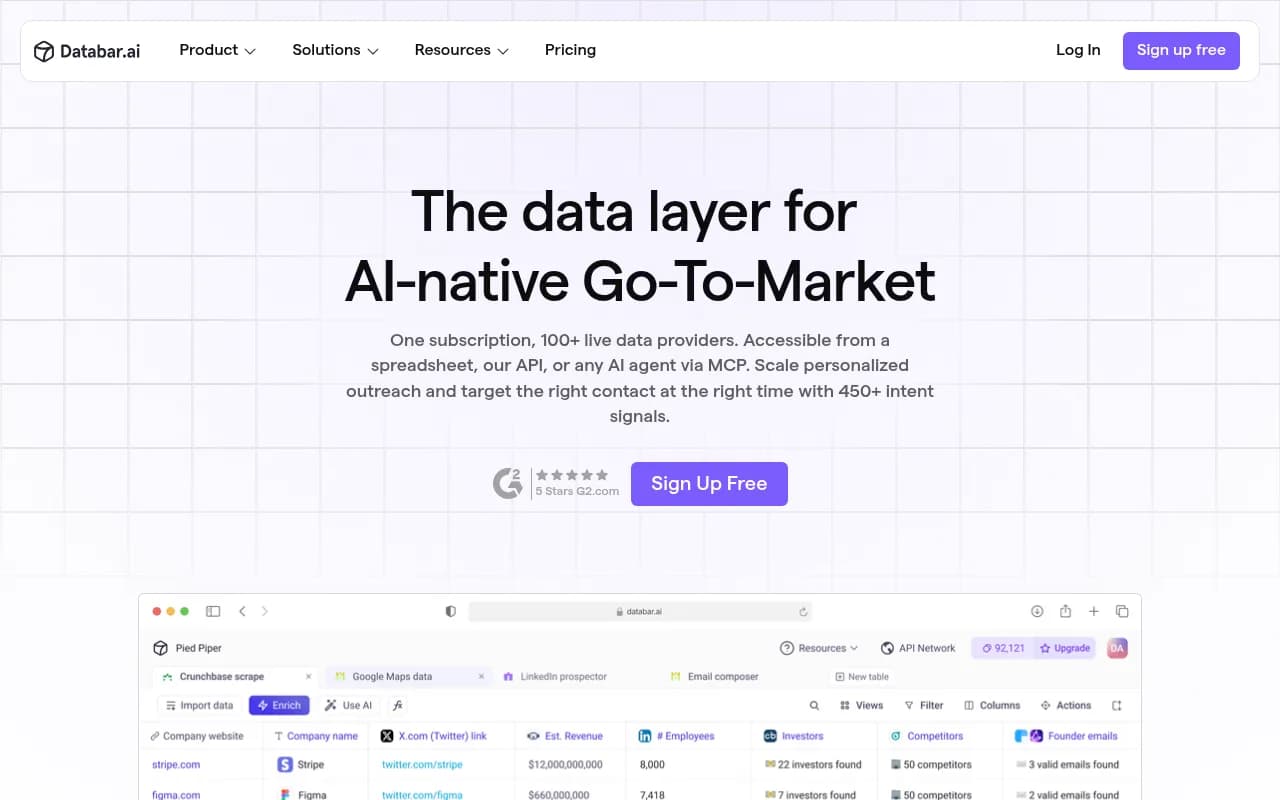
Databar.ai is a no-code data enrichment platform built for go-to-market teams who are tired of juggling a dozen separate data subscriptions. The core idea is simple: instead of paying for Clearbit, Hunter.io, People Data Labs, BuiltWith, and Owler separately, you get all of them (and 80+ more) through a single Databar subscription. You work in a spreadsheet-like interface, drag and drop the data points you need, and the platform handles all the API calls in the background.
The target audience is sales teams, growth marketers, and revenue operations professionals at companies running outbound campaigns or trying to keep their CRM clean and current. Monday.com and other recognizable GTM-focused companies appear in their customer list, and the testimonials skew toward founders and growth consultants running cold email campaigns. This is not an enterprise data warehouse tool -- it's built for people who live in spreadsheets and need to move fast.
Databar has been positioning itself more aggressively in 2025-2026 as an "AI-native GTM data layer," adding AI research agents, MCP (Model Context Protocol) support for AI agent workflows, and intent signal tracking on top of its original enrichment core. That evolution is worth paying attention to because it shifts the product from a simple API aggregator into something closer to a full prospecting and research platform.
Key features
Unified API network with 100+ data providers
The headline feature is access to over 80 data providers under one subscription. This includes well-known names like People Data Labs, Hunter.io, Clearbit, BuiltWith, Owler, Diffbot, Wappalyzer, Snov.io, Prospeo, FindyMail, ContactOut, and Brandfetch. Databar claims this replaces roughly $12,000/year in individual subscriptions. You can use Databar's own credentials for these providers (included in your plan) or plug in your own API keys if you already have them. The practical effect is that you stop worrying about which provider has the best email coverage for a given industry and just let Databar figure it out.
Waterfall enrichment
This is probably the most technically interesting feature. Instead of querying a single data source and accepting whatever fill rate you get, waterfall enrichment hits multiple providers in a defined sequence. If Provider A doesn't have an email for a contact, it automatically tries Provider B, then C, and so on. Databar claims this delivers 7x better data coverage compared to single-source enrichment. For email finding specifically, this matters a lot -- no single provider has complete coverage, and combining several gets you much closer to 100%.
Spreadsheet-style interface with drag-and-drop enrichments
The UI is designed to feel familiar to anyone who uses Google Sheets or Excel. You import a list (CSV, webhook, or CRM sync), and then you drag data points into columns. Want to add company headcount, LinkedIn URL, tech stack, and funding status? Each is a separate enrichment you drop in. The interface handles the API calls, rate limiting, and data formatting. Non-technical users can genuinely operate this without help from engineering.
AI research agent
Databar has built an AI agent layer on top of its data network. You can write natural language instructions like "Go to [company website] and find their LinkedIn, CEO name, and top three product features" and the agent will execute that research across your entire list. There are also 100+ pre-built agent templates for common research tasks. This is useful for the kind of unstructured research that doesn't fit neatly into a structured API call -- summarizing a company's recent news, categorizing a contact's job title into a sales persona, or pulling app store listings.
Intent signals and list building
Beyond enriching existing lists, Databar lets you build lists from scratch using 50+ specialized databases and 100+ filters. Intent signals include job opening alerts (a company hiring for a specific role is often a buying signal), recently funded companies, lookalike company discovery, and job change monitoring. The platform surfaces 450+ data points across companies, people, and websites. For outbound teams, this means you can identify a trigger event (say, a Series B announcement) and immediately build a targeted list of decision-makers at that company.
CRM and outbound tool integrations
Databar supports two-way sync with HubSpot, Salesforce, Pipedrive, Close CRM, Highlevel, Reply.io, Instantly, and Smartlead, plus generic webhook support. The two-way sync is important -- it means enriched data flows back into your CRM automatically, and new records from your CRM can be pulled into Databar for enrichment without manual exports. For teams running cold email sequences in Instantly or Smartlead, this creates a reasonably clean pipeline from list building to outreach.
Chrome extension for web scraping
There's a free Chrome extension that lets you scrape data from any website and pull it into Databar. It's positioned as "free forever," which is a nice entry point for teams that want to try the platform without committing to a paid plan. The extension handles the data collection side; the enrichment features require a paid subscription.
MCP support for AI agent workflows
This is a newer addition that reflects where the market is going. Databar now exposes its data network via MCP (Model Context Protocol), which means AI agents built on Claude, GPT-4, or other LLMs can call Databar's data providers directly as tools. If you're building AI-native sales workflows, this is a meaningful capability -- your AI agent can look up company data, find contacts, and verify emails without you writing custom API integrations.
Who is it for
The clearest fit is sales development teams at B2B SaaS companies running outbound campaigns. Think an SDR team of 3-10 people who need to build targeted prospect lists, find verified emails, and personalize their outreach with company-specific context. They're probably already using a sequencing tool like Instantly or Smartlead, and they need a reliable data layer upstream of that. Databar fits neatly into that workflow.
Revenue operations professionals at mid-market companies (50-500 employees) are another strong fit. These are people responsible for keeping the CRM clean, routing inbound leads correctly, and making sure sales reps have the context they need before a call. Databar's CRM sync and inbound lead scoring features address exactly those problems. The AI-powered lead qualification -- where you can write a prompt to categorize inbound signups by persona -- is particularly useful for ops teams that don't have the engineering resources to build custom scoring models.
Growth consultants and agencies running outbound for multiple clients will also find value here. The template library and multi-source enrichment mean you can spin up a new campaign quickly without rebuilding your data stack from scratch each time.
Who should probably look elsewhere: enterprise data teams that need SOC 2 compliance, complex data governance, or deep integration with a data warehouse. Databar is a GTM tool, not a data infrastructure tool. Similarly, if you're primarily doing inbound marketing and don't run outbound campaigns, the value proposition is much weaker -- most of what Databar does is oriented around finding and enriching prospects, not analyzing existing customer behavior.
Integrations and ecosystem
The CRM integrations are the most important: HubSpot, Salesforce, Pipedrive, Close CRM, and Highlevel all have native two-way sync. On the outbound side, Reply.io, Instantly, and Smartlead are supported natively, with webhooks available for anything else.
The data provider network is the real ecosystem story. Named providers include Owler, Bouncer, Store Leads, Wiza, Panda Match, ContactOut, Emailable, People Data Labs, LeadMagic, Prospeo, FindyMail, TheirStack, Diffbot, BuiltWith, Outscraper, Predict Leads, Snov.io, SpyFu, Tranco, Aeroleads, icypeas, Google Maps, Trestle, Wappalyzer, Hunter.io, ipinfo, Brandfetch, Clearbit, GitHub, Yelp, Y Combinator, Salesforce, and Tweetscraper. That's a genuinely broad network.
The Databar API is available on paid plans, documented at docs.databar.ai. The MCP integration is newer and lets AI agents access the full data network programmatically. There's also a public roadmap and changelog at feedback.databar.ai, which suggests an active development cycle.
The Chrome extension (available in the Chrome Web Store) handles web scraping and is free to use independently of a paid subscription.
Pricing and value
Databar's pricing is credit-based, which is common in this category but worth understanding before you commit. Based on available pricing information:
- Build plan: $99/month for 5,000 credits/month -- entry-level, suitable for small teams or individuals doing moderate enrichment volume
- Scale plan: $495/month for 50,000 credits/month -- the most popular tier, designed for teams running regular outbound campaigns
- Enterprise/custom: Available for larger teams with higher volume needs
Some third-party sources reference a Lite plan at $36/month with 2,000 credits, suggesting there may be a lower entry point or that pricing has been adjusted recently. Annual billing typically comes with a discount.
The credit model means costs scale with usage, which is honest but can be unpredictable. A waterfall enrichment that hits five providers to find one email will consume more credits than a single-source lookup. Teams should estimate their monthly enrichment volume carefully before choosing a plan.
The value comparison is favorable when you consider what you'd pay for individual subscriptions. People Data Labs alone can run several hundred dollars a month for meaningful volume; Hunter.io, BuiltWith, and Clearbit each add more. If you're actively using four or more of Databar's included providers, the economics work out clearly in Databar's favor.
Compared to Clay, which is the most direct competitor in this space, Databar's Scale plan at $495/month is significantly cheaper than Clay's Pro plan at $800/month. Both offer similar waterfall enrichment and AI research capabilities, though Clay has a larger template library and arguably more polish in its AI agent features.
Strengths and limitations
What it does well:
- The waterfall enrichment is genuinely useful and hard to replicate manually. Hitting multiple email providers in sequence and taking the first verified result is exactly what high-volume outbound teams need.
- The breadth of the data network is real. Having 80+ providers accessible without managing separate API keys and billing relationships is a meaningful operational simplification.
- The AI research agent handles unstructured research tasks that structured APIs can't -- summarizing websites, extracting specific facts, categorizing contacts -- and the natural language interface makes it accessible to non-technical users.
- The free Chrome extension is a low-friction entry point that lets teams evaluate the platform's data quality before paying.
Honest limitations:
- Credit-based pricing creates unpredictability. Teams running large enrichment jobs can burn through credits faster than expected, especially with waterfall enrichment enabled. Budget forecasting requires careful tracking.
- The platform is a data layer, not an outbound execution tool. You still need Instantly, Smartlead, or Reply.io to actually send emails. Some competitors (like Apollo.io) bundle prospecting, enrichment, and sequencing in one product, which reduces the number of tools in your stack.
- Data quality varies by provider and by the type of contact you're enriching. European contacts, SMBs, and non-English-speaking markets tend to have lower coverage than US-based enterprise contacts. This is an industry-wide problem, not unique to Databar, but worth knowing.
Bottom line
Databar.ai is the right tool for B2B sales and GTM teams who need high-quality, multi-source data enrichment without the overhead of managing a dozen separate data subscriptions. The waterfall enrichment, AI research agent, and broad provider network make it a strong choice for outbound-heavy teams at companies in the 10-500 employee range.
Best use case in one sentence: a sales team running cold outbound campaigns who needs to build targeted lists, find verified contact data, and personalize messaging at scale -- all without writing a line of code or managing multiple vendor relationships.
Frequently asked questions
What is Databar.ai?
How much does Databar.ai cost?
What is waterfall enrichment in Databar?
How does Databar compare to Clay?
Does Databar integrate with HubSpot and Salesforce?
Is there a free plan or trial for Databar.ai?
Similar and alternative tools to Databar.ai