Planable Review 2026
Social media management platform designed for agencies and teams, focusing on collaboration, content approval workflows, and multi-client management.
Key Takeaways:
- Best for: Agencies managing multiple clients, multi-brand companies, and marketing teams that need structured approval workflows
- Standout features: Feed/calendar/grid/list views with actual post previews, customizable multi-step approval workflows, in-context commenting with annotations
- Pricing: Free tier available; paid plans from $39/month per workspace
- Limitations: No native social listening, limited analytics compared to enterprise tools, workspace-based pricing can get expensive for large agencies
- Bottom line: If your team struggles with approval chaos and scattered feedback, Planable's visual collaboration interface and approval workflows will save you hours every week
Planable is a social media management platform that solves one of the most painful problems in marketing: getting content approved without endless email threads, Slack messages, and version control nightmares. Founded in 2016 and now trusted by over 30,000 marketers, Planable has carved out a niche as the go-to tool for teams that prioritize collaboration and client approvals over raw publishing power. It's used by agencies like Electric Kite Media, multi-brand companies managing dozens of social accounts, and in-house teams at companies like Greenhouse and Center Parcs.
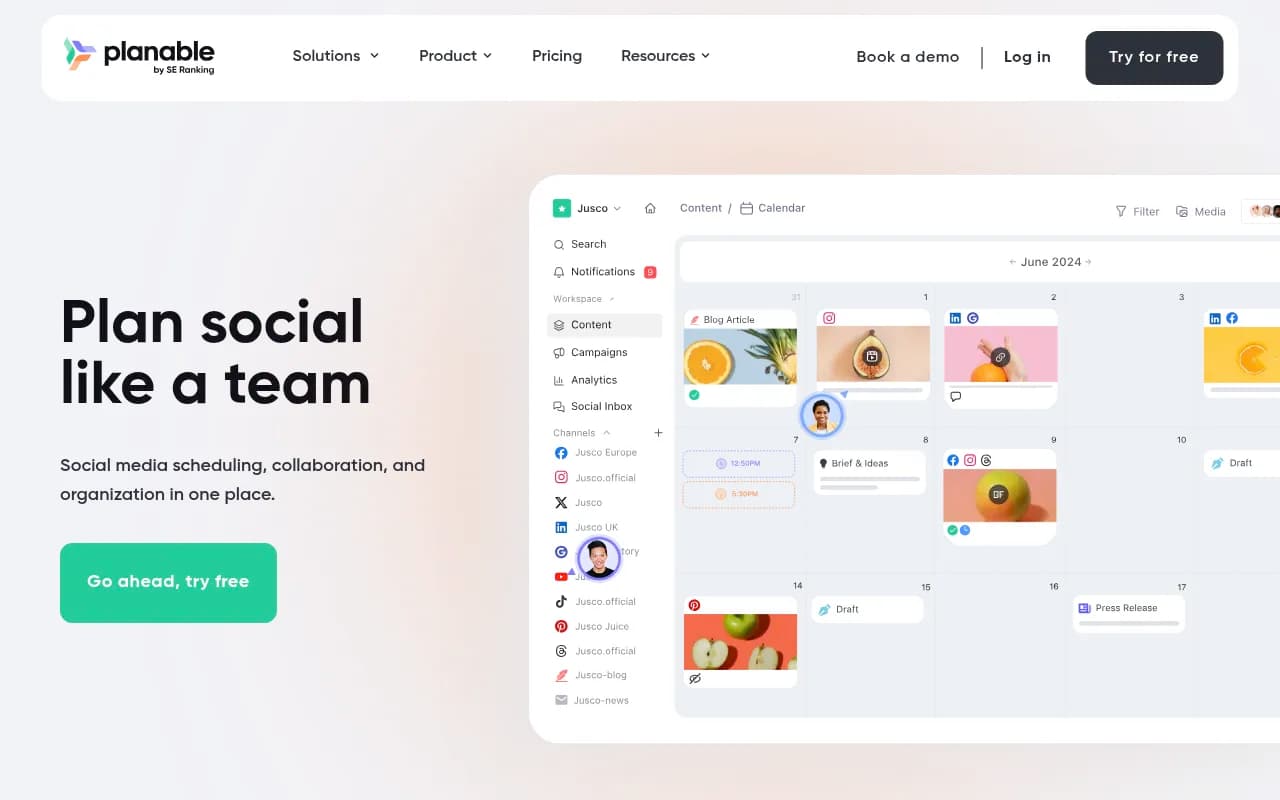
What sets Planable apart is its obsessive focus on making collaboration visual and intuitive. Instead of forcing you to click into each post to see what it looks like, Planable shows you actual post previews in feed, calendar, grid, and list views. The interface feels like working inside the social platforms themselves, which means your team and clients can review content without a learning curve. This is a tool built by people who understand that the hardest part of social media isn't scheduling posts -- it's getting everyone aligned on what to publish.
Multiple Content Views for Different Workflows
Planable offers four distinct ways to view and organize your content, and you can switch between them instantly. The Feed View displays posts exactly as they'll appear on each platform -- Instagram carousels, LinkedIn text posts, TikTok videos -- so stakeholders can approve content with confidence. No more "I thought it would look different" surprises after publishing. The Calendar View gives you a visual overview of your entire content schedule with drag-and-drop rescheduling. Unlike basic calendar tools that just show post titles, Planable displays actual post previews with images and captions, so you can spot gaps or clustering at a glance. The Grid View is specifically designed for Instagram planning -- drag and drop posts until your grid aesthetic is perfect, and see your complete grid including content published outside Planable. The List View enables bulk actions: approve, schedule, delete, or duplicate multiple posts across workspaces in one go, and save custom filtered views for recurring workflows.
Collaboration Features That Actually Work
Planable's collaboration tools are where it truly shines. In-context commenting means feedback lives right next to the content, not buried in email or Slack. Team members can leave general comments, suggest specific text edits (like Google Docs suggestions), or add annotations directly on images to point out exactly what needs changing. One-time shareable links let you get quick feedback from stakeholders without forcing them to create an account -- perfect for ad-hoc approvals from executives or external partners. @mentions notify specific team members when their input is needed, and internal notes let your team discuss strategy privately without clients seeing the conversation. All feedback is threaded and timestamped, creating a clear audit trail of who said what and when.
Customizable Approval Workflows
This is Planable's killer feature for agencies and enterprise teams. You can set up multi-step approval processes that match your actual workflow -- for example, content creator submits → copywriter reviews → client approves → final publish. Each post moves through these stages like an assembly line, and you get a dedicated Approval Inbox that shows every post awaiting your sign-off in one place. Approvals are visual and explicit: stakeholders see exactly what they're approving (with full post previews), and they can approve with a single click or request changes with inline comments. For agencies, this means clients can approve content without needing training, and you have a clear paper trail showing who approved what and when. You can customize approval workflows per workspace, so different clients or brands can have different processes.
Multi-Platform Scheduling and Publishing
Planable supports Facebook, Instagram, LinkedIn, X (Twitter), TikTok, YouTube, Pinterest, Google Business Profile, and Threads. For platforms not natively supported, you can use Universal Content to plan and collaborate on any type of marketing content (blog posts, newsletters, print ads) using the same approval workflows. Scheduling is straightforward: set a date and time, or save as a draft for later. Planable handles first comments on Instagram, carousel posts, video uploads, and multi-image posts across platforms. You can schedule posts individually or use bulk scheduling in List View. The platform also offers timezone support for global teams and optimal posting time suggestions based on your audience data.
Content Creation and Organization
Planable includes a built-in media library where you can store and organize all your visual assets in one place. Upload images, videos, and GIFs, then drag them into posts without leaving the platform. Labels and tags help you organize posts by campaign, content pillar, or client, and you can filter your calendar by these labels to see specific content subsets. Workspaces are Planable's way of organizing content -- create a dedicated workspace for each client, brand, or team, and invite only the relevant people to each one. This keeps content siloed and prevents clients from seeing each other's work. You can duplicate posts to quickly create variations or repurpose content across platforms, and bulk actions in List View let you apply changes to multiple posts at once.
Analytics and Reporting
Planable's analytics are functional but not its strongest feature. You get basic performance metrics for each platform (reach, engagement, clicks) and can create custom reports to share with stakeholders. The analytics dashboard shows performance trends over time and lets you compare posts to identify what's working. However, if you need deep social listening, competitor analysis, or advanced attribution, you'll want to pair Planable with a dedicated analytics tool. Planable is primarily a planning and collaboration platform, not an analytics powerhouse.
Social Inbox and Engagement
Planable includes a unified social inbox where you can view and respond to comments and messages across platforms. The inbox uses sentiment analysis to flag positive, negative, or neutral comments, helping you prioritize responses. You can assign comments to team members, mark them as resolved, and filter by platform or sentiment. This feature is useful for basic community management, but it's not as robust as dedicated social listening tools like Sprout Social or Hootsuite.
Integrations and Ecosystem
Planable integrates directly with all major social platforms for publishing. Beyond that, integrations are limited -- there's no Zapier integration, no API for custom workflows, and no direct connections to tools like Google Analytics or CRM systems. Planable does offer mobile apps for iOS and Android, which are surprisingly full-featured -- you can create, approve, and schedule posts from your phone, making it easy to handle approvals on the go. The lack of broader integrations is a notable gap compared to competitors like Buffer or Hootsuite.
Who Is Planable For?
Planable is ideal for agencies managing 5-50 clients who need a clean, client-friendly approval process. If you're tired of clients approving content via email screenshots or losing track of feedback in Slack threads, Planable will immediately improve your workflow. It's also perfect for multi-brand companies (think restaurant chains, retail franchises, or holding companies) that need to manage dozens of social accounts with consistent branding and centralized oversight. In-house marketing teams of 3-10 people who collaborate on social content will appreciate the visual planning and approval workflows. Freelancers and solopreneurs can use Planable, but the workspace-based pricing and collaboration features are overkill if you're working alone.
Planable is not the right fit if you need advanced social listening, influencer management, or deep competitive analysis. It's also not ideal for very large enterprises with complex publishing needs across 100+ accounts -- the workspace-based pricing model becomes expensive at that scale, and you'd be better served by an enterprise platform like Sprinklr or Hootsuite Enterprise.
Pricing and Value
Planable offers a free tier with 50 posts per workspace, which is genuinely usable for small teams or freelancers testing the platform. Paid plans start at $39/month per workspace (Basic plan, billed annually) and include unlimited posts, 8 social accounts, and basic analytics. The Pro plan at $59/month per workspace adds advanced analytics, priority support, and more social accounts. Enterprise pricing is custom and includes features like SSO, dedicated account management, and custom approval workflows. Pricing is per workspace, not per user, which is great for small teams but can get expensive for agencies managing many clients -- a 20-client agency would pay $780-$1,180/month on the Basic plan. Compared to competitors, Planable is mid-priced: cheaper than Sprout Social ($249/month) but more expensive than Buffer ($6/month per channel) or Later ($25/month).
Strengths
- Visual collaboration interface: The feed/calendar/grid views with actual post previews make it easy for non-marketers to review and approve content
- Customizable approval workflows: Multi-step approvals with a clear audit trail solve the biggest pain point for agencies and enterprise teams
- Client-friendly: Stakeholders can approve content with zero training, and one-time links make ad-hoc approvals effortless
- Mobile apps: Full-featured iOS and Android apps let you manage approvals and scheduling from anywhere
- Universal Content: Plan and collaborate on any type of marketing content, not just social posts
Limitations
- Limited integrations: No Zapier, no API, no connections to analytics or CRM tools beyond native social platform integrations
- Basic analytics: Performance reporting is functional but shallow compared to dedicated analytics platforms
- Workspace-based pricing: Can get expensive for agencies managing many clients, as each workspace is billed separately
- No social listening: You can respond to comments, but there's no monitoring of brand mentions, hashtags, or competitor activity
Bottom Line
Planable is the best social media collaboration tool for agencies and teams that prioritize approval workflows and visual content planning. If your biggest pain point is getting stakeholders to approve content quickly and clearly, Planable will save you hours every week and eliminate approval chaos. It's not the most feature-rich social media tool on the market, but it does collaboration and approvals better than anyone else. Best use case in one sentence: agencies managing 5-50 clients who need a client-friendly approval process that doesn't require training.
Tags:
Similar and alternative tools to Planable