Expandi Review 2026
Expandi is a LinkedIn automation platform built for sales teams, agencies, and recruiters who need to scale personalized outreach without getting flagged. Combines LinkedIn connection requests, InMails, and email sequences with smart automation, A/B testing, CRM integrations, and team management fea
Summary
- Best for: B2B sales teams, lead gen agencies, and recruiters running high-volume LinkedIn outreach campaigns who need automation that mimics human behavior
- Standout strength: Smart sequences with 10 actions and 10 conditions let you build complex, behavior-triggered workflows that adapt based on prospect responses -- far more sophisticated than basic drip campaigns
- Key limitation: LinkedIn automation always carries platform risk. Expandi claims to be "the safest" but no tool can guarantee zero account restrictions if you push limits too hard
- Pricing: $99/month for individual users, $79/month annual. Agency plans available for 10+ accounts with white-label options
- Bottom line: If you're doing serious B2B outreach on LinkedIn and need to automate without looking like a bot, Expandi delivers the feature depth and team collaboration tools that justify the premium over cheaper alternatives
Expandi positions itself as the LinkedIn automation tool for professionals who've outgrown basic connection request bots but aren't ready to hire a full SDR team. The company has been around since 2019 and serves over 10,000 users -- a mix of sales development reps, lead generation agencies, and recruitment teams who live and die by their LinkedIn pipeline.
The core pitch: automate LinkedIn outreach that actually converts, without triggering platform restrictions or looking obviously robotic. That's harder than it sounds. LinkedIn actively fights automation, and most tools either get accounts flagged or produce such generic outreach that response rates tank. Expandi's answer is "smart sequences" that mimic human behavior patterns and let you build conditional logic based on how prospects interact with your messages.
Smart Sequences: The core automation engine
This is where Expandi separates from basic LinkedIn bots. Instead of just sending connection requests and follow-up messages on a fixed schedule, you build multi-step workflows with branching logic. The platform gives you 10 different actions (connection requests, messages, InMails, profile views, post likes, email sends, etc.) and 10 conditions (connection accepted, message opened, link clicked, no response after X days, etc.).
In practice, this means you can set up scenarios like: view their profile, wait 2 days, like their recent post, wait 1 day, send connection request with personalized note. If they accept, send message A. If they don't respond in 4 days, send follow-up B. If they click the link in your message, tag them as "high intent" and notify your sales team. If they ignore everything, automatically move them to a nurture sequence.
The visual sequence builder shows you the entire flow as a flowchart, so you can see exactly where prospects are dropping off. Each step displays conversion stats -- how many people moved from connection request to accepted connection to replied to booked meeting. This visibility is critical for diagnosing where your outreach is breaking down. Maybe your connection request acceptance rate is strong (45%+) but your first message gets ignored. That tells you the message needs work, not the targeting.
Expandi also supports A/B testing at the campaign level. You can run two versions of the same sequence with different message copy, connection request notes, or timing delays, then compare performance. The platform will show you which variant is generating more replies, more meetings booked, or whatever conversion metric you care about. This is table stakes for serious outreach teams but missing from cheaper tools.
LinkedIn + Email omnichannel outreach
Expandi added email sequences in 2023, turning it into a true omnichannel platform. You connect your email provider (Gmail, Outlook, SMTP, or any provider via API), then build sequences that combine LinkedIn actions and email sends in one workflow.
The logic: if someone doesn't respond to your LinkedIn connection request, hit them via email 3 days later. If they accept your connection but ghost your LinkedIn message, send an email follow-up. If they engage on LinkedIn but don't book a meeting, send a calendar link via email. You're increasing touchpoints without being annoying on any single channel.
Email deliverability is handled by your own email provider, not Expandi's servers, which is the right approach. Expandi just triggers the sends and tracks opens/clicks. You can set daily send limits per email account to avoid spam flags, rotate between multiple email addresses if you're running high volume, and use merge tags for personalization (first name, company, job title, custom fields).
The email feature isn't as deep as dedicated cold email tools like Lemlist or Instantly.ai -- no email warmup, no deliverability monitoring, no spam score checking. But for teams who primarily live on LinkedIn and want email as a backup channel, it's sufficient. The real value is having everything in one sequence instead of juggling two separate tools.
Personalization: Video, GIFs, and dynamic images
Expandi integrates directly with Sendspark (personalized video) and Hyperize (dynamic image personalization). These are paid add-ons, not included in the base subscription, but the integrations are native -- you don't need Zapier or custom code.
Sendspark lets you record a video once, then automatically personalize it for each recipient. The video thumbnail shows their name, company logo, or LinkedIn profile photo. When they click play, they see a video that feels custom-made for them, even though you recorded it once and the tool dynamically inserted their details. Expandi claims this boosts reply rates by up to 55%, which tracks with what we've seen in cold outreach testing -- video almost always outperforms text-only.
Hyperize does similar magic with static images and GIFs. You can create a template that includes the recipient's LinkedIn headshot, company logo, or website screenshot, then Hyperize generates a unique image for each person in your campaign. Drop that image into your LinkedIn message or email, and suddenly your outreach looks hyper-personalized even though you're running it at scale.
The catch: both integrations cost extra. Sendspark starts at $29/month for 150 videos, Hyperize starts at $49/month for 1,000 personalized images. If you're serious about standing out in crowded inboxes, the ROI is probably there -- a 20% lift in reply rates easily pays for itself. But it does push your total cost above the $99/month base price.
Team collaboration and agency features
Expandi is built for teams, not just solo users. The platform includes role-based permissions (admin, manager, user), so you can give your SDRs access to run campaigns without letting them see billing or delete accounts. Agencies get white-label options -- rebrand the interface with your logo and colors, then give clients login access to view their campaign performance without seeing "Expandi" anywhere.
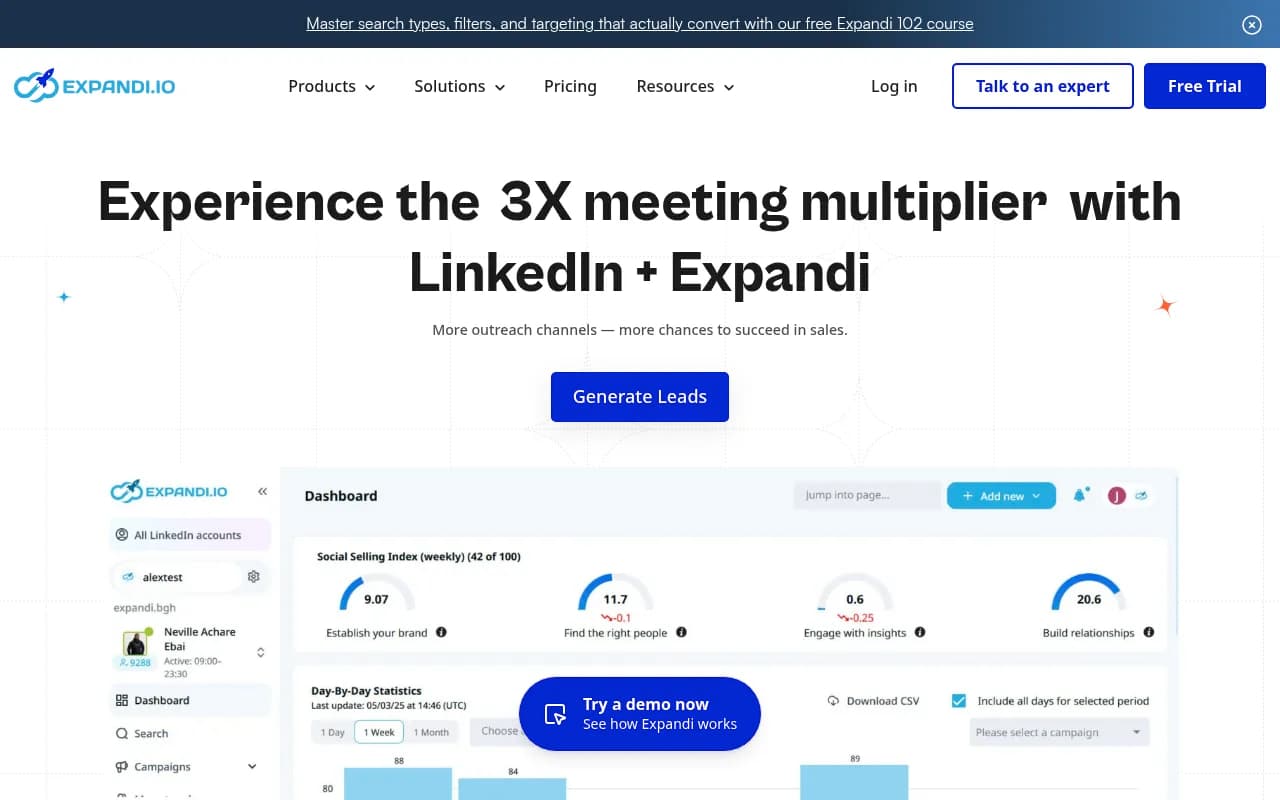
The unified dashboard shows all connected LinkedIn accounts in one view. If you're managing 20 client accounts or 10 sales reps, you can see everyone's stats (connection requests sent, acceptance rate, messages sent, replies received) without logging into each account individually. You can also set campaign priorities -- tell Expandi to focus daily limits on your highest-performing campaigns first, then allocate remaining capacity to lower-priority tests.
Reporting is solid but not spectacular. You get standard metrics (connections sent, accepted, messages sent, replies, meetings booked) with date range filters and CSV export. The "Social Selling Index" tracker monitors each account's LinkedIn SSI score, which is LinkedIn's internal measure of how active and engaged you are on the platform. Higher SSI scores correlate with better organic reach and lower risk of restrictions, so tracking this is useful.
What's missing: no built-in attribution to closed deals or revenue. Expandi will tell you how many meetings got booked, but connecting those meetings to actual sales requires pushing data to your CRM and tracking it there. The platform does integrate with HubSpot, Salesforce, Pipedrive, and other CRMs via native connectors or webhooks, so you can auto-create contacts and log activities. But the revenue reporting happens downstream, not in Expandi.
Safety and compliance (the big question)
Every LinkedIn automation tool claims to be "the safest" and Expandi is no exception. The company's pitch: they use cloud-based automation that mimics human behavior patterns (random delays between actions, variable typing speeds, realistic mouse movements), and they've never had a mass ban event where LinkedIn shut down hundreds of accounts at once.
Is this true? Hard to verify independently, but Expandi has been around since 2019 without any public scandals or mass user complaints about bans. The platform does enforce daily limits (80-100 connection requests per day, 200-250 messages per day) that align with LinkedIn's unofficial thresholds. You can't override these limits even if you want to, which protects you from yourself.
That said, LinkedIn's terms of service explicitly prohibit automation tools. Using any automation -- Expandi, Phantombuster, Dux-Soup, whatever -- technically violates the TOS. LinkedIn could ban your account tomorrow if they detect it. The risk is real. Expandi's approach is to fly under the radar by mimicking human behavior closely enough that LinkedIn's detection algorithms don't flag you. But there are no guarantees.
Practical advice from users: warm up new accounts slowly (start with 20 connection requests per day for the first week, then gradually increase), avoid spammy behavior (don't send the same generic message to 500 people), and use LinkedIn manually alongside the automation (post content, comment on posts, engage with your network) so your account looks active and human. Expandi provides these best practices in their onboarding and academy, which is more guidance than most competitors offer.
Integrations and data flow
Expandi connects to most major CRMs (HubSpot, Salesforce, Pipedrive, Zoho, Copper) via native integrations. When someone replies to your outreach, Expandi can automatically create a contact in your CRM, log the conversation, and trigger workflows (assign to a sales rep, send a Slack notification, add to a nurture sequence). You can also push custom fields -- job title, company size, industry, whatever data you collected during targeting.
For tools without native integrations, Expandi offers webhooks. You can send data to Zapier, Make (formerly Integromat), or any custom endpoint whenever specific events happen (new reply, meeting booked, connection accepted, etc.). This is flexible but requires some technical setup. If you're not comfortable with webhooks, you'll need a developer or a no-code tool like Zapier to bridge the gap.
Expandi also supports CSV import and export. You can upload a list of LinkedIn profile URLs (scraped from Sales Navigator, Apollo, or wherever), and Expandi will add them to a campaign. You can export campaign results as CSV to analyze in Excel or Google Sheets. Basic but functional.
One notable gap: no native integration with LinkedIn Sales Navigator for live scraping. You have to export leads from Sales Navigator as a CSV, then import to Expandi. Some competitors (Phantombuster, Dripify) let you scrape Sales Navigator searches directly from within the tool. Expandi's approach is more manual but arguably safer -- less API interaction with LinkedIn means less chance of detection.
Who should use Expandi
Expandi is built for B2B sales teams and agencies running serious LinkedIn outreach at scale. Specifically:
-
SDR teams at B2B SaaS companies with 5-20 reps who need to book 50-100 demos per month. You want automation to handle the repetitive work (connection requests, follow-ups) so reps can focus on conversations and closing. Expandi's team management and CRM integrations fit this use case well.
-
Lead generation agencies managing 10-50 client LinkedIn accounts. The white-label features, role-based permissions, and unified dashboard are purpose-built for agencies. You can onboard new clients in 15 minutes, set up their campaigns, and give them read-only access to track results.
-
Recruiters sourcing candidates for hard-to-fill roles. LinkedIn is still the best place to find passive candidates, and Expandi's smart sequences let you build multi-touch nurture campaigns (connection request, message, InMail, email) that keep you top-of-mind without being pushy.
-
Consultants and freelancers who sell high-ticket services ($5K+ projects) and need a steady pipeline of qualified leads. If you're doing 20-30 connection requests per day manually, Expandi will save you 2-3 hours per week and probably improve your results with better targeting and follow-up.
Who should NOT use Expandi: If you're selling low-ticket B2C products, LinkedIn probably isn't your channel anyway. If you're doing basic outreach (just connection requests and one follow-up message), you don't need Expandi's complexity -- a cheaper tool like Dux-Soup or Zopto will work fine. If you're risk-averse and can't afford to lose your LinkedIn account, manual outreach or hiring a VA is safer than any automation.
Pricing and value
Expandi charges $99/month for the Business plan (monthly billing) or $79/month if you pay annually (20% discount). This includes unlimited campaigns, all features (smart sequences, email outreach, A/B testing, CRM integrations), and one LinkedIn account. Additional LinkedIn accounts are $79/month each (annual billing).
Agency plans start at 10 LinkedIn accounts and include white-label branding, priority support, and custom onboarding. Pricing is custom -- you have to request a quote. Based on user reports, expect $600-800/month for 10 accounts, which works out to $60-80 per account. Reasonable if you're billing clients $500-1000/month for lead gen services.
Free trial: 7 days, no credit card required. You get full access to all features, so you can actually test the platform before committing.
How does this compare to competitors? Expandi is premium-priced. Dux-Soup is $55/month, Zopto is $215/month, Phantombuster is $59/month. But Expandi's feature set is deeper -- the smart sequences, email integration, team management, and white-label options justify the premium for agencies and sales teams. If you're a solo user just doing basic connection requests, Expandi is probably overkill. If you're running a lead gen agency or managing a sales team, the extra $40/month over Dux-Soup is worth it for the time savings and better results.
Strengths
- Smart sequences with conditional logic are legitimately sophisticated. Being able to branch workflows based on prospect behavior (replied, clicked link, ignored message) is a huge step up from linear drip campaigns.
- Omnichannel LinkedIn + email in one platform eliminates the need to juggle separate tools. The sequences are unified, so you can see the full customer journey in one place.
- Team and agency features (white-label, roles/permissions, unified dashboard) are best-in-class. If you're managing multiple accounts, Expandi makes it easy.
- A/B testing at the campaign level is rare in LinkedIn automation tools. Being able to test message variants and see which performs better is critical for optimization.
- Support and education are strong. Expandi offers live chat support (Monday-Friday 8am-11pm CET, weekends 11am-7pm CET), an academy with courses on LinkedIn outreach strategy, and an active Facebook community of 10,000+ users.
Limitations
- LinkedIn automation risk is real. No tool can guarantee your account won't get restricted. Expandi's safety claims are plausible but unverifiable. If you can't afford to lose your LinkedIn account, don't automate.
- Email features are basic. No warmup, no deliverability monitoring, no spam score checking. If email is your primary channel, use a dedicated cold email tool like Instantly.ai or Smartlead.
- Personalization add-ons cost extra. Sendspark and Hyperize integrations are powerful but not included in the base price. Budget an extra $50-100/month if you want video and image personalization.
- No live Sales Navigator scraping. You have to export leads from Sales Navigator as CSV, then import to Expandi. More manual than some competitors.
- Reporting doesn't track revenue. You can see meetings booked but not closed deals or revenue. You'll need to connect your CRM and track attribution there.
Bottom line
Expandi is the LinkedIn automation tool for professionals who've moved past basic connection request bots and need sophisticated, behavior-triggered sequences that actually convert. The smart sequence builder, omnichannel LinkedIn + email workflows, and team collaboration features make it the best choice for B2B sales teams and lead gen agencies running serious outreach at scale. The $99/month price is justified if you're booking 5-10 meetings per month from LinkedIn -- one closed deal pays for a year of the tool. Just understand the risks: LinkedIn prohibits automation, and no tool can guarantee zero account restrictions. Use it smart, follow best practices, and you'll probably be fine. Push too hard, and you might lose your account.
Tags:
Frequently asked questions
What is Expandi and what does it do?
How much does Expandi cost?
Is Expandi safe to use with LinkedIn?
Who should use Expandi?
What are Expandi's smart sequences?
Does Expandi offer a free trial?
Can Expandi integrate with CRM systems?
Does Expandi support team collaboration?
Similar and alternative tools to Expandi