Botsonic Review 2026
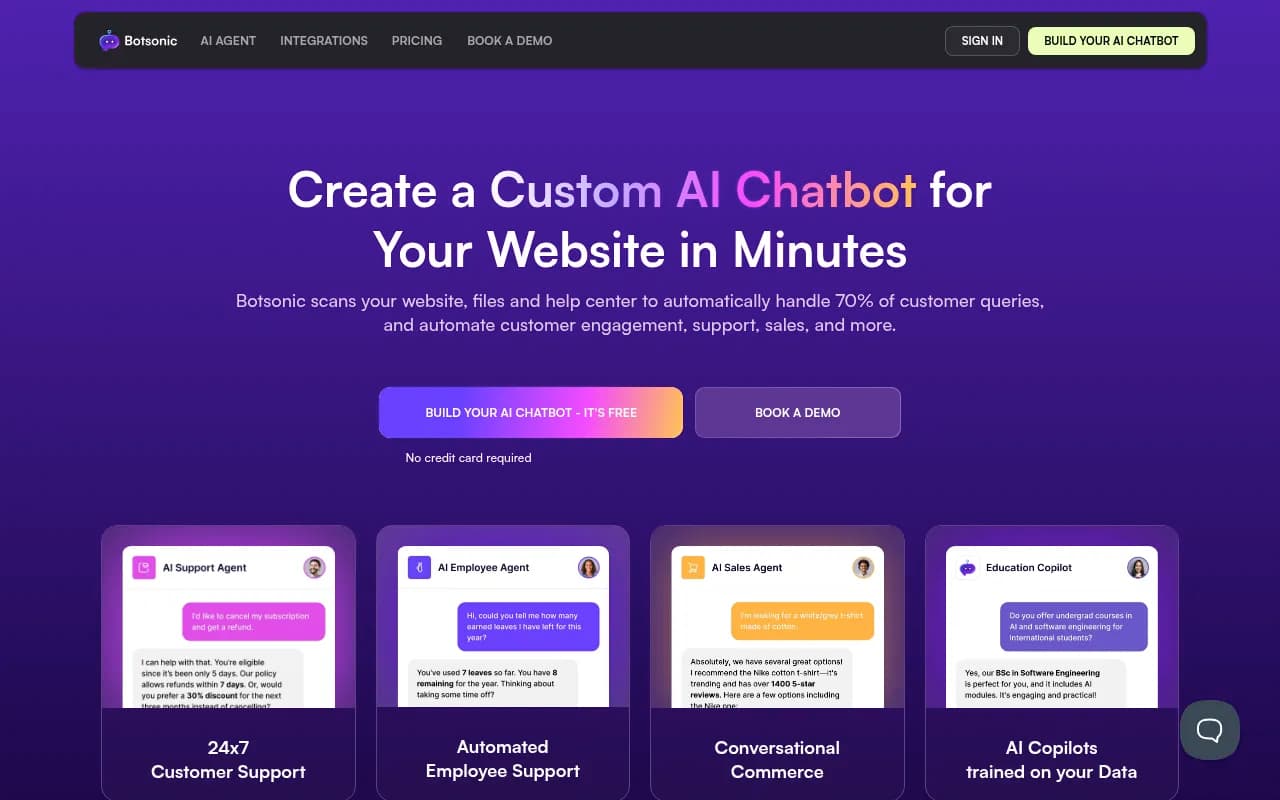
Botsonic is a no-code AI chatbot builder by Writesonic that trains on your website, files, and help docs to automate 70% of customer queries. Supports 50+ languages, omnichannel deployment, and enterprise-grade security.
Key takeaways
- Botsonic lets you build a custom AI chatbot trained on your own content (PDFs, URLs, Google Drive, Notion, Confluence) in under five minutes, with no coding required.
- Trusted by 5,000+ teams including Deloitte, Microsoft, KPMG, Pfizer, and Visa -- the enterprise client list is genuinely impressive for a no-code tool.
- Model-agnostic by design: Botsonic's proprietary GPT Router dynamically switches between multiple LLMs to optimize for speed and reliability, rather than locking you into a single provider.
- SOC 2 Type II, GDPR, and HIPAA compliant, with AES-256 encryption at rest and a zero-retention policy for LLM training data.
- Pricing is not fully transparent from the main Botsonic page -- you need to dig into Writesonic's pricing section to find plan details, which is a minor friction point.
- Backed by Y Combinator, which gives it some credibility in the crowded AI chatbot space.
Botsonic is the AI chatbot product built by Writesonic, the San Francisco-based AI writing company that came out of Y Combinator. While Writesonic started as an AI content generation tool, Botsonic is its dedicated chatbot arm -- a no-code platform that lets businesses build custom AI agents trained on their own data and deploy them across websites, WhatsApp, Slack, Facebook Messenger, and other channels. The core pitch is simple: point Botsonic at your website or upload your support docs, and it will handle the majority of customer questions automatically, without you writing a single line of code.
The problem it solves is one most growing businesses know well. Your support team is fielding the same 20 questions over and over. Your knowledge base exists but nobody reads it. You want a chatbot, but the rule-based ones from five years ago were brittle and frustrating. Botsonic's answer is to use large language models grounded in your specific content, so the bot actually knows your product, your policies, and your pricing -- and can answer questions about them accurately rather than hallucinating generic responses.
The target audience spans a wide range: e-commerce brands wanting to automate pre-sale and post-sale support, SaaS companies looking to deflect tier-1 support tickets, HR teams building internal employee knowledge bots, and digital agencies building chatbot solutions for clients. The enterprise-grade security certifications (SOC 2 Type II, HIPAA) mean it's also a realistic option for healthcare and financial services companies, not just tech startups.
Key features
Data ingestion and training
This is where Botsonic earns its keep. You can feed it content from multiple sources:
- File uploads: PDFs, Word documents, Excel spreadsheets
- Website crawling: paste a URL and it scans your site automatically
- Direct sync from Google Drive, Confluence, and Notion
The training happens fast -- the marketing claim of "under five minutes" is roughly accurate for a small knowledge base. The bot learns from whatever you give it and uses that as its grounding context when answering questions. This means answers stay factual and tied to your actual content rather than drifting into generic LLM territory.
Model-agnostic GPT Router
Most chatbot platforms lock you into one LLM provider. Botsonic built its own routing layer called GPT Router (which is open-sourced on GitHub) that dynamically selects between multiple AI models based on speed, cost, and output quality. In practice, this means the bot is less likely to go down when OpenAI has an outage, and Writesonic can swap in newer or cheaper models without you noticing. It's a genuinely smart architectural decision that competitors like Tidio or Freshchat haven't matched.
Omnichannel deployment
Once your bot is trained, you can deploy it across:
- Website chat widget (embed via script tag)
- Facebook Messenger
- Slack
- SMS
- Zapier (for connecting to hundreds of other tools)
The widget is customizable -- you can set colors, logos, conversational tone, and starter prompts to match your brand. This matters more than it sounds; a chatbot that looks like a generic third-party widget erodes trust.
Live agent handoff
When a conversation gets too complex for the AI, Botsonic can hand it off to a human agent. This is table stakes for any serious customer support deployment, and Botsonic handles it. The handoff logic is configurable, so you can set conditions for when escalation triggers.
Multilingual support
The bot handles conversations in 50+ languages. This isn't just translation -- it can understand queries in one language and respond in the same language, which is useful for global businesses that don't want to build separate bots for each market.
Analytics and conversation monitoring
Botsonic gives you a dashboard to monitor conversations, track resolution rates, and measure CSAT impact. You can see which questions are being asked most frequently, where the bot is failing, and use that data to improve your knowledge base. It's not the deepest analytics suite you'll find, but it covers the basics a support manager needs.
Security and compliance
This is where Botsonic differentiates itself from cheaper alternatives:
- AES-256 encryption at rest, TLS 1.3 in transit
- Row-level data segregation by workspace and organization
- Audit logs for all operations
- Custom data retention settings
- Zero-retention policy: your data is not used to retrain the underlying LLMs
- SOC 2 Type II certified, GDPR compliant, HIPAA aligned
For a healthcare company or a financial services firm, these aren't nice-to-haves -- they're requirements. The fact that Botsonic has them puts it ahead of many no-code chatbot tools.
Employee support use case
Beyond customer-facing bots, Botsonic explicitly supports internal HR and IT helpdesk bots. You can train it on your employee handbook, benefits documentation, IT policies, and onboarding materials. Employees can then ask questions in natural language and get instant answers without opening a ticket. This is a genuinely useful second use case that many teams overlook.
Conversational commerce
For e-commerce, Botsonic can handle product recommendations, upselling, and guided shopping experiences. The bot can be trained on your product catalog and help customers find what they're looking for, which is a more engaging experience than a search bar.
Who is it for
Botsonic fits best for customer support teams at mid-market SaaS companies and e-commerce brands that are getting crushed by repetitive support volume. Think a 50-200 person company where the support team is handling 500+ tickets a month and a significant chunk of them are the same questions about pricing, returns, or account setup. Botsonic can realistically deflect 50-70% of those without any human involvement, which translates directly to headcount savings or faster response times.
HR and internal operations teams are another strong fit. A company with 200+ employees where the HR team is fielding constant questions about PTO policies, benefits enrollment, or onboarding steps can build an internal bot in an afternoon. The Confluence and Notion integrations make this especially easy if your documentation already lives there.
Digital agencies building chatbot solutions for clients will find the white-label customization and multi-bot management useful. The enterprise client list (Deloitte, KPMG, PwC) suggests it can handle the compliance requirements that come with larger clients.
Who should probably look elsewhere: very small businesses with minimal support volume (the cost won't justify itself), developers who want deep API control and prefer building their own RAG pipeline, and companies with highly complex, multi-step support workflows that need sophisticated decision trees rather than conversational AI. Also, if your primary need is proactive outreach rather than reactive support, Botsonic isn't built for that.
Integrations and ecosystem
Botsonic connects to a solid range of tools on both the data ingestion side and the deployment side.
Data sources:
- Google Drive
- Confluence
- Notion
- Direct URL crawling
- File uploads (PDF, DOCX, XLSX)
Deployment channels:
- Website embed (JavaScript snippet)
- WhatsApp Business API
- Facebook Messenger
- Slack
- SMS
- Zapier (which opens up connections to 5,000+ other apps)
API access: Botsonic has a documented REST API, which means developers can build custom integrations or embed the bot's capabilities into their own applications. The API documentation is available at docs.botsonic.com.
GitHub: Writesonic has open-sourced GPT Router on GitHub (github.com/Writesonic/GPTRouter), which is the routing layer that powers Botsonic's model-agnostic architecture. This is useful for developers who want to understand or extend the underlying infrastructure.
There's no native Salesforce, HubSpot, or Zendesk integration listed prominently, which is a gap for teams that want conversation data flowing directly into their CRM or helpdesk. Zapier can bridge some of this, but it adds friction.
Pricing and value
Botsonic's pricing isn't displayed directly on the Botsonic homepage -- you're redirected to Writesonic's broader pricing page, which covers the full platform including AI writing tools. This makes comparison shopping slightly annoying.
Based on available information, Writesonic's plans (which include Botsonic) are structured roughly as:
- Free tier: Available, no credit card required. Good for testing the product with limited messages and one bot.
- Standard/Individual plans: Starting around $99/month (or lower on annual billing), suitable for small teams with one or two bots and moderate message volume.
- Professional plans: Around $249/month, adding more bots, higher message limits, and additional features.
- Enterprise/custom pricing: Available for larger deployments with dedicated support, custom SLAs, and advanced security configurations.
Compared to alternatives like Intercom (which can run $500-1,000+/month for comparable functionality) or Drift, Botsonic is meaningfully cheaper. Against simpler tools like Tidio or Chatbase, it's more expensive but offers better enterprise security and more deployment channels. For a business that's replacing even one support headcount, the math usually works out.
The free trial is genuinely useful -- you can build a real bot, test it on your content, and evaluate the response quality before committing to a paid plan.
Strengths and limitations
What it does well:
- Setup speed is real. The five-minute claim holds up for simple use cases. If you have a well-organized knowledge base or a clean website, the bot is usable very quickly.
- Enterprise security without enterprise complexity. SOC 2 Type II, HIPAA, GDPR, AES-256 encryption, and zero LLM training retention -- all in a no-code tool. That combination is rare.
- Model-agnostic architecture. The GPT Router approach means better reliability and the ability to benefit from new models without waiting for Botsonic to manually update their stack.
- Multilingual support at 50+ languages is genuinely broad and works without separate configuration per language.
- The client list is credible. Microsoft, Deloitte, Pfizer, and Visa aren't using toy chatbot tools. Their presence suggests the platform holds up under real enterprise scrutiny.
Honest limitations:
- Pricing transparency is poor. Having to navigate away from the Botsonic site to find plan details is a friction point that competitors like Chatbase or Tidio handle better.
- No native CRM or helpdesk integrations. The absence of direct Zendesk, HubSpot, or Salesforce connectors means you're relying on Zapier for those workflows, which adds cost and complexity.
- Analytics depth is limited. The conversation monitoring dashboard covers the basics, but if you want deep funnel analysis, sentiment tracking, or custom reporting, you'll hit a ceiling. Tools like Intercom or Freshdesk have more mature analytics.
- Complex workflow automation is not its strength. If you need a bot that can execute multi-step processes (like processing a refund, updating an order, and sending a confirmation email in sequence), Botsonic's current capabilities are more limited than dedicated workflow automation platforms.
Bottom line
Botsonic is a strong choice for mid-market companies and growing SaaS businesses that need a reliable, secure, and genuinely easy-to-deploy AI chatbot trained on their own content. The enterprise security credentials make it viable for regulated industries, and the Y Combinator backing and impressive client roster suggest it's not going anywhere soon.
Best use case in one sentence: a customer support or HR team that wants to automate repetitive queries using their existing documentation, without writing code or hiring a developer.
Frequently asked questions
What is Botsonic?
Is Botsonic free to use?
How does Botsonic train on my data?
Is Botsonic secure enough for enterprise use?
What channels can I deploy a Botsonic chatbot on?
How does Botsonic compare to tools like Intercom or Tidio?
Similar and alternative tools to Botsonic