Folk CRM Review 2026
Lightweight, AI-assisted CRM that helps small teams manage contacts, track deals, and run personalized outreach campaigns to convert qualified leads into customers.
Key takeaways
- Folk is a genuinely lightweight CRM built for small teams, founders, and agencies who find Salesforce or HubSpot overkill but need more than a spreadsheet
- The AI Assistants (Follow-up, Recap, Research, Workflow) are the real differentiator -- they automate the tedious parts of relationship management rather than just surfacing data
- The folkX Chrome extension makes LinkedIn prospecting fast, which is a meaningful workflow improvement for anyone doing outbound
- Pricing starts at $24/member/month (billed annually) on Standard, rising to $48/member/month on Premium -- reasonable for the feature set but adds up for larger teams
- Not built for enterprise sales orgs with complex reporting needs or large SDR teams running high-volume sequences
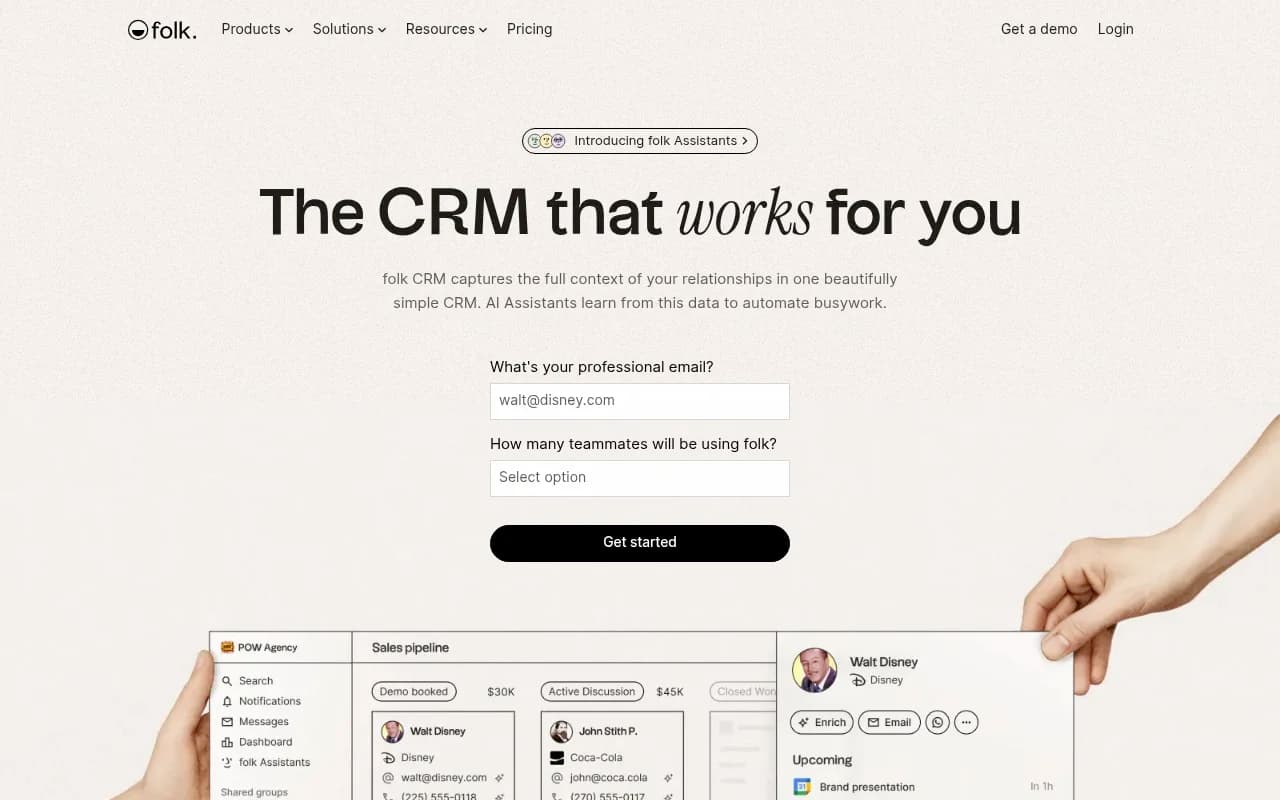
Folk is a Paris-based CRM that launched around 2022 and has quietly built a following among founders, agencies, and small sales teams who are tired of bloated CRM software. The pitch is simple: most CRMs are designed to capture data, but folk is designed to act on it. The platform combines contact management, pipeline tracking, and outreach into one tool, then layers AI Assistants on top to handle the repetitive work -- drafting follow-ups, summarizing conversations, enriching company profiles, and triggering personalized email sequences.
The target audience is pretty clear from the product design. Folk works best for teams of 1-20 people who are doing relationship-driven sales, partnerships, or business development. Think a 5-person SaaS startup managing investor relationships and early customer outreach, or a boutique agency tracking client deals across LinkedIn, email, and WhatsApp. It's not trying to compete with Salesforce for enterprise accounts -- and that's a deliberate choice, not a limitation.
The company has grown to over 4,000 customers and holds a 4.9 on Product Hunt and 4.5 on G2, which are solid numbers. It's SOC 2 Type I certified and GDPR compliant, which matters for European teams in particular.
Key features
folkX Chrome extension
This is one of folk's strongest practical features. The folkX extension lets you import leads directly from LinkedIn -- including LinkedIn Sales Navigator -- without leaving the browser. It detects contact profiles as you browse, pulls in name, company, role, and other visible data, and adds them to your folk database in one click. For anyone doing LinkedIn-based prospecting, this removes a genuinely annoying manual step. The extension is rated 4.8 on the Chrome Web Store, which suggests it actually works reliably.
1-click contact enrichment
Once a contact is in folk, Smart Fields can find email addresses and phone numbers with a single click. The enrichment pulls from People Data Labs as a data provider, which is a reputable source. It also identifies a lead's "strongest connection" -- meaning which of your teammates has the warmest relationship with that contact -- which is useful for deciding who should make first contact. You can also import data from a prospect's website using AI, which is a nice touch for building company profiles quickly.
AI Assistants (the core differentiator)
Folk has four distinct AI Assistants, each handling a different part of the sales workflow:
- Follow-up Assistant: Scans your email (Gmail or Outlook) and WhatsApp conversations to detect when a discussion has gone quiet and there's an unresolved next step. It then drafts a follow-up email in your tone of voice, tailored to the conversation history. You control the inactivity threshold and which contacts it applies to. Notifications appear in-app, by email, and on contact profiles.
- Recap Assistant: Generates an instant AI summary of your relationship with any person, company, or deal. It pulls from emails, notes, meetings, WhatsApp messages, and LinkedIn activity to produce a structured brief covering what was discussed, what was decided, and what the next steps are. You can customize the format to match sales methodologies like MEDDIC or BANT. This is genuinely useful for preparing for calls or handing off accounts.
- Research Assistant: Automatically enriches company profiles with industry, size, funding details, website, social links, and location -- powered by People Data Labs for enrichment and Perplexity for research notes. You can run it on a single company or in bulk across a group. You can also add custom questions or themes that the assistant applies consistently every time it runs research.
- Workflow Assistant: Trigger-based email automation. You define a trigger (e.g., when a contact's status changes to "Qualified"), and the assistant sends a personalized email using CRM data and AI personalization. Each workflow generates a campaign with tracking for sent, opened, replied, and bounced emails. This is folk's answer to basic sales automation tools, and it covers the core use case well without the complexity of a dedicated tool like Outreach or Apollo.
Pipeline management
Folk's pipeline view is clean and customizable. You can create multiple pipelines for different use cases -- sales deals, partnership conversations, investor outreach -- and set custom stages for each. The pipeline supports shared access with role-based permissions, which makes it usable for small teams collaborating on deals. There's a sales dashboard for tracking deal values and stage progression. It's not as feature-rich as Pipedrive's pipeline, but it covers the basics without the clutter.
Contact and company database
The data model in folk is flexible. You can manage People, Companies, Objects, and Deals as separate entities and define custom fields for each. Groups let you segment contacts by any criteria -- similar to tags or lists in other CRMs but more flexible. The interface is closer to Notion or Airtable in feel than traditional CRM software, which is either a feature or a limitation depending on your preference.
Integrations and multi-channel data capture
Folk connects to Gmail, Outlook, Google Calendar, LinkedIn, WhatsApp, and 6,000+ other tools via Zapier and native integrations. The idea is that every interaction -- email, meeting, social message -- gets captured in one place so you have full context on every relationship. This is the "multi-channel data in one place" promise, and it works reasonably well in practice for the channels folk supports natively.
API and custom integrations
Folk has a public API for building custom integrations. There's also a native integration with popular AI tools that lets you "chat with your CRM" -- asking questions like "What were the main lost reasons last week?" and getting answers from your CRM data. This is a newer capability and positions folk as a more AI-native tool than traditional CRMs.
Who is it for
Folk is a strong fit for founders and small sales teams doing relationship-driven outreach. A solo founder managing 200 investor relationships, a 3-person partnerships team tracking co-marketing deals, or a boutique agency managing 15 active client pipelines -- these are the people who get the most out of folk. The AI Assistants are particularly valuable when you're wearing multiple hats and can't afford to let follow-ups slip through the cracks.
Agencies are a notable sweet spot. Folk has built specific landing pages and use cases around agency CRM, and the combination of LinkedIn prospecting (folkX), email sequences, and relationship context makes it well-suited for agencies that do a mix of new business development and ongoing client management. The multi-pipeline setup means you can separate new business from existing accounts without things getting messy.
Who should probably look elsewhere: large sales teams with complex reporting requirements, companies running high-volume cold outreach at scale (Apollo or Outreach are better suited), or organizations that need deep CRM customization, territory management, or enterprise-grade workflow automation. Folk is deliberately simple, and that simplicity is a trade-off.
Integrations and ecosystem
Folk's integration story is solid for a tool at this price point. Native integrations include Gmail, Outlook, Google Calendar, LinkedIn (via folkX), and WhatsApp. For everything else, Zapier covers 6,000+ apps. There's also a native API for custom workflows.
The folkX Chrome extension is the most important integration for most users -- it's what makes LinkedIn prospecting fast enough to actually use in practice. The extension is available on the Chrome Web Store and has a 4.8 rating.
For data enrichment, folk uses People Data Labs (contact and company data) and Perplexity (AI-generated research notes). These are reputable providers, which matters for data quality.
There's no dedicated mobile app mentioned prominently, which is a gap for users who need CRM access on the go. The web app is the primary interface.
Pricing and value
Folk's pricing is per-member, per-month:
- Standard: $30/member/month (monthly) or $24/member/month (billed annually)
- Premium: $48/member/month (billed annually, approximately $576/year per member)
- Free trial: Available -- no credit card required based on the signup flow
For a solo founder or a 2-person team, the Standard plan at $24/member/month is very reasonable. A 5-person team on Standard would run $120/month annually, which is competitive with HubSpot's Starter tier and cheaper than Pipedrive's Professional plan.
The Premium plan at $48/member/month is where the AI Assistants and advanced collaboration features live. For a 5-person team, that's $240/month -- still manageable, but worth comparing against what you'd get from HubSpot Sales Hub Professional (which starts around $90/seat/month but includes more automation depth).
The value proposition is strongest for teams of 1-5 people who need AI-assisted relationship management without paying enterprise CRM prices. For teams of 10+, the per-seat cost starts to add up and the feature set may not justify it compared to more established tools.
Strengths and limitations
What folk does well:
- The AI Assistants are genuinely useful, not just marketing. The Follow-up Assistant in particular solves a real problem -- knowing when to follow up and having a draft ready -- in a way that most CRMs don't attempt.
- The folkX Chrome extension makes LinkedIn prospecting meaningfully faster. It's one of the better LinkedIn-to-CRM workflows available at this price point.
- The interface is clean and approachable. Onboarding is fast, and the learning curve is low compared to Salesforce, HubSpot, or even Pipedrive.
- The flexible data model (People, Companies, Objects, Deals) lets you adapt folk to non-standard use cases without fighting the software.
- Multi-channel data capture -- email, calendar, LinkedIn, WhatsApp -- gives you genuine relationship context in one place.
Honest limitations:
- Reporting and analytics are basic. If you need detailed sales forecasting, custom dashboards, or revenue attribution, folk isn't there yet. Pipedrive and HubSpot are significantly stronger here.
- High-volume outreach is not folk's strength. The Workflow Assistant handles simple trigger-based sequences, but it's not a replacement for Apollo, Outreach, or Salesloft for teams sending thousands of emails per month.
- No dedicated mobile app is a real gap for salespeople who need CRM access between meetings or on the road.
- The AI Assistants are powerful but depend on data quality. If your contact database is messy or your email integration isn't set up properly, the Follow-up and Recap Assistants won't have enough context to be useful.
Bottom line
Folk is a well-designed CRM for small teams and agencies who want AI to handle the busywork of relationship management -- follow-ups, research, and outreach personalization -- without the complexity or cost of enterprise CRM software. It's particularly strong for founders, partnership managers, and agency teams doing LinkedIn-heavy prospecting and relationship-driven sales.
Best use case: A 2-10 person team that needs a clean, AI-assisted CRM for managing deals, investor relationships, or agency new business -- and wants LinkedIn prospecting and automated follow-ups built in from day one.
Frequently asked questions
What is Folk CRM?
How much does Folk CRM cost?
What are Folk's AI Assistants?
Does Folk integrate with LinkedIn?
Who is Folk CRM best suited for?
How does Folk compare to HubSpot or Pipedrive?
Similar and alternative tools to Folk CRM