Key takeaways
- Google launched dedicated Search Generative AI performance reports in Search Console in June 2026, letting you isolate impressions from AI Overviews, AI Mode, and Discover separately.
- You can now see which queries trigger AI Overviews where your content appears -- and which ones don't, revealing content gaps.
- GSC data is a starting point, not a complete picture. It only covers Google's AI features, not ChatGPT, Perplexity, Claude, or other AI engines.
- The new toggle (live since June 17, 2026) lets you block your content from appearing in AI Overviews and AI Mode -- useful to know exists, but rarely the right move.
- Closing visibility gaps requires acting on the data: creating content that answers the prompts AI models want to cite.
Google Search Console has always been the closest thing to a direct line between your website and Google's search engine. In June 2026, that relationship got a lot more interesting. Google launched dedicated generative AI performance reports inside Search Console -- meaning you can now see, for the first time, exactly how your site performs inside AI Overviews and AI Mode, not just traditional blue-link results.
This is a meaningful shift. For the past couple of years, AI Overviews impressions were folded into the regular Performance report, making it nearly impossible to understand whether your traffic changes were coming from traditional rankings or from AI-generated answers. That ambiguity is now gone.
This guide walks through how to use the new reports, what the data actually tells you, and -- more importantly -- what to do with it.
What changed in Google Search Console in 2026
The new generative AI performance reports
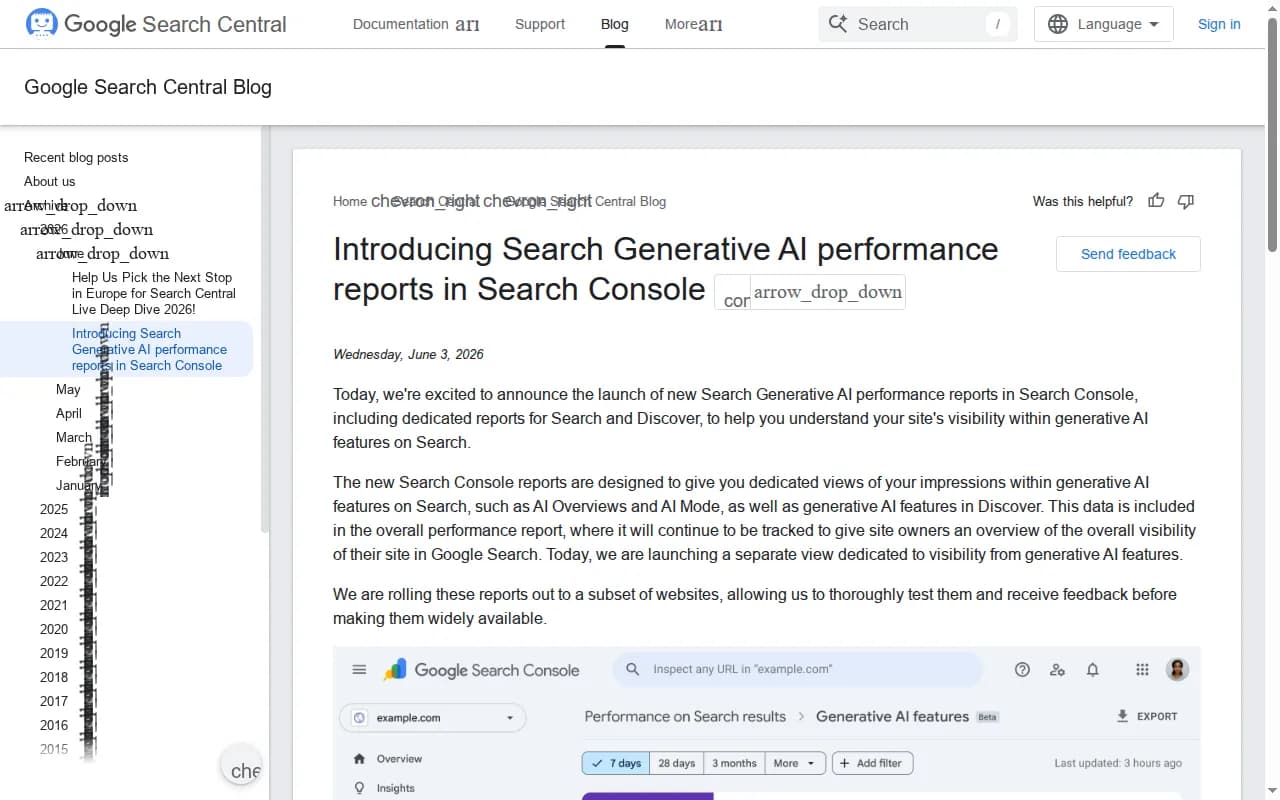
On June 3, 2026, Google announced the rollout of Search Generative AI performance reports in Search Console. The core change: you now get dedicated views for your impressions within generative AI features on Search, including AI Overviews, AI Mode, and Discover.
Previously, if your page appeared in an AI Overview, that impression was counted alongside your regular search impressions. You had no way to separate them. Now you can filter by search type and isolate AI-specific data.
What you can see in the new reports:
- Impressions from AI Overviews (how often your content appeared as a cited source)
- Impressions from AI Mode (Google's more conversational search experience)
- Clicks from AI-generated results
- The specific queries that triggered AI responses where you appeared
- Position data within AI-generated answers
The opt-out toggle
Google also added a toggle that lets site owners block their content from appearing in AI Overviews and AI Mode. It took effect on June 17, 2026. This is worth knowing about, but for most sites, opting out is counterproductive -- AI Overviews are increasingly where attention goes, and removing yourself from them is removing yourself from consideration.
The toggle makes more sense for publishers with specific editorial or licensing concerns, not for brands trying to grow their visibility.
How to access the AI performance data
Finding the reports
Log into Google Search Console.
From the left sidebar, go to "Search results" under the Performance section. You'll see a new option to filter by search type. The available types now include:
- Web (traditional results)
- Image
- Video
- News
- AI Overviews
- AI Mode
- Discover
Select "AI Overviews" or "AI Mode" to isolate your generative AI performance. The date range defaults to the last three months, which gives you enough data to spot patterns.
What to look at first
Start with impressions, not clicks. In AI Overviews, your content can appear as a cited source without generating a click -- the user reads the AI summary and moves on. Impressions tell you whether AI is finding your content relevant. Clicks tell you whether users want more detail.
A high impression count with low clicks isn't necessarily bad. It might mean your content is being used to generate answers, which builds brand familiarity even without the click. But if you have zero impressions for queries you should be ranking for, that's the real problem to solve.
Reading the data: what it's actually telling you
Queries where you appear in AI results
The query report is the most actionable part. Filter by AI Overviews and sort by impressions. You'll see the specific questions and searches where Google's AI is citing your content.
Look for patterns:
- Which topics are generating the most AI impressions?
- Are these queries aligned with your core business, or are they tangential?
- What's the average position? (Lower position in an AI Overview still means you're cited, but you're not the primary source.)
Queries where you don't appear -- but should
This is harder to extract from GSC directly, because the tool only shows you data for queries where you already have some presence. To find the gaps -- the queries where competitors are being cited but you're not -- you need to combine GSC data with competitor research.
One approach: take your top-performing traditional search queries from GSC, then manually check whether AI Overviews appear for those queries and whether your site is cited. If Google is generating an AI Overview for a query you rank well for traditionally, but your site isn't cited in the AI answer, that's a gap worth addressing.
Click-through rate differences between AI and traditional results
Compare your CTR for the same queries across search types. If a query has a 5% CTR in traditional results but 0.8% in AI Overviews, that's not surprising -- AI answers reduce the need to click. But if your CTR from AI Mode is notably higher than from AI Overviews, that tells you something about user intent in each format.
Turning GSC data into content improvements
Identify your strongest AI-cited pages
Filter to AI Overviews, sort by impressions, and click through to the Pages tab. These are your pages that Google's AI considers authoritative enough to cite. Study them:
- What format are they in? (FAQ, how-to, listicle, definition?)
- How long are they?
- Do they use structured data?
- Are they comprehensive or narrow in scope?
The answers tell you what to replicate across other pages.
Find pages with AI impressions but no traditional rankings
Sometimes a page gets cited in AI Overviews despite not ranking well in traditional results. This is interesting -- it suggests the content is factually useful even if it's not optimized for traditional SEO signals. These pages are worth investing in: improve their on-page SEO and they might start pulling double duty.
Find pages with strong traditional rankings but zero AI impressions
These are your biggest opportunity. You're already ranking, which means Google trusts the domain and the page. But the content isn't being pulled into AI answers. Common reasons:
- The content doesn't directly answer a question (AI models prefer direct, declarative answers)
- The page lacks structured data that helps AI parse it
- The content is thin or doesn't cover the topic comprehensively
- The page has too much promotional language and not enough factual substance
Fix these pages and you can often convert traditional rankings into AI citations relatively quickly.
Structuring content for AI Overviews
Answer questions directly and early
AI models pull from content that answers questions clearly. If your page buries the answer three paragraphs down after an introduction, the AI might skip it. Put the direct answer in the first paragraph, then expand.
For example, if you're targeting "what is [X]", the first sentence of your page should define [X] clearly. Not "In this article, we'll explore what [X] means and why it matters." Just the definition.
Use structured data
Schema markup helps Google understand what your content is about. For content targeting AI Overviews:
- FAQ schema for question-and-answer content
- HowTo schema for step-by-step guides
- Article schema with author and date information
- Speakable schema for content you want read aloud in AI responses
GSC will show you if structured data errors are affecting your pages under the Enhancements section. Fix those first.
Write for comprehensiveness, not just length
AI models prefer sources that cover a topic thoroughly. A 600-word page that answers one question well can outperform a 3,000-word page that wanders. But a 2,000-word page that answers the main question and every reasonable follow-up question? That's what tends to get cited repeatedly.
Use the "People Also Ask" data from your GSC queries to understand what follow-up questions users have. Build those answers into your pages.
The limits of Google Search Console for AI visibility
GSC is genuinely useful now, but it has a hard ceiling. It only shows you data for Google's AI features. It tells you nothing about:
- Whether ChatGPT cites your content
- How Perplexity uses your pages
- Whether Claude, Gemini (standalone), or Grok mention your brand
- What prompts in other AI engines your competitors are winning
This matters because a growing share of AI-driven discovery happens outside Google. Someone asking ChatGPT for a software recommendation, or using Perplexity to research a purchase decision, isn't generating any data in your GSC account.
For a complete picture of your AI search visibility, you need tools that monitor across multiple AI engines. Promptwatch does this -- tracking how your brand appears across ChatGPT, Perplexity, Claude, Gemini, Grok, and others, and showing you which prompts competitors are winning that you're not.

The combination that works: use GSC for Google-specific AI data (it's free, it's accurate, and it's directly from the source), then layer on a dedicated AI visibility platform for cross-engine monitoring and gap analysis.
Comparing your options for AI search visibility monitoring
| Tool | Google AI Overviews data | Other AI engines | Content gap analysis | Content generation | Crawler logs |
|---|---|---|---|---|---|
| Google Search Console | Yes (native) | No | No | No | No |
| Promptwatch | Yes | Yes (10 engines) | Yes | Yes | Yes |
| Semrush | Partial | Limited | No | No | No |
| Ahrefs | Partial | No | No | No | No |
| Otterly.AI | Yes | Yes | No | No | No |
| Profound | Yes | Yes | No | No | No |
Otterly.AI

Profound

The pattern is clear: GSC gives you the most accurate Google-specific data, but stops there. Most dedicated AI monitoring tools add cross-engine coverage but stop at monitoring. The gap is in the action layer -- knowing what to do with the data.
A practical workflow for using GSC AI data
Here's a repeatable process you can run monthly:
Week 1: Audit your current AI visibility
- Pull AI Overviews impressions from GSC for the past 30 days
- Identify your top 10 pages by AI impressions
- Identify your top 10 traditional-ranking pages with zero AI impressions
Week 2: Analyze the gap
- For each zero-AI-impression page, manually check if AI Overviews appear for its target queries
- Note whether competitors are cited in those AI answers
- List the specific questions those AI answers are addressing
Week 3: Fix and create
- Update existing pages to answer questions more directly
- Add FAQ sections targeting the questions you identified
- Create new pages for topics where you have no content but AI Overviews are active
Week 4: Measure
- Check GSC again for movement in AI impressions
- Note which updated pages started appearing in AI results
- Repeat
This isn't fast. AI visibility improvements typically take 4-8 weeks to show up in GSC data, because Google needs to crawl, index, and then incorporate your updated content into its AI responses. But the compound effect is real -- pages that get cited in AI Overviews tend to stay cited.
Technical factors that affect AI citation rates
Page speed and Core Web Vitals
Google's AI features draw from pages that Google can crawl and render efficiently. Slow pages or pages with render-blocking JavaScript can reduce how frequently Google's systems process your content. Check your Core Web Vitals in GSC under the Experience section and fix any pages flagged as "Poor."
Crawl coverage
If Google isn't crawling your pages regularly, your content won't appear in AI answers. Check the Index Coverage report in GSC for errors, and make sure your sitemap is submitted and up to date. Pages with crawl errors can't be cited.
Mobile usability
AI Overviews appear predominantly on mobile. Pages with mobile usability issues (text too small, clickable elements too close together) may be deprioritized. GSC's Mobile Usability report shows you exactly which pages have problems.
What good looks like
A well-optimized site for AI search visibility in 2026 looks something like this in GSC:
- AI Overviews impressions growing month-over-month
- A mix of pages being cited (not just one or two)
- Queries being cited that align with your actual business (not just tangential topics)
- CTR from AI Mode higher than from AI Overviews (indicating your content satisfies users who want depth)
- No crawl errors on your most-cited pages
Getting there takes consistent work: auditing your GSC data, updating content to answer questions directly, fixing technical issues, and tracking what moves. The new reports make that work measurably easier than it was six months ago.
For visibility beyond Google -- which is where a meaningful portion of AI-driven discovery now happens -- GSC alone won't cut it. But it's a genuinely good place to start, and for most sites, there's more actionable data sitting in those new AI reports than they've yet looked at.