KWFinder Review 2026
User-friendly keyword research tool focused on finding long-tail keywords with low SEO difficulty, ideal for startups targeting achievable rankings.
Summary: Key Takeaways
- Best for beginners and small teams: KWFinder's clean interface and straightforward metrics make keyword research accessible without overwhelming you with data
- Low-competition focus: The tool's standout feature is its accurate SEO difficulty scores that help you find keywords you can actually rank for, not just high-volume vanity terms
- Excellent value: At $29/month (annual billing), you get KWFinder plus four other SEO tools (SERPChecker, SERPWatcher, LinkMiner, SiteProfiler) in the Mangools suite
- Limitations: Daily lookup limits on lower tiers and fewer advanced filtering options compared to enterprise tools like Ahrefs or Semrush
- Ideal users: Solopreneurs, content creators, local businesses, and SEO freelancers managing 1-5 client sites who need reliable keyword data without the complexity or cost of enterprise platforms
KWFinder is a keyword research tool built by Mangools that has carved out a loyal following among SEO beginners and small teams since its launch in 2014. While giants like Ahrefs and Semrush dominate the enterprise market with overwhelming feature sets and four-figure price tags, KWFinder takes a different approach: it focuses on doing one thing exceptionally well -- helping you find keywords you can actually rank for. The tool's clean interface, accurate difficulty scores, and affordable pricing have made it a go-to choice for over 25,000 paying customers, including freelancers, startups, and small agencies who need actionable keyword data without the learning curve or budget of enterprise tools. Mangools has processed over 2.5 billion related keywords and continues to grow its database by roughly 20 million keywords monthly.
The target audience is clear: if you're a solopreneur building your first content site, a freelance SEO consultant managing a handful of clients, or a small marketing team at a startup, KWFinder is designed for you. It's not trying to be everything to everyone. Instead, it delivers the core keyword research capabilities most people actually need -- search volume, difficulty scores, SERP analysis, and competitor insights -- in a package that doesn't require a PhD in SEO to understand. Brands like Airbnb, Skyscanner, and Adidas have used Mangools tools, but the real sweet spot is the one-person content creator or 2-5 person agency that needs reliable data without enterprise complexity.
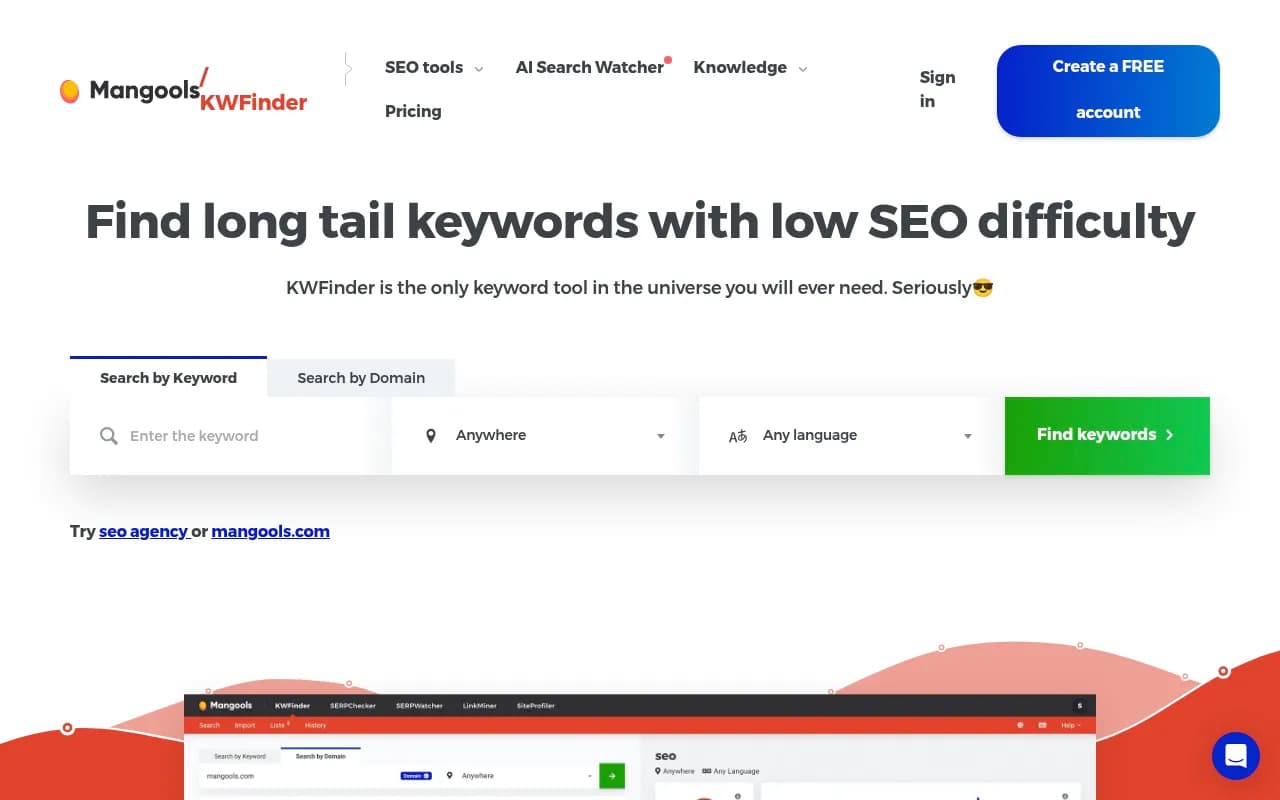
Keyword Difficulty Scoring KWFinder's headline feature is its SEO difficulty score, displayed on a 0-100 scale with color coding (green for easy, orange for medium, red for hard). Unlike some competitors that use opaque proprietary metrics, KWFinder's difficulty calculation is based on the link profile strength of the top 10 ranking pages -- specifically looking at domain authority, page authority, citation flow, trust flow, and the number of backlinks. The tool labels keywords under 30 as "easy" and those over 70 as "hard," giving you an at-a-glance sense of whether a keyword is worth targeting. In practice, this works well for small sites and new domains. If you're a startup blog with minimal backlinks, filtering for keywords with difficulty scores under 25-30 will surface genuinely achievable targets. The accuracy isn't perfect (no keyword difficulty metric is), but it's reliable enough to guide content strategy for most users. Ahrefs and Semrush offer similar metrics, but KWFinder's simplicity and visual clarity make it easier to act on quickly.
Exact Search Volumes and Trends KWFinder provides exact monthly search volumes (not ranges) pulled from Google Keyword Planner data, along with 12 months of historical trend data displayed as a mini line chart next to each keyword. This is crucial for identifying seasonal keywords or spotting rising trends before they peak. For example, if you're targeting "best tax software," you'll see search volume spike every January-April and drop off in summer -- helping you time content publication for maximum impact. The trend data also helps you avoid wasting time on declining keywords. Many cheaper tools only show annual averages or vague ranges like "1K-10K," which makes planning nearly impossible. KWFinder's exact numbers and historical context put it on par with enterprise tools in this regard, which is impressive at its price point.
Keyword Suggestions and Related Keywords Enter a seed keyword and KWFinder returns hundreds of related keyword ideas, including autocomplete suggestions, questions, and related searches. On the Basic plan, you get 200 suggestions per lookup with 25 related keywords. Premium and Agency plans unlock unlimited suggestions per lookup. The suggestions are organized by relevance, search volume, or difficulty, and you can filter by search volume range, difficulty range, word count, and included/excluded terms. The autocomplete suggestions are particularly useful for finding long-tail variations that real users are typing into Google. For example, searching "email marketing" surfaces terms like "email marketing software for small business" and "email marketing automation tools" -- specific, lower-competition phrases that are easier to rank for. The question-based suggestions are gold for content creators building FAQ sections or blog posts targeting featured snippets.
SERP Analysis and Competitor Insights Every keyword result includes a live SERP preview showing the top 10 Google results with key metrics: domain authority, page authority, citation flow, trust flow, number of backlinks, estimated visits, Facebook shares, and LPS (link profile strength). This lets you quickly assess whether you can compete. If the top 10 results are all DR 70+ domains with thousands of backlinks, you know it's a tough keyword. If you see a mix of DR 20-40 sites with modest backlink profiles, it's a green light. You can also click into any result to see the full backlink profile via LinkMiner (another Mangools tool included in your subscription). The SERP analysis is less detailed than Ahrefs' SERP overview, which shows more granular data like referring domains and traffic estimates, but for most users, KWFinder's metrics are sufficient to make go/no-go decisions.
Competitor Keyword Research Switch to the "Search by Domain" tab and KWFinder shows you the keywords any competitor ranks for, along with their positions, search volumes, and difficulty scores. This is invaluable for competitive analysis and content gap identification. For example, if you're launching a project management tool, you can plug in asana.com or monday.com and see exactly which keywords are driving their organic traffic. You can then filter for keywords where they rank in positions 1-10 but you don't rank at all, giving you a prioritized list of content opportunities. The competitor analysis isn't as deep as Ahrefs' Site Explorer (which shows more historical data and content decay insights), but it's more than enough for small teams doing quarterly content planning.
Local SEO and Location Targeting KWFinder supports over 65,000 locations, including countries, states, cities, and even districts. You can search for "plumber" in "Austin, Texas" and get hyper-local search volumes and SERP results specific to that geography. This is a game-changer for local businesses, multi-location brands, and agencies managing local SEO clients. Most keyword tools only support country-level targeting, making KWFinder one of the few affordable options for granular local keyword research. The local SERP results show the actual Google results for that location, including local pack listings, so you can see what you're competing against. If you're a local bakery in Brooklyn, you can see exactly which keywords have low competition in your specific neighborhood and build content around them.
Keyword Lists and Organization You can save keywords to custom lists for organization and export them as CSV files. This is basic but functional. You can create lists like "Q1 Content Plan" or "Client A - Blog Keywords" and drag keywords into them as you research. The lists sync across the Mangools suite, so keywords saved in KWFinder are accessible in SERPWatcher (the rank tracking tool). The export functionality is straightforward -- you get a CSV with all the metrics (search volume, difficulty, CPC, trend data) that you can import into Google Sheets or Excel for further analysis. It's not as robust as Ahrefs' keyword list features (which include bulk metrics and filtering), but it covers the basics.
Integration with Mangools Suite KWFinder is part of the Mangools bundle, which includes four other tools: SERPChecker (SERP analysis), SERPWatcher (rank tracking), LinkMiner (backlink analysis), and SiteProfiler (domain overview). All five tools share a unified interface and data flows between them. For example, you can research keywords in KWFinder, add them to a tracking campaign in SERPWatcher, analyze competitor backlinks in LinkMiner, and audit your own site in SiteProfiler -- all without leaving the Mangools ecosystem. This integration is a huge value-add. Most competitors charge separately for each tool or lock advanced features behind higher tiers. With Mangools, you get the full suite at every pricing level, just with different usage limits.
Who Is KWFinder For? KWFinder is purpose-built for individuals and small teams who need reliable keyword data without enterprise complexity or cost. If you're a freelance content writer building a portfolio site, a solopreneur launching a niche blog, or a small agency managing 3-5 local SEO clients, this tool is ideal. It's also excellent for startups in the early stages of content marketing who need to identify low-hanging fruit keywords to build initial organic traffic. The typical user is someone managing 1-10 sites, publishing 5-20 pieces of content per month, and working with limited budgets. KWFinder helps you punch above your weight by focusing on keywords you can realistically rank for, rather than chasing high-volume terms dominated by enterprise competitors.
KWFinder is less suitable for large agencies managing 50+ clients, enterprise SEO teams tracking thousands of keywords, or advanced users who need features like API access, bulk keyword analysis, or deep content gap analysis. If you're managing a site with millions of pages or need to track 10,000+ keywords daily, you'll outgrow KWFinder's limits quickly and should look at Ahrefs, Semrush, or Moz Pro. Similarly, if you need advanced features like keyword clustering, SERP feature tracking, or AI-powered content briefs, KWFinder doesn't offer those. It's a focused tool for focused users.
Integrations and Ecosystem KWFinder integrates natively with the other Mangools tools (SERPChecker, SERPWatcher, LinkMiner, SiteProfiler) and supports CSV export for use in Google Sheets, Excel, or other tools. There's no official API, which limits automation and integration with third-party platforms. You can't, for example, pull KWFinder data into a custom dashboard or automate keyword research workflows via Zapier. For most small teams, this isn't a dealbreaker, but it's worth noting if you rely heavily on API integrations. The tool is web-based with no desktop app, but the interface is responsive and works well on tablets. There's no mobile app, which is fine since keyword research isn't typically a mobile activity.
Pricing and Value Mangools offers three pricing tiers, all of which include the full suite of five tools (KWFinder, SERPChecker, SERPWatcher, LinkMiner, SiteProfiler). Annual billing saves 35% compared to monthly.
Mangools Basic: $29/month (annual) or $49/month. Includes 100 keyword lookups per 24 hours, 200 keyword suggestions per lookup (25 related keywords), 100 SERP lookups per day, 200 tracked keywords, 100k backlink rows per month, and 20 site lookups per day. Best for solopreneurs and freelancers managing 1-3 sites.
Mangools Premium: $44/month (annual) or $69/month. Includes 500 keyword lookups per 24 hours, unlimited keyword suggestions per lookup, 500 SERP lookups per day, 700 tracked keywords, 500k backlink rows per month, 70 site lookups per day, and 3 extra user seats. Best for small agencies and marketing teams managing 5-10 sites.
Mangools Agency: $68/month (annual) or $129/month. Includes 1,200 keyword lookups per 24 hours, unlimited keyword suggestions, 1,200 SERP lookups per day, 1,500 tracked keywords, 1.2M backlink rows per month, 150 site lookups per day, and 5 extra user seats. Best for agencies managing 10-20 clients.
All plans include a 10-day free trial (no credit card required) and a 48-hour money-back guarantee. Compared to competitors, this is exceptional value. Ahrefs starts at $129/month, Semrush at $139.95/month, and Moz Pro at $99/month -- all significantly more expensive with steeper learning curves. For small teams and individuals, Mangools delivers 80% of the functionality at 25% of the cost.
Strengths
- Beginner-friendly interface: Clean, intuitive design that doesn't overwhelm new users with data
- Accurate difficulty scores: Reliable SEO difficulty metrics that help small sites find achievable keywords
- Exact search volumes and trends: Real numbers and historical data, not vague ranges
- Local SEO support: 65,000+ locations for hyper-local keyword research
- Exceptional value: Full five-tool suite starting at $29/month with no feature gating across tiers
- Fast and reliable: Quick load times and stable performance even during peak usage
Limitations
- Daily lookup limits: Even the Agency plan caps keyword lookups at 1,200 per day, which can be restrictive for large projects
- No API access: Can't automate workflows or integrate with custom tools
- Basic filtering: Fewer advanced filters compared to Ahrefs or Semrush (e.g., no SERP feature filters, no parent topic grouping)
- Limited competitor analysis depth: Competitor keyword data is solid but lacks the historical tracking and content decay insights of enterprise tools
- No content optimization features: Doesn't offer AI content briefs, on-page SEO scoring, or content gap analysis like Surfer SEO or Clearscope
Bottom Line KWFinder is the best keyword research tool for beginners, freelancers, and small teams who need reliable data without enterprise complexity or cost. If you're managing 1-10 sites, publishing content regularly, and working with a limited budget, this tool will help you find low-competition keywords you can actually rank for -- which is the whole point of keyword research. The clean interface, accurate difficulty scores, and full Mangools suite make it an easy recommendation at $29/month. However, if you're managing 20+ clients, need API access, or require advanced features like keyword clustering and content optimization, you'll eventually need to graduate to Ahrefs or Semrush. For everyone else, KWFinder is the smart choice in 2026.
Tags:
Similar and alternative tools to KWFinder