Sketch Review 2026
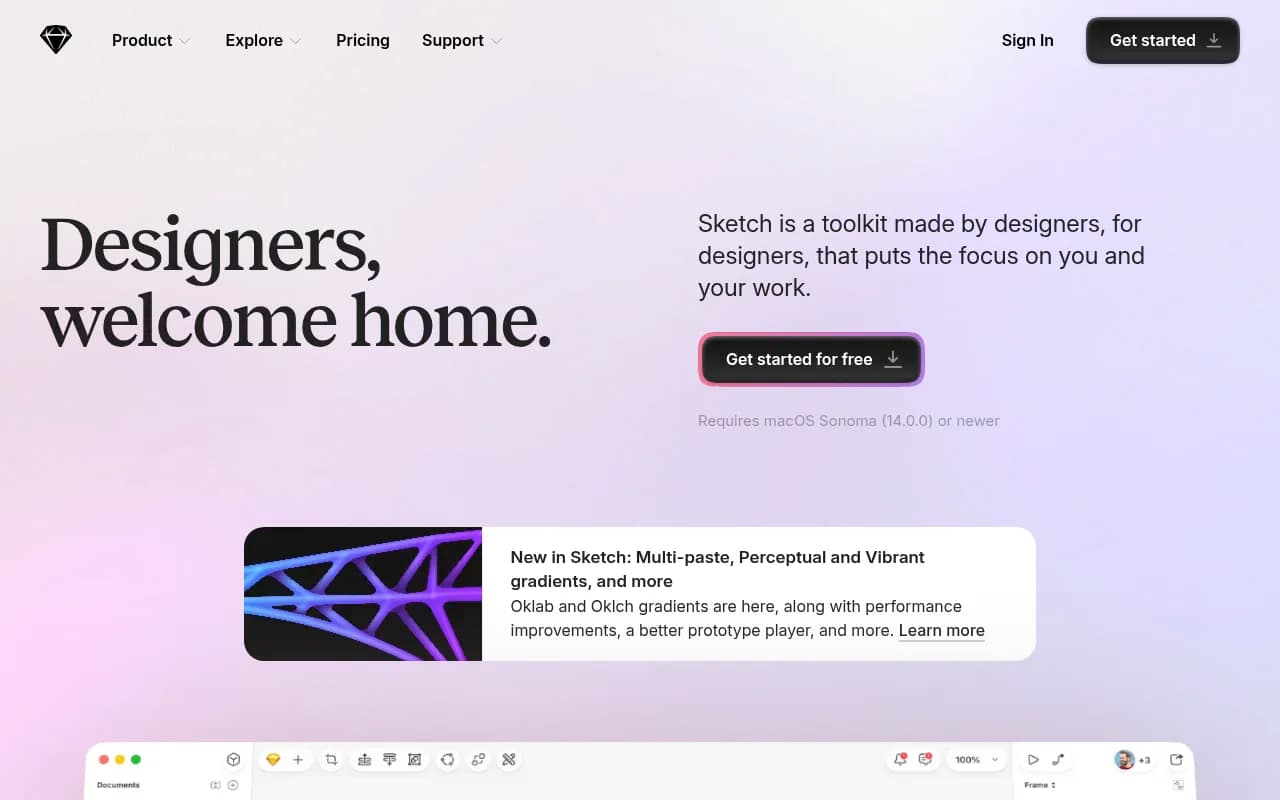
A vector-based design app for creating UI, prototypes, and design systems. Popular among product and UX designers for its symbol libraries and developer handoff tools.
Key takeaways
- Sketch is a Mac-only vector design tool built specifically for UI and product design, with a strong reputation among indie app developers and product teams
- Starts at $12/month per editor (billed yearly), with a 30-day free trial and no credit card required
- Real-time co-editing, shared component libraries, and free developer handoff are included at all paid tiers
- The Mac-only requirement is a genuine dealbreaker for cross-platform teams or anyone on Windows/Linux
- Figma remains the dominant competitor, especially for browser-based and cross-platform workflows; Sketch's advantage is its native performance and offline capability
Sketch has been around since 2010, and for a long stretch of the 2010s it was simply the tool for UI design on Mac. Before Figma existed, before Adobe XD was a thing, Sketch was where product designers lived. It replaced Photoshop for interface work almost overnight, largely because it was built from scratch for screen design rather than retrofitted from a photo editing tool.
The company behind it, Bohemian Coding (now operating as Sketch B.V.), has stayed independent throughout. No acquisition, no VC-fueled pivot, no Adobe buyout attempt. That independence shows up in how the product is priced and how decisions get made. They've been vocal about not doing shady per-seat pricing tricks, and they mean it: if a guest editor already pays for Sketch, inviting them to your workspace doesn't cost you extra.
The target audience is product and UX designers working primarily on Mac, especially those building iOS apps, macOS apps, or web products where pixel-perfect vector work matters. Sketch has a particularly loyal following among indie developers and small studios, partly because of its native macOS feel and partly because it's genuinely fast on Apple Silicon. Enterprise teams use it too, though Figma has taken significant market share in that segment over the past few years.
Key features
Vector editing engine
Sketch's vector editor is the core of everything. It handles bezier curves, boolean operations, and path editing with the kind of precision you'd expect from a dedicated illustration tool. The pen tool behaves predictably, which sounds like a low bar but anyone who's fought with Illustrator knows it isn't. Recent updates added Oklab and Oklch gradient support, which matters for designers who care about perceptually uniform color transitions. The canvas also includes a Minimap for navigating large documents, and a Command Bar that surfaces actions without hunting through menus.
Symbols and component libraries
Symbols are Sketch's answer to reusable components. You define a Symbol once, use it across your document, and changes propagate everywhere. Nested Symbols let you build complex components from simpler ones. Shared Libraries extend this across documents and teams, so a design system can live in one file and be consumed by dozens of projects. Library updates can be accepted or rejected per-document, which gives teams control over when they adopt changes.
Stack layouts and frames
Sketch has added auto-layout-style functionality through stack layouts, which let you create responsive component arrangements that reflow as content changes. Nestable frames give you a more structured way to organize designs compared to the older artboard model. These features close the gap with Figma's auto layout, though Figma still has a slight edge in flexibility for complex responsive designs.
Prototyping with Smart Animate
Prototyping in Sketch has improved substantially. You can create interactive flows with click, hover, press, drag, and swipe interactions. Overlays handle modals, alerts, and panels. Smart Animate adds motion between screens, with control over easing and timing. Scroll areas support horizontal, vertical, and multi-directional scrolling. Prototypes can be tested in any browser or on iPhone and iPad via the Sketch Mirror app. The "less than 10 clicks to a working prototype" claim is actually pretty accurate for simple flows.
Real-time collaboration
Co-editing landed in Sketch a few years after Figma made it table stakes, but it works well. Multiple designers can edit the same document simultaneously, with presence indicators showing who's where. The collaboration model is cloud-based through Sketch's Workspace, but the underlying file is still a native .sketch file, which means you can work offline and sync later. This hybrid approach is genuinely useful for designers who travel or work in environments with unreliable internet.
Developer handoff
Sketch includes free developer handoff tools. Developers get a web-based inspector where they can examine layer properties, copy CSS or Swift code snippets, download assets, and export design tokens. This doesn't require developers to have a paid Sketch license. The handoff experience is solid for most workflows, though it's not as feature-rich as Zeplin (which integrates with Sketch) for teams that need more advanced annotation or documentation features.
Templates and asset libraries
Sketch ships with hundreds of free templates and frame presets covering common device sizes and UI patterns. The community has also built an enormous ecosystem of third-party resources, UI kits, and icon libraries in .sketch format. Getting started on a new project is fast because you're rarely starting from a blank canvas.
Privacy and offline work
This is worth calling out specifically because it's genuinely different from browser-based tools. Sketch files live on your Mac. You can design on a plane, in a coffee shop with no wifi, or in a secure environment where cloud sync isn't allowed. The app doesn't require an internet connection to function. For designers working with sensitive client data or in regulated industries, this matters.
Performance on Apple Silicon
Sketch is a native macOS app built with Apple's frameworks. On M-series Macs, it's noticeably faster than browser-based alternatives for large documents with many layers. Scrolling, zooming, and rendering feel immediate in a way that Figma in a browser tab doesn't quite match, even with Figma's desktop app.
Who is it for
Sketch fits best with Mac-based product designers who work primarily on iOS, macOS, or web UI. The sweet spot is freelancers and small-to-medium product teams (roughly 2-20 designers) who want a fast, focused tool without the overhead of enterprise design platforms. Indie app developers who also do their own design work are a core constituency, as the testimonials on Sketch's homepage make clear: Halide, Darkroom, Tapbots, Gentler Streak. These are all Apple Design Award winners who've built their workflows around Sketch.
For larger teams, Sketch works well when the design system is managed centrally through Shared Libraries and the team is Mac-homogeneous. Companies building iOS-first products often stick with Sketch because the native feel and Apple ecosystem integration (exporting assets in the right formats, working with SF Symbols, etc.) is genuinely better than what you get from a browser-based tool.
Who should not use Sketch: anyone on Windows or Linux, full stop. The Mac-only requirement isn't going away. Cross-functional teams where developers or stakeholders need to edit designs (not just inspect them) will also find the collaboration model more limited than Figma's. And if your team is already deep in Figma with components, variables, and plugins built around it, switching to Sketch has a real migration cost that's hard to justify unless you have specific reasons.
Integrations and ecosystem
Sketch has a plugin ecosystem that's been around for over a decade. Plugins extend the app with everything from content generation to accessibility checking to custom export formats. The Plugin Manager is built into the app.
Notable integrations include:
- Zeplin: The most popular third-party handoff tool for Sketch, offering more annotation and documentation features than Sketch's built-in handoff
- Abstract: Version control for Sketch files, though Abstract has scaled back its product significantly
- Lottie/Bodymovin: Export animations from Sketch for use in production
- Craft by InVision: Sync designs to InVision prototypes (though InVision has wound down its main product)
- Overflow: User flow diagramming that connects Sketch artboards
Sketch has a public API for plugins and a developer documentation site. The .sketch file format is documented and parseable, which has enabled third-party tools to read and write Sketch files without going through the app itself.
There's no official Zapier integration for workflow automation. The Sketch Mirror iOS app lets you preview designs on device in real time. There's no Android app.
Import support covers SVG, PDF, and image formats. Export covers PNG, JPG, SVG, PDF, WebP, and more. Sketch can import Figma files through third-party converters, though the fidelity varies.
Pricing and value
Sketch's pricing is straightforward:
- Free trial: 30 days, no credit card required, full access
- Standard plan: $12/month per editor, billed yearly ($15/month billed monthly). Covers individuals and small teams with cloud collaboration, Workspace, and all core features.
- Mac-only license: $120 per seat, one-time purchase. This gives you the desktop app without cloud features. Good for designers who work entirely locally and don't need collaboration.
- Business/Enterprise: Custom pricing for larger teams, with SSO, priority support, and advanced admin controls.
Guest editors who already have their own Sketch subscription don't count against your seat count, which is a meaningful difference from how some competitors handle external collaborators.
Compared to Figma's pricing (which starts at $15/month per editor for the Professional plan), Sketch is slightly cheaper for small teams. Adobe XD was discontinued in 2023, removing one competitor from the market. Figma's free tier is more generous than Sketch's (Figma allows unlimited viewers and 3 projects free; Sketch's free trial is time-limited).
For a solo designer or a small team that's Mac-based, $12/month per editor is reasonable. The one-time $120 Mac license is an interesting option for designers who don't need cloud sync and prefer to own their software outright.
Strengths and limitations
What Sketch does well:
- Native macOS performance is genuinely better than browser-based tools on large, complex documents. If you're working on a 200-artboard design system, you'll feel the difference.
- The vector editor is precise and predictable. Sketch's pen tool and path editing have been refined over 15 years.
- Offline-first design is a real advantage for designers who travel or work in secure environments.
- The pricing model is honest. No seat-count tricks, no surprise charges for guests who already pay.
- The indie developer community around Sketch is strong, and the plugin ecosystem covers most workflow gaps.
Honest limitations:
- Mac-only is a hard wall. There's no web app, no Windows client, no Linux support. If anyone on your team uses Windows, Sketch doesn't work for them.
- Figma has pulled ahead on variables, component properties, and advanced auto layout. For complex design systems with multiple modes and responsive components, Figma's implementation is more mature.
- The collaboration model, while functional, still feels secondary to the solo design experience. Figma was built for multiplayer from day one; Sketch added it later, and it shows in some edge cases.
- No built-in user testing or advanced analytics. Tools like Maze or Useberry integrate with Sketch but aren't native.
Bottom line
Sketch is the right tool for Mac-based product designers who want a fast, focused, native app with honest pricing and a mature vector editing engine. It's especially strong for indie developers, iOS-focused teams, and designers who value offline capability and file ownership over cloud-first collaboration.
If your team is cross-platform, already invested in Figma, or needs the most advanced component variable system available, Sketch probably isn't the move in 2026. But for the designer who wants a tool that feels like it was made for their Mac and their workflow, Sketch still earns its place.
Best use case: A Mac-based product design team of 2-10 people building iOS or web products who want native performance, offline capability, and straightforward per-seat pricing without collaboration overhead.
Frequently asked questions
Is Sketch available on Windows or as a web app?
How much does Sketch cost?
How does Sketch compare to Figma?
Does Sketch support real-time collaboration?
Is developer handoff free in Sketch?
What happened to Adobe XD, and is Sketch a good replacement?
Similar and alternative tools to Sketch