Edraw.AI Review 2026
An AI-assisted diagramming platform supporting flowcharts, mind maps, org charts, and Visio-compatible formats. Available online and as a desktop app across platforms.
Key takeaways
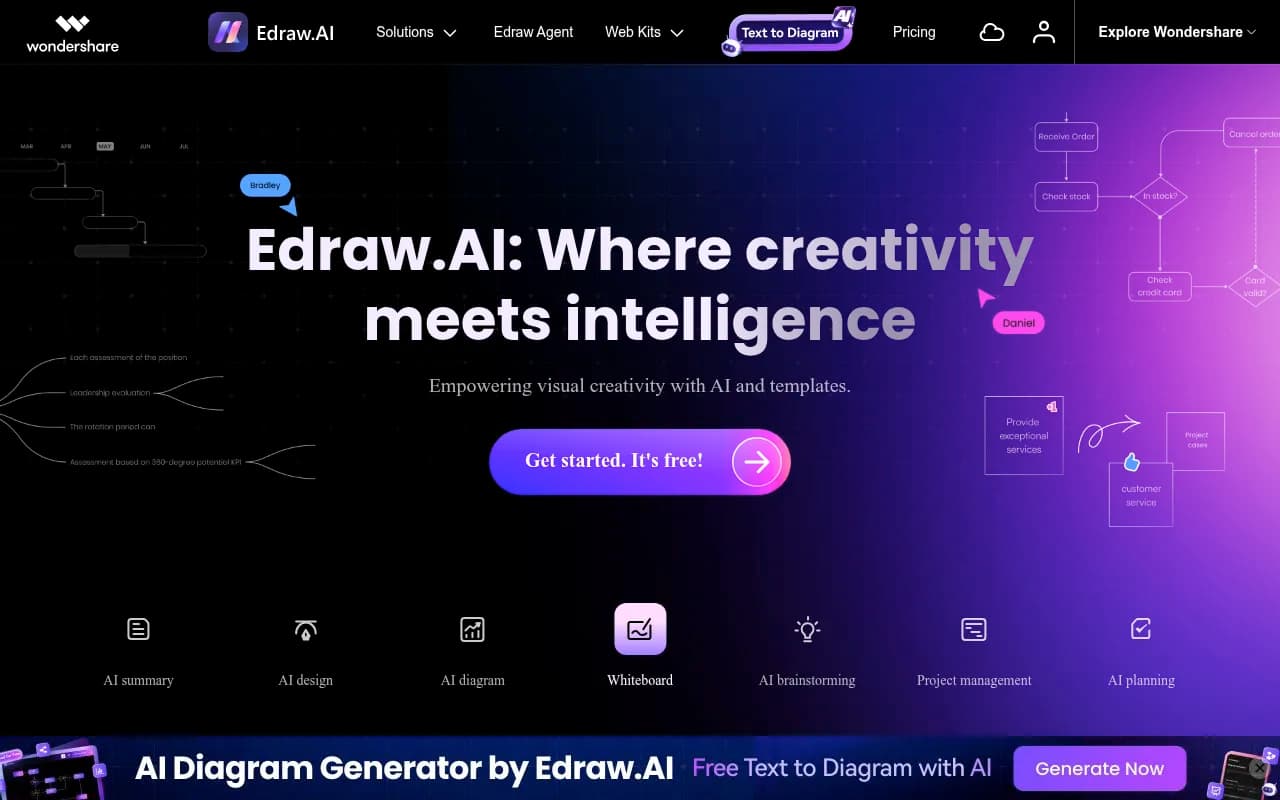
- Edraw.AI packs 40+ AI tools into a single visual workspace covering diagrams, mind maps, whiteboards, file analysis, and AI drawing -- a broader toolkit than most dedicated diagramming apps.
- The template library (700+ templates, 26,000+ symbols) is one of the largest in the category, making it genuinely useful for teams that need to move fast without starting from scratch.
- Real-time collaboration is built in, with no download required for the web version -- though the desktop app is available for Windows, Mac, and Linux.
- Pricing is token-based for AI features, which can feel opaque compared to competitors like Lucidchart or Miro that bundle AI into flat-rate plans.
- Best suited to small and mid-size teams in IT, project management, education, and consulting who want an all-in-one visual tool without paying Miro or Lucidchart enterprise prices.
Edraw.AI is the AI-forward branch of EdrawSoft, a Chinese software company that has been building diagramming tools for over two decades. The parent product, EdrawMax, has accumulated more than 30 million users across 100+ countries, and Edraw.AI is essentially the cloud-native, AI-first evolution of that product. Where EdrawMax was a desktop-first Visio alternative, Edraw.AI is built around a browser-based collaborative canvas with a suite of generative AI tools layered on top.
The problem it's solving is real: most diagramming tools still require you to do the heavy lifting manually. You pick a template, drag shapes, connect nodes, and spend 45 minutes building something that communicates a 10-minute idea. Edraw.AI's pitch is that you type a prompt, and the diagram appears. That's not unique in 2026 -- Miro, Lucidchart, and Canva all have AI diagram generators now -- but Edraw.AI goes wider than most by bundling AI mind mapping, AI file analysis, AI drawing, and an AI chat assistant into the same workspace.
The target audience is broad by design. EdrawSoft markets to project managers, IT teams, researchers, engineers, marketers, consultants, and educators. That breadth is both a strength and a weakness: the tool does a lot, but specialists in any one area (say, software architects who live in draw.io) may find it less precise than a purpose-built tool.
Key features
AI diagram generator Type a description and Edraw.AI produces a structured diagram -- flowchart, org chart, network diagram, timeline, or others from the 210+ diagram types supported. In practice, the output quality depends heavily on how specific your prompt is. Vague prompts produce generic structures; detailed prompts with context about the process or hierarchy produce something closer to usable. The generator handles basic flowcharts well. Complex multi-lane swimlane diagrams or highly technical network topologies usually need manual cleanup, which is honest for any AI diagramming tool right now.
AI mind map This is one of the stronger AI features. Give it a topic -- "product launch strategy for a B2B SaaS tool" -- and it generates a branching mind map with main nodes and sub-nodes. You can expand any node further with another AI prompt, which makes it genuinely useful for brainstorming sessions where you want to explore a topic quickly. The output integrates directly into the canvas, so you can drag, rearrange, and style it without switching tools.
AI file analysis Upload a PDF, Word document, or spreadsheet and Edraw.AI will parse it and generate a visual summary -- a mind map, a flowchart, or a structured outline depending on what the content calls for. This is a standout feature that most competitors don't offer at this level. For researchers or consultants who regularly need to turn dense reports into visual summaries, it saves meaningful time. The accuracy is good for well-structured documents; loosely formatted files produce messier outputs.
AI drawing A text-to-image generator built into the canvas. You describe an image and it generates one you can embed directly into your diagram or whiteboard. It's not competing with Midjourney -- the outputs are functional rather than polished -- but having it inside the diagramming workspace means you don't have to context-switch to another tool for simple visual assets.
Whiteboard with AI brainstorming The whiteboard mode supports sticky notes, freehand drawing, shapes, and text, with an AI brainstorming layer that can generate ideas, expand on topics, or organize scattered notes into structured formats. It's closer to Miro's AI features than FigJam's, though Miro's AI brainstorming is more mature at this point.
Template library 700+ professionally designed templates and 26,000+ symbols cover an impressive range: business diagrams, engineering drawings, network maps, educational visuals, marketing frameworks, and more. Templates are organized by category and searchable. You can also star templates (yours or others') to save them for reuse, which is a small but practical feature for teams with recurring diagram types.
Real-time collaboration Multiple users can work on the same canvas simultaneously. There's commenting, cursor presence, and the ability to share via link or email. It's not as polished as Miro's collaboration layer -- Miro has more granular permission controls and better facilitation features like voting and timers -- but for most team use cases, Edraw.AI's collaboration is solid.
Export and compatibility Export to PDF, PNG, SVG, Word, Excel, PowerPoint, and Visio (.vsdx) formats. The Visio compatibility is important for teams migrating from Microsoft's ecosystem. You can also share diagrams as interactive web links, which is useful for stakeholder presentations.
AI chat assistant A general-purpose AI chat panel embedded in the workspace. You can ask it to explain a diagram, suggest improvements, generate content for a specific node, or answer questions about your project. It's a useful utility feature rather than a core differentiator.
Project management views Gantt charts, timelines, and Kanban-style boards are available as diagram types. These aren't full project management tools -- there's no task assignment, notifications, or integrations with tools like Jira -- but for teams that want to visualize a project plan without switching to a dedicated PM tool, they're functional.
Who is it for
The clearest fit is small to mid-size teams (5-50 people) that need a shared visual workspace but don't want to pay Miro or Lucidchart enterprise rates. Think a 15-person marketing agency that needs to build customer journey maps, campaign timelines, and client presentation decks in one place. Or an IT team at a mid-size company that documents network architecture, troubleshoots with flowcharts, and plans sprints on a shared whiteboard. Edraw.AI handles all of those without requiring separate subscriptions.
Educators and students are a strong secondary audience. The AI mind map and AI diagram features lower the barrier to creating structured visuals significantly, and the free tier makes it accessible for classroom use. A teacher building a lesson plan visual or a student mapping out a research paper can get real value without paying anything.
Consultants and researchers who regularly convert documents into visuals will find the AI file analysis feature particularly useful. If you're regularly turning 40-page strategy reports into executive summary diagrams, that feature alone justifies the subscription.
Who should probably look elsewhere: software teams that need precise UML or architecture diagrams with version control and developer integrations (draw.io or Lucidchart are better fits). Design teams that need pixel-perfect outputs (Figma or Canva). Large enterprises with complex SSO, audit logging, and compliance requirements (the enterprise tier exists but Edraw.AI's security documentation is less detailed than Lucidchart's or Miro's).
Integrations and ecosystem
Edraw.AI's integration story is thinner than competitors. There's no native Slack, Jira, Confluence, or Notion integration listed. The main ecosystem touchpoints are:
- Export compatibility: Visio (.vsdx), PDF, PNG, SVG, Word, Excel, PowerPoint
- Cloud storage: Files are stored in Edraw.AI's cloud (AWS-hosted), with the ability to export locally
- Web sharing: Shareable links for diagrams and whiteboards
- Desktop apps: Available for Windows, Mac, and Linux -- useful for users who prefer offline work or have security restrictions on browser-based tools
- Mobile: No dedicated mobile app appears to be available, which is a gap compared to Miro and Lucidchart
There's no public API documented on the main site, which limits custom workflow integration. For teams that want to embed diagrams in their own tools or automate diagram generation, this is a meaningful limitation.
Pricing and value
Edraw.AI uses a token-based pricing model for AI features, which is somewhat unusual in this category. The base platform is free to use online, but AI features consume tokens that are purchased separately or bundled in paid plans.
- Free tier: Access to the canvas, templates, and basic features. AI features are limited by a token allowance.
- EdrawMax AI Assets: Approximately $15.90/month (with 20% discount, billed annually) after a 7-day free trial. This appears to be the individual plan for AI feature access.
- Token packs: Available separately for users who need more AI generation capacity without upgrading plans.
The pricing structure is less transparent than Miro ($8-16/user/month) or Lucidchart ($9-20/user/month), which use straightforward per-seat models. The token system means power users of AI features may find costs harder to predict. That said, for teams that use AI features moderately, the base subscription is competitive on price.
Annual billing discounts are available. There's no clear published enterprise pricing on the main site -- you'd need to contact sales.
Compared to Miro (which starts at $8/user/month for the Starter plan) and Lucidchart ($9/user/month), Edraw.AI appears cheaper for individual users but the token model makes direct comparison tricky for teams.
Strengths and limitations
What it does well:
- The AI file analysis feature is genuinely differentiated. Uploading a document and getting a structured visual back is something most competitors don't do as smoothly.
- Template and symbol depth is exceptional. 700+ templates and 26,000+ symbols means you're unlikely to hit a wall when looking for a starting point.
- The breadth of diagram types (210+) covers more ground than most tools. From BPMN to electrical diagrams to Gantt charts, it's all in one place.
- Cross-platform availability (web, Windows, Mac, Linux) with Visio compatibility makes it a practical choice for teams migrating from legacy tools.
- The free tier is genuinely usable, not artificially crippled to force upgrades.
Honest limitations:
- The token-based AI pricing is opaque. It's hard to know upfront how many tokens a typical workflow will consume, which makes budgeting difficult for teams.
- Integration depth is weak. No Slack, Jira, Confluence, or Notion connectors means Edraw.AI sits outside most modern team workflows rather than inside them.
- Collaboration features, while functional, lag behind Miro in polish. Miro's facilitation tools (voting, timers, presentation mode) are more developed.
- No mobile app is a real gap in 2026, when a significant portion of knowledge work happens on tablets and phones.
- The AI diagram output quality for complex diagrams still requires manual cleanup -- this is an industry-wide limitation, but worth setting expectations.
Bottom line
Edraw.AI is a capable, broad-scope visual collaboration tool that punches above its price point, particularly for individuals and small teams who need diagramming, mind mapping, and whiteboarding in one place without paying Miro or Lucidchart rates. The AI file analysis and AI mind map features are genuinely useful, and the template library is one of the deepest in the category.
The token pricing model and thin integration story are real friction points for teams that want predictable costs and tight workflow connections. If your team lives in Slack and Jira, Miro or Lucidchart will fit more naturally. But if you're a consultant, educator, or small team that needs a versatile visual workspace with solid AI assistance and doesn't need deep integrations, Edraw.AI delivers solid value.
Best for: Small teams and individual professionals who need an all-in-one diagramming and whiteboard tool with AI assistance, particularly those converting documents into visuals or building complex mind maps from scratch.
Frequently asked questions
What is Edraw.AI?
Is Edraw.AI free to use?
How does Edraw.AI compare to Miro or Lucidchart?
Does Edraw.AI work offline?
What file formats can Edraw.AI export to?
Who is Edraw.AI best suited for?
Similar and alternative tools to Edraw.AI