Hemingway Editor Review 2026
Writing tool that analyzes content readability and clarity. Helps marketers simplify complex copy and improve content accessibility.
Summary
• Best for: Writers, bloggers, marketers, and content creators who want to simplify their prose and improve readability without overthinking style • Standout strength: Color-coded highlights make it instantly clear what to fix -- yellow for complex sentences, red for very dense prose, purple for simpler word suggestions, blue for weak phrases • Key limitation: The free version has no grammar checking and limited AI features -- you need Plus ($100/year) for advanced corrections and rewrites • Pricing: Free web app with basic readability analysis. Plus starts at $8.33/month (billed annually at $100) for 5,000 AI sentences/month. Desktop app available separately. • Bottom line: If you write anything meant to be read by humans -- blog posts, marketing copy, emails, reports -- Hemingway Editor will make your writing clearer and more direct. It's not a full grammar tool, but it's unmatched for catching bloated, confusing sentences.
Hemingway Editor is a writing clarity tool built around a simple premise: most writing is too complicated. Named after Ernest Hemingway, whose prose was famously direct and punchy, the app analyzes your text and highlights sentences that are hard to read, words that could be simpler, and phrases that weaken your message. It's been around since 2013 and has become a staple for writers, content marketers, and anyone who needs to communicate clearly without sounding like a corporate memo.
The tool is used by freelance writers polishing blog posts, marketing teams simplifying landing page copy, students editing essays, and novelists tightening their prose. It's not a grammar checker in the traditional sense -- it's a readability editor. The free web version gives you instant feedback on sentence complexity and readability grade level. The paid Plus version (launched more recently) adds AI-powered grammar checking, sentence rewrites, and tone adjustments. There's also a classic desktop app for offline work with no AI features.
How It Actually Works
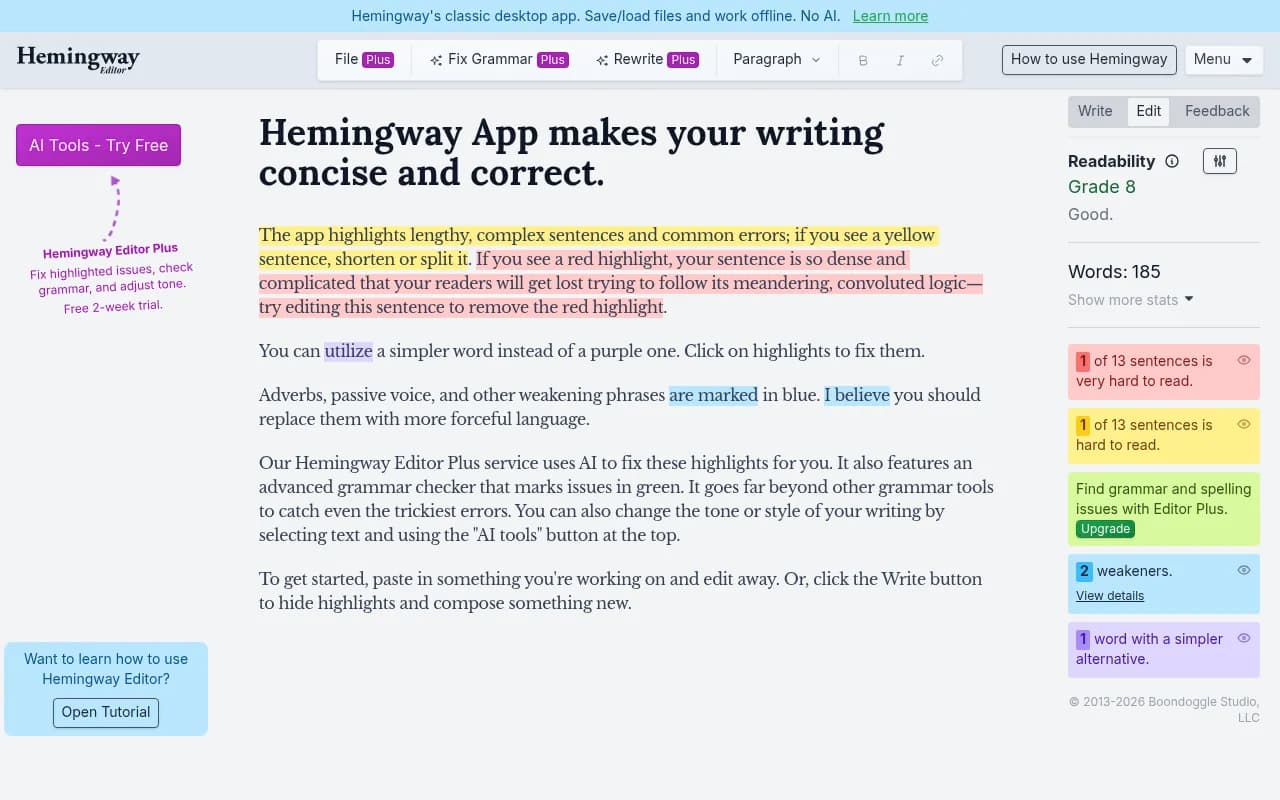
You paste or type your text into the editor, and Hemingway immediately color-codes problem areas. Yellow highlights mark sentences that are hard to read -- usually because they're too long or have too many clauses. Red highlights flag sentences that are extremely dense and confusing -- the kind where readers have to re-read three times to understand. Purple highlights suggest simpler alternatives to complex words (e.g. "utilize" becomes "use"). Blue highlights mark adverbs, passive voice, and weak phrases that dilute your message ("I believe you should" vs. "You should"). The Plus version adds green highlights for grammar and spelling errors.
On the right sidebar, you see a readability grade level (e.g. "Grade 8" means an average 8th grader can understand it), word count, reading time, sentence count, and counts of adverbs, passive voice uses, and complex phrases. The goal is usually to aim for Grade 10 or lower for general audiences -- most professional content sits around Grade 8-10. Academic or technical writing might be higher, but anything above Grade 15 is almost certainly too dense.
The editor doesn't auto-correct anything. You have to manually rewrite sentences based on the highlights. This is intentional -- the tool teaches you to write better over time rather than just fixing mistakes for you. However, the Plus version does offer AI-powered fixes. Click a highlight and you get suggestions to simplify, shorten, or rewrite the sentence. You can also select text and use the AI tools button to change tone (more formal, more casual, more confident) or rewrite entirely.
Hemingway Editor Plus: AI Features
The Plus version adds three major capabilities. AI Grammar Checking goes beyond basic spell-check to catch subject-verb agreement, tense consistency, misplaced modifiers, and other grammatical errors marked in green. It's more advanced than the free version's readability-only approach, though not as exhaustive as dedicated grammar tools like Grammarly or ProWritingAid. AI Sentence Fixes let you click any yellow, red, or blue highlight and get AI-generated rewrites that are clearer, shorter, or more direct. You can accept the suggestion or use it as inspiration. AI Rewrite and Tone Adjustment lets you select any text and ask the AI to rewrite it in a different style -- more formal, more casual, more confident, more concise. This is useful for adapting content to different audiences or tightening up drafts quickly.
Plus plans are usage-based. The Individual 5K Plan ($8.33/month billed annually at $100) gives you 5,000 AI sentences per month. The Individual 10K Plan ($10/month or $120/year) bumps that to 10,000 sentences. The Team 10K Plan (pricing on request) allows multiple users under one admin account, each with 10,000 sentences/month. "AI sentences" refers to any sentence you ask the AI to fix, rewrite, or adjust -- not the total sentences in your document. For most users, 5,000 sentences/month is plenty unless you're editing book-length manuscripts or high-volume content.
Desktop App vs. Web App
Hemingway offers a classic desktop app (Mac and Windows) that works completely offline with no AI features. It's a one-time purchase (around $20) and gives you the same readability analysis as the free web version, but with the ability to save and load files locally, export to Word or PDF, and work without an internet connection. This is popular with novelists, journalists, and anyone who wants distraction-free writing without cloud sync or AI. The desktop app does not include the Plus AI features -- those are web-only.
The web app is free for basic readability analysis and requires a Plus subscription for AI features. It auto-saves your work in the browser, but you can't save files locally unless you copy-paste or export (Plus users can export to Word/PDF). The web version is best for quick edits, blog posts, emails, and marketing copy. The desktop app is better for long-form projects like books or reports where you want version control and offline access.
Who Is Hemingway Editor For
Hemingway is ideal for content marketers and copywriters who need to simplify landing pages, email campaigns, and blog posts for broad audiences. It's also widely used by freelance writers and bloggers who want to tighten their prose and hit readability targets for SEO or publication guidelines. Students and academics use it to make essays and papers more readable without dumbing down the content. Business professionals use it to simplify reports, presentations, and internal communications so they're actually understood. Novelists and creative writers use the desktop app to catch overwritten passages and tighten dialogue.
It's best for individuals or small teams (1-10 people) writing in English. Larger content teams might need more robust collaboration features like Google Docs-style commenting or version history. It's also not ideal for highly technical or legal writing where complexity is unavoidable -- the tool will flag jargon and long sentences, but sometimes those are necessary. If you're writing for a specialized audience (engineers, lawyers, scientists), you'll need to ignore many of the highlights.
Hemingway does not support languages other than English. If you write in Spanish, French, German, etc., you'll need a different tool. It also doesn't integrate with other platforms -- no Google Docs add-on, no WordPress plugin, no API. You have to copy-paste text in and out, which is fine for occasional use but tedious for high-volume workflows.
Integrations and Workflow
Hemingway Editor has no native integrations. It's a standalone web app or desktop app. You copy text from Google Docs, Word, Notion, or wherever you write, paste it into Hemingway, edit based on the highlights, then copy it back. This is simple but not seamless. There's no browser extension, no API, no Zapier connection. For teams using collaborative writing tools, this means Hemingway is a manual step in the editing process rather than an integrated part of the workflow.
The desktop app can export to Word (.docx) and PDF, which is useful for final drafts. The web app (Plus version) also supports export to Word and PDF. You can also publish directly to Medium or WordPress from the web app, though this feature is basic -- it just posts the text, no formatting or image handling.
Pricing Breakdown
Free Web App: Unlimited use of the readability editor with color-coded highlights for sentence complexity, adverbs, passive voice, and simpler word suggestions. No grammar checking, no AI features, no file saving (browser auto-save only).
Hemingway Editor Plus: $8.33/month (billed annually at $100) for the Individual 5K Plan. Includes AI grammar checking, AI sentence fixes, AI rewrite and tone adjustment, and up to 5,000 AI sentences per month. Export to Word/PDF. Free trial available.
Individual 10K Plan: $10/month (billed monthly or annually at $120/year). Same features as 5K Plan but with 10,000 AI sentences per month. Best for heavy users or professional writers.
Team 10K Plan: Pricing on request. Multi-user access with a single admin controlling licenses. Each user gets 10,000 AI sentences/month. Good for content teams or agencies.
Desktop App: One-time purchase around $20 (separate from Plus). Offline readability editor with file save/load, no AI features, no grammar checking. Works on Mac and Windows.
Compared to competitors, Hemingway is very affordable. Grammarly Premium is $12-30/month depending on the plan. ProWritingAid is $10-20/month. Hemingway Plus at $8.33/month is cheaper and focuses specifically on readability rather than trying to be an all-in-one grammar tool. However, it's also less comprehensive -- no plagiarism checker, no style guide enforcement, no team collaboration features.
Strengths
Instant visual feedback: The color-coded highlights make it immediately obvious what needs fixing. You don't have to read through a list of suggestions -- you just scan for red and yellow and start editing. This is faster and more intuitive than most grammar checkers.
Readability focus: Hemingway is the only major tool that prioritizes sentence clarity and readability grade level over grammar. This makes it uniquely useful for simplifying complex ideas, which is critical for marketing copy, blog posts, and public-facing content.
Teaches better writing: Because you have to manually rewrite sentences (in the free version), you learn to recognize and fix bloated prose over time. The Plus AI features speed this up, but the tool still encourages you to think about why a sentence is hard to read.
Affordable and simple: At $8.33/month, it's one of the cheapest writing tools available. The interface is clean and distraction-free -- no feature bloat, no overwhelming menus. You paste text, see highlights, fix them, done.
Desktop app for offline work: The one-time purchase desktop app is great for writers who want no distractions, no internet dependency, and no AI. It's a rare option in an increasingly cloud-based world.
Limitations
Hemingway is not a full grammar checker. The free version has no grammar checking at all. The Plus version adds AI grammar checking, but it's not as thorough as Grammarly or ProWritingAid. If you need exhaustive grammar and style checking, you'll need a dedicated tool.
No collaboration features. There's no commenting, no track changes, no real-time co-editing. If you're working with a team, you'll have to copy-paste text back and forth or use Hemingway as a personal editing step before sharing.
English only. If you write in other languages, Hemingway won't help. Competitors like LanguageTool or Grammarly support multiple languages.
No integrations. The lack of a Google Docs add-on, WordPress plugin, or API means Hemingway is a manual step in your workflow. For high-volume content teams, this is a friction point.
AI sentence limits. The Plus plans cap AI usage at 5,000 or 10,000 sentences per month. If you're editing book-length manuscripts or dozens of blog posts, you could hit the limit. Competitors like Grammarly and ProWritingAid offer unlimited AI usage on their premium plans.
Bottom Line
Hemingway Editor is the best tool for making your writing clearer and more readable. If you write blog posts, marketing copy, emails, reports, or anything meant for a general audience, Hemingway will help you cut the fluff and get to the point. The free version is perfect for occasional use. The Plus version ($8.33/month) is worth it if you write regularly and want AI-powered grammar checking and rewrites. The desktop app is ideal for novelists and long-form writers who want offline access and no distractions.
It's not a replacement for a full grammar checker like Grammarly, and it's not built for team collaboration. But for individual writers who want to simplify their prose and improve readability, Hemingway is unmatched. Best use case in one sentence: Use Hemingway Editor to turn dense, confusing drafts into clear, punchy writing that readers actually finish.
Tags:
Similar and alternative tools to Hemingway Editor