Pipedrive Review 2026
Sales CRM platform that helps startups accelerate decision-making and manage their sales pipeline with AI-powered features for growth and efficiency.
Key Takeaways:
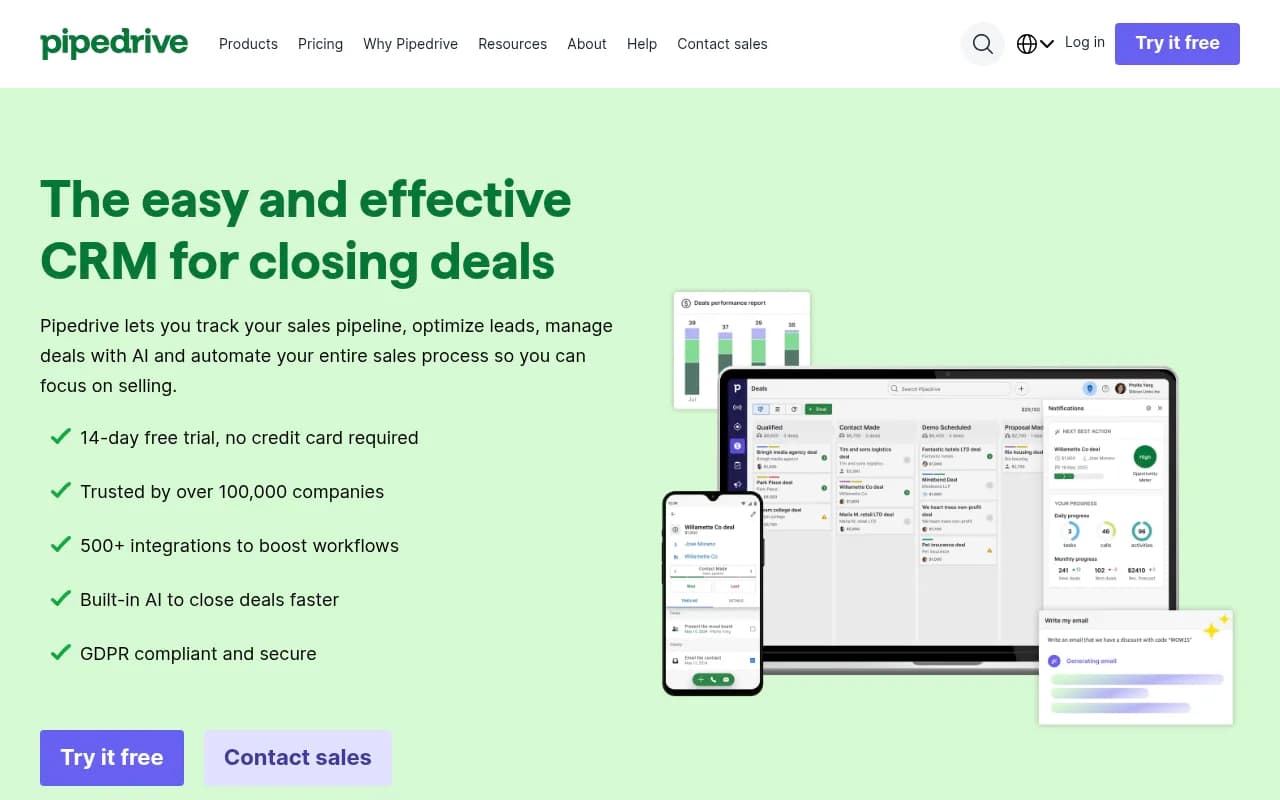
- Visual pipeline management: Pipedrive's kanban-style dashboard makes it easy to see your entire sales funnel at a glance and move deals forward with drag-and-drop simplicity
- Built for sales teams: Unlike bloated all-in-one CRMs, Pipedrive focuses specifically on pipeline management and closing deals, with an interface sales reps actually enjoy using
- Strong automation & AI: Automate lead routing, follow-ups, and repetitive tasks while AI suggests which deals to prioritize and predicts win probability
- Affordable & scalable: Starting at $24/user/month with a 14-day free trial, it's accessible for startups but scales to support larger teams with enterprise features
- Honest limitations: While excellent for sales pipeline management, it's less robust for marketing automation or customer service compared to all-in-one platforms like HubSpot or Salesforce
Pipedrive is a sales-focused CRM platform that has carved out a strong position in the crowded CRM market by doing one thing exceptionally well: helping sales teams visualize and manage their pipeline. Founded in 2010 by a team of Estonian entrepreneurs who were frustrated with existing CRM tools, Pipedrive now serves over 100,000 companies across 179 countries. The platform has consistently earned top ratings on review sites like Capterra (4.5/5), G2 (4.2/5), and SourceForge (4.7/5), largely because it prioritizes ease of use and sales-specific workflows over trying to be everything to everyone.
What sets Pipedrive apart is its activity-based selling approach. Rather than just storing contact information, it's built around the idea that sales success comes from completing the right activities at the right time. The visual pipeline view, automated reminders, and AI-powered suggestions all work together to keep sales reps focused on moving deals forward rather than drowning in administrative tasks.
Visual Pipeline Management Pipedrive's signature feature is its kanban-style pipeline view, which displays deals as cards that move across customizable stages. You can create multiple pipelines for different products, regions, or sales processes, and each pipeline can have its own stages, automation rules, and probability settings. Deals are color-coded by status, and you can filter by owner, value, expected close date, or custom fields. The drag-and-drop interface makes it intuitive to update deal stages, and the system automatically logs these changes for reporting. Unlike traditional list-based CRMs, this visual approach makes it immediately obvious where deals are stuck and which reps need support.
Centralized Contact & Deal Management All customer data lives in a unified contact database with full interaction history. You can link multiple deals to a single contact, attach products or services to deals, and add unlimited custom fields to capture industry-specific information. The platform supports smart formulas for custom fields, so you can automatically calculate things like deal margin or days in pipeline. Import is straightforward -- you can pull data from spreadsheets, other CRMs, or via API in just a few clicks. Contact records show a complete timeline of emails, calls, meetings, notes, and deal changes, giving reps full context before every interaction.
Unified Sales Inbox & Email Sync Pipedrive's sales inbox consolidates all customer communications in one place with two-way email sync. You can connect up to five email accounts (Gmail, Outlook, or any IMAP provider) and send/receive emails directly within the CRM. All emails are automatically linked to the relevant contact and deal, and you can track opens, clicks, and replies. The platform includes customizable email templates with merge fields, scheduled sending, and group email capabilities. There's also a built-in email signature generator and the ability to create email sequences for automated follow-ups. Unlike some CRMs where email integration feels like an afterthought, Pipedrive's inbox is genuinely usable as your primary email client for sales conversations.
Calendar Sync & Meeting Scheduling Pipedrive syncs with Google Calendar, Outlook Calendar, and Apple Calendar to show all your meetings and tasks in one view. You can create activities (calls, meetings, tasks, deadlines) directly in the CRM and set reminders so nothing falls through the cracks. The scheduler feature lets you share your availability with prospects via a link, and they can book time slots that automatically create calendar events and CRM activities. Meeting links for Google Meet, Zoom, or Microsoft Teams are generated automatically. This eliminates the back-and-forth of scheduling and ensures every meeting is logged in your pipeline.
Workflow Automation Pipedrive's automation builder lets you create multi-step workflows triggered by deal stage changes, email interactions, field updates, or time-based conditions. You can automate lead assignment, follow-up emails, task creation, deal updates, notifications, and integrations with other tools. The platform includes pre-built automation templates for common scenarios like lead nurturing, deal handoffs between reps, and stale deal alerts. For example, you can set up a workflow that automatically assigns new leads to the rep with the lightest workload, sends them a welcome email, creates a follow-up task for 2 days later, and notifies the sales manager if no activity happens within a week. This level of automation is comparable to much more expensive CRMs and can easily cut administrative time in half.
AI-Powered Sales Assistant Pipedrive's AI Sales Assistant analyzes your historical data to predict which deals are most likely to close and which are at risk. It provides daily recommendations on which leads to prioritize, suggests optimal times to follow up, and flags deals that have been idle too long. The AI also offers email response suggestions and can help draft personalized outreach based on deal context. While not as advanced as dedicated AI sales tools, it's genuinely useful for helping reps focus their time on the highest-value activities. The AI learns from your team's patterns over time, so recommendations become more accurate the longer you use it.
Real-Time Reporting & Forecasting Pipedrive includes visual dashboards and reports that update in real-time as deals progress. You can track metrics like conversion rates by stage, average deal size, sales cycle length, win/loss ratios, and individual rep performance. The forecasting tool predicts future revenue based on deal probability and historical close rates, with separate views for recurring revenue vs. one-time deals. You can set team and individual goals, then monitor progress with visual goal trackers. Custom reports can be built using filters, groupings, and date ranges, and all reports can be scheduled for automatic email delivery. For sales managers, the insights are detailed enough to identify bottlenecks and coaching opportunities without requiring a data analyst.
Lead Management & Routing Pipedrive's Leads Inbox is a separate workspace for managing prospects before they become active deals. Leads can be imported from web forms, integrations, or manually added, and they're automatically scored based on criteria you define. You can set up automatic lead assignment rules that distribute leads based on territory, product interest, lead score, or round-robin rotation. As leads are qualified, they're converted to deals with a single click, preserving all interaction history. This separation between leads and deals helps keep pipelines clean and prevents reps from getting overwhelmed by unqualified prospects.
Mobile Apps Pipedrive offers full-featured mobile apps for iOS and Android that let you manage your pipeline on the go. You can view and update deals, log calls and meetings, send emails, check your schedule, and access contact information offline. The mobile app includes voice-to-text for quick note-taking and can scan business cards to automatically create contacts. For field sales teams, the mobile experience is genuinely usable, not just a stripped-down version of the desktop app.
Marketplace & Integrations Pipedrive's Marketplace features 500+ integrations covering lead generation (Leadfeeder, Clearbit), communication (Slack, Microsoft Teams, Zoom), marketing (Mailchimp, ActiveCampaign), accounting (QuickBooks, Xero), project management (Trello, Asana), and more. Popular integrations include Zapier for connecting to thousands of other apps, PandaDoc for proposals and e-signatures, and Outfunnel for marketing automation. Most integrations are native and can be set up in minutes without developer help. The API is well-documented for custom integrations, and Pipedrive offers webhooks for real-time data sync.
Security & Compliance Pipedrive is SOC 2 Type II compliant and uses AES-256 encryption for data at rest and in transit. Data is hosted on AWS and Rackspace infrastructure with automatic backups and 99.9% uptime SLA. The platform is GDPR compliant with data processing agreements available, and it includes granular permission controls so you can restrict access by user role. Two-factor authentication is available, and you can set up IP whitelisting for enterprise accounts. Security alerts notify admins of suspicious login attempts or unusual activity.
Who Is Pipedrive For?
Pipedrive is ideal for small to mid-sized B2B sales teams (5-50 reps) that need a visual, activity-focused CRM without the complexity of enterprise platforms. It's particularly strong for companies with defined sales processes and multiple deal stages, such as SaaS companies, agencies, consultancies, real estate firms, and professional services. Sales managers who want their reps to actually use the CRM (rather than fight it) consistently choose Pipedrive because the interface is intuitive and the learning curve is minimal.
It's also a great fit for startups and growing businesses that need to scale their sales operations without enterprise-level budgets. The combination of affordable pricing, quick setup, and powerful automation means you can implement sophisticated sales workflows without hiring a CRM administrator.
Pipedrive is less suitable for:
- Marketing teams needing advanced campaign management, lead scoring, or multi-channel attribution (consider HubSpot or ActiveCampaign instead)
- Customer service teams requiring ticketing, knowledge bases, or customer portals (Zendesk or Freshdesk are better fits)
- Enterprise organizations with complex approval workflows, territory management, or advanced customization needs (Salesforce is more appropriate)
- E-commerce businesses focused on transactional sales rather than relationship-based selling
Pricing & Value
Pipedrive offers four pricing tiers (annual billing, prices per user/month):
Essential ($24/user/month): Core pipeline management, contact/deal tracking, email integration, calendar sync, mobile apps, 3,000 open deals, 30 custom fields, and basic reporting. Good for small teams just getting started with CRM.
Advanced ($44/user/month): Adds workflow automation, email templates and tracking, group emailing, meeting scheduler, 10,000 open deals, 100 custom fields, and advanced reporting. This is the sweet spot for most growing sales teams.
Professional ($64/user/month): Includes AI Sales Assistant, revenue forecasting, team management features, 100,000 open deals, 500 custom fields, and custom fields with formulas. Best for sales managers who need predictive insights and team performance tracking.
Power ($79/user/month): Adds project management features, document management, enhanced security controls, unlimited open deals, and phone support. Designed for larger teams with complex needs.
Enterprise ($129/user/month): Includes unlimited everything, dedicated account manager, advanced permissions, and priority support.
All plans include a 14-day free trial with no credit card required. Compared to competitors, Pipedrive offers strong value -- you get robust automation and AI features at price points where competitors like Salesforce or HubSpot only offer basic functionality. The main cost consideration is that some advanced features (like the AI Sales Assistant) are locked to higher tiers, so teams may need to upgrade sooner than expected.
Strengths
Genuinely intuitive interface: Sales reps can start using Pipedrive productively within hours, not weeks. The visual pipeline and activity-based approach match how salespeople actually think about their work.
Strong automation at mid-market prices: Workflow automation that rivals enterprise CRMs is available starting at $44/user/month, making sophisticated sales processes accessible to smaller teams.
Excellent email integration: Unlike many CRMs where email sync feels bolted on, Pipedrive's sales inbox is genuinely usable as your primary email client for customer conversations.
Mobile-first design: The mobile apps are full-featured and work offline, making Pipedrive a strong choice for field sales teams.
Active development: Pipedrive ships new features regularly and listens to user feedback, with a public roadmap showing what's coming next.
Limitations
Limited marketing automation: While Pipedrive handles sales well, it lacks native marketing campaign tools, lead nurturing sequences, or landing page builders. You'll need to integrate with Mailchimp, ActiveCampaign, or similar tools for marketing automation.
Basic customer service features: There's no built-in ticketing system, knowledge base, or customer portal. If you need post-sale support workflows, you'll need a separate help desk tool.
Reporting could be more flexible: While the standard reports are useful, creating truly custom reports with complex calculations requires workarounds or exporting to spreadsheets. Power users may find the reporting less flexible than Salesforce or HubSpot.
Bottom Line
Pipedrive is the best CRM choice for small to mid-sized sales teams that want a visual, activity-focused platform they'll actually enjoy using. It strikes an excellent balance between simplicity and power -- easy enough for non-technical users to master quickly, yet robust enough to support sophisticated sales workflows with automation and AI. The pricing is fair, the interface is genuinely intuitive, and the focus on pipeline management means it does one thing exceptionally well rather than trying to be everything to everyone. If your primary need is managing a sales pipeline and closing deals (rather than running marketing campaigns or customer service operations), Pipedrive delivers outstanding value and will likely have your team up and running productively faster than any competitor.
Tags:
Similar and alternative tools to Pipedrive