HubSpot SEO Review 2026
SEO recommendations, topic cluster planning, and performance tracking integrated directly into HubSpot's marketing platform. Best for teams already using HubSpot CMS.
Key takeaways
- HubSpot SEO is not a standalone tool -- it's a feature set inside Marketing Hub, so you're paying for the full platform to access it
- The topic cluster model is genuinely well-implemented and useful for content teams building pillar-page strategies
- On-page recommendations are solid for beginners but lack the depth of dedicated SEO tools like Ahrefs or Semrush
- No AI search visibility tracking, no LLM citation monitoring, and no GEO capabilities -- if AI search is part of your strategy, you'll need a separate tool
- Best suited to small-to-mid-size marketing teams already using HubSpot CMS; poor value if you're not already in the HubSpot ecosystem
HubSpot SEO is the SEO feature layer baked into HubSpot's Marketing Hub. It's not a product you buy separately -- it comes along with Marketing Hub Starter, Professional, and Enterprise plans. The pitch is simple: if you're already building your website on HubSpot CMS and running campaigns through Marketing Hub, why open a separate SEO tool? HubSpot's answer is to bring keyword tracking, topic planning, on-page recommendations, and performance reporting into the same interface where you're already writing content and managing contacts.
HubSpot as a company has been around since 2006 and essentially invented the term "inbound marketing." The SEO tools have evolved considerably since the early days of basic keyword tracking -- the topic cluster model, which HubSpot popularized through its own blog and content strategy, is now central to how the SEO features work. The integration with Google Search Console, added in later iterations, made the reporting significantly more useful. That said, HubSpot SEO has never been positioned as a power tool for SEO specialists. It's aimed squarely at marketing generalists who need enough SEO capability to do their jobs without becoming full-time SEO practitioners.
The target audience is marketing teams at small-to-mid-size B2B companies, typically 10-200 employees, who are already using HubSpot as their CRM and CMS. Agencies that have built client sites on HubSpot CMS also use it, though dedicated SEO agencies tend to reach for more specialized tools. If you're a solo blogger, an e-commerce brand on Shopify, or an enterprise with a dedicated SEO team, HubSpot SEO probably isn't the right fit.
Key features
Topic cluster planning and content strategy tool
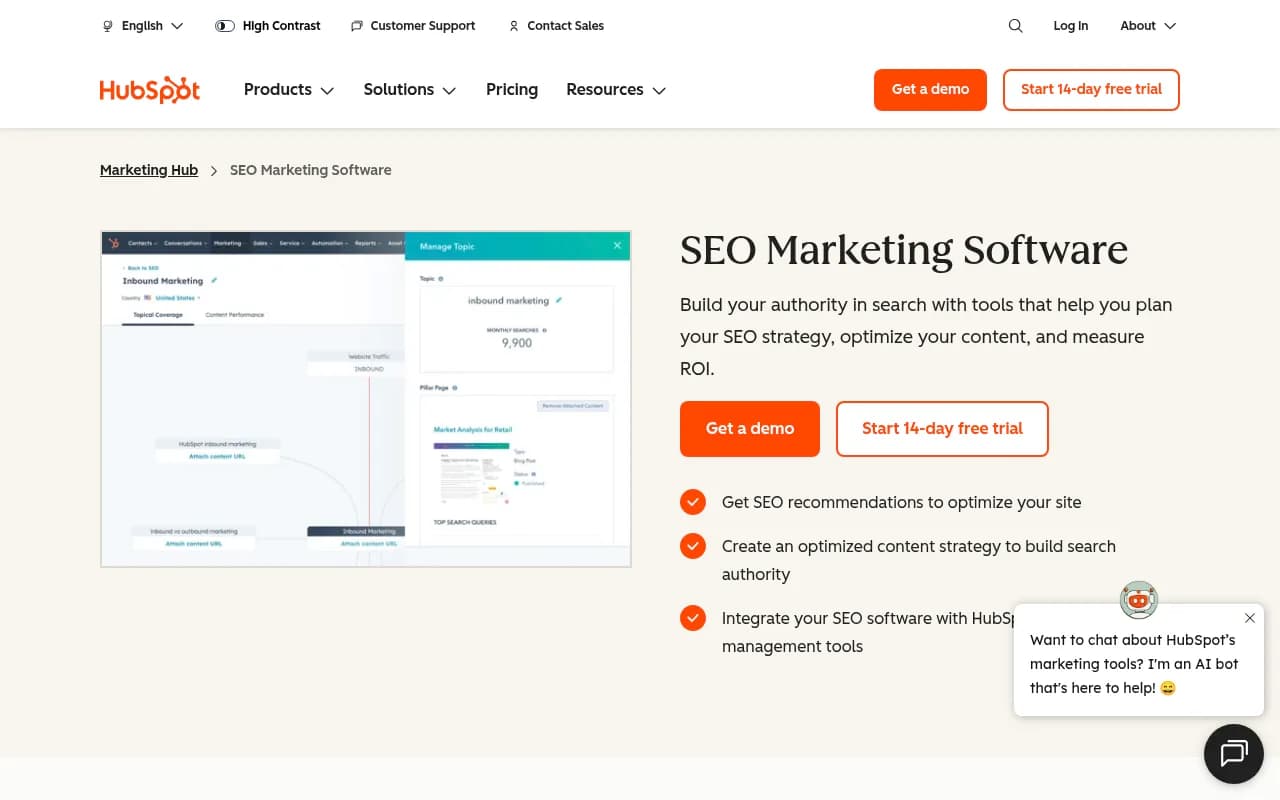
This is the most distinctive feature HubSpot SEO offers. The content strategy tool is built around the pillar page model: you identify a broad "pillar" topic, then create cluster content (blog posts, landing pages) that links back to it. HubSpot surfaces topic suggestions based on relevance, competition, and search popularity, and lets you map out which content covers which subtopic. The visual cluster map makes it easy to see gaps in your coverage at a glance. For content teams that are trying to build topical authority rather than just chase individual keywords, this is genuinely useful. It's not as data-rich as Ahrefs' content gap analysis or Semrush's topic research tool, but it's more approachable for non-specialists.
On-page SEO recommendations
HubSpot scans your pages and surfaces prioritized recommendations -- things like missing meta descriptions, title tag issues, broken internal links, missing alt text, and page speed flags. Recommendations are ranked by estimated impact, so you're not wading through a flat list of 200 issues trying to figure out what matters. The in-editor integration is the real convenience here: when you're editing a page in HubSpot CMS, SEO suggestions appear in the sidebar without needing to open a separate tool. For teams that aren't running regular technical audits, this catches the most common issues. That said, it doesn't go deep on technical SEO -- crawl budget analysis, log file review, structured data validation, and JavaScript rendering issues are outside its scope.
Keyword tracking and topic monitoring
You can track keywords and topics directly in HubSpot, seeing how your rankings change over time. The dashboard shows search volume estimates, current ranking positions, and traffic projections for topics you're targeting. Canonical URL management is also handled here, which is useful for teams managing large content libraries with potential duplicate content issues. The keyword data pulls from third-party sources and is generally reliable for directional decisions, though it's not as granular as what you'd get from a dedicated rank tracker.
Google Search Console integration
Connecting GSC to HubSpot brings impressions, clicks, and average position data directly into the HubSpot reporting interface. This is one of the more practically useful integrations -- it means you can see which queries are driving traffic to specific pages without leaving HubSpot. The data is presented cleanly and is accessible to non-technical users. You can filter by page, query, and date range, and use the data to identify content that's ranking on page two and worth optimizing further.
Performance reporting and ROI tracking
HubSpot's broader analytics infrastructure means SEO performance data can be connected to contact and deal data. If a visitor finds your site through organic search and eventually converts, you can trace that path in HubSpot's attribution reports. This is a meaningful advantage over standalone SEO tools that only show traffic data -- you can actually see which organic keywords and topics are contributing to pipeline. The reporting dashboards are customizable and can be shared with stakeholders who don't need full HubSpot access.
CMS integration and drag-and-drop editor
Because HubSpot SEO lives inside the same platform as HubSpot CMS, the workflow between writing content and optimizing it is genuinely smooth. The drag-and-drop page editor surfaces SEO recommendations inline, so you can fix issues as you build rather than running a separate audit afterward. SSL certificates, canonical URLs, and sitemap generation are all handled automatically for HubSpot-hosted content. This tight integration is the core value proposition -- it removes friction for teams that would otherwise have to context-switch between a CMS and an SEO tool.
AI content tools (Breeze)
HubSpot has been adding AI writing features under the "Breeze" brand. The AI blog writer, meta description generator, and paragraph rewriter are available within the content creation workflow. These are general-purpose writing assistants rather than SEO-specific tools -- they help you produce content faster but don't do anything like keyword-optimized content briefs or competitive content analysis. They're useful for marketing generalists but won't replace a dedicated content strategy workflow.
Who is it for
HubSpot SEO makes the most sense for marketing teams at B2B SaaS companies, professional services firms, and mid-market businesses that have already committed to HubSpot as their primary marketing platform. Think: a 15-person marketing team at a 100-person software company, where the content manager is also handling email campaigns, lead nurturing, and social -- and needs SEO to be manageable without becoming a full-time specialty. For these users, having SEO recommendations, keyword tracking, and performance data in the same place as everything else is a real quality-of-life improvement.
HubSpot-certified agencies that build and manage client sites on HubSpot CMS are another natural fit. The ability to show clients SEO performance data within the same dashboard as their campaign metrics and lead data makes reporting cleaner. Agencies running 5-20 HubSpot client accounts will find the integration saves meaningful time compared to running separate SEO audits and then manually correlating the data with HubSpot analytics.
Who should look elsewhere: dedicated SEO professionals and agencies whose primary deliverable is search rankings. HubSpot SEO doesn't have the technical depth of Screaming Frog, the backlink data of Ahrefs, or the keyword research breadth of Semrush. E-commerce brands on Shopify or WooCommerce won't benefit from the CMS integration at all. And any team that's serious about tracking AI search visibility -- how their brand appears in ChatGPT, Perplexity, or Google AI Overviews -- will find HubSpot SEO completely silent on that front.
Integrations and ecosystem
The most important integration is Google Search Console, which brings query-level data into HubSpot's reporting. Beyond that, HubSpot SEO benefits from being part of the broader HubSpot ecosystem:
- HubSpot CMS: Tight native integration means SEO recommendations appear inline during content editing
- HubSpot CRM: Organic traffic can be attributed to contacts and deals for revenue reporting
- HubSpot Marketing Hub: Email, social, ads, and SEO data all live in the same analytics layer
- Salesforce: Via HubSpot's native Salesforce integration, SEO-sourced leads can be synced to Salesforce for sales teams
- HubSpot API: Developers can pull SEO and analytics data via HubSpot's REST API for custom reporting or data warehouse integrations
- Looker Studio: HubSpot data can be exported to Looker Studio for custom dashboards
There's no native integration with third-party SEO tools like Ahrefs, Semrush, or Moz -- HubSpot SEO is designed to be self-contained within the HubSpot ecosystem rather than to complement external tools. There's no browser extension for on-page analysis outside of HubSpot-hosted content, and no mobile app with SEO-specific functionality.
Pricing and value
HubSpot SEO is included in Marketing Hub plans, not sold separately. Current pricing (as of 2026):
- Marketing Hub Starter: From $20/month (billed annually) for 1,000 marketing contacts. Includes basic SEO recommendations and topic tools, but limited reporting depth.
- Marketing Hub Professional: From $890/month (billed annually) for 2,000 contacts. Unlocks the full content strategy tool, topic clusters, Google Search Console integration, and custom reporting. This is where HubSpot SEO becomes genuinely useful.
- Marketing Hub Enterprise: From $3,600/month for 10,000 contacts. Adds advanced attribution reporting, custom objects, and team permissions.
The 14-day free trial gives access to the full feature set. There's also a free HubSpot CRM tier, but it doesn't include the SEO tools.
The value calculation here is unusual because you're not buying an SEO tool -- you're buying a marketing platform that includes SEO features. If you're already paying for Marketing Hub Professional for email automation and lead nurturing, the SEO tools are essentially free. If you're evaluating HubSpot specifically for SEO, the $890/month Professional tier is hard to justify against Ahrefs ($129/month) or Semrush ($140/month), which offer far more SEO depth. The value is in the integration, not the SEO capability itself.
Strengths and limitations
What it does well:
- The topic cluster model is well-implemented and genuinely helps content teams think about topical authority rather than individual keywords. The visual cluster map is one of the cleaner implementations of this concept in any marketing tool.
- The CMS integration is seamless. Inline SEO recommendations during content editing reduce the friction of optimization significantly for non-specialist teams.
- Revenue attribution from organic search is a real differentiator. Connecting keyword rankings to pipeline data is something standalone SEO tools can't do without significant custom work.
- For teams already in the HubSpot ecosystem, the consolidated reporting is a meaningful time saver -- one dashboard instead of three.
Honest limitations:
- Technical SEO depth is shallow. If you need crawl analysis, log file review, JavaScript rendering diagnostics, or structured data testing, you'll need a separate tool. HubSpot SEO is built for content marketers, not technical SEO specialists.
- Backlink data is absent. There's no link analysis, no referring domain tracking, and no disavow workflow. For any SEO strategy that includes link building, you're on your own.
- No AI search visibility. HubSpot SEO has no capability to track how your brand appears in ChatGPT, Perplexity, Google AI Overviews, or any other AI-powered search surface. As AI search becomes a larger share of how people find information, this is a growing gap. Teams that want to monitor and optimize for AI search will need a dedicated platform like Promptwatch alongside HubSpot.
- Keyword research is limited. The topic suggestions are useful for content planning but don't replace a proper keyword research workflow. There's no SERP analysis, no keyword difficulty scoring with backlink data, and no competitor keyword gap analysis.
Bottom line
HubSpot SEO is the right choice for marketing teams that are already living in HubSpot and want SEO to be part of their existing workflow rather than a separate discipline. The topic cluster tools, inline recommendations, and revenue attribution make it genuinely useful for content-focused marketing teams at B2B companies. But it's a complement to a broader marketing platform, not a standalone SEO solution -- and anyone serious about technical SEO, link building, or AI search visibility will need additional tools to fill the gaps.
Best use case: A B2B SaaS marketing team running their website on HubSpot CMS who wants to build topical authority through content and track how organic traffic converts to pipeline, without managing a separate SEO tool.
Tags:
Frequently asked questions
Is HubSpot SEO a standalone tool?
How much does HubSpot SEO cost?
Does HubSpot SEO work if my website isn't on HubSpot CMS?
Can HubSpot SEO track AI search visibility in ChatGPT or Perplexity?
How does HubSpot SEO compare to Ahrefs or Semrush?
Is there a free trial for HubSpot SEO?
Similar and alternative tools to HubSpot SEO