Saleshandy Lead Finder Review 2026
Lead generation tool inside Saleshandy with a large B2B database covering USA, Europe, and global regions, paired with cold email sequencing features.
Key takeaways
- Massive database at a low price point: 852M+ contacts and 42M+ company profiles, with plans starting at $49/mo — a fraction of what ZoomInfo ($15,000+/yr) or Cognism ($10,000+/yr) charge.
- Real-time waterfall enrichment is the standout feature: Instead of pulling from a single static database, Saleshandy checks 9 data providers in sequence and only charges a credit when it delivers a verified result. This is genuinely different from how most competitors work.
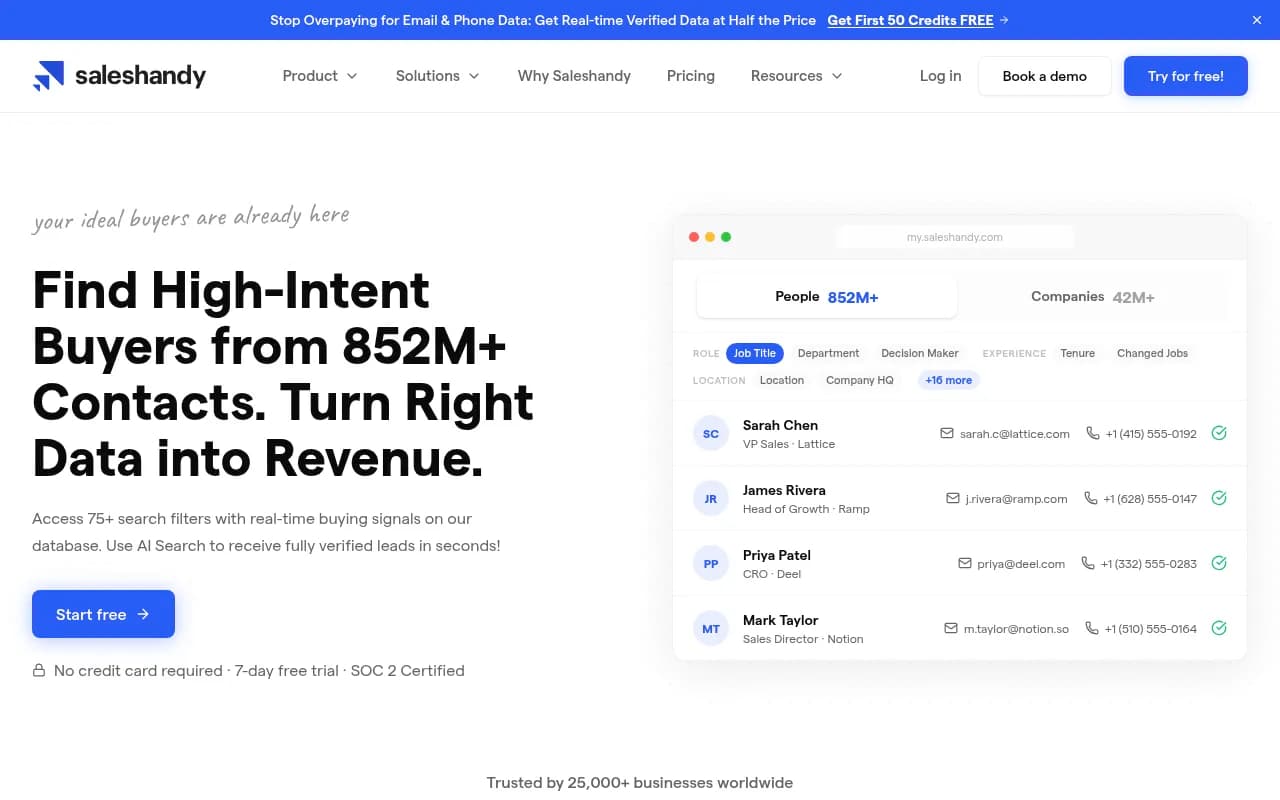
- 75+ filters including buying signals, tech stack, and company financials make it competitive with Apollo.io and Clay for ICP targeting depth.
- Tight integration with Saleshandy's cold email sequencing means you can go from search to outreach in one click — no CSV exports or tool-switching required.
- Not a standalone enrichment powerhouse: If you need deep CRM enrichment workflows, intent data at scale, or enterprise-grade data governance, tools like ZoomInfo or Clay may still be worth the premium.
- 7-day free trial with 50 free credits — no credit card required, which makes it easy to test data quality before committing.
Saleshandy started as a cold email outreach platform, and for years it was best known for its email sequencing, tracking, and deliverability features. The Lead Finder product is a more recent addition that turns Saleshandy into a full prospecting-to-outreach stack. The pitch is simple: stop paying $10,000+ per year for ZoomInfo or Apollo when you can get comparable (or better, they claim) data quality for $49/month.
The target audience is sales teams, SDRs, founders doing outbound, and growth marketers who need verified contact data at volume. It's particularly well-suited to small and mid-sized B2B companies that can't justify enterprise data contracts but still need accurate email and phone data to run cold outreach at scale. Agencies running outbound campaigns for multiple clients will also find the credit-based model and list management features useful.
Saleshandy is an Indian SaaS company that has grown to serve 25,000+ businesses. Notable customers listed on the site include GoDaddy, Cloudflare, Gartner, Colliers, NetApp, and Marsh — a mix of enterprise names and growth-stage companies that gives the platform some credibility beyond the SMB segment.
Key features
Waterfall enrichment across 9 providers
This is the feature that genuinely sets Lead Finder apart from single-source databases. When you request a contact, Saleshandy doesn't just pull from its own database. It runs a sequential check across nine data providers — Findymail, Prospeo, Scalelist, Enrich.so, RocketReach, LeadMagic, Wiza, Icypeas, and Zerobound — stopping when it finds a verified result. The claimed outcome: 98% verification accuracy and an average bounce rate under 3%.
The credit model reinforces this: you only pay one credit when a verified result is returned. If none of the nine providers can verify the contact, you pay nothing. In practice, this means your credit spend is tied directly to data quality, which is a meaningful difference from tools that charge you regardless of whether the email bounces.
75+ search filters with buying signals
The filter set is genuinely deep. Beyond the standard job title, company size, and location filters, Lead Finder includes:
- Company financials (revenue ranges, funding stage, funding round recency)
- Tech stack (e.g., "companies using HubSpot + Salesforce")
- Hiring signals (e.g., "companies currently hiring SDRs")
- Decision-maker flags
- Job change recency (people who recently changed roles)
- Lookalike company search (find companies similar to a named account like Stripe)
- DACH, APAC, and other regional targeting
The hiring signals and funding recency filters are particularly useful for timing outreach. Catching a company that just raised a Series B or just started hiring SDRs is a classic buying signal for sales tools, and having that baked into the filter UI rather than requiring a separate intent data subscription is a real convenience.
AI search
Rather than manually stacking filters, you can describe your ideal buyer in plain language and the AI search interprets it into a filtered query. The example on the site — "CTOs at Series A startups in FinTech with 10-50 employees" — returns a filtered result set automatically. This is more of a UX convenience than a fundamentally new capability, but it lowers the barrier for less technical users and speeds up prospecting for experienced ones.
Net new contacts and list deduplication
One of the more practical workflow features: Lead Finder automatically tracks which contacts you've already pulled and flags them. The "Net New" tab shows only contacts you haven't seen before, so you don't accidentally spend credits on someone already in your pipeline. For teams running ongoing prospecting campaigns, this prevents the common problem of burning credits on duplicates.
List building and saved filters
You can build named People and Company lists, then include or exclude those lists from future searches. This is useful for territory management, account-based prospecting, and keeping different campaigns cleanly separated. Saved filters let you store your best search criteria and rerun them in one click — practical for teams with repeatable ICP definitions or agencies running the same search for multiple clients.
One-click export to sequences
Because Lead Finder lives inside the Saleshandy ecosystem, you can add contacts directly to a cold email sequence without leaving the tool. This is the core workflow advantage over standalone data tools like Apollo or ZoomInfo used alongside a separate email platform. The friction of exporting a CSV, formatting it, importing it into your sequencer, and mapping fields is eliminated. You can also enrich prospects with AI after adding them to sequences, which adds personalization data to your outreach.
Enrichment API
For teams that want to build Lead Finder into their own workflows, there's a REST API supporting company enrichment by domain or LinkedIn URL, and contact enrichment by name or LinkedIn profile. Batch requests support up to 100 records per call with real-time status polling. This is useful for RevOps teams enriching CRM records automatically or developers building custom prospecting pipelines.
Phone number coverage
Lead Finder returns phone numbers alongside emails, which is increasingly important as email deliverability gets harder. The waterfall enrichment approach applies to phone data too, though phone verification is generally harder to guarantee than email verification across the industry.
Who is it for
The clearest fit is SDR teams and sales-led SaaS companies in the 10-200 employee range that are running cold outbound at volume. If you're sending 1,000-10,000 cold emails per month and your current data source is Apollo, Hunter, or a ZoomInfo contract that feels overpriced, Lead Finder is worth a serious look. The $49/month entry point with 2,500 credits is genuinely accessible, and the waterfall enrichment model means those credits go further than a flat-rate database subscription.
Founders doing their own outbound — a common pattern at early-stage B2B startups — will appreciate the AI search and the tight integration with sequencing. You don't need a dedicated RevOps person to get value out of it. The filter depth is enough to build a precise ICP without needing a data analyst to configure it.
Agencies running outbound campaigns for clients are another strong use case. The list management features (include/exclude lists, saved filters, net new tracking) map well to managing multiple client campaigns simultaneously. The credit model also makes it easier to allocate costs per client.
Who should probably look elsewhere: enterprise companies with complex data governance requirements, teams that need deep intent data (Bombora-style behavioral signals rather than hiring/funding signals), or companies that need tight Salesforce or HubSpot CRM enrichment workflows with field mapping and sync logic. ZoomInfo and Cognism have more mature enterprise integrations, and Clay is more flexible for complex enrichment workflows even if it's more expensive and technical to set up.
Integrations and ecosystem
The most important integration is the native connection to Saleshandy's cold email sequencing platform. This is the core workflow advantage — find contacts, add to sequence, launch outreach, all in one tool.
Beyond that, the enrichment API lets you connect Lead Finder data to any system that can make REST API calls. The site mentions CSV export as a standard option for teams that want to take data into other tools.
The platform is SOC 2 certified, which matters for enterprise buyers and anyone handling contact data at scale.
There's no mention of native Salesforce or HubSpot CRM sync on the Lead Finder product page specifically, though Saleshandy's broader platform does have CRM integrations. Teams that need automated CRM enrichment may need to use the API or CSV export workflows.
A Chrome extension for LinkedIn prospecting isn't prominently featured on the Lead Finder page, though Saleshandy has historically offered browser extension functionality in its broader product suite.
Pricing and value
Lead Finder uses a credit-based model where one credit equals one verified contact result. Unused credits roll over, which is a meaningful benefit for teams with variable prospecting volume.
- Lead Starter: $49/month (billed annually) — 2,500 credits/month, 852M+ database, real-time verification, 60+ filters, waterfall enrichment
- Lead Pro: $79/month (billed annually) — 4,000 credits/month, 70+ filters, priority enrichment, advanced company data
A 7-day free trial is available with 50 free credits and no credit card required.
For context on value: ZoomInfo starts at $15,000+/year, Cognism at $10,000+/year, and Lusha at $3,600+/year. Apollo.io's paid plans start around $49/month but with a different credit model and a single-source database. The waterfall enrichment approach at Lead Finder's price point is a genuine differentiator — you're effectively getting access to nine data sources for the price of one.
The "you only pay for verified results" model also changes the math on data quality. With a flat-rate database, you pay the same whether the email bounces or not. With Lead Finder, unverified contacts cost nothing, which means your effective cost-per-good-contact is more predictable.
One thing to watch: the pricing page shows Lead Finder plans separately from Saleshandy's cold email outreach plans. If you want both the database and the sequencing features, you'll need to understand how the two product lines are bundled or priced together.
Strengths and limitations
What it does well:
- The waterfall enrichment model is genuinely differentiated. Checking 9 providers in sequence and only charging for verified results is a smarter approach than single-source databases, and the claimed 98% verification accuracy and sub-3% bounce rate are backed by user testimonials that reference specific numbers.
- The filter depth — especially hiring signals, funding recency, tech stack, and lookalike company search — is competitive with Apollo and meaningfully better than simpler tools like Hunter or Snov.io.
- The price-to-database-size ratio is hard to beat. 852M contacts at $49/month is a compelling entry point, especially for teams that have been paying ZoomInfo or Cognism prices.
- The native integration with Saleshandy's sequencing platform eliminates a real workflow pain point. Going from search to outreach in one click saves time and reduces the errors that come from CSV export/import cycles.
- The net new contact tracking and list deduplication features show genuine product thinking about how sales teams actually work, not just how they ideally work.
Limitations and honest gaps:
- The two-tier pricing (Starter and Pro) is relatively simple, which is fine for SMBs but may not offer enough configuration for enterprise teams with complex needs. There's no obvious enterprise tier with dedicated support, custom data agreements, or advanced admin controls listed on the Lead Finder page.
- Phone number data quality is harder to verify than email, and the site is more specific about email verification rates than phone accuracy. Teams that rely heavily on phone outreach should test this carefully before committing.
- The enrichment API is useful but the documentation visible on the product page is minimal. Teams with complex enrichment workflows may find Clay or Clearbit more mature for programmatic use cases.
- No mention of intent data beyond hiring and funding signals. If you need behavioral intent (companies actively researching your category), you'll still need a separate tool like Bombora or G2 Buyer Intent.
Bottom line
Saleshandy Lead Finder makes the most sense for B2B sales teams and agencies that need high-volume, high-accuracy contact data without paying enterprise database prices. The waterfall enrichment model is the real differentiator — it's a smarter approach to data quality than most competitors at this price point, and the native cold email sequencing integration makes it a genuinely complete outbound stack for teams that don't need deep CRM sync or intent data.
Best for: SDR teams and outbound-focused founders at B2B SaaS companies who want Apollo-level data quality at a fraction of the cost, with cold email sequencing built in.
Tags:
Frequently asked questions
What is Saleshandy Lead Finder?
How much does Saleshandy Lead Finder cost?
Is there a free trial for Saleshandy Lead Finder?
How does waterfall enrichment work in Saleshandy?
How does Saleshandy Lead Finder compare to Apollo.io or ZoomInfo?
What filters does Saleshandy Lead Finder offer?
Similar and alternative tools to Saleshandy Lead Finder