Whatagraph Review 2026
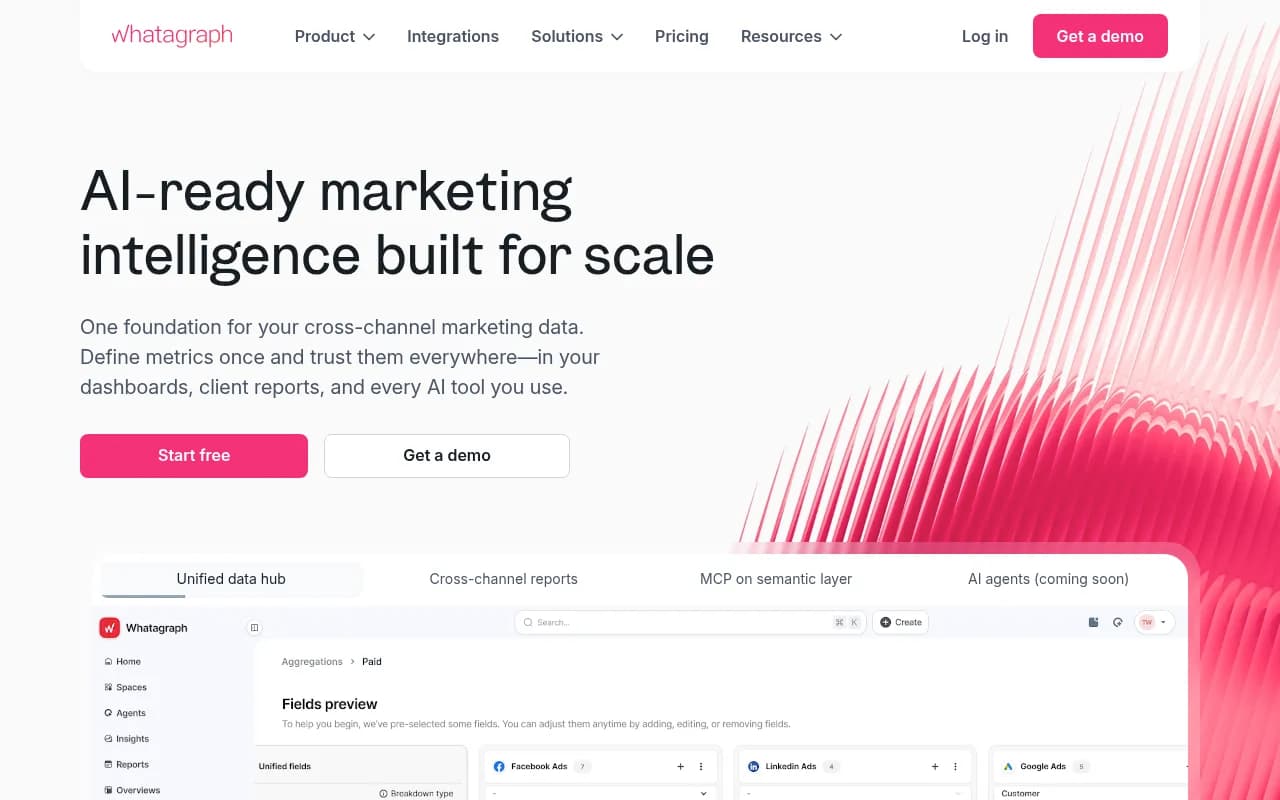
A reporting tool that pulls data from marketing channels like Google Ads, Meta, and SEO tools into automated client-ready reports and dashboards.
Key takeaways
- Whatagraph is best suited for digital marketing agencies managing 10+ client accounts and multi-location brands that need automated, white-label reporting at scale
- The platform's core strength is its governed semantic layer: define a metric once (CAC, ROAS, CPL) and it stays consistent across reports, dashboards, and AI tools
- MCP (Model Context Protocol) support is a genuinely interesting differentiator that lets AI tools like Claude query your marketing data directly
- Pricing is credit-based and can get expensive as you add data sources; smaller teams may find better value elsewhere
- No free plan, but a 14-day trial of the Max plan is available
Whatagraph started life as a visual reporting tool for agencies tired of building PowerPoint decks from Google Analytics exports. That was around 2015, when the company launched out of Lithuania. Over the years it has grown into something more ambitious: a marketing intelligence platform that tries to be the single source of truth for cross-channel marketing data, not just a pretty report builder.
The pitch in 2026 is different from what it was even two years ago. Whatagraph now positions itself around a "semantic layer" concept, where you define your metrics once and they stay consistent whether you're looking at a client report, an internal dashboard, or asking an AI assistant a question about campaign performance. That's a real problem worth solving. Anyone who has managed reporting for a mid-size agency knows the pain of a client asking why the ROAS in the monthly report doesn't match the number in the live dashboard. Whatagraph's answer is to make that inconsistency structurally impossible.
The platform is trusted by over 1,000 agencies and brands, including names like Ticketmaster, Havas, and McCann. It's not a niche tool anymore. The question is whether it's the right fit for your specific situation, and that depends a lot on team size, client volume, and how much you care about AI-readiness versus just getting reports out the door.
Key features
Unified data hub with a semantic layer
This is the architectural centerpiece of the current product. Instead of pulling raw data into each report separately, Whatagraph asks you to define your metrics, dimensions, and data blends in a central hub. Once you've set up CAC or ROAS with your specific formula, that definition propagates everywhere. In practice, this means you're not recalculating the same metric six different ways across six different reports. It also means when a data source changes its API, you fix it in one place.
The hub supports:
- Custom metrics and dimensions built with formula editors
- Source groups that let you blend data across channels (e.g., combine Google Ads and Meta spend into a single "Total Paid Spend" metric)
- Currency conversion for multi-market clients
- Data blending across sources that don't natively talk to each other
Cross-channel reporting with 50+ integrations
Whatagraph connects to the usual suspects: Google Ads, Google Analytics 4, Meta Ads, LinkedIn Ads, TikTok Ads, Shopify, HubSpot, Salesforce, and a long list of SEO tools including Ahrefs and SEMrush. The connector library is broad enough to cover most agency use cases without needing a custom integration.
Reports are built with a drag-and-drop editor. You can start from a template (there are hundreds, organized by channel and use case) or build from scratch. The visual output is genuinely polished, which matters when you're sending reports directly to clients.
White-label client reporting
Agencies can fully brand the reporting experience: custom domains, logos, color schemes, and branded client folders. Clients get a login to their own portal where they can view live reports and dashboards without seeing any Whatagraph branding. This is table stakes for agency tools, and Whatagraph does it cleanly.
Linked reports are a useful feature here: you build one report template and link it to multiple client accounts. When you update the template, all linked reports update automatically. For an agency with 50 clients on similar service packages, this is a significant time saver.
Scalable templates and themes
The template system goes beyond just visual layouts. Source tags let you tag data sources by client, region, or channel, so when you apply a template to a new client, the system knows which data to pull in. Adding a new client account doesn't mean rebuilding a dashboard from scratch; it means applying a template and mapping the sources.
Scalable themes let you maintain consistent visual branding across all client reports while still allowing per-client customization where needed.
MCP (Model Context Protocol) integration
This is the most forward-looking feature in the current product. Whatagraph has built an MCP server on top of its semantic layer, which means AI tools that support MCP (like Claude) can query your marketing data directly using natural language. Ask "What was our best-performing campaign last month across all clients?" and the AI tool pulls from Whatagraph's governed data, not from raw API calls that might return inconsistent numbers.
This is genuinely useful rather than just a marketing checkbox. Because the semantic layer enforces consistent metric definitions, the AI tool gets clean, trustworthy data rather than raw numbers that need interpretation. Whether MCP becomes the dominant way people interact with marketing data is an open question, but Whatagraph is positioned well if it does.
IQ Chat (built-in AI assistant)
Separate from MCP, Whatagraph has its own in-platform AI chat called IQ Chat. You can ask questions about your data in natural language and get answers without building a custom report. It's useful for quick lookups and ad-hoc analysis, though it's not as flexible as using an external AI tool via MCP.
Dashboards for internal teams
Beyond client-facing reports, Whatagraph supports internal dashboards that update in real time. These are designed for team use rather than client presentation, with more density and less polish. You can share dashboards via Slack or email on a schedule, or embed them in other tools.
BigQuery export
For teams that want to do their own analysis or feed data into other systems, Whatagraph supports exporting to BigQuery. This is important for larger organizations that have data engineering resources and want Whatagraph to be one input into a broader data stack rather than the final destination.
Who is it for
The clearest fit is a digital marketing agency managing somewhere between 15 and 200 client accounts. At that scale, manual reporting is genuinely painful, and the template-plus-linked-reports system pays off quickly. An agency with 50 clients on a standard SEO and paid media package can set up one template, link it to all 50 accounts, and have automated monthly reports going out without anyone touching them individually. The white-label portal means clients feel like they're getting a premium experience, not a generic SaaS report.
Multi-location operators are the second major use case. A franchise brand with 200 locations needs to report on each location's performance individually while also rolling up to regional and national views. Whatagraph's source tagging and template system handles this reasonably well, though it requires some upfront setup to get the data model right.
Multi-brand ecommerce is the third use case the company targets. If you're managing five Shopify stores under one umbrella, you want to compare performance across brands without rebuilding dashboards for each one. The blending and grouping features help here.
Who should probably look elsewhere: solo freelancers or very small agencies with fewer than 10 clients will likely find the pricing hard to justify. Teams that primarily need SEO reporting (rather than paid media and cross-channel) might be better served by more specialized tools. And if your reporting needs are simple enough that Looker Studio templates would work, Whatagraph's added complexity may not be worth it.
Integrations and ecosystem
Whatagraph's connector library covers the major marketing platforms:
- Paid media: Google Ads, Meta Ads, LinkedIn Ads, TikTok Ads, Microsoft Ads, Pinterest Ads, Snapchat Ads, Twitter/X Ads
- Analytics: Google Analytics 4, Adobe Analytics
- SEO: Google Search Console, Ahrefs, SEMrush, Moz
- Social: Facebook Pages, Instagram, LinkedIn Pages, YouTube
- CRM and ecommerce: HubSpot, Salesforce, Shopify, WooCommerce
- Email: Mailchimp, Klaviyo, ActiveCampaign
- Data warehouses: BigQuery (export)
The MCP integration is the most notable ecosystem development in 2026. It allows any MCP-compatible AI tool to query Whatagraph's semantic layer, which opens up a range of use cases beyond what the platform's own UI supports.
There's no native Zapier integration listed prominently, and the API access appears to be limited to higher-tier plans. The platform doesn't have a mobile app, which is a minor gap for clients who want to check dashboards on the go.
Pricing and value
Whatagraph uses a credit-based pricing model where credits correspond to data source connections. The three main plans are:
- Go: Entry-level, suitable for smaller agencies. Exact pricing requires a quote or trial signup, but it's positioned as the starting point.
- Max: The most common plan for growing agencies. A 14-day free trial is available at this tier.
- Prime: For larger teams and enterprises with more complex needs.
Based on available information, pricing starts in the range of a few hundred dollars per month for the Go plan and scales up significantly as you add more data source credits. One customer testimonial on the site mentions Whatagraph being 65% cheaper than Funnel.io, which gives some context: Funnel's plans start around $400-500/month, so Whatagraph's entry point is likely in the $150-300/month range, though exact current pricing requires checking their pricing page directly.
The credit model means costs can creep up as you add clients and data sources. This is worth modeling carefully before committing, especially for agencies that are growing quickly.
Compared to alternatives: Looker Studio is free but requires significant manual setup and maintenance. AgencyAnalytics is cheaper but less sophisticated. Funnel.io is more expensive and more data-engineering focused. Whatagraph sits in the middle: more capable than basic reporting tools, less expensive than enterprise data platforms.
Strengths and limitations
What it does well
- The semantic layer concept is genuinely well-executed. Metric consistency across reports, dashboards, and AI tools is a real problem, and Whatagraph's architecture addresses it at the right level.
- White-label reporting is polished and complete. The client portal experience is professional enough that clients rarely realize they're looking at a third-party tool.
- Template scalability is a real time saver for agencies with many similar clients. The linked reports system means you're not doing repetitive work.
- MCP support puts Whatagraph ahead of most reporting tools in terms of AI readiness. It's a bet on where the industry is going, and it's a reasonable one.
- The visual quality of reports is consistently good. This matters more than people admit when you're sending reports to clients who judge professionalism by aesthetics.
Limitations and honest gaps
- The credit-based pricing model is opaque and can lead to bill shock as you scale. Teams should model their expected credit usage carefully before committing.
- No mobile app means clients can't easily check dashboards on their phones, which is an increasingly common expectation.
- The platform is complex enough that onboarding takes real time. The semantic layer setup, source tagging, and template system all require upfront investment before you see the payoff. Smaller teams may not have the bandwidth for this.
- AI agents are listed as "coming soon," which means the AI-readiness story is partly aspirational. MCP is real and working, but the broader AI agent functionality isn't available yet.
Bottom line
Whatagraph is the right tool for digital marketing agencies managing 15 or more client accounts who want to stop rebuilding reports from scratch every month. The semantic layer is a genuine architectural advantage, the white-label experience is polished, and the MCP integration is a smart bet on where marketing data consumption is heading. The credit-based pricing requires careful planning, and the onboarding investment is real, but for agencies at scale, the time savings justify both.
Best use case: A 10-person digital marketing agency managing 50+ client accounts across paid media and SEO channels who needs automated, white-label monthly reporting without a dedicated data analyst.
Frequently asked questions
What is Whatagraph?
Who is Whatagraph best for?
Does Whatagraph have a free plan?
How does Whatagraph pricing work?
What makes Whatagraph different from Looker Studio or AgencyAnalytics?
Does Whatagraph support AI tools?
Similar and alternative tools to Whatagraph