Feedly Review 2026
Aggregates content from thousands of sources and uses AI to track competitors, industry trends, and threats, with team collaboration and workflow integrations.
Key takeaways
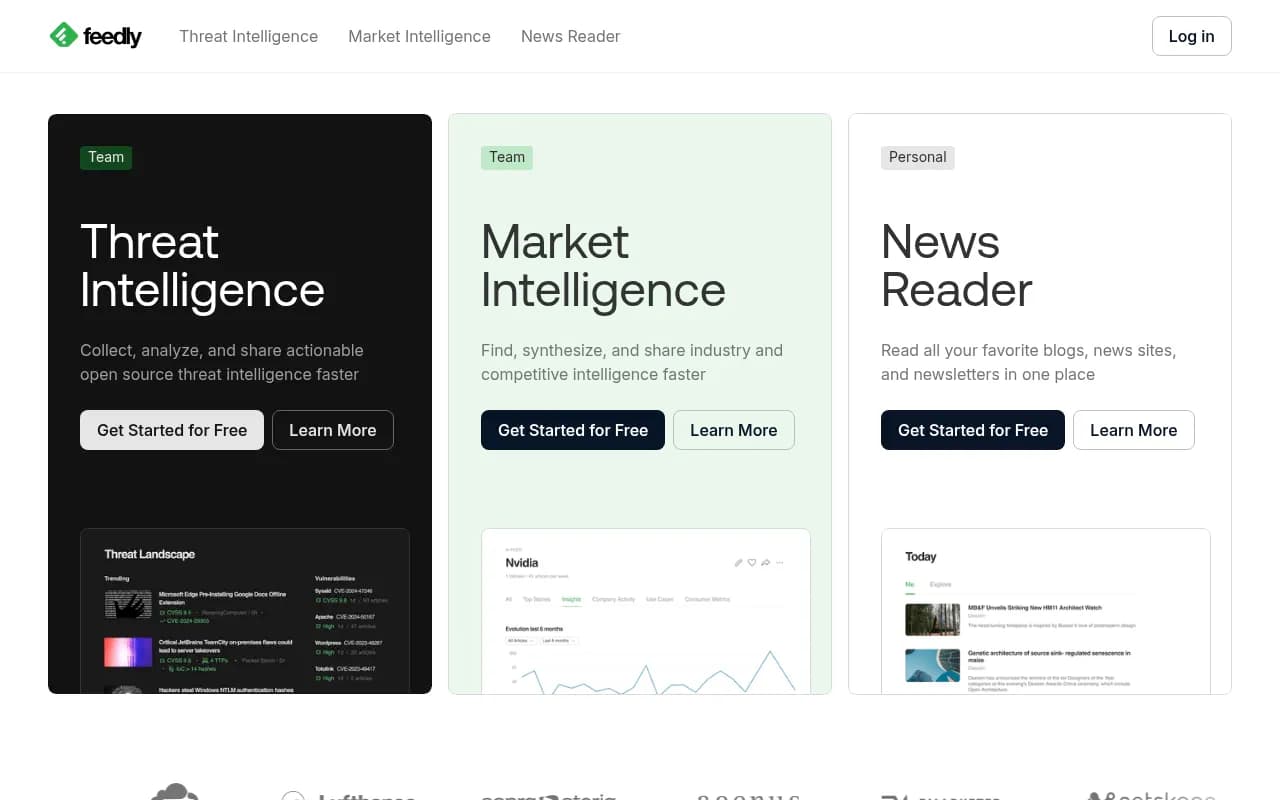
- Feedly serves three distinct audiences: cybersecurity teams (threat intelligence), market research teams (competitive intel), and individual news readers — each with a dedicated product tier
- The AI layer, called Leo, does the heavy lifting of filtering noise from thousands of sources, surfacing only what's relevant to your defined topics and entities
- Strong integrations with SIEM tools, Slack, and workflow platforms make it practical for enterprise security and research teams
- Pricing ranges from a free personal plan to enterprise contracts, with team plans starting around $12-18/user/month depending on the product
- Not a tool for tracking brand visibility in AI search engines (ChatGPT, Perplexity, etc.) — for that, Promptwatch is the relevant platform
Feedly has been around since 2008, originally launching as a Google Reader alternative and gradually evolving into something much more ambitious. What started as a clean RSS aggregator is now a dual-track intelligence platform: one product aimed at cybersecurity teams collecting open-source threat intelligence (OSINT), and another aimed at market and competitive intelligence teams tracking industry signals. There's still a personal news reader product too, but the company's real focus is clearly on the enterprise side.
The company is based in Redwood City, California, and has raised funding from investors including Balderton Capital. It's been profitable for several years, which is notable for a SaaS company in this space. The user base spans well-known names like Cloudflare, Verizon, Airbus, Danone, and the Royal Bank of Scotland — a mix that reflects how broadly applicable the "stay on top of information" problem is.
The core idea is simple: the internet produces too much content for any analyst to manually monitor. Feedly's job is to pull from thousands of sources (RSS feeds, news sites, blogs, newsletters, Twitter/X, Reddit, and more), then use AI to filter, tag, and prioritize what actually matters to you. In practice, this means less time scrolling and more time acting on relevant signals.
Key features
Leo AI assistant
Leo is Feedly's AI layer, and it's the feature that separates Feedly from a basic RSS reader. You train Leo by defining topics, companies, technologies, or threats you care about. Leo then reads every article in your feeds and assigns relevance scores, automatically muting low-priority content and surfacing high-priority signals. In practice, this means an analyst tracking ransomware campaigns doesn't have to read 500 articles a day — Leo filters it down to the 20 that actually matter.
Leo can also generate AI summaries of articles, extract named entities (companies, people, CVEs, malware families), and flag articles that match specific criteria like "mentions a competitor's product launch" or "contains a new CVE with a CVSS score above 7."
Threat intelligence feeds
The cybersecurity product is built around OSINT collection. Feedly aggregates from security blogs, vendor advisories, dark web monitoring sources, government feeds (CISA, NIST), and community sources. Leo automatically extracts structured threat data: IoCs (indicators of compromise), TTPs (tactics, techniques, and procedures mapped to MITRE ATT&CK), CVE scores, and malware family mentions. This structured extraction is genuinely useful — it turns unstructured blog posts and advisories into machine-readable intelligence that can feed into a SIEM or threat intel platform.
The threat intel product also supports threat actor tracking, where you can follow specific APT groups or ransomware operators and get alerts when new activity is reported.
Market intelligence feeds
The market intel product is aimed at competitive intelligence analysts, product managers, and strategy teams. You set up feeds around competitors, industry topics, regulatory changes, or technology trends. Leo surfaces relevant signals: a competitor's product launch, a regulatory filing, a funding announcement, an analyst report. You can save articles to "Boards" (shared workspaces) and annotate them with notes for team collaboration.
The AI summaries here are particularly useful for busy executives who need the gist of a development without reading the full article.
Boards and team collaboration
Boards are Feedly's shared workspace feature. Team members can save articles to a board, add annotations, and share curated intelligence packages with stakeholders. This is where Feedly moves from a personal reading tool to a team workflow tool. You can create boards around specific topics (e.g., "Q3 Competitor Moves" or "Ransomware Campaigns") and use them as a running intelligence log.
Boards support comments and are shareable via link, which makes it easy to brief non-Feedly users on what's happening in a given area.
Source management and feed customization
Feedly supports a wide range of source types: RSS/Atom feeds, Twitter/X accounts and lists, Reddit communities, newsletters, YouTube channels, and custom web sources. The source discovery feature helps you find relevant sources you might have missed — useful when setting up a new topic area.
You can organize sources into folders and prioritize them. The "Priority" view shows only Leo-flagged high-importance articles, which is the main interface for power users who've trained Leo well.
Newsletters and non-RSS sources
One underrated feature: Feedly gives you a unique email address you can use to subscribe to newsletters, which then appear in your Feedly feed alongside RSS content. This is genuinely useful for consolidating all your reading in one place, especially as more quality content has moved to email newsletters.
Integrations and export
Feedly connects to Slack (for alerts), Microsoft Teams, Zapier, IFTTT, and a range of SIEM and security platforms including Splunk, IBM QRadar, and Microsoft Sentinel. The threat intel product has specific integrations with ThreatConnect, MISP, and other threat intel platforms. There's also a REST API for custom integrations.
For market intel teams, integrations with tools like Notion, Confluence, and Slack make it easy to push relevant articles into existing workflows.
Mobile apps
Feedly has solid iOS and Android apps that sync with the web interface. The mobile experience is primarily designed for reading, though you can save to boards and annotate from mobile. The apps are well-maintained and support offline reading.
Who is it for
Feedly's clearest fit is for cybersecurity analysts at mid-to-large enterprises who need to monitor threat intelligence from open sources. A security operations team at a financial institution, for example, might use Feedly to track CVE disclosures, ransomware campaigns, and threat actor activity across dozens of security blogs and government advisories simultaneously. The structured extraction of IoCs and TTPs is a real time-saver for analysts who'd otherwise be manually reading and tagging this content.
The second strong use case is competitive intelligence and market research teams at companies with dedicated CI functions. Think a product marketing manager at a B2B SaaS company tracking five competitors, or a strategy analyst at a consulting firm monitoring regulatory changes across three industries. Feedly's board and collaboration features make it practical for teams of 3-15 analysts who need to share and discuss intelligence.
Individual professionals — journalists, researchers, curious generalists — are the third audience, and the free/Pro personal plans serve them well. If you follow 50+ sources and want a cleaner reading experience than browser bookmarks, Feedly's personal tier is a solid choice.
Who should probably look elsewhere: teams that need social listening beyond Twitter/X (Feedly doesn't do Instagram, TikTok, or LinkedIn monitoring), teams that need primary research capabilities (surveys, interviews), or anyone whose main need is tracking brand mentions in real-time across the web (tools like Mention or Brand24 are better suited). Feedly is fundamentally a content aggregation and filtering tool — it's excellent at that, but it's not a social listening or PR monitoring platform.
Integrations and ecosystem
Feedly's integration story is strongest on the security side. The threat intel product connects directly to:
- SIEM platforms: Splunk, IBM QRadar, Microsoft Sentinel
- Threat intel platforms: ThreatConnect, MISP, Anomali
- Ticketing: ServiceNow, Jira
- Communication: Slack, Microsoft Teams
For market intel teams, the relevant integrations include:
- Productivity: Notion, Confluence, Evernote, OneNote
- Automation: Zapier, IFTTT, Make (formerly Integromat)
- Communication: Slack, Microsoft Teams, email digests
The Feedly API is available on team and enterprise plans. It's a REST API that lets you pull articles, boards, and annotations programmatically. Documentation is reasonably thorough, though the API is more useful for reading data out of Feedly than for pushing data in.
There's no native Looker Studio or BI tool integration, which can be a gap for teams that want to visualize intelligence trends over time.
Pricing and value
Feedly's pricing splits across its three products:
Personal/News Reader
- Free: Up to 100 sources, basic reading experience
- Pro: ~$8/month (billed annually) — adds Leo AI, unlimited sources, reading time estimates
- Pro+: ~$18/month — adds more Leo training, priority support
Market Intelligence (team product)
- Standard: Starts around $12-15/user/month for small teams
- Advanced: Higher tier with more AI features, custom sources, and deeper integrations
- Enterprise: Custom pricing, includes dedicated onboarding and SLA
Threat Intelligence (team product)
- Similar tiered structure, with pricing typically higher than the market intel product given the specialized security features
- Free trial available for both team products
Exact pricing for team plans requires contacting sales for a quote, which is a minor friction point. The personal Pro plan at ~$8/month is competitive with alternatives like Inoreader Pro.
Compared to dedicated competitive intelligence platforms like Crayon or Klue (which run $15,000-$30,000+/year), Feedly's market intel product is significantly more affordable. Compared to dedicated threat intel platforms like Recorded Future or Mandiant Advantage, Feedly is also much cheaper — though it's also less comprehensive on the security side.
Strengths and limitations
Where Feedly does well:
- The Leo AI filtering is genuinely effective once trained. The difference between a well-configured Feedly setup and a raw RSS reader is dramatic — Leo can cut daily reading volume by 70-80% while improving signal quality.
- The threat intelligence structured extraction (IoCs, TTPs, CVEs) is a real differentiator. Few content aggregators do this automatically.
- Source breadth is impressive. The ability to follow RSS, Twitter/X, Reddit, newsletters, and YouTube in one interface is more comprehensive than most competitors.
- The board and collaboration features are practical and don't require heavy onboarding. Teams can be productive within a day.
Honest limitations:
- Feedly is a reactive tool — it surfaces what's already been published. It doesn't help you understand what questions people are asking AI systems, what content gaps exist on your website, or how your brand appears in AI-generated answers. For that kind of proactive intelligence, you'd need a different category of tool entirely.
- The market intel product can feel underpowered compared to dedicated CI platforms like Crayon or Klue, which offer more structured competitor tracking, battlecard generation, and sales enablement features.
- Social listening coverage is limited. No Instagram, LinkedIn, or TikTok monitoring. Twitter/X integration has been inconsistent since API changes in 2023.
- The UI, while functional, hasn't changed dramatically in years. Power users sometimes find the board and folder management clunky at scale.
Bottom line
Feedly is a well-built, mature platform for teams that need to monitor large volumes of published content and extract actionable intelligence from it. Cybersecurity teams tracking OSINT and market analysts monitoring competitors will find genuine value in the AI filtering and structured extraction features. The personal news reader remains one of the cleaner RSS experiences available.
Best use case in one sentence: a cybersecurity analyst or competitive intelligence team that needs to monitor dozens of sources daily and wants AI to filter noise and extract structured signals without building a custom pipeline.
Tags:
Frequently asked questions
What is Feedly used for?
Is there a free version of Feedly?
How much does Feedly cost?
What is Leo in Feedly?
How does Feedly compare to dedicated competitive intelligence tools like Crayon or Klue?
Does Feedly track brand mentions in AI search engines like ChatGPT or Perplexity?
Similar and alternative tools to Feedly